This is the multi-page printable view of this section. Click here to print.
Documentation 0.10.0
- 1: Getting Started
- 1.1: Why Lucille
- 1.2: Installation
- 1.3: Your First Pipeline
- 1.4: Running Lucille
- 2: Architecture
- 2.1: Overview
- 2.1.1: The Problem of Search ETL
- 2.1.2: Parallelizing Search ETL
- 2.1.3: From Single Process to Distributed
- 2.1.4: Topology
- 2.1.5: Document Lifecycle
- 2.1.6: Design Rationale
- 2.2: Components
- 2.2.1: Document
- 2.2.1.1: Overview
- 2.2.1.2: Document IDs
- 2.2.1.3: Document Model
- 2.2.2: Connector
- 2.2.3: Publisher
- 2.2.3.1: Publisher Accounting
- 2.2.4: Event
- 2.2.5: Stage
- 2.2.6: Pipeline
- 2.2.6.1: Pipeline Internals
- 2.2.7: Worker
- 2.2.8: Indexer
- 2.2.9: Runner
- 2.2.9.1: Runner Orchestration
- 2.2.10: Config
- 2.3: Internals
- 2.3.1: Messenger Abstraction
- 2.3.2: Message Ordering
- 2.3.3: Error Handling and Fault Tolerance
- 2.3.4: Kafka Integration
- 2.3.5: Metrics and Observability
- 3: Ingest Designer Guide
- 3.1: Writing a Config
- 3.2: Defining Pipelines
- 3.3: Control Flow
- 3.4: Connectors
- 3.4.1: File Connector
- 3.4.2: Database Connector
- 3.4.3: Solr Connector
- 3.4.4: Kafka Connector
- 3.4.5: Parquet Connector
- 3.4.6: RSS Connector
- 3.5: Stages
- 3.5.1: All Stages
- 3.5.2: ChunkText
- 3.5.3: PromptOllama
- 3.5.4: QueryOpensearch
- 3.5.5: EmbeddedPython
- 3.5.6: ExternalPython
- 3.6: Indexers
- 3.6.1: Solr Indexer
- 3.6.2: OpenSearch Indexer
- 3.6.3: Elasticsearch Indexer
- 3.6.4: CSV Indexer
- 3.6.5: NopIndexer (No-op)
- 3.6.6: Pinecone Indexer
- 3.6.7: Weaviate Indexer
- 3.7: Cookbooks
- 3.7.1: File Ingestion Cookbook
- 3.7.2: Vector Search Cookbook
- 3.7.3: RSS Cookbook
- 4: Component Developer Guide
- 4.1: What the Framework Gives You
- 4.2: Developing New Components
- 4.3: Developing Stages
- 4.4: Developing Connectors
- 4.5: Developing Indexers
- 4.6: Developing File Handlers
- 4.7: Developing Storage Clients
- 4.8: SPEC Validation System
- 4.9: Quick Reference
- 4.10: Testing Pipelines
- 4.11: Javadoc
- 5: Operations Guide
- 5.1: Configuration Management
- 5.2: Deployment
- 5.2.1: Local Batch
- 5.2.2: Distributed Batch
- 5.2.3: Distributed Streaming
- 5.2.4: Hybrid Streaming
- 5.2.5: Docker Compose
- 5.2.6: Kubernetes
- 5.2.7: Production Operations
- 5.3: Logging Setup
- 5.4: Log Interpretation
- 5.5: Performance Tuning
- 5.6: Security Configuration
- 5.7: REST API
- 5.8: Support Matrix
- 5.9: Troubleshooting
- 6: Contributor Guide
- 7: Releases
- 8: Concepts and Glossary
- 9: FAQ
- 10:
1 - Getting Started
Lucille is a production-grade Search ETL framework for loading data into Lucene-based search engines — Apache Solr, Elasticsearch, and OpenSearch — and vector databases such as Pinecone and Weaviate. It supports batch, incremental, and streaming ingestion with inline document enrichment, and runs as a single JAR with no persistent server to manage. Lucille is Java-based and open-source, developed and maintained by KMW Technology.
How Lucille Works
- A Connector retrieves data from a source system and publishes it as Lucille Documents.
- Workers route each Document through a configurable enrichment Pipeline built from composable Stages.
- An Indexer sends the processed Documents to the search backend.
- These three components communicate through a messaging layer — either in-memory queues (local mode, single JVM) or Apache Kafka (distributed mode, multiple JVMs at scale).
- Document lifecycle events — publication, processing, indexing, failure, and drops — are tracked so Lucille knows when a run is complete and can report exact success and failure counts.
For a deeper look at the architecture, see Architecture Overview.
1.1 - Why Lucille
What Lucille Does
Lucille is a Java-based framework for getting data into search engines and vector databases. It reads from source systems (databases, filesystems, APIs, Kafka topics), enriches the data through a configurable pipeline of processing stages, and delivers it to a search backend (Solr, OpenSearch, Elasticsearch, Pinecone, Weaviate) in batches.
The framework handles the hard parts of production search ingestion — concurrency, completion detection, fault tolerance, batching, retry, error handling, backpressure, and testability — so that you can focus on the specifics of your data and your enrichment logic.
What Lucille Excels At
Search-native indexing. Lucille’s indexers understand search engine bulk APIs, batching semantics, deletion markers, index routing, and retry logic. The document model represents data the way search engines think about it — typed fields, single-valued and multi-valued, with operations that map directly to search engine semantics. You don’t adapt a generic ETL tool to speak search; the framework already does.
Inline enrichment. A large library of built-in stages covers common search ingestion tasks without custom code: text extraction, NLP, entity recognition, language detection, embedding generation, text chunking, database lookups, HTTP enrichment, scripting (JavaScript, Python), and JSONata transformations. Enrichment happens inside the pipeline as documents flow through — not as a separate post-processing step.
Scalability without code changes. The same pipeline configuration runs in a single JVM for development and in a fully distributed Kafka deployment for production. Scaling up means adding Worker threads (local mode) or Worker processes (distributed mode). The transition is a command-line flag, not a rewrite.
Operational simplicity. Lucille is a JAR you run from the command line. It starts, processes documents, and exits. There is no server to keep running between jobs, no management UI to maintain, and no deployment infrastructure beyond the JVM.
Exact document accounting. Every document is tracked from publication through its terminal state. At the end of a run, you know exactly how many documents succeeded, failed, or were dropped — not an approximation.
Fault tolerance in distributed mode. Crash resilience via Kafka consumer group rebalancing, poison pill detection with dead-letter queues, and graceful shutdown that preserves in-flight work. One bad document doesn’t stop the run; one crashed Worker doesn’t lose data.
Configuration-driven operation. All aspects of an ingest — sources, pipelines, stages, destinations, tuning parameters — are declared in a readable HOCON configuration file. Changes are possible by editing the file alone, without rebuilding the project. Configuration is composable, parameterizable, and validatable before execution.
Testability. The entire framework runs inside a unit test with no external infrastructure. A dedicated test mode captures the complete history of every document for assertion, making it straightforward to verify pipeline correctness.
When Lucille Is the Right Choice
Lucille is a strong fit when:
- Your destination is a search engine or vector database — Solr, OpenSearch, Elasticsearch, Pinecone, or Weaviate.
- Your pipeline involves non-trivial enrichment — NLP, embeddings, OCR, database lookups, LLM-based extraction, text chunking — not just field mapping.
- You need both batch and streaming from the same pipeline — start with a batch backfill, transition to continuous streaming updates, without rewriting anything. Batch mode gives you exact accounting and structured run summaries; streaming mode gives you unbounded continuous ingestion. The same pipeline logic works in both.
- You want to start simple and scale later — develop in local mode, deploy distributed when volume demands it, without changing pipeline logic.
- You prefer code-and-config over UI-driven workflows — pipelines are version-controlled HOCON files, not visual diagrams.
- You’re a Java shop (or willing to use Java for custom components) — the framework and extension points are Java-native.
How to Know If It’s Not the Right Fit
Lucille is probably not the best choice when:
- Your destination is a data warehouse (Snowflake, BigQuery, Redshift). Lucille’s indexers target search engines and vector databases.
- You need a massive SaaS connector catalog. Lucille’s built-in connectors cover databases, filesystems, Kafka, RSS, and search engines. If you need to ingest from hundreds of SaaS applications (Salesforce, HubSpot, Zendesk), tools with larger connector ecosystems may be more practical.
- Sub-second real-time indexing latency is a hard requirement. Lucille’s streaming mode is continuous but routes through Kafka, a Worker pipeline, and a batching Indexer — adding latency that dedicated CDC-to-search connectors can avoid.
- A visual workflow editor is required. Lucille pipelines are defined in configuration files. There is no drag-and-drop UI or graphical pipeline designer.
- Your team has no Java engineers and no interest in Java. Custom connectors and stages are Java classes. The
EmbeddedPythonandExternalPythonstages provide a Python authoring path for enrichment logic, but the framework itself is Java.
Other Tools to Consider
If Lucille isn’t the right fit, or if you want to evaluate alternatives, tools that teams commonly consider for search-adjacent ETL include:
- Logstash — input/filter/output pipeline model, tightly integrated with the Elastic ecosystem
- OpenSearch Data Prepper — data collector oriented toward observability and log ingestion into OpenSearch
- Apache NiFi — visual dataflow tool with a large processor library and a persistent server model
- Apache Spark — distributed data processing framework suited to petabyte-scale workloads
- Airbyte — replication tool with a large SaaS connector catalog, oriented toward data warehouses
- Custom pipelines — Python scripts, Java applications, or Spark jobs grown organically over time
Each has different strengths and tradeoffs. Lucille’s niche is the intersection of search-native indexing, inline enrichment, and operational simplicity — a purpose-built tool for the specific problem of getting enriched data into search engines at scale.
1.2 - Installation
Do You Need to Install Lucille?
It depends on how you’re using it:
Using Lucille as a Library in an Existing Java Project
If you’re embedding Lucille inside an existing Java project (e.g., calling Runner.run() programmatically, or using Lucille’s Document API and Stages within your own application), you don’t need to install anything. Just add Lucille as a Maven dependency:
<dependencyManagement>
  <dependencies>
    <dependency>
      <groupId>com.kmwllc</groupId>
      <artifactId>lucille-bom</artifactId>
      <version>0.9.0</version>
      <type>pom</type>
      <scope>import</scope>
    </dependency>
  </dependencies>
</dependencyManagement>

<dependencies>
  <dependency>
    <groupId>com.kmwllc</groupId>
    <artifactId>lucille-core</artifactId>
  </dependency>
  <!-- Add plugins as needed -->
  <dependency>
    <groupId>com.kmwllc</groupId>
    <artifactId>lucille-tika</artifactId>
  </dependency>
</dependencies>
Lucille is published to Maven Central. The BOM ensures all Lucille modules are at the same version. No source build required.
Running Lucille from the Command Line (Runner, Worker, Indexer)
If you’re launching Lucille components via java -cp ... com.kmwllc.lucille.core.Runner (or Worker, WorkerIndexer, Indexer), you need the compiled JARs and their dependencies on the classpath. The easiest way to get these is to clone the repository and build from source:
git clone https://github.com/kmwtechnology/lucille.git
cd lucille
git checkout v0.9.0  # check out the release tag/branch you want to use
mvn clean install
After the build, the JARs and dependencies are in each module’s target/ directory. You can then run Lucille with:
java -Dconfig.file=my-config.conf -cp 'lucille-core/target/lucille-core-0.9.0.jar:lucille-core/target/lib/*' com.kmwllc.lucille.core.Runner
Developing New Lucille Components (Stages, Connectors, Indexers)
If you’re contributing to Lucille or developing new components that will be part of the Lucille codebase, clone the repository and build from source as described below.
Prerequisites
To build and run Lucille from source, you need:
- Java 21+ JDK (not just a JRE)
- Maven (recent version)
Java Setup (JDK 21+ Required)
Important: Before running any Lucille commands, make sure JAVA_HOME points to a JDK 21+ (not just a JRE) and that $JAVA_HOME/bin is on your PATH (or %JAVA_HOME%\bin on Windows). Maven and the java launcher rely on this.
Verify Java
java -version
You should see version 21 (or newer). If it’s missing or older than 21 install a JDK 21+ using one of the options below.
Install Options
Package manager
- macOS (Homebrew)
brew install openjdk@21 - Windows (Chocolatey)
choco install microsoft-openjdk21
Vendor installer
- Download a JDK 21+ installer from a vendor such as Oracle JDK.
- Run the installer, then set
JAVA_HOMEas shown below.
Set JAVA_HOME and PATH
macOS
export JAVA_HOME="$(/usr/libexec/java_home -v 21)"
export PATH="$JAVA_HOME/bin:$PATH"
Windows
- Open System Properties, Environment Variables.
- Create/Edit JAVA_HOME and point it to your JDK folder.
- Edit Path and add
%JAVA_HOME%\binabove other Java entries.
Maven Setup
mvn -v
You should see a recent Maven version and your Java home. If mvn is not found, install Maven using one of the options below.
Install Options
Package manager
- macOS (Homebrew)
brew install maven - Windows (Chocolatey)
choco install maven
Binary installer
- Download the binary zip/tar for Apache Maven from the official website.
- Add Maven’s
bin/to yourPATH.
macOS
export PATH="<maven-dir>/bin:$PATH"
Windows
- Open System Properties, Environment Variables.
- Edit Path and add
<maven-dir>/bin.
Clone the Repository
git clone https://github.com/kmwtechnology/lucille.git
cd lucille
To use a specific release version, check out the corresponding tag:
git checkout 0.9.0 # replace with the version you want
To see available release tags:
git tag --list
Build Lucille
mvn clean install
This compiles all modules and produces build artifacts under each module’s target/ folder. After the build:
lucille-core/target/lucille-core-{version}.jar— the core framework JARlucille-core/target/lib/— all runtime dependencieslucille-plugins/lucille-tika/target/lucille-tika-{version}.jar— plugin JARs (one per plugin)lucille-examples/*/target/lib/— example projects with all dependencies copied for easy classpath setup
1.3 - Your First Pipeline
This page walks you through creating a Lucille configuration file from scratch — a single connector reading from a CSV file, a pipeline with two stages, and an indexer writing to a local CSV output. No search backend required.
By the end, you’ll understand the structure of a Lucille config and be ready to adapt it for your own data.
Prerequisites
- Lucille built from source (see Installation)
- A terminal in the Lucille repository root
Step 1: Create a Source File
Create a file called my-source.csv with a small set of classic novels:
id,title,author,year
1,The Great Gatsby,F. Scott Fitzgerald,1925
2,To Kill a Mockingbird,Harper Lee,1960
3,1984,George Orwell,1949
4,Pride and Prejudice,Jane Austen,1813
5,The Catcher in the Rye,J.D. Salinger,1951
Step 2: Write the Config File
This config reads my-source.csv, applies two field transformations to each row, and writes the results to a new CSV file. This config has three parts:
- Connector — a
FileConnectorwith the CSV file handler readsmy-source.csvand emits each row as a Document. - Pipeline — two stages manipulate fields on each Document: one renames
titletobook_title, and one adds a staticsourcetag to every Document. - Indexer — a CSV indexer writes the transformed Documents to an output file. No search backend is needed for this first example.
Create a file called my-first-pipeline.conf:
# ─── CONNECTORS ───────────────────────────────────────────────
# A list of connectors to run in sequence.
# Each connector reads from a source and publishes Documents.

connectors: [
  {
    # A name for this connector (appears in logs and run summary)
    name: "csv-reader"

    # The connector implementation class
    class: "com.kmwllc.lucille.connector.FileConnector"

    # Which pipeline should process this connector's documents
    pipeline: "my-pipeline"

    # Path(s) to the source file(s)
    paths: ["my-source.csv"]

    # Apply the CSV file handler (with default options) to *.csv files.
    # Each CSV file is parsed row by row; one Document is emitted per row.
    fileHandlers: {
      csv: {}
    }
  }
]

# ─── PIPELINES ────────────────────────────────────────────────
# Each pipeline is a named sequence of Stages.
# Stages transform Documents in place before they reach the Indexer.

pipelines: [
  {
    name: "my-pipeline"

    stages: [
      # Stage 1: Rename "title" to "book_title"
      {
        name: "rename-title"
        class: "com.kmwllc.lucille.stage.RenameFields"
        fieldMapping: {
          "title": "book_title"
        }
      },

      # Stage 2: Add a static field to every document
      {
        name: "add-source-tag"
        class: "com.kmwllc.lucille.stage.SetStaticFieldValue"
        fieldName: "source"
        fieldValue: "my-first-pipeline"
      }
    ]
  }
]

# ─── INDEXER ──────────────────────────────────────────────────
# The Indexer sends processed Documents to a destination.
# We use the CSV indexer here so no search backend is needed.

indexer {
  type: "CSV"
}

# CSV indexer settings
csv {
  # Which fields to include in the output (must match field names after pipeline processing)
  columns: ["id", "book_title", "author", "year", "source"]

  # Where to write the output
  path: "my-output.csv"

  # Include a header row
  includeHeader: true
}
Step 3: Run It
java -Dconfig.file=my-first-pipeline.conf \
  -cp 'lucille-core/target/lucille-core-*.jar:lucille-core/target/lib/*' \
  com.kmwllc.lucille.core.Runner
Step 4: Check the Output
Open my-output.csv:
id,book_title,author,year,source
1,The Great Gatsby,F. Scott Fitzgerald,1925,my-first-pipeline
2,To Kill a Mockingbird,Harper Lee,1960,my-first-pipeline
3,1984,George Orwell,1949,my-first-pipeline
4,Pride and Prejudice,Jane Austen,1813,my-first-pipeline
5,The Catcher in the Rye,J.D. Salinger,1951,my-first-pipeline
The title field was renamed to book_title, and a source field was added to every document.
Step 5: Check the Logs
You should see output like:
INFO  Runner: Pipeline Configuration is valid.
INFO  Runner: Connector Configuration is valid.
INFO  Runner: Indexer Configuration is valid.
INFO  Runner: Starting run with id ...
INFO  Runner: Running connector csv-reader feeding to pipeline my-pipeline
INFO  PublisherImpl: First doc published after ... ms
INFO  WorkerPool: 5 docs processed. One minute rate: ... docs/sec. Mean pipeline latency: ... ms/doc.
INFO  Stage: Stage rename-title metrics. Docs processed: 5. Mean latency: ... ms/doc. Children: 0. Errors: 0.
INFO  Stage: Stage add-source-tag metrics. Docs processed: 5. Mean latency: ... ms/doc. Children: 0. Errors: 0.
INFO  Runner: RUN SUMMARY: Success. 1/1 connectors complete. All published docs succeeded.
INFO  Runner: Run took ... secs.
Understanding the Config Structure
Every Lucille config has three required parts:
| Block | Purpose |
|---|---|
connectors | A list of data sources to read from, executed in sequence |
pipelines | Named sequences of Stages that transform Documents |
indexer | Where to send the processed Documents |
Each connector specifies:
name— for logging and the run summaryclass— the fully qualified Java class that implements the connectorpipeline— which pipeline processes this connector’s output- Connector-specific settings (e.g.,
pathsfor FileConnector)
Each stage in a pipeline specifies:
class— the fully qualified Java class that implements the stagename(optional) — for logging and per-stage metrics- Stage-specific parameters (e.g.,
fieldMappingfor RenameFields)
The indexer specifies:
type— a shorthand for built-in indexers (Solr, OpenSearch, Elasticsearch, CSV)- Or
class— for plugin or custom indexers - Backend-specific settings in a separate block (e.g.,
csv {},solr {},opensearch {})
What Have We Accomplished?
At first glance, the config above might feel disproportionate to the task. We renamed one field and added a static value — a transformation you could express in a single line of shell:
sed '1s/title/book_title/' my-source.csv \
  | awk -F, 'BEGIN{OFS=","} NR==1{print $0,"source"} NR>1{print $0,"my-first-pipeline"}' \
  > my-output.csv
That’s fair. For this specific transformation on this specific file, a shell one-liner wins. The value of Lucille comes from what you can do next — and how little you have to change to get there.
1. Index to any search backend
Replace the CSV indexer with a real search backend — OpenSearch, Elasticsearch, or Solr — and your trivial file experiment becomes a real search ingestion pipeline. For OpenSearch:
indexer {
  type: "OpenSearch"
}

opensearch {
  url: ${?OPENSEARCH_URL}
  index: "my-books"
}
That’s the only change. The connector, the pipeline, the stages — everything else stays exactly the same. If you later want to switch from OpenSearch to Solr, you change the indexer block and add a solr {} block. No code, no build cycle, no rewrite.
2. Iterate on your pipeline
Add stages, chain transformations, and introduce conditions — all in config. Want to generate an embedding for each book title and store it as a vector field? Add a stage. Want to skip that stage for documents that already have an embedding? Add a condition. Browse the Stage Reference for the full library of available transformations.
None of this requires a build. Edit the config file, rerun Lucille, see the results. The pipeline is the config.
3. Scale
In our example, five rows processed in milliseconds and scale was not a concern. But now imagine the CSV has a million rows, each containing an S3 URL to a large PDF. Your pipeline must fetch each PDF, extract text with Tika, run OCR on scanned pages, and generate embeddings. That pipeline takes hours or days on a single thread.
Step 1: add worker threads. Lucille’s local mode uses a thread pool for document processing. Increase the number of threads to parallelize across available CPU cores and overlap IO:
worker {
  threads: 8
}
No other changes needed. The same config, more threads.
Step 2: distribute across machines. If one machine isn’t enough, switch to distributed mode. Lucille’s components — Runner, Workers, and Indexer — run as separate JVM processes and communicate through Kafka. Here’s what changes:
- The Runner gets the
-usekafkaflag:com.kmwllc.lucille.core.Runner -usekafka - Workers and the Indexer are started as separate processes on separate machines (or in separate Kubernetes pods):
com.kmwllc.lucille.core.Worker my-pipelineandcom.kmwllc.lucille.core.Indexer my-pipeline - A
kafka {}block withbootstrapServersis added to the config
Your connector definition and your pipeline stages are untouched. See Production Deployment for the full distributed mode setup.
At first, with a trivial five-row example that ran in under a second, Lucille looked like overkill compared to a shell script. But as soon as we wanted to ingest into a real search backend, iterate on enrichment logic, and scale out to handle large volumes of heavy documents, we could do all of that in a config-driven way — switching backends, adding stages, and distributing across machines — without having to solve any of those problems from scratch.
Consider what Lucille is doing on our behalf in the scaled-out version of this pipeline. The Runner is reading our million-row CSV and producing each row as a Document onto a Kafka topic, applying backpressure so it doesn’t publish faster than Workers can consume. Multiple Worker processes — running on different machines or in different Kubernetes pods — are each pulling Documents off that topic in parallel, each running multiple threads, each thread independently fetching a PDF from S3, extracting text, running OCR, and generating embeddings. As each Document finishes processing, a lifecycle event is sent back to the Runner so it can track exactly how many Documents have succeeded, failed, or been dropped. If a Worker crashes mid-run, Kafka’s consumer group protocol detects it and reassigns its unacknowledged Documents to another Worker — nothing is silently lost. If a single malformed PDF repeatedly crashes a Worker, Lucille routes it to a dead-letter topic after a configurable number of retries and keeps the rest of the run going. The Indexer is collecting processed Documents and sending them to the search backend in tunable batches, managing bulk API semantics, and handling retries on transient backend errors. Throughout the run, Lucille is logging throughput metrics, per-stage latency, and document counts at regular intervals. When the last Document reaches a terminal state, Lucille determines that the run is complete and prints a structured summary — how many succeeded, how many failed, how many were dropped, and how long it took.
All of that happens without any code on our part. Our contribution is the config file we wrote in Step 2.
1.4 - Running Lucille
Try the Examples
Lucille’s lucille-examples module contains several runnable examples:
| Example | Description |
|---|---|
| lucille-simple-csv-solr-example | Ingest a CSV file into Solr in local mode. A good first example. |
| lucille-distributed-example | Full distributed mode with Runner, Worker, Indexer, Kafka, ZooKeeper, and Solr each running in their own Docker container via Docker Compose. Includes an integration test that verifies the ingest result. Run with mvn verify -Pnightly from that directory. |
To run the simple CSV example, start an instance of Apache Solr on port 8983 and create a collection called quickstart. Then from lucille-examples/lucille-simple-csv-solr-example, run:
mvn clean install
./scripts/run_ingest.sh
This executes Lucille with simple-csv-solr-example.conf, which reads a CSV of top songs and sends each row as a document to Solr. After the run, issue a commit with openSearcher=true on your quickstart collection and run a *:* query in the Solr admin dashboard to see the indexed documents.
Local Mode
Local mode runs all Lucille components — Connector, Workers, and Indexer — as threads inside a single JVM. No Kafka or external messaging is required. This is the right mode for development, testing, and single-machine production runs.
Prepare a Configuration File
Point Lucille at a config file declaring your connectors, pipelines, and indexer. See Configuration Management for the full schema, or follow Your First Pipeline for a step-by-step walkthrough.
Run the Runner
From the repository root:
java \
  -Dconfig.file=<PATH/TO/YOUR/CONFIG.conf> \
  -cp 'lucille-core/target/lucille.jar:lucille-core/target/lib/*' \
  com.kmwllc.lucille.core.Runner
| Flag | What it does |
|---|---|
-Dconfig.file=... | Path to your HOCON configuration file |
-cp '...' | Lucille core JAR and all runtime dependencies |
com.kmwllc.lucille.core.Runner | Boots the Lucille engine in local mode and runs the configured pipeline to completion |
See the troubleshooting guide if Lucille doesn’t start as expected.
Distributed Mode
Distributed mode runs each Lucille component as its own JVM process, communicating through Apache Kafka. Use this when you need to scale out across multiple machines or processes.
This guide assumes Kafka and your destination system are already running and reachable. For production deployment patterns including Docker Compose and Kubernetes, see Production Deployment.
Prepare a Configuration File
Use a single config file shared by all components. It must declare your connector(s), pipeline(s), kafka configuration, and your indexer with its backend config.
Start the Runner
The Runner publishes documents to the Kafka source topic, listens for pipeline run events, logs run statistics, and waits for the run to complete:
java \
  -Dconfig.file=<PATH/TO/YOUR/CONFIG.conf> \
  -cp 'lucille-core/target/lucille.jar:lucille-core/target/lib/*' \
  com.kmwllc.lucille.core.Runner \
  -usekafka
Start Workers
Each Worker consumes documents from the Kafka source topic, processes each document through the configured pipeline, and writes processed documents to the Kafka destination topic:
java \
  -Dconfig.file=<PATH/TO/YOUR/CONFIG.conf> \
  -cp 'lucille-core/target/lucille.jar:lucille-core/target/lib/*' \
  com.kmwllc.lucille.core.Worker \
  <pipeline-name>
Start Workers before the Runner to avoid Kafka consumer group rebalancing delays while documents are already in flight.
Start the Indexer
The Indexer consumes documents from the Kafka destination topic and sends batches to the configured search backend:
java \
  -Dconfig.file=<PATH/TO/YOUR/CONFIG.conf> \
  -cp 'lucille-core/target/lucille.jar:lucille-core/target/lib/*' \
  com.kmwllc.lucille.core.Indexer \
  <pipeline-name>
| Flag | What it does |
|---|---|
-Dconfig.file=... | Path to your HOCON configuration file |
-cp '...' | Lucille core JAR and all runtime dependencies |
Runner -usekafka | Starts the run and coordinates with Kafka |
Worker <pipeline-name> | Processes documents through the named pipeline |
Indexer <pipeline-name> | Writes processed documents to the configured backend |
See the troubleshooting guide if components don’t connect as expected.
Verifying Your Run
During the Run
Lucille logs throughput and latency metrics periodically:
25/10/31 13:40:21 INFO WorkerPool: 27017 docs processed. One minute rate: 1787.10 docs/sec. Mean pipeline latency: 10.63 ms/doc.
25/10/31 13:40:22 INFO PublisherImpl: 37029 docs published. One minute rate: 3225.69 docs/sec. Waiting on 21014 docs.
25/10/31 13:40:22 INFO Indexer: 17016 docs indexed. One minute rate: 455.07 docs/sec. Mean backend latency: 6.90 ms/doc.
At Completion
At the end of every run, Lucille prints a stage-by-stage performance summary followed by a final run result:
25/10/31 13:46:47 INFO Stage: Stage rename-title metrics. Docs processed: 200000. Mean latency: 0.0003 ms/doc. Children: 0. Errors: 0.
25/10/31 13:46:47 INFO Stage: Stage add-source-tag metrics. Docs processed: 200000. Mean latency: 0.3532 ms/doc. Children: 0. Errors: 0.
25/10/31 13:46:47 INFO Runner:
RUN SUMMARY: Success. 1/1 connectors complete. All published docs succeeded.
connector1: complete. 200000 docs succeeded. 0 docs failed. 0 docs dropped. Time: 416.47 secs.
25/10/31 13:46:47 INFO Runner: Run took 417.46 secs.
Check Your Search Backend
After the run, verify that documents are visible in your target system. For Solr, a commit with openSearcher=true is required before documents appear in query results — Lucille does not issue a commit automatically. For Elasticsearch and OpenSearch, documents are available after the index refresh interval (default: 1 second).
2 - Architecture
Lucille separates the three concerns of ETL — reading, transforming, and writing — into distinct components that run concurrently.
Start Here
| Section | What It Covers |
|---|---|
| Overview | The problem Lucille solves, the core architecture, topology, document lifecycle, and design rationale |
| Components | Reference pages for each component (Document, Pipeline, Publisher, Connectors, Indexers, Stages, Config) |
How Components Interact
The components communicate through queues. In local mode these are in-memory LinkedBlockingQueue instances. In distributed mode they are Kafka topics. The component code is identical in both cases — only the messenger implementation changes.
Connector → [processing queue] → Worker(s) → [indexing queue] → Indexer
                                       ↓ events ↑
                                  Publisher (run accounting)
For in-depth explanations of how each subsystem works internally, see Internals.
2.1 - Overview
Read these pages in order for a complete introduction to Lucille’s architectural design.
- The Problem of Search ETL — Why a simple sequential ingest loop falls short in production and what needs to change.
- Parallelizing Search ETL — How Lucille maps the three ETL functions to concurrent components communicating through queues, and how it tracks document lifecycle across an asynchronous system.
- From Single Process to Distributed — How the same pipeline code runs identically in a single JVM or distributed across machines, and how the Messenger abstraction makes this possible.
- Topology — Batch and streaming models, the WorkerIndexer, and deployment configurations from single-JVM to fully distributed.
- Document Lifecycle — The complete journey of a single Document through the system, plus cross-cutting concerns like logging, metrics, and testing.
- Design Rationale — The 24 requirements that govern Lucille’s architecture and why the system is designed the way it is.
2.1.1 - The Problem of Search ETL
Organizations build search applications when their users need to find information across large, heterogeneous collections of data — product catalogs, legal documents, support tickets, research papers, internal wikis, file shares. The data lives in databases, cloud storage, APIs, and content management systems, often in different formats and with varying levels of structure. Before any of it becomes searchable, it must be extracted from these sources, cleaned, enriched (with metadata, classifications, embeddings, or extracted entities), and delivered to a search engine or vector database in the right format. This process — getting source data into a search-ready state — is search ETL.
Getting data into a search engine involves three distinct functions:
- Connect to a source system to acquire data.
- Clean and enrich the data.
- Send the data to the search backend.
In a first prototype of a search ingestion process, it is common to perform these functions in a sequential loop:
// as long as the source system has more data for us to consume…
while (source.hasNext()) {
    // 1 – create a Document from the next record
    Document doc = Document.from(source.next());
    // 2 – pass the Document through an enrichment pipeline
    pipeline.process(doc);
    // 3 – send the document to the search engine
    searchClient.index(doc);
}
When you’re ingesting a few hundred documents in a POC, this loop finishes in seconds. It works. It’s easy to reason about. At this point, adopting a search ETL framework feels like overkill.
Then you go to production.
The dataset is no longer a few hundred documents — it’s millions. The loop that finished in ten seconds now takes a full day. And over the course of that day, you run into a series of problems that the simple loop has no answer for.
1. One bad document stops everything
Somewhere in that day-long run, a document fails. Maybe the enrichment logic throws an exception on an unexpected input. Maybe the search backend rejects a malformed field. The loop stops.
Do you fix the document and restart from the beginning? That means re-ingesting everything you already indexed. Do you build checkpointing logic so you can resume from where you left off? Now you need a persistent state store. Or do you skip the bad document and keep going? If you do, where does the failed document go? How do you know at the end of the run which documents succeeded and which didn’t? How do you inspect and reprocess just the failures?
The simple loop gives you no framework for any of these decisions. And search backends make this harder than general ETL in a specific way: bulk indexing APIs return mixed results. A single bulk request can partially succeed — some documents accepted, others individually rejected due to a field type mismatch or a mapping conflict — and the response requires per-document inspection to know what actually happened. You can’t treat indexing as a simple pass/fail operation and retry the batch whole. You need per-document error tracking inside every batch.
2. You can’t see what’s happening
The run has been going for six hours. Is it on track? Is it stuck? Are there bottlenecks building up somewhere? How many documents have been indexed so far, and how many are still waiting?
The loop has no instrumentation. You have no visibility into throughput, no per-stage latency breakdown, no count of in-flight documents, no way to distinguish “slow but progressing” from “silently stuck.” You’re watching a process run for a day with no dashboard and no progress bar.
3. Enrichment logic becomes tangled and unreusable
As the pipeline grows — adding text extraction, NLP, embedding generation, database lookups — the enrichment logic accumulates inside or alongside the loop. It becomes difficult to adjust individual steps without touching the whole thing. Testing a change requires running the full ingest or building a separate harness.
When a second project needs some of the same transformations, there’s no clean mechanism for reuse. The logic gets copied or extracted into a shared library that gradually accumulates its own complexity. Configuration for which steps run and in what order is hardcoded rather than declared.
4. One source document fans out into many index records
In general ETL, a record in the source maps to a record in the destination. Search ingestion breaks that assumption.
For semantic search and RAG pipelines, a single source document — a PDF, a support ticket, a product page — often needs to be split into smaller chunks, each indexed as an independent search record so that retrieval can return the most relevant passage rather than the entire document. One source document becomes tens or hundreds of index records.
The simple loop has no model for this. searchClient.index(doc) indexes one document. If a stage in the pipeline splits a document into chunks, those chunks need to flow through the rest of the pipeline independently, be tracked individually for accounting purposes, and be indexed as separate records. The parent document and its chunks may also need to be indexed in a specific order if the chunks reference the parent by ID.
This 1-to-N fan-out is unique to search ingestion. It doesn’t arise in database ETL, and it breaks both the loop’s execution model and any completion-tracking logic built on top of it.
5. Environment-specific settings are hardcoded
The pipeline runs against a development search backend today. Next week it needs to run against staging, with different credentials, a different Solr URL, and a different collection name. After that, production — with its own connection details, possibly different Kafka brokers, and secrets that shouldn’t be hardcoded.
Managing that across environments — without duplicating code, without accidentally running dev config against prod, with a clear way to inject secrets at runtime — is not a problem the loop was designed to solve.
6. The sequential loop can’t go faster
This is the hardest problem, and the reason all the others matter more once you solve it.
If a full dataset ingest takes a day, the obvious question is: can we make it faster? The answer is yes — but not by iterating on the sequential loop. To go faster, you have to parallelize.
Part of what makes this problem harder in search ingestion than in general ETL is the cost of the enrichment step itself. In database-to-database ETL, transformation is often lightweight — type conversion, field mapping, simple lookups. In search ingestion, enrichment exists specifically to pre-compute things that make search fast and relevant: OCR on scanned documents, named entity extraction, classification, vector embedding generation. This work is genuinely expensive per document. The pipeline is CPU-bound in a way that most ETL pipelines are not, which is exactly why parallelizing it matters so much — and why the gains from doing it correctly are so large.
The loop is slow because its three steps have fundamentally different performance characteristics: connecting to the source system is I/O-bound, pipeline enrichment is often CPU-bound (model inference, API calls, computation), and indexing is I/O-bound but also depends on the CPU of the search backend. The sequential loop adds the latency of all three steps per document:
total time = ((source latency) + (pipeline latency) + (indexing latency)) × (number of documents)
To do better, you need to run these three phases concurrently — reading the next batch of documents while the previous batch is being enriched, while the batch before that is being indexed. And you need multiple enrichment workers running in parallel to saturate available CPU.
But parallelizing the loop creates its own roadblocks. Multiple reader threads need to coordinate so they don’t fetch the same records twice. The enrichment stage may hold expensive resources — models, connection pools — that can’t safely be shared across threads. The search backend performs best when documents arrive in batches, not one at a time, which requires accumulating results from multiple parallel workers before flushing. And if you scale to multiple machines, you need a message queue to distribute work across processes, which means managing Kafka topics, consumer groups, and partition assignment.
Then, once you succeed in parallelizing, a new set of problems emerges. How do you know when the run is complete? With a sequential loop, the answer is obvious: the loop returns. With parallel workers, you can’t know the run is done just because the source is exhausted — documents are still in flight, being processed and indexed. You need an accounting system that tracks every document from publication through its terminal state. How do you handle backpressure? A fast source feeding slow enrichment workers will produce documents faster than they can be consumed, eventually exhausting memory. How do you handle a worker crash mid-run? Kafka’s consumer group protocol can reassign its partitions, but unacknowledged documents need to be redelivered without silently dropping or double-indexing them. What about a document that repeatedly crashes a worker — a malformed input that triggers a bug in third-party code? Without a retry limit and a dead-letter queue, one bad document can loop forever.
Lucille is the system you arrive at after encountering these problems in real production deployments, solving them one by one, and validating the solutions at scale. It is not a theoretical framework — it is the accumulated result of decisions forced by real failure modes.
2.1.2 - Parallelizing Search ETL
Lucille addresses all of the pain points described in The Problem of Search ETL — error handling, observability, pipeline composition, fan-out, configuration management, and scalability. This page focuses on the last and most fundamental of those problems: the sequential loop can’t go faster.
Lucille’s answer is a parallel architecture whose components derive directly from the structure of the problem. Each of the three functions of search ETL — acquiring data, enriching it, and indexing it — becomes its own independent concurrent component, operating at its own pace, limited only by its own resources rather than by the speed of the others.
To design any concurrent system, two questions must be answered:
- What are the core components?
- How do they communicate?
The Core Components
Connectors connect to source systems to acquire data. A Connector reads from its source — a filesystem, a database, a Kafka topic, an RSS feed — and emits Documents into the system one at a time. It does not know how many Workers will process those documents, or how long enrichment will take.
Workers enrich documents by passing them through a Pipeline of Stages. Each Stage performs a specific transformation: extracting text, running NLP, generating embeddings, looking up database records. A Worker handles one document at a time and writes the result onward. Multiple Workers run concurrently, each with its own Pipeline instance, so enrichment scales with available CPU.
Indexers receive processed documents and send them in batches to the search backend. An Indexer accumulates documents until a batch is full or a timeout expires, then issues a single bulk API call. Batching is essential for search engine performance — bulk writes are significantly faster than one-at-a-time indexing.
No component waits for another unless it exhausts its backlog of work — or the downstream queue is full, which provides natural backpressure on the upstream component.
How Should They Communicate?
In some distributed systems, asynchronous components require tight, fine-grained communication. Consider a distributed query engine where a central coordinator assigns specific data partitions to worker nodes, monitors their progress with heartbeats, detects straggler tasks, re-assigns failed partitions to other nodes, and waits for explicit acknowledgment from every worker before declaring a query complete. The coordinator and workers exchange a continuous stream of control messages — assignment, acknowledgment, status updates, failure notifications — and the coordinator must maintain a detailed model of the state of every worker at all times.
Lucille takes a different approach. The key observation is that Connectors, Workers, and Indexers can be largely decoupled. No component needs to know what the others are doing in real time. A Connector doesn’t need to know how many Workers exist or whether they are fast or slow — it just needs somewhere to put its output. A Worker doesn’t need to know which Connector produced a document or which Indexer will consume it. An Indexer doesn’t need to know where documents came from or how many are still in the pipeline behind them.
This means it suffices for the components to communicate via queues. Each component places its output on a queue for the next component to read from:
- The Connector puts documents on a processing queue.
- Workers read the processing queue, process documents through the Pipeline, and put results on an indexing queue.
- Indexers read the indexing queue and send documents to the search backend.
No component calls another directly. No component waits for a response. Each simply produces to a queue and consumes from a queue. The queue is the entire communication contract.
// Shared queues connecting the three components.
Queue processingQueue;   // documents waiting to be enriched
Queue indexingQueue;     // enriched documents waiting to be indexed


// === CONNECTOR ===
while (source.hasNext()) {
    Document doc = Document.from(source.next());
    processingQueue.put(doc);
}


// === WORKER (N instances, running concurrently) ===
while (running) {
    Document doc = processingQueue.poll();
    Document result = pipeline.process(doc);
    indexingQueue.put(result);
}


// === INDEXER (M instances, running concurrently) ===
while (running) {
    Document doc = indexingQueue.poll();
    batch.add(doc);
    if (batch.isFull() || batch.isExpired()) {
        searchClient.bulkIndex(batch.flush());
    }
}
This is the core of Lucille’s architecture. The Connector, Workers, and Indexers need no knowledge of each other beyond the existence of these two queues.
What’s Missing?
The pseudocode above captures the essential structure but leaves out something important: there is no way to know when a batch ingest is complete, no way to track how many documents have succeeded or failed, and no support for two common pipeline operations — dropping documents that should not be indexed, and emitting child documents from a single source record.
With the sequential loop, completion was trivial:
while (source.hasNext()) { }
// loop returns → run is done
In a concurrent system, the Connector finishing is not enough. When the Connector stops putting documents on the processing queue, Workers may still be enriching documents, and Indexers may still be sending batches. The system is not done until every document has reached a terminal state — indexed, failed, or dropped.
Tracking this requires knowing about every document in flight: which ones have been introduced, which have completed, and which are still being processed. A Worker can also generate new child documents during pipeline processing — for example, splitting a source document into chunks for a RAG pipeline — and those children must be tracked independently.
One approach would be a central coordinator that determines completion by polling all components — querying the Connector, all Worker instances, and all Indexer instances, and declaring the run done when all queues are empty and all components report no work in flight. Lucille avoids this design: it would require every component to expose a status interface, and the coordinator would need to know the full topology of the running system. Instead, Lucille uses an event-driven model in which components report their own progress without being interrogated.
The Solution: an Event Queue and a Publisher
Lucille’s solution is to introduce two additional elements:
An event queue carries document lifecycle notifications from Workers and Indexers. When a document is successfully indexed, the Indexer sends a FINISH event. When a document fails, a FAIL event is sent. When a Stage deliberately drops a document, a DROP event is sent. When a Worker generates a child document, a CREATE event is sent so that child can be tracked.
A Publisher is used by the Connector to introduce documents into the system. The Publisher stamps each document with a run ID, records its ID as pending, and places it on the processing queue. It then listens to the event queue, reconciling events against its pending set. When a FINISH, FAIL, or DROP event arrives for a document ID, the Publisher removes it from the pending set. When a CREATE event arrives for a child document, the Publisher adds that new ID to the pending set.
The run is complete when three conditions hold simultaneously: the Connector has stopped, the event queue is empty, and the Publisher has no pending IDs. Any one condition alone is insufficient.
This design handles two subtle edge cases. First, a child document can be indexed and receive a FINISH event before the Publisher has processed its CREATE event, because Workers and Indexers run concurrently. The Publisher handles this with a secondary ledger of premature completions that it reconciles when the CREATE event eventually arrives. Second, the pending set is a Bag rather than a Set — two documents with the same ID can be published in the same run, and a Bag counts duplicates, so two publishes of the same ID require two separate terminal events to clear.
The complete pseudocode, now including the event queue and Publisher, is shown below. See Appendix: Full Pseudocode for the detailed version presented as an appendix.
Appendix: Full Pseudocode
// === QUEUES ===

Queue processingQueue;  // documents waiting to be enriched by Workers
Queue indexingQueue;    // processed documents waiting to be sent to the search backend
Queue eventQueue;       // document lifecycle events (CREATE, FINISH, FAIL, DROP)


// === RUNNER / CONNECTOR ===
// Runner launches the connector in its own thread; the main thread waits for completion.

publisher = new Publisher(processingQueue, eventQueue);

new Thread(() -> {
    // publisher.publish() is thread-safe, so a connector can spawn multiple
    // publishing threads; this example calls publish() sequentially
    while (source.hasNext()) {
        Document doc = Document.from(source.next());
        publisher.publish(doc);  // stamps run ID, tracks doc ID, puts on processingQueue
    }
}).start();

// main thread: block until all documents (and their children) reach a terminal state
publisher.waitForCompletion();


// === WORKER (N instances) ===
// Each instance has its own Pipeline with its own instances of every Stage.
// Stages can hold stateful resources (models, connections, compiled patterns)
// without synchronization because they are never shared across threads.

pipeline = new Pipeline(stages);  // per-thread instance

while (running) {
    Document doc = processingQueue.poll();    // blocking poll with timeout
    Iterator<Document> results = pipeline.process(doc);

    for (Document result : results) {
        if (result.isChild()) {
            eventQueue.send(CREATE, result);  // notify publisher of new child
        }
        if (result.isDropped()) {
            eventQueue.send(DROP, result);    // notify publisher, discard document
        } else {
            indexingQueue.put(result);        // send for indexing
        }
    }
}


// === INDEXER (M instances) ===
// Each instance runs independently, consuming from the shared indexingQueue.

while (running) {
    Document doc = indexingQueue.poll();      // blocking poll with timeout

    batch.add(doc);

    if (batch.isFull() || batch.isExpired()) {
        try {
            searchClient.bulkIndex(batch.flush());
            for (Document indexed : batch) {
                eventQueue.send(FINISH, indexed);
            }
        } catch (Exception e) {
            for (Document failed : batch) {
                eventQueue.send(FAIL, failed);
            }
        }
    }
}


// === PUBLISHER (event loop, runs on main thread) ===
// Reconciles lifecycle events to determine when all work is complete.

Bag<String> pending = {};  // IDs not yet in a terminal state

on publish(doc):
    pending.add(doc.id);

on event(CREATE, id):
    pending.add(id);

on event(FINISH | FAIL | DROP, id):
    pending.remove(id);

isComplete():
    return connector.isDone() && eventQueue.isEmpty() && pending.isEmpty();
Nothing in this pseudocode specifies what the queues actually are — whether they are in-memory data structures or distributed messaging infrastructure. That question is addressed in the next page: Pluggable Queueing and the Deployment Model.
2.1.3 - From Single Process to Distributed
The previous page showed how to parallelize search ingestion using three concurrent components — Connector, Workers, and Indexers — communicating through a processing queue and an indexing queue. What we have not yet discussed is what those queues actually are.
What a Queue Must Provide
The queues in Lucille’s architecture have a specific set of requirements. They must support concurrent access from multiple producers and consumers. They must support a blocking poll() operation so that a Worker or Indexer that finds an empty queue waits efficiently rather than spinning. And when multiple Workers are calling poll() concurrently, work must be distributed fairly among them — each document should go to exactly one Worker.
The Case Against Hardcoding
In a project like Lucille, it would have been tempting to choose a suitable queue implementation and hardcode it directly into the components that use it. But either obvious choice would have carried a significant cost.
Hardcoding LinkedBlockingQueue would limit scaling to what can be achieved by adding threads inside a single JVM. For large-scale ingestion that needs to be distributed across multiple machines, this ceiling is too low.
Hardcoding Kafka would require every user to have a running Kafka cluster — even for a simple ingest that does not need to scale beyond one JVM. For development, testing, and smaller production workloads, this is unnecessary infrastructure with real operational overhead.
The Key Observation: Queues Are Used in a Limited, Standardized Way
Lucille’s components interact with queues in a narrow and well-defined way: producers call put(), consumers call poll(). There is no complex queue-specific logic embedded in the component code — no partition management, no consumer group coordination, no topic configuration. Since the interface is this simple, the queue implementation can be made pluggable without changing any component code.
Lucille achieves this through a Messenger abstraction. Each component type has its own Messenger interface — PublisherMessenger, WorkerMessenger, IndexerMessenger — that defines exactly the messaging operations that component needs. The Connector and Publisher use a PublisherMessenger to put documents on the processing queue and read from the event queue. Workers use a WorkerMessenger to poll the processing queue and put results on the indexing queue. Indexers use an IndexerMessenger to poll the indexing queue and send events.
Each component is written entirely against its Messenger interface. The component code is identical regardless of which Messenger implementation is in use — it has no knowledge of whether the underlying queue is an in-memory data structure or a Kafka topic.
A Flexible Deployment Model and a Natural Scaling Path
The pluggable Messenger model directly enables a flexible deployment model.
For a simple deployment, the Connector, Workers, and Indexer all run as threads inside a single JVM where the queues are in-memory LinkedBlockingQueue instances with fixed capacity. This is the LocalMessenger implementation. No external infrastructure is required.
To scale the deployment, the Connector, Workers, and Indexers can run in separate JVMs where the queues are Kafka topics. This is the KafkaMessenger implementation. Kafka’s consumer group protocol handles partition assignment and rebalancing as Workers are added or removed.
This gives Lucille a natural scaling path. You can begin with a single-JVM deployment, gain experience with the system, tune your pipeline, and validate your configuration — all without Kafka. When your data volumes require more throughput than a single JVM can provide, you introduce Kafka and distribute the load across multiple machines. The only thing that changes in this transition is the Messenger implementation. Every other code path — the pipeline stages, the accounting logic, the retry behavior, the batching — remains exactly the same. This gives a high degree of confidence that the system will behave identically at scale to how it behaved in a single-JVM deployment.
Testability
The pluggable Messenger model also has significant advantages for testing.
Moving from a sequential loop to a concurrent, queue-based architecture introduces a new challenge: the system becomes harder to test. A simple loop with mocked externals runs trivially inside a unit test. A multi-threaded, queue-based system with concurrent components does not — unless it has been specifically designed to make testing straightforward.
The Messenger abstraction solves this directly. Lucille provides a test mode where a TestMessenger wraps the LocalMessenger and records a history of every message sent between components — every document published, every document sent for indexing, every lifecycle event. After a test run, test code can retrieve this history and make assertions about exactly what happened.
The Indexer runs in bypass mode during tests: the full indexing code path executes — batching, event sending, error handling — right up to the point of communicating with the search backend, which is bypassed. This means the Indexer’s logic is exercised without requiring a live Solr or OpenSearch instance.
Connectors and pipeline stages that communicate with live source systems do need some form of mocking for those external systems — for example, using WireMock to simulate an HTTP endpoint, or an in-memory database for a JDBC connector. But that mocking is scoped to the external system itself. The Lucille components — the Workers, the Indexer, the Publisher, the event queue — are not mocked at all. They run exactly as they would in production.
The practical effect is that end-to-end integration tests of complex pipelines are straightforward to write. The full Lucille system runs inside a unit test, in its complete and realistic form, without requiring Lucille’s own components to be stubbed out. The confidence this provides is significant: a pipeline that passes its tests in this mode has been proved to work with the real Lucille mechanics, not a simplified approximation of them.
The pages so far have focused on the batch ingest model — a bounded run with a defined start and end. Lucille also supports a streaming model for continuous, unbounded ingestion, as well as a hybrid WorkerIndexer deployment pattern that offers a practical middle ground between single-JVM and fully distributed. These are covered in the next page: Topology.
2.1.4 - Topology
Batch and Streaming Models
The pages so far have described Lucille in terms of a batch ingest: a bounded run where a Connector reads a finite dataset to completion, the Publisher tracks every document through to a terminal state, and the run ends when all work is done.
Lucille also supports a streaming model for unbounded, continuous ingestion. In a streaming scenario, documents arrive continuously from an external source and need to be processed and indexed as they arrive. There is no run boundary, no completion accounting, and no Connector lifecycle — the stream simply flows.
From an architectural standpoint, the streaming model is a straightforward variation of the batch model. Because Lucille is a queue-based system, the Connector’s role can be taken over by an external producer that writes documents directly to the processing queue (a Kafka topic). Workers consume from that topic and process documents exactly as they would in batch mode. The rest of the system — Workers writing to an indexing queue, Indexers reading from it and sending batches to the search backend — functions identically.
Crucially, the pipeline stages themselves are unaware of which model they are running under. A Stage that extracts entities or generates embeddings does not know or care whether it is processing a bounded batch or an unbounded stream. This means you can develop and test pipeline logic in batch mode — where the accounting and test infrastructure make correctness verification straightforward — and then deploy the same pipeline in streaming mode for real-time production ingestion.
The WorkerIndexer: A Practical Middle Ground
In the fully distributed deployment, Workers and Indexers run as separate JVM processes connected by a Kafka topic. This maximizes flexibility — each fleet can be scaled independently — but it adds a Kafka round-trip between Worker output and Indexer input.
As a practical simplification, Lucille provides the WorkerIndexer: a single JVM process that pairs a Worker with a co-located Indexer. The Worker reads from Kafka and writes processed documents to an in-memory queue; the paired Indexer reads from that in-memory queue and sends to the search backend. This eliminates the Worker-to-Indexer Kafka round-trip while retaining horizontal scaling — you can run as many WorkerIndexer processes as needed, and Kafka’s consumer group protocol distributes partitions across them automatically.
The WorkerIndexer is a useful middle ground between the fully local single-JVM deployment and the fully distributed model with independent Worker and Indexer fleets. It is the recommended starting point for distributed deployments that do not require separate Worker and Indexer scaling.
Worker Processes and Worker Threads
There are two independent knobs for scaling enrichment throughput, and it is important to distinguish them.
A Worker process is a JVM process running Lucille’s Worker component. In distributed deployments, multiple Worker processes can be launched on separate machines, all consuming from the shared Kafka processing topic.
Within each Worker process, a Worker thread is a single thread executing the pipeline — and each Worker thread is also an independent Kafka consumer. The Kafka poll() call happens inside the thread, so each thread fetches and processes documents directly from the topic. Kafka’s consumer group protocol assigns partitions across all active consumer threads, summed across all Worker processes. A Worker process runs a configurable number of Worker threads (worker.threads), each with its own independent Pipeline instance — its own copy of every Stage, with its own connections, models, and any other stateful resources. Because Stage instances are never shared across threads, they require no synchronization.
The two knobs compose: to maximize throughput, scale out with more Worker processes across machines, and scale up with more Worker threads within each process. One constraint applies: the total number of Worker threads across all processes should not exceed the number of partitions in the Kafka source topic, since Kafka cannot assign a partition to more than one consumer in the same group — excess threads would sit idle. The same distinction applies to WorkerIndexer processes, where each process contains a Worker thread pool paired with an Indexer.
For the commands to start each mode in production, see Production Deployment.
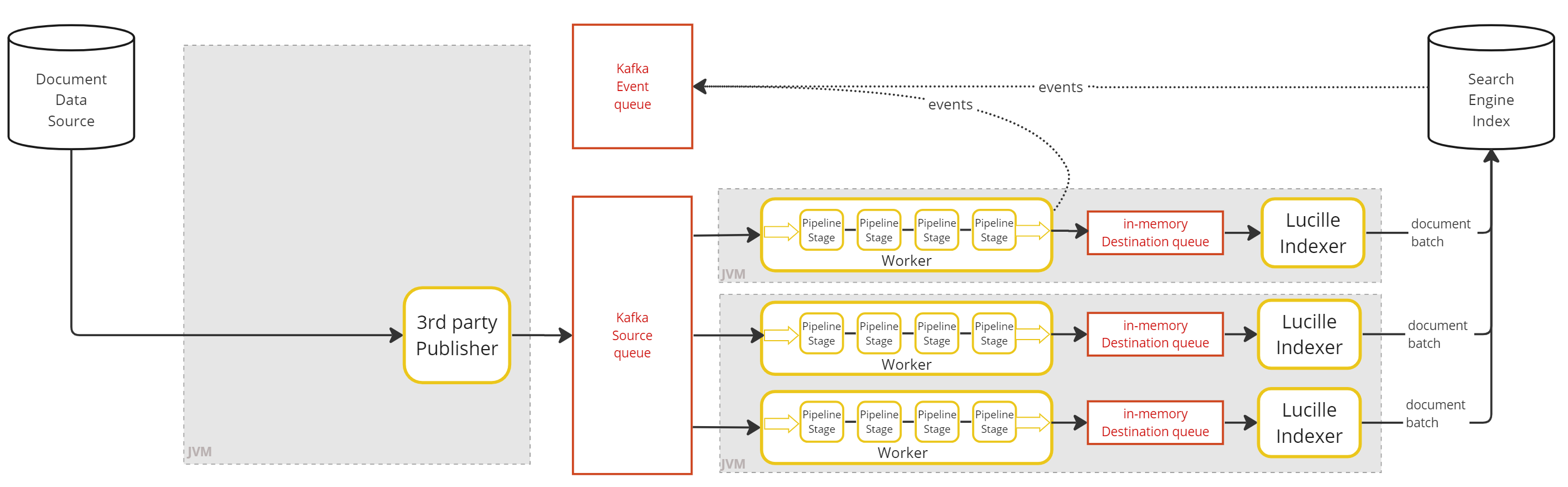
Local Modes
In local modes (also called single-node or standalone modes), all Lucille components run as threads in a single JVM process. Lucille supports two local modes.
Local
All components run as threads in one JVM. Inter-component communication uses in-memory queues. No external dependencies required.
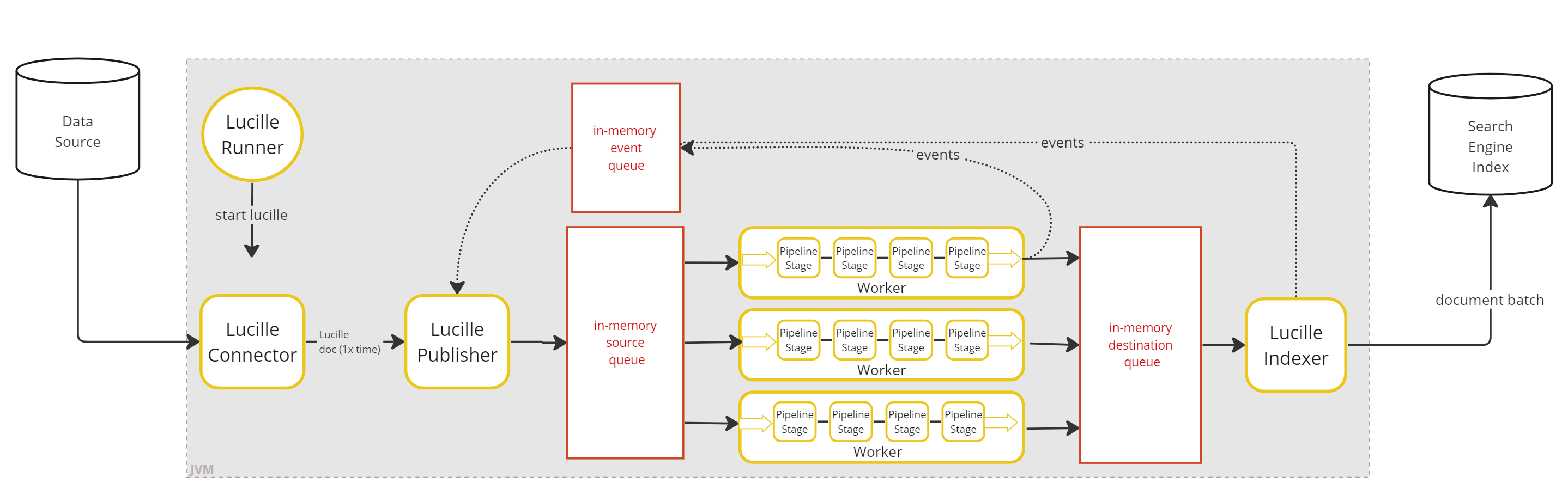
Kafka Local
All components still run as threads in one JVM, but inter-component communication uses an external Kafka instance instead of in-memory queues. Useful for testing Kafka integration without deploying separate processes.
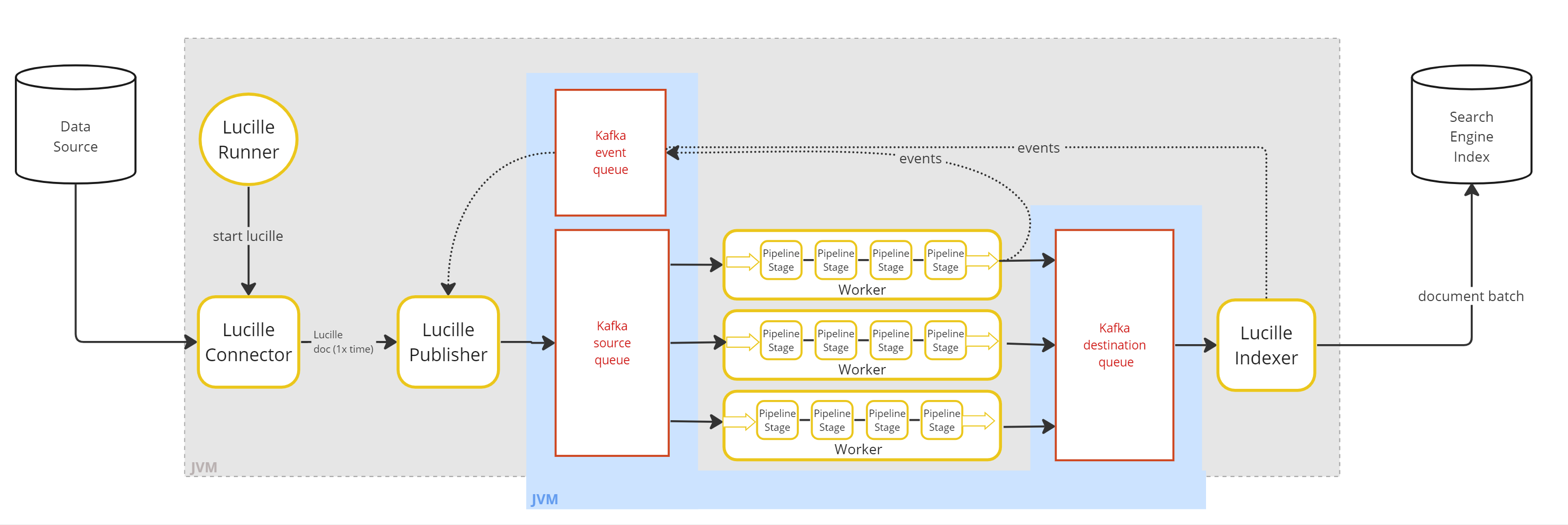
Distributed Modes
Distributed modes are how Lucille scales horizontally. Kafka provides message persistence and fault tolerance, and each Lucille component type runs as one or more separate JVM processes.
Fully Distributed
Best for batch ingest architecture.
The Connector/Publisher, Workers, and Indexers each run as separate JVM processes. All inter-component communication flows through Kafka topics. Workers and Indexers send lifecycle events to a Kafka event topic, which the Publisher polls to track completion.
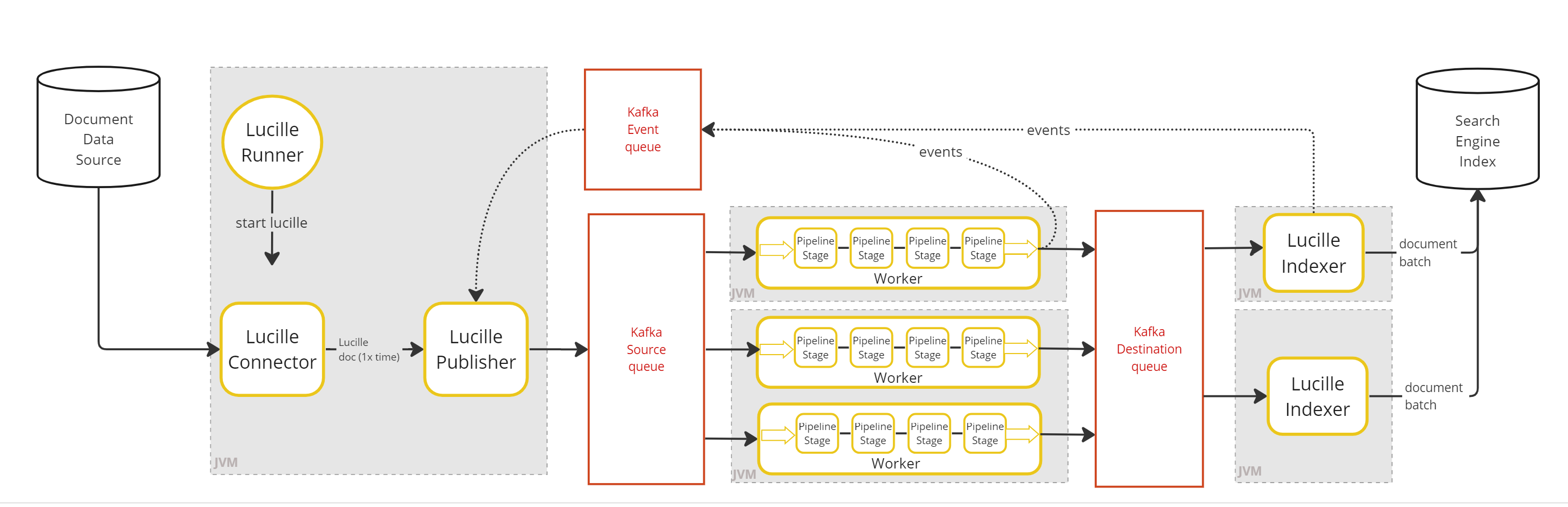
Connector-less Distributed
Best for streaming ingest architecture.
Like Fully Distributed, but with no Lucille Connector or Publisher. An external system writes documents directly to the Kafka source topic, where Workers pick them up. Because there is no Publisher, there is no run-completion accounting — this mode is intended for unbounded streaming workloads.
If events are enabled, the external publisher must stamp each document with a run_id.
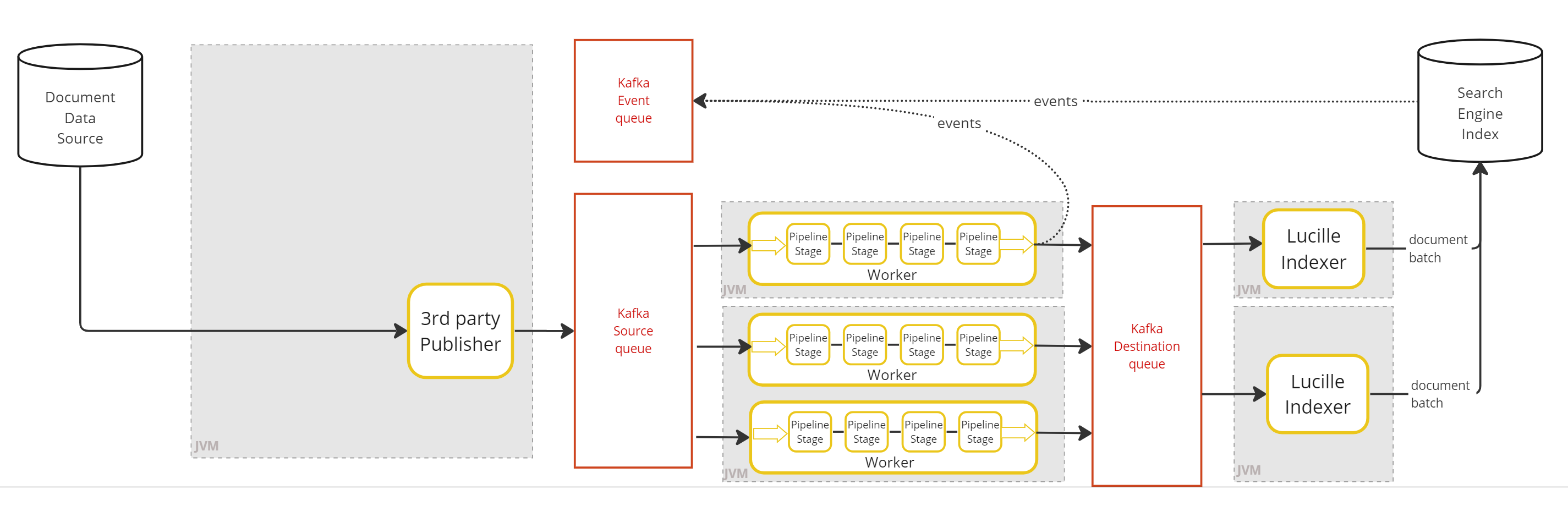
Hybrid
Best for streaming update architecture.
Like Connector-less Distributed, but each Worker is paired with a co-located Indexer in the same JVM (a WorkerIndexer). Workers read from a Kafka source topic and write processed documents to an in-memory queue; the paired Indexer reads from that queue and sends to the search backend. This eliminates one Kafka round-trip per document compared to Fully Distributed.
2.1.5 - Document Lifecycle
This page traces a single Document from the moment it exists only as raw data in a source system to the moment it is retrievable by a search query. It takes the Lucille architecture as a given — for the conceptual explanation of how the system is structured, see Parallelizing Search ETL and Pluggable Queueing.
The Happy Path
Before a document’s lifecycle begins, the system components must be set up. A batch ingest is launched via the Runner, which first validates the configuration. Assuming a single-connector config, the Runner creates a Publisher, passes it to the Connector, and launches the Connector in its own thread. The Runner then calls publisher.waitForCompletion() and blocks. In distributed mode, the Worker and Indexer processes would have been started separately beforehand. In local mode, the Runner starts the Worker and Indexer as threads in the same JVM. With this infrastructure in place, documents can begin their journey.
Step 1 — Raw data in the source system
The document begins as a row in a database table, a file on a filesystem, a message on a Kafka topic, or any other source that Lucille’s Connector knows how to read. At this point it is not yet a Lucille Document — it is raw data in whatever format the source system uses.
Step 2 — The Connector reads the record and creates a Document
Inside connector.execute(publisher), the Connector reads the next record from its source and constructs a Document with a stable, user-defined ID. The ID must be deterministic — if the pipeline is re-run, the same source record must produce the same document ID so that the Indexer’s upsert semantics correctly update rather than duplicate the record in the search backend.
The Connector calls publisher.publish(document).
Step 3 — The Publisher registers the Document and puts it on the processing queue
Before placing the document on the processing queue, the Publisher does two things in order:
- Stamps the document with the
run_id— an immutable field set once and used for log correlation, event routing, and Kafka topic naming throughout the document’s lifetime. - Registers the document’s ID in its accounting ledger (
docIdsToTrack). Registration happens before the document is placed on the queue — the moment it is on the queue, a Worker could process it and the Indexer could send a FINISH event. If the Publisher hadn’t registered the ID yet, it would misclassify that event.
The document is then placed on the processing queue. In distributed mode, this crosses a Kafka boundary: the document becomes a message on the {pipeline}_source Kafka topic, serialized and persisted.
No lifecycle event is sent at this point — the Publisher tracks the document internally through the accounting ledger rather than via the event queue.
Step 4 — A Worker thread picks up the Document
A Worker thread is blocking on processingQueue.poll(). In distributed mode, this is a Kafka consumer poll() call — each Worker thread is an independent Kafka consumer within the consumer group, and Kafka’s consumer group protocol has assigned it one or more partitions of the source topic. The document is delivered to exactly one Worker thread.
The Worker passes the document through each Stage in the pipeline in sequence.
Step 5 — Pipeline processing
Each Stage receives the document, performs its transformation — extracting text, running NLP, generating an embedding, querying a database — and returns the result.
Step 6 — The parent Document moves to the indexing queue
Once the parent document has passed through all pipeline stages, the Worker places it on the indexing queue. In distributed mode, this crosses a second Kafka boundary: the document becomes a message on the {pipeline}_dest Kafka topic.
Step 7 — The Indexer batches and sends the Document
The Indexer thread is blocking on indexingQueue.poll(). It accumulates documents in a batch. When the batch reaches its configured size (indexer.batchSize, default 100 documents) or its timeout elapses (indexer.batchTimeout, default 100ms), the Indexer issues a single bulk API call to the search backend.
Before sending, the Indexer strips reserved internal fields (___dropped, ___skipped, ___children) and applies any configured field whitelist or blacklist. The document that reaches the search backend contains only the fields you want indexed.
The search backend accepts the document. The document now exists in the index.
Step 8 — The Indexer sends a FINISH event
After a successful bulk operation, the Indexer sends a FINISH event to the event queue for each document in the batch — including our document. In distributed mode this event travels on the {pipeline}_event_{runId} Kafka topic, which is unique per run so that events from concurrent runs never interfere with each other.
The Publisher’s polling loop receives the FINISH event, looks up the document’s ID in docIdsToTrack, and removes it. The document’s lifecycle is complete.
Step 9 — The Document is searchable
The document has been accepted by the search backend. Once the backend makes it visible — via a scheduled commit in Solr, or after the refresh interval in Elasticsearch and OpenSearch — a query can retrieve it. Lucille does not issue commits; visibility timing is controlled entirely by the search backend’s configuration. The enrichment performed during pipeline processing — the extracted text, the entity tags, the vector embedding — is available for full-text search, faceting, and semantic retrieval.
After all documents (parents and children) have completed their individual lifecycles, the framework determines that the run is complete. The Publisher continuously evaluates three conditions: (1) the Connector thread has terminated (no more documents will be published), (2) the event queue is empty (no more events are in transit), and (3) docIdsToTrack is empty (every document has reached a terminal state). All three must hold simultaneously. When they do, waitForCompletion() returns and the Runner logs the run summary.
The Detailed Path
The Happy Path above omits edge cases, error handling, logging, metrics, backpressure, routing, and child documents. This section walks through the same journey again, annotating each step with everything that actually happens. A developer debugging “why didn’t my document get indexed?” can walk through these steps to identify where the document’s journey diverged.
Step 1 — Raw data in the source system
Same as the Happy Path. No additional mechanisms apply until the Connector reads the record.
Step 2 — The Connector reads the record and creates a Document
Everything from the Happy Path, plus:
- Backpressure (maxPendingDocs). If
publisher.maxPendingDocsis configured and the pending count has reached the threshold,publisher.publish()blocks here — the Connector thread waits until downstream components process enough documents to bring the count below the max. - Backpressure (queue capacity). In local mode, if
publisher.queueCapacityis reached, theput()call blocks until a Worker consumes a document from the queue. - Pause/resume. If
publisher.pause()has been called (rare, used in specialized deployment patterns),publish()blocks untilresume()is called. - Metrics. The Publisher’s timer measures the gap between consecutive
publish()calls — this becomes the “Mean connector latency” metric visible in periodic logs. - Logging. The DocLogger logs:
"Publishing document {id}."
Step 3 — The Publisher registers the Document and puts it on the processing queue
Everything from the Happy Path, plus:
- Collapsing mode. If collapsing mode is active and the previous document had the same ID, the Publisher merges this document’s fields into the previous one via
setOrAddAll()and does NOT place it on the queue yet. It waits for a document with a different ID before sending the merged result. - MDC. The document’s
run_idfield is now set and immutable. All subsequent log lines for this document (via MDC) will include this run_id. - Serialization. In local mode, the Document object (a Jackson
ObjectNodewrapper) is placed directly on the in-memory queue — no serialization occurs. In distributed mode, the Document is serialized to a JSON string and produced to the Kafka source topic. The document’sidbecomes the Kafka message key (ensuring ordering guarantees), and the full JSON representation becomes the message value. The JSON format means documents on Kafka are human-readable with standard tooling.
Step 4 — A Worker thread picks up the Document
Everything from the Happy Path, plus:
- Deserialization. In distributed mode, the Worker’s Kafka consumer receives the JSON message and deserializes it back into a
KafkaDocument(aDocumentsubclass that also carries the Kafka partition, offset, and key metadata). In local mode, the Worker receives the originalDocumentobject directly from the in-memory queue — no deserialization needed. - Stuck-worker detection. The Worker updates its
pollInstanttimestamp — the WorkerPool watcher uses this to detect stuck workers. If the Worker doesn’t poll again withinworker.maxProcessingSecs, the watcher logs an error (and optionally exits the JVM ifworker.exitOnTimeoutis true). - MDC in distributed mode. The Worker updates the MDC
run_idfrom the document’s stamped run_id (since the Worker thread may process documents from different runs over its lifetime). - Poison pill detection. If
worker.maxRetriesis configured, the Worker checks the RetryCounter. If this document has exceeded its retry limit (because it crashed Workers on previous attempts), the Worker sends it to the dead letter queue and sends a FAIL event — it never enters the pipeline.
Step 5 — Pipeline processing
Everything from the Happy Path, plus:
- Conditional execution. Before each Stage, the framework evaluates the
conditionsblock. If conditions don’t match, the Stage is skipped entirely for this document —processDocument()is never called, no time is recorded for that Stage, and the DocLogger logs"Stage {name} did not process {id}." - Dropped/skipped bypass. If the document is marked as dropped (
___dropped = true) or skipped (___skipped = true), ALL remaining stages are bypassed. - Per-stage metrics. For each Stage that does execute, the framework records processing time in a per-stage Timer. This becomes the “Mean latency: X ms/doc” in the per-stage metrics logged at end of run. The stage’s child Counter is incremented for each child emitted.
- Per-stage logging. The DocLogger logs
"Stage {name} to process {id}"before and"Stage {name} done processing {id}"after each stage execution. - Error handling. If a Stage throws
StageException, the Worker catches it, sends a FAIL event, and the document’s lifecycle ends here — it never reaches the Indexer. The stage’s error Counter is incremented. - Child document emission. A Stage can emit child documents by returning them from
processDocument()as anIterator<Document>. The most common use case is chunking: aChunkTextStage attaches text chunks to the parent, and a subsequentEmitNestedChildrenStage converts them into independently flowing documents. Each emitted child becomes a separate search record. When the Worker emits a child, it immediately sends aCREATEevent to the event queue — before the parent document’s pipeline execution continues. This ordering guarantee ensures the Publisher registers the child’s ID indocIdsToTrackbefore it could possibly receive a completion event for the parent (which would otherwise make the run appear done while children are still in flight). The child joins the processing queue and is picked up by a Worker thread — possibly the same one, in a later poll iteration — for its own independent pipeline run.
Step 6 — The parent Document moves to the indexing queue
Everything from the Happy Path, plus:
- Dropped documents. If the document is dropped (
___dropped = true), it does NOT go to the indexing queue. The Worker sends a DROP event to the Publisher and discards it. The document’s lifecycle ends here. - Skipped documents. If the document is skipped (
___skipped = true), it DOES go to the indexing queue — it bypassed enrichment stages but still needs to reach the Indexer (typically to issue a delete against the search backend). - Metrics. The Worker’s processing Timer stops — the elapsed time contributes to “Mean pipeline latency” in periodic logs.
- Offset management. In distributed mode, the Worker commits the Kafka offset for this document. In WorkerIndexer mode, the commit is deferred until after indexing succeeds.
- Serialization to indexing queue. In distributed mode, the document is serialized to JSON again and produced to the Kafka dest topic (again with the document ID as the message key). In local mode or WorkerIndexer mode, the Document object is placed directly on an in-memory queue.
Step 7 — The Indexer batches and sends the Document
Everything from the Happy Path, plus:
- Index routing. If
indexer.indexOverrideFieldis configured and the document has that field, the document is routed to a different index/collection than the default. With MultiBatch, it goes into a separate batch for that destination. - Deletion handling. If the document is marked for deletion (via
deletionMarkerField+deletionMarkerFieldValue), the Indexer issues a delete operation instead of an index operation. IfdeleteByFieldFieldanddeleteByFieldValueare also present, it’s a delete-by-query. - ID override. If
indexer.idOverrideFieldis configured, the document’s ID in the search backend is taken from that field rather than the internal document ID. - Field filtering. The configured whitelist/blacklist is applied — only the desired fields reach the search backend. Reserved fields (
___dropped,___skipped,___children) are always stripped. - Retries. If the bulk API call fails with a retryable status code (429, 503) and
indexer.maxRetries > 0, the entire batch is retried with exponential backoff. The document may be sent multiple times before succeeding or being declared failed. - Metrics. The Indexer’s Meter and Histogram record the batch: docs/sec throughput and per-doc backend latency.
Step 8 — The Indexer sends a FINISH event
Everything from the Happy Path, plus:
- Per-document failures. If the bulk API reported a per-document failure for this specific document (e.g., schema violation), a FAIL event is sent instead of FINISH. The document was processed successfully through the pipeline but rejected by the search backend.
- Offset commitment. The
batchComplete()call fires in thefinallyblock regardless of success or failure — this allows Kafka offset commits in WorkerIndexer mode even when a batch fails. - Backpressure release. The Publisher receives the event, removes the document’s ID from
docIdsToTrack, and decrements the pending count. IfmaxPendingDocswas blocking the Connector, this may unblock it. - Run accounting. The document contributes to the run’s
numSucceeded(FINISH),numFailed(FAIL), ornumDropped(DROP) count, which appears in the final run summary.
Step 9 — The Document is searchable
Everything from the Happy Path, plus:
- Run summary. The run summary logged at completion includes this document in its counts: e.g.,
"200000 docs succeeded. 0 docs failed. 0 docs dropped." - Per-stage metrics. The per-stage metrics logged at completion show how much time this document (aggregated with all others) spent in each stage.
- Audit trail. If the DocLogger was enabled at INFO level, a complete audit trail exists for this document — every stage entry/exit, every queue transition, the FINISH event — filterable by document ID via MDC.
For detailed explanations of how each component works internally, see the Internals section — particularly Publisher Accounting, Pipeline Internals, Kafka Integration, and Metrics and Observability.
2.1.6 - Design Rationale
These are the overarching design decisions that shape everything about Lucille. Every architectural choice, every API design, and every operational feature must be consistent with these principles. They emerged from years of building search ingestion frameworks for customer projects and were refined through production deployments.
Part I: Guiding Principles
1. Built for search
The system should be purpose-built for getting data into search engines and vector databases — not a general-purpose ETL tool adapted for search. This focus should shape the document model, the identity model, the wire format, and the operations the system supports natively.
2. Concurrency
The tasks of retrieving data, processing it, and sending it to the search engine should be handled by separate components that run concurrently. No component should wait for another unless it exhausts its backlog of work. While the system should be highly concurrent, pipeline authors should not have to manage concurrency — the framework should handle parallelism transparently.
3. Scalability
It should be easy to scale the system by adding more component instances — especially more Workers — even while the system is running. Scaling up should not require stopping the ingest, modifying configuration, or redeploying.
4. Extensibility
It should be easy to extend the system by adding new implementations of the core component types — new Connectors, new Stages, new Indexers — without modifying the framework itself. Extension points should be defined by small, well-documented interfaces.
5. Deployment versatility
The system should be easy to deploy as a single, self-contained process, and it should have a clear pathway for expanding into a distributed deployment. The codepaths should remain nearly identical when switching from one deployment mode to another.
6. Batch and streaming unity
The system should support both batch architecture (finite data with completion detection) and streaming architecture (unbounded data with no run boundary). Enrichment logic should not know or care which mode it is running under.
7. Minimal framework overhead
The framework itself should never be the bottleneck. Per-document overhead should be negligible relative to the actual enrichment work. Available system resources should be used effectively, with the constraint always being the source system, the enrichment logic, or the search backend — never the framework.
8. Observability
The system should make it easy to understand what is happening during an ingest, what has happened after an ingest, and what went wrong when something fails. Metrics, logging, and status reporting should be built into the framework, not bolted on.
9. Testability
The entire framework should easily run inside a unit test. It should be straightforward to write end-to-end tests of ingestion pipelines that exercise the real framework components with only external systems mocked or bypassed.
10. Configuration-driven operation
All aspects of an ingest should be specified in a readable configuration file. Changes should be possible by editing the file alone, without rebuilding the project. Configuration should be composable, parameterizable, and validatable.
11. Optimistic error handling
The system should ingest as much data as possible, continuing past per-document errors rather than aborting. However, the system should stop immediately on structural errors rather than wasting time on work that cannot succeed.
12. Resilience
The system should recover from failures without losing work. Transient failures should be retried, poison-pill documents should be quarantined, and the system should shut down gracefully when asked, preserving in-flight work rather than abandoning it.
Part II: Features by Principle
1. Built for search
The document model represents data the way search engines think about it: typed fields, single-valued and multi-valued, with operations that map directly to search engine semantics.
- Search-oriented document model. Fields support single and multi-valued access uniformly. The three update modes (overwrite, append, skip) match how search engine fields are actually populated.
- Deterministic document IDs. Connectors derive IDs from source data (file paths, database primary keys, URLs) so that re-ingestion updates existing records rather than creating duplicates.
- ID namespacing. A configurable
docIdPrefixon each Connector prevents ID collisions when multiple connectors write to the same index. - ID override at indexing time. The
idOverrideFieldsetting lets the Indexer use a different field’s value as the document’s ID in the search backend, decoupling internal tracking from index identity. - Deletion markers. Documents can represent delete-by-ID or delete-by-query operations via configurable marker fields, enabling CDC and incremental ingestion patterns.
- Operation ordering. Sequences of creates, updates, and deletes for the same document ID preserve their order in distributed mode by using the document ID as the Kafka message key.
- Zero-cost JSON serialization. The document is backed by a Jackson ObjectNode — already in the wire format that search engine bulk APIs expect. No conversion at the boundary.
- Multiple search backends. Solr, OpenSearch, Elasticsearch, Pinecone, Weaviate, and CSV are supported as indexing destinations.
- Index routing. Documents in the same batch can be routed to different indices or collections via
indexOverrideField, supporting multi-tenant architectures.
2. Concurrency
Connector, Worker, and Indexer run as independent concurrent components communicating through queues. The framework manages all parallelism so that pipeline authors write sequential code.
- Component separation. Each component operates at its own pace. The Connector publishes to a queue, Workers pull and process, the Indexer batches and sends. No component blocks another unless queues are full or empty.
- Per-thread pipeline instantiation. Each Worker thread gets its own Pipeline with its own instances of every Stage. Instance fields in a Stage are effectively thread-local — no synchronization required.
- Event-driven completion detection. The Publisher tracks every document from publication to terminal state (FINISH, FAIL, DROP) using an event queue. The run is complete when all documents reach a terminal state.
- Bag-based accounting. The Publisher uses a multiset (Bag) rather than a Set, correctly handling duplicate IDs published in the same run — each publication requires its own terminal event.
- Concurrent run isolation. Each batch run gets a dedicated event topic (
{pipeline}_event_{runId}), preventing events from one run interfering with another. - Child documents. Stages can generate additional documents mid-pipeline. The Publisher is notified via CREATE events and tracks children independently.
- Sequential composition. Multiple batch ingests can be composed in strict sequence — one ingest cannot start until all work from the previous ingest is complete.
- Document collapsing. The Publisher can merge consecutive same-ID documents into a single document before sending for processing, reducing redundant work in CDC scenarios.
3. Scalability
Adding capacity is an operational action, not a development effort.
- Hot scaling. New Worker instances can join a running ingest without restart or coordination. In distributed mode, a new Worker joins the Kafka consumer group and receives partition assignments immediately.
- Vertical scaling. Within a single process, adding Worker threads is a configuration change (
worker.threads). - Horizontal scaling. Across processes, adding Workers means launching additional JVMs. Both are independent levers.
- WorkerIndexer hybrid. Co-located Worker+Indexer processes provide horizontal scaling without the operational complexity of managing separate fleets.
4. Extensibility
New components are added by implementing an interface, placing the compiled code on the classpath, and referencing it by name in configuration.
- Interface-based extension. Stage, Connector, and Indexer are small, well-defined interfaces. Implementing one is the only requirement for adding new functionality.
- Runtime discovery. Components are instantiated reflectively from class names in configuration. No registration step, no framework modification, no core rebuild required.
- Modular Maven structure. Plugins are separate Maven modules. New connectors, stages, and indexers can be developed and versioned independently of the core.
- Built-in enrichment stages. Common processing tasks are available out of the box: field manipulation, regex, text operations, entity extraction, language detection, embeddings, chunking, database lookups, HTTP enrichment, scripting (JavaScript, Python), and JSONata transformations.
- Source coverage. Built-in connectors for databases (JDBC), filesystems (local, S3, Azure, GCS), CSV/XML/JSON files, Kafka topics, RSS feeds, and search engines.
- Multi-cloud file access. A single FileConnector handles local filesystem, S3, Azure Blob, and GCS through pluggable StorageClient implementations selected by URI scheme.
5. Deployment versatility
The same pipeline configuration, the same component implementations, and the same enrichment logic run regardless of deployment mode.
- Local mode. All components run as threads in a single JVM with in-memory queues. No external infrastructure required.
- Distributed mode. Components run as separate processes communicating via Kafka topics.
- Hybrid mode (WorkerIndexer). Worker and Indexer co-located in a single process, consuming from Kafka but avoiding a second Kafka round-trip between processing and indexing.
- Streaming mode. Workers consume directly from a Kafka topic populated by an external system, with no Runner or Connector.
- Deployment-independent codepaths. Only the messaging implementation changes between modes (in-memory queues vs. Kafka). All other code paths — pipeline stages, accounting logic, retry behavior, batching — remain identical.
- Programmatic run triggering. Runs can be triggered and managed via a REST API (RunnerManager), with support for concurrent runs in the same JVM.
6. Batch and streaming unity
Pipeline logic is written once and deployed in either mode without modification.
- Batch mode. A Runner triggers a finite ingest with completion detection. The Connector retrieves a bounded set of data, and the system reports when all work is done.
- Streaming mode. An external system places documents on a Kafka topic continuously. Workers process them with no run boundary or completion accounting.
- Mode-transparent stages. A Stage that extracts entities or generates embeddings works identically in both modes. It never knows which mode it is running under.
- Incremental/stateful ingestion. Connectors can track what they have previously published (via JDBC-backed state) and process only new or modified data on subsequent runs — bridging batch and streaming patterns.
7. Minimal framework overhead
The bottleneck should always be the source system, the enrichment logic, or the search backend — never the framework’s own overhead.
- Zero-cost JSON serialization. The Document is already in wire format. No conversion step at queue boundaries or when sending to search backends.
- Lazy iterator-based processing. Child documents are produced as an iterator, not materialized into a list. Memory usage is bounded regardless of how many children a Stage produces.
- Batch indexing. Documents are sent to the search backend in configurable batches with both size and timeout thresholds, amortizing network round-trips.
- Backpressure. The Publisher blocks the Connector when too many documents are in flight, preventing out-of-memory conditions without artificial throttling or unbounded queue growth.
8. Observability
Understanding system behavior requires no custom instrumentation by the user.
- Per-component metrics. Each component reports throughput and latency continuously during execution via a shared MetricRegistry.
- Per-stage timing. Processing time is measured per Stage, so pipeline bottlenecks can be identified without adding instrumentation to stage code.
- Run summary. A structured summary at the end of each run shows documents succeeded, failed, dropped, and total elapsed time.
- Inspectable data in flight. Documents on Kafka topics are human-readable JSON. An administrator can inspect any topic with standard Kafka tooling.
- Per-document tracing. The run ID and document ID are pushed into the SLF4J MDC, so every log line emitted while processing a document includes its identity.
- Heartbeat/liveness. Components report liveness for container orchestrators to verify health.
9. Testability
Testing a pipeline requires no external infrastructure — no Kafka, no search engine, no database.
- Test mode (RunType.TEST). The full pipeline runs end-to-end with in-memory messaging and a bypassed indexer. The real framework components execute — real queues, real pipeline processing, real document routing.
- Complete document history. A TestMessenger captures every document published, every document sent for indexing, and every lifecycle event. Test code asserts against this history.
- No external infrastructure. Tests run with in-memory queues. The mocking focuses on external services (source systems, search backends); the Lucille components themselves are real.
10. Configuration-driven operation
Changes are possible by editing a configuration file alone, without rebuilding the project.
- HOCON format. Comments, relaxed syntax, and human-readable structure. Any valid JSON is also valid HOCON.
- Environment variable substitution. Credentials and environment-specific values are injected via
${?ENV_VAR}syntax without code changes. - Config composition (includes). Shared settings — connection strings, common pipeline fragments — are defined once and included everywhere.
- Pre-run validation (SPEC system). Every component declares its expected configuration. All errors are reported at once before execution starts, so a developer can fix all issues in a single pass.
- Config rendering (-render). The fully resolved config can be printed for debugging, showing what values Lucille will actually see at runtime.
- Validation without execution (-validate). Configuration can be checked in CI pipelines without running an ingest.
- Conditional stage execution. Stages execute only when the document meets criteria specified in configuration (field presence, field value, combinations). The framework handles this — stage authors never implement conditional logic.
- Connector lifecycle. Connectors have pre-execution, execution, post-execution, and close phases with defined error semantics.
11. Optimistic error handling
The guiding principle: get as much data into the search engine as possible, but stop as soon as possible if you’d only be wasting your time.
- Per-document error handling. Exceptions during document processing fail the individual document without stopping the ingest. The document is routed to a failure state; other documents continue flowing.
- Structural error fast-fail. Invalid configuration, failed component initialization, or an unreachable search backend cause immediate termination rather than processing documents that can never be indexed.
12. Resilience
The system should recover from failures without losing work and prevent resource exhaustion proactively.
- Poison pill detection. Documents that repeatedly cause a Worker process to crash are detected (via a distributed retry counter) and routed to a Dead Letter Queue after a configurable retry limit.
- Crash resilience. Uncompleted work is resumed when a component restarts, or picked up by another instance via Kafka’s consumer group protocol. Work is not silently dropped.
- Graceful shutdown. Signal handling (SIGINT/SIGTERM) cleanly stops all components — the Connector stops publishing, Workers drain remaining documents, the Indexer flushes its current batch, and the process exits with a run summary.
- Backpressure. The Publisher blocks the Connector when too many documents are in flight or when queues are full, preventing unbounded growth that leads to out-of-memory crashes.
- Indexer retry with exponential backoff. Failed batch calls are retried with configurable maximum attempts, initial wait duration, and retryable status codes. Non-retryable failures fail immediately.
2.2 - Components
Lucille is built from a small set of components that work together to move data from source systems into a search backend.
| Component | Role |
|---|---|
| Connectors | Read data from a source system and emit Documents into the pipeline. |
| Stages | Process and enrich Documents. Composed into Pipelines. |
| Indexers | Batch processed Documents and send them to the search backend. |
| Pipeline | An ordered sequence of Stages applied to each Document. |
| Worker | Pulls Documents from the source queue, runs them through the Pipeline, and forwards results. |
| Publisher | Tracks every Document from publication to terminal state; provides backpressure. |
| Runner | Orchestrates a complete run: validates config, starts components, waits for completion. |
| Document | The basic unit of data flowing through the system. |
| Config | Why Lucille is configuration-driven, and how HOCON and Typesafe Config shape the system. |
For a catalogue of specific implementations — built-in connectors, stages, indexers, file handlers, and plugins — see the Ingest Design section.
2.2.1 - Document
Search engines are designed to handle messy, incomplete, heterogeneous, loosely structured data. The basic unit of data in a search engine is typically called a “document” — it is simply a set of named fields, where each field may hold a single value or a list of values.
In Lucille, a Document is the basic unit of data that flows through a pipeline and gets indexed. Lucille’s Document aims to be as close to a search engine document as possible. The idea is that you don’t want to wait until the last minute to convert your data into a search-engine-friendly representation; you want to start with a search-engine-friendly representation the moment you acquire data from the source system, and use that representation throughout the entire enrichment pipeline. This means no intermediate object model, no mapping layer at the end — just fields in, fields out.
Why not POJOs?
If you’re coming from a background where encapsulation and strong typing are second nature, your first instinct might be to define POJOs for each entity type — a Product, a SupportTicket, a LegalDocument — with transformation logic behind well-named methods. That approach works when your domain has a small number of well-understood record types with stable schemas.
Search ingestion rarely looks like that. A typical project pulls data from multiple source systems, each with its own schema. The fields vary wildly from one record to the next — a database row has structured columns, a PDF has extracted text and metadata, a JSON API response has nested objects. Even within a single source, records are often inconsistent: optional fields that are sometimes present and sometimes not, multi-valued fields with unpredictable cardinality, fields whose meaning changes depending on the record type. Trying to capture all of this in a POJO hierarchy quickly becomes impractical — you end up with dozens of classes, most of which are just bags of optional fields, and the type system works against you rather than for you.
The pragmatic alternative is a generic map — something like Map<String, Object>. This gives you the flexibility to handle arbitrary fields, but at a cost: no typed access, no distinction between single-valued and multi-valued fields, verbose null-checking on every read, manual serialization logic at every boundary, and no built-in support for the update patterns (overwrite, append, skip) that search ingestion requires constantly.
Lucille’s Document is the middle ground. It has the flexibility of a map — any field name, any number of fields, no fixed schema — but with a purpose-built API that eliminates the boilerplate. Typed getters, uniform single/multi-valued access, update modes as first-class operations, and zero-cost JSON serialization because the document is already in the format that search engines expect. You get the adaptability of a schemaless representation without giving up the ergonomics of a well-designed API.
2.2.1.1 - Overview
A Document is an ordered, named set of fields. Each field may hold a single value or a list of values (multi-valued). All field values are ultimately represented in JSON. Every Document has a unique id.
Creating a Document
Use the static factory methods on the Document interface:
// Create with an explicit ID
Document doc = Document.create("my-doc-123");

// Create with an auto-generated UUID
Document doc = Document.create();
Connectors typically create Documents and call publisher.publish(doc) to send them into the pipeline.
Reserved Fields
Lucille reserves several field names for internal use. Do not use these for application data.
| Field | Description |
|---|---|
id | The unique document ID. Immutable once set. |
run_id | The run ID stamped by the Publisher. Immutable once set. |
___children | Internal: tracks child documents generated in the pipeline. |
___dropped | Set to true when a document is dropped (not sent to the Indexer). |
___skipped | Set to true when a document should bypass Stages but still reach the Indexer (used for deletions). |
Field Types
Lucille Documents support the following value types:
StringBooleanIntegerDoubleFloatLongjava.time.Instantbyte[]com.fasterxml.jackson.databind.JsonNodejava.sql.Timestampjava.util.Date
Reading Fields
Single-Valued Access
String  title  = doc.getString("title");
int     count  = doc.getInt("count");
double  score  = doc.getDouble("score");
float   weight = doc.getFloat("weight");
long    size   = doc.getLong("size");
boolean flag   = doc.getBoolean("active");
Instant ts     = doc.getInstant("created_at");
byte[]  raw    = doc.getBytes("content");
JsonNode json  = doc.getJson("metadata");
Multi-Valued Access
These methods also wrap a single value in a list if needed:
List<String>  titles = doc.getStringList("title");
List<Integer> counts = doc.getIntList("counts");
List<Double>  scores = doc.getDoubleList("scores");
List<Long>    sizes  = doc.getLongList("sizes");
Checking Field Existence
if (doc.has("title")) {
    String t = doc.getString("title");
}
Writing Fields
setField — Overwrite
Replaces any existing value(s) and makes the field single-valued:
doc.setField("title", "Hello World");
doc.setField("count", 42);
doc.setField("active", true);
doc.setField("score", 0.95);
doc.setField("created_at", Instant.now());
addToField — Append
Appends a value, converting the field to multi-valued if it was single-valued:
doc.addToField("tags", "search");
doc.addToField("tags", "etl");
// tags is now ["search", "etl"]
setOrAdd — Create or Append
Creates the field as single-valued if it does not exist; appends if it does:
doc.setOrAdd("tags", "search");
doc.setOrAdd("tags", "etl");
update — Controlled Write with UpdateMode
The update method accepts an UpdateMode enum that covers the three most common write patterns:
import com.kmwllc.lucille.core.UpdateMode;

// OVERWRITE: first value replaces all existing values; additional values are appended
doc.update("title", UpdateMode.OVERWRITE, "New Title");

// APPEND: all values are appended (field becomes or remains multi-valued)
doc.update("tags", UpdateMode.APPEND, "search", "etl");

// SKIP: field is left unchanged if it already has a value
doc.update("title", UpdateMode.SKIP, "Default Title");
Nested JSON
Documents support reading and writing values within nested JSON objects and arrays using dot-path notation (e.g., "metadata.author.name") or structured List<Document.Segment> paths.
Reading Nested Values
JsonNode node = doc.getNestedJson("metadata.author.name");

// Or using structured path segments
List<Document.Segment> path = Document.Segment.parse("metadata.items[2].title");
JsonNode node2 = doc.getNestedJson(path);
Writing Nested Values
ObjectMapper mapper = new ObjectMapper();
doc.setNestedJson("metadata.score", mapper.valueToTree(0.95));
Removing Nested Values
doc.removeNestedJson("metadata.tempField");
Path Segments
List<Document.Segment> segments = Document.Segment.parse("a.b[2].c");
String path = Document.Segment.stringify(segments); // "a.b[2].c"
Dropping and Skipping
Dropping removes the document from the pipeline entirely. It will not reach the Indexer.
Use the DropDocument Stage in config, or call setDropped() in stage code:
doc.setDropped(true);
Skipping causes the document to bypass all downstream Stages but still reach the Indexer. This is used for deletion markers, so the Indexer can issue a delete against the search backend.
Use the SkipDocument Stage in config, or call setSkipped() in stage code:
doc.setSkipped(true);
Child Documents
A Stage may generate child documents — additional Documents that flow through the remaining pipeline stages as independent records and are indexed alongside the parent. A Stage returns children from processDocument() as an Iterator<Document>.
Children are always emitted before the parent document, ensuring the Publisher’s accounting registers child IDs before it sees the parent’s completion event.
Iterating Fields
for (String fieldName : doc) {
    // iterate over all field names in the Document
}
Serialization
Documents serialize to and from JSON. In Kafka-distributed mode, Documents flow between components as JSON bytes. The id and run_id are always included.
String json = doc.toString();
2.2.1.2 - Document IDs
Why IDs Must Be Deterministic
In search ingestion, the document ID serves as the primary key in the search index. When you index a document with ID “ABC”, the search engine either creates a new record or updates the existing record with that ID (upsert semantics). This has a critical implication:
If you run the same ingest twice, you want the same documents to get the same IDs. Otherwise, the second run creates duplicates instead of updating existing records. A search index with 100,000 documents would become 200,000 documents after a re-run — all duplicates.
Deterministic IDs mean:
- Re-ingestion is safe. Running the pipeline again updates existing documents rather than creating duplicates.
- Incremental updates work. A document that changes in the source system gets re-indexed under the same ID, replacing the old version.
- Deletions are possible. To delete a document from the index, you need to know its ID. If the ID was random, you’d have no way to reference it later.
- Parent-child relationships are stable. Child documents reference their parent by ID. If the parent’s ID changes on re-run, the relationship breaks.
This is why Connectors are responsible for creating documents with meaningful, stable IDs derived from the source data — a file path, a database primary key, a URL — rather than random UUIDs.
Why IDs Are Immutable in Lucille
Once a Document is created with an ID, that ID cannot be changed through the normal Document API. The id field is in the RESERVED_FIELDS set, so setField("id", ...), addToField("id", ...), and renameField("id", ...) all throw IllegalArgumentException.
This immutability exists because the ID is used as a tracking key throughout the system:
- The Publisher registers the ID in its accounting ledger when the document is published. If the ID changed mid-pipeline, the Publisher would never receive a terminal event for the original ID — the run would hang.
- The Worker sends CREATE events for child documents using their IDs. If a child’s ID changed after the CREATE event was sent, the Publisher’s accounting would be corrupted.
- The Kafka message key is the document ID. Changing the ID mid-pipeline would break ordering guarantees (the document would land on a different partition after the change).
- The Indexer uses the ID to send upserts and deletions to the search backend. The ID must be the same value that was tracked through the entire pipeline.
In short: the ID is the document’s identity across all components. Mutating it would break accounting, ordering, and idempotency simultaneously.
How Lucille Handles Duplicate IDs
Duplicate IDs — multiple documents with the same ID published in the same run — are a legitimate scenario. They arise in CDC (Change Data Capture) scenarios where a source system emits multiple updates for the same record, or when a connector reads from a source that contains duplicate entries.
Lucille handles duplicates at two levels:
At the Publisher Level: The Bag Data Structure
The Publisher’s docIdsToTrack is a Bag<String> (multiset), not a Set<String>. If two documents with ID “doc-1” are published, the Bag count for “doc-1” becomes 2. The Publisher expects to receive two separate terminal events for that ID. Each terminal event decrements the count by one. The run is not considered complete until the count reaches zero for all IDs.
// Two documents with same ID published → bag count is 2
docIdsToTrack.add("doc-1");  // count: 1
docIdsToTrack.add("doc-1");  // count: 2

// First terminal event → count drops to 1
docIdsToTrack.remove("doc-1", 1);  // count: 1

// Second terminal event → count drops to 0
docIdsToTrack.remove("doc-1", 1);  // count: 0, now removed
This means duplicate IDs don’t corrupt the accounting — each published document is tracked independently even if it shares an ID with another.
At the Publisher Level: Collapsing Mode
For connectors that emit multiple consecutive documents with the same ID (common in CDC), the Publisher supports a collapsing mode (requiresCollapsingPublisher() = true). In this mode, consecutive same-ID documents are merged into a single document via setOrAddAll() before being sent for processing:
if (previousDoc.getId().equals(document.getId())) {
    previousDoc.setOrAddAll(document);  // merge fields into one document
} else {
    sendForProcessing(previousDoc);     // different ID — send the previous one
    previousDoc = document;             // hold the new one
}
This reduces N consecutive same-ID documents to one document with multi-valued fields, which is then processed and indexed once. numReceived counts all N inputs; numPublished counts only the single merged output.
At the Indexer Level: Upsert Semantics
When two documents with the same ID reach the Indexer (either because collapsing is not enabled, or because they were non-consecutive), the search engine’s upsert semantics handle it: the second document overwrites the first in the index. The final state of the index reflects the last document indexed with that ID. Combined with Lucille’s ordering guarantees (same ID → same partition → same consumer → sequential processing), this means the final state is deterministic.
At the Indexer Level: Ordering Within a Batch
If a batch contains both an upsert and a delete for the same ID, the Indexer implementations (SolrIndexer, OpenSearchIndexer) explicitly handle ordering — flushing pending upserts before processing a delete for the same ID, or vice versa. This ensures that the operations are applied in the correct sequence even within a single batch.
The idOverrideField: Decoupling Internal ID from Index ID
Sometimes the ID used internally for tracking is not the ID you want in the search index. For example:
- A Connector might use a composite key (source + record number) for tracking uniqueness, but the search index expects a simpler ID.
- A pipeline might compute a better ID during enrichment (e.g., hashing certain fields to create a deduplication key).
- A document might need different IDs in different destination indices.
Lucille solves this with indexer.idOverrideField — a configuration option that tells the Indexer to use a different field’s value as the document’s ID when sending to the search backend, without modifying the document’s internal ID:
indexer {
  idOverrideField: "computed_id"
}
How It Works
- The Connector creates the document with a stable internal ID (e.g.,
"source-record-42") - A pipeline Stage computes a better ID and stores it in a field (e.g.,
doc.setField("computed_id", "hash-abc123")) - The document flows through the system tracked by its internal ID (
"source-record-42") - At indexing time, the Indexer calls
getDocIdOverride(doc)which returns"hash-abc123" - The document is sent to the search backend with ID
"hash-abc123"
What Uses Which ID
The internal ID ("source-record-42") is used for:
- Publisher accounting
- Kafka message key (ordering)
- Event tracking (CREATE, FINISH, FAIL)
- Logging and debugging
The override ID ("hash-abc123") is used only for:
- The document’s ID in the search index
This separation means the pipeline’s internal correctness guarantees (ordering, accounting, fault tolerance) are never affected by what ID appears in the search index. The override is applied at the very last moment — after all tracking is complete — as a pure presentation concern.
ID Generation Strategies: Good and Bad
How Existing Connectors Generate IDs
FileConnector: MD5 hash of the full file path.
String docId = DigestUtils.md5Hex(fullPath);
Document doc = Document.create(StorageClient.createDocId(docId, params));
The FileConnector uses the MD5 hash of the file’s full URI (e.g., s3://bucket/path/to/file.pdf) as the document ID. This is a good strategy because:
- It’s deterministic — the same file always produces the same ID
- It’s stable across re-runs — re-ingesting the same file updates rather than duplicates
- It handles special characters — file paths with spaces, unicode, or long lengths are reduced to a fixed-length hex string that’s safe for any search engine
- It’s unique — different file paths produce different hashes (collision probability is negligible)
The docIdPrefix is then prepended via StorageClient.createDocId(), producing IDs like "file-a1b2c3d4e5f6...".
DatabaseConnector: Value from a configured ID column.
String id = createDocId(rs.getString(idColumn));
Document doc = Document.create(id);
The DatabaseConnector reads the ID from a column specified in config (idField). This is the natural choice for database sources because:
- The database already has a primary key that uniquely identifies each record
- It’s deterministic and stable across re-runs
- It matches what the user expects — the search index ID corresponds to the database primary key
ChunkText: Parent ID + chunk number.
String id = parentId + "-" + (i + 1);
Document childDoc = Document.create(id);
Child documents derive their IDs from the parent ID plus a positional suffix. This ensures:
- Children have unique IDs (parent ID is unique, suffix is unique within the parent)
- The relationship to the parent is visible in the ID itself
- Re-chunking the same parent produces the same child IDs (deterministic)
Good ID Strategies
| Strategy | When to Use | Example |
|---|---|---|
| Database primary key | Source has a natural unique key | "customer-42", "order-10051" |
| File path (or hash of it) | File-based sources | md5("s3://bucket/file.pdf") |
| URL | Web crawling | md5("https://example.com/page") |
| Composite key | Multiple fields needed for uniqueness | "source-table-pk" → "crm-accounts-42" |
| Parent ID + suffix | Child documents | "doc-123-chunk-1", "doc-123-chunk-2" |
| Content hash | Deduplication across sources | md5(title + body) |
Bad ID Strategies
| Strategy | Why It’s Bad |
|---|---|
UUID.randomUUID() | Not deterministic — re-running creates duplicates in the index |
| Auto-incrementing counter | Not stable — if source order changes, IDs shift; not unique across runs |
| Timestamp | Not unique if two documents are created in the same millisecond |
| Row number in result set | Changes if query order changes or rows are added/deleted |
| Mutable source field | If the field changes in the source, the document gets a new ID and the old one becomes an orphan in the index |
When Random UUIDs Are Acceptable
There is one scenario where random UUIDs are acceptable: when the index is always rebuilt from scratch (full re-index, not incremental). If you drop and recreate the index on every run, duplicate IDs from re-runs are not a concern because the old index is gone. However, this limits you to full batch mode and prevents incremental updates.
Hashing as an ID Strategy
Hashing (MD5, SHA-256) is useful when:
- The natural key is too long for a search engine ID field (some have length limits)
- The natural key contains characters that are problematic in URLs or APIs
- You want to deduplicate across sources (hash the content, not the source path)
The FileConnector’s use of DigestUtils.md5Hex(fullPath) is a good example. The tradeoff is that the ID is opaque — you can’t look at it and know which file it represents. The FileConnector mitigates this by also storing the full path in a file_path field on the document.
The docIdPrefix: Namespacing IDs by Connector
When multiple connectors feed documents into the same index, their IDs might collide. A database connector and a file connector might both produce a document with ID “1”. The docIdPrefix configuration on a connector prepends a string to all document IDs it creates:
connectors: [
  {
    name: "database"
    class: "com.kmwllc.lucille.connector.DatabaseConnector"
    docIdPrefix: "db-"
    # produces IDs like "db-1", "db-2", ...
  },
  {
    name: "files"
    class: "com.kmwllc.lucille.connector.FileConnector"
    docIdPrefix: "file-"
    # produces IDs like "file-/path/to/doc.pdf", ...
  }
]
The prefix is applied by the connector when creating documents via AbstractConnector.createDocId(id). It becomes part of the document’s immutable ID from that point forward.
Summary
| Concern | Mechanism |
|---|---|
| Deterministic IDs | Connector derives ID from source data |
| ID immutability | Reserved field protection in Document API |
| Duplicate ID accounting | Bag (multiset) in Publisher, not Set |
| Consecutive duplicate merging | Collapsing mode in Publisher |
| Non-consecutive duplicates | Search engine upsert semantics + ordering guarantees |
| Same-ID operations in one batch | Explicit ordering logic in Indexer implementations |
| Different ID in search index | indexer.idOverrideField |
| ID collision across connectors | docIdPrefix on each connector |
2.2.1.3 - Document Model
Why the Document API Matters
At first glance, the idea of a “document” in a search ingestion system seems simple: it’s a bag of named fields with values. A Map<String, Object> would seem to suffice. In practice, a well-designed Document API turns out to be one of the most important practical considerations in a search ETL framework, for reasons that only become apparent when you’ve written dozens of pipeline stages and dealt with the realities of search engine field models.
Every pipeline stage reads fields, transforms them, and writes results back. A stage might be three lines of logic surrounded by ten lines of field access boilerplate — checking if a field exists, handling null, deciding whether to overwrite or append, converting types, dealing with single-valued vs. multi-valued fields. If the Document API is clumsy, that boilerplate dominates every stage you write. If the API is well-designed, stages are concise and the intent is clear.
Lucille’s Document API is the result of iterating on this problem across many real-world pipelines. Every method exists because a common pattern in search ingestion code demanded it.
Matching the Search Engine’s Field Model
Search engines (Solr, Elasticsearch, OpenSearch) have a field model that differs from a typical programming language map in important ways:
Single-valued vs. multi-valued fields. In a search engine schema, a field can hold one value or a list of values. A document might have a single title but multiple tags. This distinction matters for how the field is indexed, how it’s queried, and how it’s displayed. A Map<String, Object> does not capture this distinction — is the value a String or a List<String>? You’d need to check at every access point.
Lucille’s Document makes this explicit:
getString("title")returns the single value (or the first value if multi-valued).getStringList("tags")returns all values as a list (wrapping a single value in a list if necessary).setField("title", "Hello")creates a single-valued field.addToField("tags", "search")converts the field to multi-valued if it wasn’t already.setOrAdd("tags", "etl")creates the field as single-valued if absent, or appends if present.
This mirrors exactly how search engines think about fields. A stage author doesn’t need to write if (value instanceof List) checks — the API handles the single/multi distinction uniformly.
The three update patterns. When a stage writes to a field, there are exactly three things it might want to do:
- Overwrite whatever was there before.
- Append to whatever was there (creating a multi-valued field).
- Skip — write only if the field doesn’t already exist (don’t clobber earlier enrichment).
These three patterns appear so frequently in search ingestion code that Lucille provides them as a first-class UpdateMode enum, usable with the update() method:
doc.update("title", UpdateMode.OVERWRITE, "New Title");
doc.update("tags", UpdateMode.APPEND, "tag1", "tag2");
doc.update("summary", UpdateMode.SKIP, "Default summary");
The update() method also accepts varargs, so a stage can write multiple values in a single call. Without this, every stage would implement its own if/else logic for these three cases — and get it subtly wrong in edge cases (e.g., forgetting to convert a single-valued field to multi-valued before appending).
Why JSON Backing (ObjectNode) Is the Right Choice
Lucille’s Document is implemented as a thin wrapper around a Jackson ObjectNode. This is not an obvious choice — a HashMap<String, Object> would be simpler to implement. The JSON backing is motivated by the realities of how documents flow through the system.
Serialization Without Type Metadata
Documents cross boundaries constantly in Lucille: they’re placed on queues (in-memory or Kafka), sent to search backends via bulk APIs, logged for debugging, and captured in test mode for assertions. Every boundary crossing requires serialization.
With a JSON-backed document, serialization is trivial: data.toString() produces valid JSON. No conversion step, no schema, no type registry.
Critically, JSON’s type system eliminates the need to store explicit type information with each field. Jackson’s ObjectNode stores values as typed nodes — TextNode, IntNode, BooleanNode, ArrayNode, etc. When serialized to JSON, the types are implicit in the syntax:
"title": "Hello"— string (quoted)"count": 42— integer (unquoted number)"active": true— boolean (literal)"tags": ["a", "b"]— array (brackets)
When deserialized, Jackson reconstructs the correct node types from the JSON syntax. No type annotations, no class names in the serialized form, no versioning concerns. Compare this to Java serialization or a HashMap-based approach where you’d need to store type discriminators alongside values to reconstruct them correctly on the other end.
This matters operationally: documents on Kafka topics are human-readable JSON. An administrator can inspect them with standard Kafka tooling and understand what they contain without a decoder ring.
Zero-Cost Boundary Crossings
Because the document is JSON internally, there is no impedance mismatch at any boundary:
- From a JSON source (file, HTTP response, Kafka message): Parse the JSON into an ObjectNode and it becomes the Document’s backing store directly. No field-by-field copying.
- To a search engine: The bulk API for Elasticsearch, OpenSearch, and Solr all accept JSON. The document is already in the right format.
- To Kafka: Serialize the ObjectNode to a string. Done.
- From Kafka: Parse the string back to an ObjectNode. Done.
- In test assertions:
document.toString()gives you the complete state as readable JSON.
A HashMap-backed document would require a serialization pass at every one of these boundaries — and in a system where a document crosses 4+ boundaries (source → processing queue → worker → indexing queue → indexer → search backend), that overhead is significant.
Native Nested Structure Support
Modern search ingestion often involves complex nested data: JSON responses from HTTP enrichment stages, structured extraction results from LLMs, nested document schemas in Elasticsearch. An ObjectNode naturally represents nested JSON (objects within objects, arrays of objects).
Lucille’s getNestedJson/setNestedJson API works directly on the tree structure:
// Read a nested value
JsonNode author = doc.getNestedJson("metadata.author.name");

// Set a nested value (creates intermediate objects as needed)
doc.setNestedJson("metadata.source.url", TextNode.valueOf("https://..."));

// Array indexing
JsonNode thirdTag = doc.getNestedJson("results[0].metadata.tags[2]");
With a HashMap, nested access would require ((Map) ((Map) map.get("metadata")).get("author")).get("name") — casting at every level, null-checking at every level, and no type safety. The Jackson tree API provides a typed, null-safe traversal.
Interop with the Jackson Ecosystem
Stages that call external APIs (HTTP enrichment, LLM calls, search engine queries) typically use HTTP clients that return Jackson JsonNode objects. These can be stored directly on the Document without conversion:
JsonNode apiResponse = httpClient.get(url);  // returns JsonNode
doc.setField("enrichment_result", apiResponse);  // stored directly
Similarly, Lucille’s JSONata transformation support operates on the Jackson tree natively — the Document’s backing ObjectNode is the input to the JSONata expression, and the result is written back as a JsonNode.
The Tradeoffs
The JSON backing is not free:
Per-field access overhead. Getting a String from an ObjectNode means node.get("field").asText() rather than (String) map.get("field"). The Document API hides this behind typed getters, but the implementation does more work per access than a HashMap. For stages that read many fields in a tight loop, this is measurably slower.
Memory overhead. Each field value is wrapped in a JsonNode subclass (TextNode, IntNode, etc.) rather than stored as a raw Java object. For documents with many small fields, the per-field wrapper overhead adds up.
No arbitrary Java types. A HashMap can store any Java object. An ObjectNode can only store JSON-representable types. Lucille works around this (byte arrays are stored as base64-encoded binary nodes, Instants are stored as ISO-8601 strings), but the Document cannot natively hold arbitrary domain objects.
Deep copy cost. Copying a document requires objectNode.deepCopy(), which recursively copies the entire JSON tree. A HashMap with immutable String values would be cheaper to shallow-copy.
In practice, these tradeoffs are acceptable because pipeline stages typically read a small number of fields, do expensive work (API calls, model inference, text processing), and write a small number of fields. The per-access overhead is negligible relative to the actual enrichment work. The serialization savings at every boundary crossing more than compensate.
Notable Design Choices in the API
Uniform Single/Multi-Valued Access
The getStringList() method returns a List<String> regardless of whether the field is single-valued or multi-valued. If the field is single-valued, it wraps the value in a singleton list. This means a stage that processes “all values of a field” doesn’t need to check whether the field is single or multi-valued first — it can always iterate over the list.
Conversely, getString() always returns the first value, whether the field is single or multi-valued. A stage that only cares about the primary value doesn’t need to handle the list case.
The setOrAdd Pattern
setOrAdd() is a single method that handles the most common field-writing pattern in search ingestion: “if this field doesn’t exist yet, create it; if it does, append to it.” Without this, every stage that accumulates values would need:
if (doc.has("tags")) {
    doc.addToField("tags", newTag);
} else {
    doc.setField("tags", newTag);
}
With setOrAdd, it’s one line: doc.setOrAdd("tags", newTag). Across a pipeline with dozens of stages, this eliminates hundreds of lines of boilerplate.
Typed Getters with Null Semantics
Every getter returns null for both “field absent” and “field present but null.” The has() method distinguishes between these cases when it matters. This is a deliberate choice: most stage logic doesn’t care why a value is missing — it just needs to handle the missing case. The rare stage that needs to distinguish “field not set” from “field explicitly null” can use has() + hasNonNull().
Reserved Fields with Triple-Underscore Prefix
Internal control fields (___dropped, ___skipped, ___children) use a triple-underscore prefix. This keeps them out of the normal field namespace — a triple-underscore prefix is highly unlikely to collide with any user-defined field name — and makes them visually distinct from user data fields. The validateFieldNames() method prevents stages from accidentally writing to reserved fields by checking membership in RESERVED_FIELDS.
Field Name Validation on Every Write
Every setter calls validateFieldNames() before writing. This catches two classes of bugs immediately:
- Attempting to write to a reserved field (like
idorrun_id). - Passing a null or empty field name.
The validation happens at write time, not at indexing time, so bugs are caught in the stage that caused them rather than surfacing later in the pipeline.
Insertion Order Preservation
ObjectNode uses a LinkedHashMap internally, so getFieldNames() returns fields in insertion order. This is a subtle but useful property: when a document is serialized to JSON, the fields appear in the order they were added. This makes debugging easier (the ID is always first, enrichment fields appear in pipeline order) and produces deterministic output for testing.
JSONata Integration
The transform() method applies a JSONata expression directly to the Document’s backing ObjectNode. JSONata is a query and transformation language for JSON — think of it as XPath/XSLT for JSON. Because the Document is already JSON, there’s no conversion step. A stage can reshape a document’s structure with a single expression:
Jsonata expr = Jsonata.jsonata("{ 'fullName': firstName & ' ' & lastName }");
doc.transform(expr);
This is particularly powerful for stages that need to restructure complex nested data without writing procedural Java code.
The asMap() Escape Hatch
asMap() converts the Document to a Map<String, Object> using Jackson’s MAPPER.convertValue(). This is the escape hatch for code that needs a plain Map — typically when interfacing with libraries that expect Map input. It’s deliberately not the primary API because it loses the typed access, the single/multi-valued distinction, and the zero-cost serialization. But it exists for interop.
Summary
Lucille’s Document API is designed around three principles:
- Match the search engine’s field model — single/multi-valued distinction, typed access, update modes that reflect how search fields are actually populated.
- Minimize serialization cost — JSON backing means zero-cost boundary crossings in a system where documents cross many boundaries.
- Eliminate stage boilerplate —
setOrAdd,updatewithUpdateMode, uniform list access, and null handling reduce the per-stage code that isn’t core logic.
The result is that a typical pipeline stage is a few lines of domain logic rather than a page of field-access ceremony. Across a pipeline with dozens of stages, this compounds into significantly less code, fewer bugs, and faster development.
2.2.2 - Connector
What a Connector Does
A Connector is the component responsible for acquiring data from a source system and introducing it into Lucille as Documents. It is the entry point for all data in the system.
A Connector reads from its source — a database, a filesystem, a Kafka topic, an RSS feed, a search engine — and emits Documents one at a time by calling publisher.publish(doc). It does not know how many Workers will process those documents, how long enrichment will take, or where the documents will ultimately be indexed. Its only job is to produce Documents and hand them off.
Lifecycle
Every Connector goes through four lifecycle phases on each run:
preExecute(runId)— Called beforeexecute. Use for setup: acquiring locks, creating temporary tables, validating source accessibility.execute(publisher)— The main phase. Read from the source and callpublisher.publish(doc)for each Document.postExecute(runId)— Called only ifexecutesucceeds. Use for cleanup: releasing locks, writing completion markers.close()— Always called, even on failure. Use for releasing resources.
This lifecycle is enforced by the framework. The separation of preExecute from execute allows setup that should not be repeated on retry. The guarantee that close() is always called — regardless of whether execute or postExecute threw — ensures resources are never leaked.
Sequential Execution
When multiple Connectors are defined in a single run, they execute in sequence. Each Connector runs to completion — all its documents processed and indexed — before the next begins. This ordering guarantee is enforced automatically by the Publisher’s accounting system, without external orchestration.
This enables patterns like indexing parent documents before child documents that reference them by ID, or running a full ingest followed by a deletion pass.
Decoupling from Downstream
A Connector is fully decoupled from the rest of the system. It does not know:
- How many Worker threads or processes will consume its output
- What pipeline will be applied to its documents
- Which search backend the documents will reach
- Whether the system is running in local or distributed mode
This decoupling is what allows the same Connector implementation to work identically in all deployment modes. The Connector publishes to a queue; everything downstream is the framework’s concern.
Practical Guide
For how to configure connectors — common parameters, config syntax, and the full catalogue of built-in connectors — see Connectors in the Ingest Designer Guide.
For how to build a custom Connector, see Developing Connectors.
2.2.3 - Publisher
The Publisher is the internal accounting system that tracks every Document from the moment it is submitted to the pipeline until it reaches a terminal state (indexed, failed, or dropped).
What the Publisher Does
- Accepts documents from a Connector via
publisher.publish(doc). - Stamps the run ID on each document before it enters the pipeline.
- Registers the document in its accounting ledger so it can track completion.
- Buffers documents on the source queue for Workers to consume.
- Receives events (FINISH, FAIL, DROP, CREATE) from Workers and the Indexer.
- Determines run completion when all submitted documents have reached a terminal state.
Run Completion
The Publisher declares a run complete only when all three of the following are simultaneously true:
- The Connector thread has finished publishing all documents.
- All document IDs in the accounting ledger have been accounted for (each has a terminal event).
- The event queue is drained (no more events arriving).
This ensures that even out-of-order events and child documents generated mid-pipeline are correctly accounted for before the run is declared complete.
The internal accounting ledger is a Bag (multiset), not a Set. This means a Connector can legitimately publish two documents with the same ID in a single run — each is tracked independently and must individually reach a terminal event before the run completes.
Document Lifecycle Events
| Event | Meaning |
|---|---|
CREATE | A child document was generated by a Stage and needs to be tracked. |
FINISH | A document was successfully indexed. |
FAIL | A document failed during pipeline processing or indexing. |
DROP | A document was explicitly dropped and will not be indexed. |
Backpressure
The Publisher implements backpressure to prevent a fast Connector from overwhelming the system:
- In local mode:
publisher.queueCapacitybounds the in-memory source and destination queues.publish()blocks when the queue is full. - In distributed mode:
publisher.maxPendingDocsblockspublish()when too many documents are in flight (pending completion).
publisher {
  # Local mode: max docs in each queue (source and destination queues share this limit)
  queueCapacity: 10000

  # Distributed mode: block the Connector when this many docs are pending
  maxPendingDocs: 80000
}
Collapsing Mode
When a Connector emits multiple consecutive Documents with the same user-visible ID (e.g., a CDC stream with multiple updates to the same record), the Publisher can merge them into a single Document with multi-valued fields before passing them to the pipeline. This is enabled by setting requiresCollapsingPublisher() to true in the Connector implementation.
numReceivedcounts every call topublisher.publish().numPublishedcounts only the documents actually sent downstream after collapsing.
Run Statistics
The Publisher tracks the following counts for each run:
| Stat | Description |
|---|---|
numPublished | Documents submitted to the pipeline (after collapsing). |
numReceived | Total calls to publish() (before collapsing). |
numPending | Documents currently in flight (submitted but not yet terminal). |
numSucceeded | Documents that reached the Indexer successfully. |
numFailed | Documents that failed during processing or indexing. |
numDropped | Documents explicitly dropped by a Stage. |
These are reported in the run summary at completion:
connector1: complete. 200000 docs succeeded. 0 docs failed. 0 docs dropped.
Pause and Resume
The Publisher supports pausing and resuming document publication. publish() blocks when paused and wakes when resume() is called. This is used internally in some specialized deployment patterns.
Event Handling in Distributed Mode
In local mode, events flow through an in-memory queue. In distributed mode, events flow through a dedicated Kafka event topic. The topic name is derived from the run ID, ensuring isolation between concurrent runs.
See Events for more details.
2.2.3.1 - Publisher Accounting
Overview
The Publisher is Lucille’s bookkeeper. It tracks every document from the moment it enters the system until it reaches a terminal state (indexed, failed, or dropped). This accounting is what allows the Runner to know when a connector’s work is truly complete.
The core implementation lives in PublisherImpl, which maintains an in-memory ledger of pending documents. By design, the Publisher does not remember all documents it has ever published — only those currently in-flight. This keeps memory bounded regardless of how many documents flow through the system.
The Central Data Structure: docIdsToTrack
private final Bag<String> docIdsToTrack = SynchronizedBag.synchronizedBag(new HashBag<>());
This is the Publisher’s primary ledger — a synchronized Bag<String> from Apache Commons Collections. Every document ID that is currently “in-flight” (published but not yet terminal) lives here.
Why a Bag Instead of a Set
A Bag (multiset) allows duplicate entries. This matters because the same document ID can legitimately appear multiple times in a single run. If a connector publishes two documents with ID “doc-1”, the Publisher expects to receive two separate terminal events for that ID. With a Set, removing the ID after the first terminal event would leave the second document untracked. With a Bag, each remove call decrements the count by one:
// Two documents with same ID published → bag count is 2
docIdsToTrack.add("doc-1");  // count: 1
docIdsToTrack.add("doc-1");  // count: 2

// First terminal event → count drops to 1
docIdsToTrack.remove("doc-1", 1);  // count: 1

// Second terminal event → count drops to 0
docIdsToTrack.remove("doc-1", 1);  // count: 0, now removed
The SynchronizedBag wrapper ensures thread safety since publish() and handleEvent() run on different threads.
The Secondary Ledger: docIdsIndexedBeforeTracking
private final Bag<String> docIdsIndexedBeforeTracking = SynchronizedBag.synchronizedBag(new HashBag<>());
This handles a race condition with child documents. When a Worker creates a child document during pipeline processing, two things happen asynchronously:
- A
CREATEevent is sent to the Publisher (so it starts tracking the child) - The child is processed and eventually reaches a terminal state (
FINISHorFAIL)
These events can arrive out of order. If the terminal event arrives before the CREATE event, the Publisher can’t find the ID in docIdsToTrack. Rather than ignoring this, it records the ID in docIdsIndexedBeforeTracking. When the late CREATE event eventually arrives, the Publisher checks this secondary ledger first:
// In handleEvent(), when event.isCreate():
if (!docIdsIndexedBeforeTracking.remove(docId, 1)) {
    docIdsToTrack.add(docId);
}
If the ID is found in docIdsIndexedBeforeTracking, the Publisher knows the child already completed — no need to start tracking it.
The waitForCompletion Polling Loop
This is the method that blocks the main thread until all work is done:
public PublisherResult waitForCompletion(ConnectorThread thread, int timeout) throws Exception {
    while (true) {
        Event event = messenger.pollEvent();
        if (event != null) {
            handleEvent(event);
        }
        // Three termination conditions:
        if (!thread.isAlive() && !hasPending() && event == null) {
            return new PublisherResult(!thread.hasException(), null);
        }
    }
}
The loop terminates when all three conditions are met simultaneously:
- Connector thread is dead (
!thread.isAlive()) — no more documents will be published - No pending documents (
!hasPending()) — every published document and child has reached a terminal state - Event queue is empty (
event == null) — the previous poll returned nothing, meaning no more events are in transit
Condition 3 is critical. Even if conditions 1 and 2 are met, there might be events still in the queue that would change the pending count (e.g., a CREATE event for a child that hasn’t been accounted for yet).
The messenger.pollEvent() call is a blocking operation with a timeout (typically 50ms for local, 2000ms for Kafka), preventing a busy-wait while still checking termination conditions periodically.
Thread Interaction: handleEvent() vs publish()
The Publisher is designed for concurrent access from two threads:
- Connector thread calls
publish()— adds IDs todocIdsToTrack - Main thread (in
waitForCompletion) callshandleEvent()— removes IDs fromdocIdsToTrack
Both methods mutate docIdsToTrack, which is why it must be a SynchronizedBag. The publish() method can also be called from multiple connector threads simultaneously (except in collapsing mode).
The maxPendingDocs Backpressure Mechanism
When configured, this prevents the connector from overwhelming downstream components:
private final ReentrantLock lockForPendingDocs = new ReentrantLock();
private final Condition pendingDocsBelowMaxCondition = lockForPendingDocs.newCondition();
In publish(), if the pending count exceeds the threshold, the calling thread blocks:
if (maxPendingDocs != null) {
    lockForPendingDocs.lock();
    while (docIdsToTrack.size() >= maxPendingDocs) {
        pendingDocsBelowMaxCondition.await(10, TimeUnit.SECONDS);
    }
    lockForPendingDocs.unlock();
}
In handleEvent(), when a terminal event reduces the pending count below the max, blocked threads are signaled:
if (docIdsToTrack.size() < maxPendingDocs) {
    pendingDocsBelowMaxCondition.signalAll();
}
The 10-second timeout on await() is a safety net — if a signal is somehow missed, the thread will re-check the condition periodically.
Important concurrency note: If N threads are blocked on publish() and the pending count drops to maxPendingDocs - 1, all N threads are signaled simultaneously. Each may then publish a document, causing the actual pending count to temporarily exceed maxPendingDocs by up to N-1. This is acceptable because each thread will block again on its next publish() call.
Collapsing Mode
When isCollapsing == true, consecutive documents with the same ID are merged into one:
private void publishInternal(Document document) throws Exception {
    if (!isCollapsing) {
        sendForProcessing(document);
        return;
    }
    if (previousDoc == null) {
        previousDoc = document;
        return;
    }
    if (previousDoc.getId().equals(document.getId())) {
        previousDoc.setOrAddAll(document);  // merge fields
    } else {
        sendForProcessing(previousDoc);
        previousDoc = document;
    }
}
The Publisher holds onto the previous document. If the next document has the same ID, fields are merged. If the ID differs, the previous document is finally sent for processing. The flush() method handles the last held document.
Thread safety caveat: Collapsing mode is NOT thread-safe for multiple publishing threads because previousDoc is shared mutable state without synchronization.
numPublished vs numReceived
numReceived— incremented every timepublish()completes (counts inputs)numPublished— incremented every timesendForProcessing()is called (counts outputs)
In non-collapsing mode, these are equal. In collapsing mode, numPublished <= numReceived because multiple inputs may collapse into one output.
Registration Ordering
A critical invariant: the document ID is added to docIdsToTrack before the document is placed on the processing queue:
private void sendForProcessing(Document document) throws Exception {
    document.initializeRunId(runId);
    String docId = document.getId();

    // Track FIRST
    docIdsToTrack.add(docId);

    try {
        // Send SECOND
        messenger.sendForProcessing(document);
    } catch (Exception e) {
        // Rollback tracking if send fails
        docIdsToTrack.remove(docId, 1);
        throw e;
    }
    numPublished.incrementAndGet();
}
If the order were reversed (send first, then track), a fast Worker could process the document and emit a terminal event before the Publisher starts tracking it. The event would then be misclassified as “early” and placed in docIdsIndexedBeforeTracking, corrupting the accounting.
Pause/Resume Mechanism
The Publisher supports pausing all publishing threads:
private final ReentrantLock lockForPauseResume = new ReentrantLock();
private volatile Condition resumeCondition = null;
pause() creates a Condition object. Any thread calling publish() checks for this condition and blocks if it’s set:
if (resumeCondition != null) {
    lockForPauseResume.lock();
    if (resumeCondition != null) {  // double-check after acquiring lock
        while (resumeCondition != null) {
            resumeCondition.await();  // loop handles spurious wakeups
        }
    }
    lockForPauseResume.unlock();
}
resume() signals all waiting threads and nulls out the condition. The double-checked locking pattern (check volatile field, then acquire lock and re-check) avoids lock contention in the common case where the Publisher is not paused.
Thread Safety Summary
| Field | Protection | Accessed By |
|---|---|---|
docIdsToTrack | SynchronizedBag | publish thread(s) + event handling thread |
docIdsIndexedBeforeTracking | SynchronizedBag | event handling thread only (in practice) |
numReceived | AtomicLong | multiple publish threads |
numPublished | AtomicLong | multiple publish threads |
numCreated/Failed/Succeeded/Dropped | unsynchronized long | event handling thread only |
previousDoc | none (collapsing mode is single-thread only) | single publish thread |
maxPendingDocs blocking | ReentrantLock + Condition | publish thread(s) + event thread |
pause/resume | ReentrantLock + volatile Condition | publish thread(s) + external caller |
firstDocStopWatch | volatile + synchronized block | publish thread(s) |
timerContext | ThreadLocal | per-thread |
2.2.4 - Event
Lucille Events
As a Document passes through the Lucille pipeline, Event messages are generated at key transitions. The Publisher consumes these events to track the lifecycle of every document in the run and determine when all work is complete.
Event Types
| Event | Who Sends It | Meaning |
|---|---|---|
CREATE | Worker (on behalf of a Stage) | A child document was generated inside the pipeline and must be tracked. |
FINISH | Indexer | A document was successfully sent to the search backend. |
FAIL | Worker or Indexer | A document failed during processing or indexing. |
DROP | Worker | A document was explicitly dropped and will not be indexed. |
Events include the document’s id and run_id, allowing the Publisher to match each event to its corresponding accounting entry.
Event Flow
Worker → [event queue] → Publisher
Indexer → [event queue] → Publisher
In local mode, events flow through an in-memory queue on the main thread’s polling loop.
In distributed mode, events flow through a dedicated Kafka event topic. The topic name is derived from the run ID, ensuring that events from different concurrent runs are always isolated.
Event Topics (Kafka)
In distributed mode, each run creates its own event topic named based on the run ID and pipeline name. This ensures that the Publisher for a given run only sees events for its own documents. Because Workers and Indexers are long-running processes that serve multiple runs over their lifetime, a document’s run_id is the mechanism that routes its events to the correct Publisher — enabling multiple concurrent Runner invocations to share the same Worker and Indexer pool without their accounting interfering with each other. See Long-Running Workers and Indexers for the full operational pattern.
When kafka.events is set to false in the config, event messages are not sent to Kafka. This is appropriate only in streaming mode (no Runner) where run completion tracking is not needed.
kafka {
  events: true  # default; set to false only in pure streaming mode
}
Connector-less (Streaming) Mode
In connector-less distributed mode, a third-party publisher writes Documents directly to a Kafka source topic. There is no Lucille Runner or Publisher. In this case:
- If
kafka.eventsistrue, the third-party publisher must include arun_idon each document (it can choose its own run ID value). - Workers and the Indexer send events to the Kafka event topic as usual.
- Since there is no Publisher polling the event topic, events accumulate in the topic and are not consumed (unless you route them to your own consumer).
If run tracking is not needed in streaming mode, set kafka.events: false to suppress event production entirely.
Child Documents
Child documents generated by Stages must be registered with the Publisher before the parent document reaches the Indexer. The Worker sends a CREATE event for each child as soon as it is emitted, before the parent’s pipeline execution completes. This ordering guarantee ensures the Publisher never declares a run complete while child documents are still in flight.
Out-of-Order Events
The Publisher handles out-of-order events correctly. A child document can complete (receive a FINISH event from the Indexer) before the Publisher has even received the child’s CREATE event (because Workers and Indexers run concurrently). In this case, the Publisher stores the premature FINISH in a secondary buffer and reconciles it when the CREATE event subsequently arrives.
2.2.5 - Stage
What a Stage Does
A Stage is the fundamental unit of document transformation in Lucille. Each Stage performs a single, focused operation on a Document: extracting text, renaming fields, generating embeddings, looking up data from an external system, or any other enrichment task.
Stages are composed into Pipelines. When a Document flows through a Pipeline, it passes through each Stage in sequence. Each Stage receives the Document as mutated by all previous Stages and can read fields, write fields, or emit child documents.
The Stage Contract
A Stage implementation must provide one method: processDocument(Document doc). This method receives a Document, performs its transformation (typically by reading and writing fields), and returns an iterator of result documents. For most stages, the iterator contains just the input document (now modified). Stages that generate child documents return the children followed by the parent.
The framework handles everything else:
- Instantiation — Stages are created from class names in configuration via reflection.
- Lifecycle —
start()is called once before processing begins (for resource acquisition);stop()is called once after processing ends (for cleanup). - Condition evaluation — The framework checks conditions before calling
processDocument(). If conditions are not met, the Stage is skipped entirely. - Thread isolation — Each Worker thread gets its own Stage instance. No synchronization is needed.
- Error handling — If
processDocument()throws, the framework catches the exception, marks the document as failed, and continues processing other documents.
Conditions as a Design Decision
Rather than supporting sub-pipelines or branching, Lucille provides per-stage conditions that control whether a Stage applies to a given Document. This keeps the pipeline linear while allowing different processing for different document types.
Conditions are evaluated by the framework before invoking the Stage. A Stage author never implements conditional logic — they write a Stage that does one thing, and the configuration determines which documents it applies to. This separation means Stages are simpler to write, simpler to test, and reusable across pipelines with different condition configurations.
Child Document Emission
A Stage can produce additional documents — children — that flow through the remaining pipeline stages independently. This is how Lucille handles 1-to-N fan-out (e.g., chunking a document into embedding-sized pieces). Children are tracked by the Publisher’s accounting system and indexed as independent records.
The iterator-based return type (Iterator<Document>) means children are produced lazily. Memory usage is bounded regardless of how many children a Stage generates.
Practical Guide
For how to configure stages — syntax, conditions, conditionPolicy, and the full catalogue of built-in stages — see Stages in the Ingest Designer Guide.
For how to build a custom Stage, see Developing Stages.
2.2.6 - Pipeline
A Pipeline is an ordered sequence of processing Stages. When a Connector publishes a Document, that Document is picked up by a Worker and passed through every Stage in the configured Pipeline before being sent to the Indexer.
Linear Execution Model
Stages execute in the order they are listed. Each Stage receives the Document as mutated by all previous Stages. If a Stage generates child documents, those children flow through the remaining stages of the same pipeline independently.
This is a deliberate architectural choice: a pipeline is a linear sequence, not an arbitrary graph. There are no branches, no sub-pipelines, and no conditional routing to different pipeline paths.
Why No Sub-Pipelines
Experience has shown that sub-pipelines and branching graphs introduce significant cognitive and testing complexity. They make pipelines harder to reason about and harder to troubleshoot — before you can diagnose a problem, you first have to determine which route a document took. In most real-world ingestion scenarios, sub-pipelines do not turn out to be necessary.
Lucille provides three mechanisms that cover the cases where branching might seem attractive:
Conditions. Every stage supports a conditions block in configuration that determines whether that stage should process a given document. Conditions can check field presence, field values, or combinations (with all/any policy). The framework evaluates conditions before invoking the stage — stage authors never implement conditional logic themselves. This allows a single linear pipeline to apply different processing to different document types without branching.
Custom stages for complex logic. If you need decision logic more complex than what conditions can express, the pathway is to write a custom stage where that logic is implemented and tested in Java — or in Python using Lucille’s EmbeddedPython or ExternalPython stages. A custom stage can inspect any aspect of the document and take arbitrary action, including setting fields that downstream conditions can check.
Config includes for reuse. If the concern is reusing common sequences of stages across multiple pipelines, those sequences can be defined in a separate config file and composed into a larger pipeline definition using HOCON’s array concatenation. The pipeline remains a single linear sequence at execution time — the composition happens at config resolution time, not at runtime.
Per-Thread Isolation
When multiple Worker threads are active, each thread gets its own Pipeline instance — and its own instance of every Stage. This means:
- Stages can safely hold stateful resources (database connections, loaded models, compiled patterns) without synchronization.
- Expensive setup (model loading, connection pool creation) happens once per Worker thread at startup.
- Per-thread isolation eliminates a whole class of concurrency bugs in Stage implementations.
This design means that pipeline authors write sequential code — read a field, transform it, write a field — and the framework handles parallelism. The complexity of concurrent execution is the framework’s responsibility, not the user’s.
Multiple Pipelines
Multiple pipelines can be defined in a single run, each serving different connectors. All pipelines feed the same Indexer. This allows a single Lucille invocation to ingest from multiple sources with different enrichment logic, all writing to the same search backend.
Practical Guide
For how to define pipelines in configuration — syntax, connecting connectors, conditions, reuse patterns, and examples — see Defining Pipelines in the Ingest Designer Guide.
2.2.6.1 - Pipeline Internals
What a Pipeline Is
A Pipeline is an ordered sequence of Stages. When a Document enters the Pipeline, it flows through each Stage in order. Each Stage modifies the Document in place and may optionally generate child Documents. The Pipeline returns an Iterator over all Documents that emerged from the processing — the original (possibly modified) Document plus any children generated along the way.
The key insight is that the Pipeline does not eagerly process everything and return a collection. It returns a lazy Iterator that processes Documents on demand as next() is called. This has profound implications for memory usage, especially when stages generate children.
How Pipeline.processDocument() Works
The implementation is deceptively simple:
public Iterator<Document> processDocument(Document document) throws StageException {
    Iterator<Document> result = document.iterator();

    for (Stage stage : stages) {
        result = stage.apply(result);
    }

    return result;
}
This builds a chain of lazy iterators — one per stage — and returns the outermost one. No processing has happened yet. The stages are not called until next() is called on the returned Iterator.
What happens when next() is called
Consider a pipeline with stages S1, S2, S3. When the Worker calls next() on the returned Iterator:
- The outermost iterator (S3’s wrapper) calls
next()on its input iterator (S2’s wrapper). - S2’s wrapper calls
next()on its input iterator (S1’s wrapper). - S1’s wrapper calls
next()on its input iterator (the original document’s singleton iterator). - The original document is returned.
- S1’s wrapper calls
apply(document)— which callsprocessConditional(document)— which calls S1’sprocessDocument(document). S1 modifies the document in place and returns an iterator of children (or null). - S1’s
apply(document)returns anIteratorChain(children, parent)— children first, then the parent. - S2’s wrapper receives the first element from S1’s output (a child, if any, or the parent) and calls
apply()on it. - This continues up the chain until S3 produces its first output document.
The critical property: each document is processed through the full pipeline one at a time. The pipeline doesn’t process all documents through S1, then all through S2, then all through S3. It processes one document through all stages before starting the next.
Children flow through downstream stages only
If S2 generates a child document, that child is passed through S3 but NOT back through S1. This is because the iterator chain is built left-to-right: S1’s output feeds S2, S2’s output feeds S3. A child generated by S2 enters the chain at S2’s output position and only flows forward.
This is the correct semantic for search ingestion: if S1 extracts text from a PDF and S2 chunks that text into pieces, the chunks should flow through S3 (which might generate embeddings) but should NOT flow back through S1 (which would try to extract text from them again).
Depth-first traversal order
The iterator chain traverses children depth-first. When a stage produces children, the first child flows through all downstream stages — and if those stages produce their own children, the first grandchild flows through all stages below it — before the second child at any level is even requested from its producing stage. This means that at any point during pipeline execution, only one document per level of the chain is actively being processed. Children do not accumulate in memory waiting for downstream processing — each child is fully processed and handed off to the Worker before the next sibling is pulled from the iterator.
This property holds as long as child-generating stages return lazy iterators. A stage that materializes all children into a list before returning will hold those children in memory at that level, but they still flow through downstream stages one at a time. For maximum memory efficiency in stages that produce many children (e.g., text chunking), return a lazy iterator that generates children on demand rather than building a complete list.
Why Iterators Instead of Lists
The memory problem with lists
Consider what would happen if processDocument() returned a List<Document> instead of an Iterator<Document>:
// HYPOTHETICAL: if stages returned lists
List<Document> processDocument(Document doc) {
    List<Document> results = List.of(doc);
    for (Stage stage : stages) {
        List<Document> nextResults = new ArrayList<>();
        for (Document d : results) {
            nextResults.addAll(stage.process(d));  // returns list of doc + children
        }
        results = nextResults;
    }
    return results;
}
This approach has a critical flaw: all documents must be held in memory simultaneously.
Consider a pipeline that chunks a large document into 1,000 pieces (S1), then generates an embedding for each piece (S2), then formats each for indexing (S3):
- After S1: 1,000 documents in memory
- After S2: still 1,000 documents in memory (each now with an embedding vector)
- After S3: still 1,000 documents in memory
With the list approach, all 1,000 chunks exist in memory at once. With the iterator approach, only one chunk at a time flows through S2 and S3. The previous chunk has already been handed off to the Worker (which sends it to the indexing queue) before the next chunk is generated.
Compounding with multiple child-generating stages
The problem compounds when multiple stages generate children. Consider:
- S1: Extracts 10 files from a zip archive (10 children)
- S2: Extracts text from each file, producing 5 pages each (50 children)
- S3: Chunks each page into 20 pieces (1,000 children)
With lists: after S3, you’d have 1,000 documents in memory simultaneously.
With iterators: at any given moment, you have at most one document at each level of the chain being processed. The zip is opened lazily, files are extracted one at a time, pages are produced one at a time, chunks are produced one at a time. Memory usage is proportional to the depth of the pipeline, not the breadth of the output.
The lazy evaluation model
The iterator chain implements pull-based lazy evaluation. Nothing happens until the consumer (the Worker) calls next(). Each next() call pulls exactly one document through the full pipeline. This means:
- Documents are produced one at a time
- Each document is fully processed (through all stages) before the next begins
- Memory usage is bounded by the pipeline depth, not the number of children
- The Worker can send each document to the indexing queue immediately after receiving it, freeing memory
In-Place Modification vs. Copying
Lucille stages modify Documents in place rather than creating new copies. This is a deliberate design choice with significant implications.
How it works
@Override
public Iterator<Document> processDocument(Document doc) throws StageException {
    // modifies doc directly — no copy is made
    String value = doc.getString("input");
    doc.setField("output", value.toUpperCase());
    return null;
}
The same Document object flows through all stages. S1 modifies it, then S2 sees the modifications S1 made, then S3 sees the modifications both S1 and S2 made.
Why in-place modification is the right choice for search ETL
Memory efficiency. A search ingestion document can be large — it might contain extracted text from a PDF (megabytes), binary content, or dozens of fields. Copying the entire document at each stage would multiply memory usage by the number of stages. With 20 stages and a 5MB document, that’s 100MB per document in flight vs. 5MB.
Simplicity for stage authors. The mental model is straightforward: “I receive a document, I modify it, I’m done.” There’s no need to construct a new Document, copy all existing fields, add new fields, and return it. The boilerplate savings are significant across dozens of stages.
Natural accumulation. In search ingestion, stages typically add information to a document: S1 extracts text, S2 detects language, S3 extracts entities, S4 generates embeddings. Each stage enriches the document with new fields. The in-place model makes this accumulation natural — each stage sees everything previous stages added.
Performance. No allocation, no copying, no garbage collection pressure from intermediate Document objects. For pipelines processing millions of documents, this matters.
The tradeoff: no rollback on failure
If S3 throws an exception after S1 and S2 have already modified the document, the document is in a partially-enriched state. There’s no way to “undo” the modifications from S1 and S2. In Lucille, this is acceptable because:
- A failed document is routed to a failure state — it’s not indexed in its partial form.
- Search ingestion is generally idempotent — if the document is retried, it will be processed from scratch (a fresh copy from the source).
- The alternative (copying at each stage for rollback capability) would impose a performance cost on every document for a scenario that affects a tiny minority.
The tradeoff: stage ordering matters
Because stages see each other’s modifications, the order of stages in the pipeline is significant. S2 can depend on fields that S1 created. This is a feature, not a bug — it’s how enrichment pipelines naturally work (extract text before you can detect language, detect language before you can apply language-specific NER). But it means reordering stages can change behavior, and a stage that expects a field to exist will fail if the stage that creates it is moved downstream.
When copies are necessary
The one case where copies are needed is child document creation. When a stage generates a child, it creates a new Document object (via Document.create(childId)). The child is a separate object from the parent — modifications to the child don’t affect the parent and vice versa. This is correct because children are independent documents that will be indexed separately.
The Stage.apply() Contract
Each Stage has two apply methods that implement the iterator chaining:
apply(Document doc) — process one document
public Iterator<Document> apply(Document doc) throws StageException {
    Iterator<Document> children = processConditional(doc);
    Iterator<Document> parent = doc.iterator();

    if (children == null) {
        return parent;  // no children — just the (modified) parent
    }

    // wrap children to copy run ID and count metrics
    Iterator<Document> wrappedChildren = new Iterator<>() { ... };

    return new IteratorChain(wrappedChildren, parent);  // children first, then parent
}
Key details:
- Children come before the parent in the returned iterator. This ensures the Worker sends CREATE events for children before the parent completes, so the Publisher knows about children before it might declare the parent done.
- The run ID is copied from parent to child automatically.
- Child count metrics are incremented as children are produced (lazily, as
next()is called).
apply(Iterator<Document> docs) — wrap an iterator
public Iterator<Document> apply(Iterator<Document> docs) throws StageException {
    return new Iterator<>() {
        Iterator<Document> current = null;

        public boolean hasNext() {
            return (current != null && current.hasNext()) || docs.hasNext();
        }

        public Document next() {
            if (current != null && current.hasNext()) {
                return current.next();
            }
            Document d = docs.next();
            current = apply(d);  // process this document, get iterator of children + parent
            return current.next();  // return first element
        }
    };
}
This wraps an input iterator so that each document pulled from it is processed through the stage. If a document produces children, they are returned before the next document from the input iterator is pulled. This is how the “children flow through downstream stages” behavior works — a child produced by S2 enters S3’s input iterator and is processed by S3 before the next document from S2’s output.
What the Pipeline Framework Gives You
As a stage author, you don’t think about:
- Iterator mechanics. You implement
processDocument(Document doc)and return null or an iterator of children. The framework handles the chaining. - Conditional execution. The framework evaluates conditions before calling your method. If conditions don’t match, your code is never called.
- Dropped/skipped documents. The framework checks these flags before calling your method.
- Metrics. Processing time, error count, and child count are tracked automatically.
- Logging. Stage entry/exit is logged per document automatically.
- Child document lifecycle. Run ID copying, CREATE event sending, and downstream routing are handled by the framework.
- Thread safety. Each Worker thread has its own Pipeline instance with its own Stage instances.
- Memory management. The lazy iterator model ensures bounded memory usage regardless of how many children are generated.
As a pipeline designer, you get:
- Composability. Stages are independent units that can be reordered, added, or removed without modifying other stages.
- Conditional execution via config. Skip stages for certain documents without writing code.
- Heterogeneous document handling. A single pipeline can process different document types differently using conditions.
- Predictable ordering. Stages execute in config order. Children flow through downstream stages only.
- Bounded memory. Even pipelines that generate millions of children from a single input document operate in bounded memory.
Compared to writing your own processing loop:
A naive processing loop (for each stage: stage.process(doc)) would need to handle:
- What if a stage produces children? Do you process them through remaining stages?
- What if children produce grandchildren?
- How do you avoid holding all children in memory?
- How do you ensure children are emitted before parents for accounting?
- How do you handle conditional execution?
- How do you handle dropped/skipped documents?
- How do you track metrics per stage?
- How do you handle errors in one stage without affecting others?
Lucille’s Pipeline handles all of this in ~50 lines of iterator-chaining code that stage authors never see. The stage author’s world is simple: receive a document, modify it, optionally return children. Everything else is the framework’s problem.
Summary
The Pipeline’s design rests on three key decisions:
Lazy iterators instead of eager lists. Documents are produced one at a time, bounding memory usage regardless of how many children are generated. Processing is pull-based — nothing happens until the consumer asks for the next document.
In-place modification instead of copying. Stages enrich a document by adding fields to it directly. No allocation overhead, no copy overhead, natural accumulation of enrichment across stages. The tradeoff (no rollback on failure) is acceptable because failed documents are discarded, not indexed in a partial state.
Children before parents in the output order. This ensures the accounting system learns about children before it might consider the parent complete, preventing premature run-completion detection.
Together, these decisions produce a pipeline framework that is memory-efficient, simple for stage authors, and correct for the accounting system — without requiring stage authors to understand any of the underlying mechanics.
2.2.7 - Worker
A Worker is a thread that pulls Documents from the source queue, runs them through a Pipeline of Stages, and pushes the processed results onto the destination queue for the Indexer to consume.
What the Worker Does
When a Worker starts, it:
- Constructs its own instance of the configured Pipeline (including a private instance of every Stage).
- Enters a polling loop, pulling Documents from the source queue one at a time.
- Passes each Document through every Stage in the Pipeline in order.
- Pushes the processed Document (and any child documents) to the destination queue.
- Sends lifecycle events (FINISH, FAIL, DROP, CREATE) to the Publisher via the event queue.
Per-Thread Pipeline Isolation
Each Worker thread has its own isolated Pipeline instance. This is a deliberate design choice:
- Stages can hold stateful resources (database connections, loaded ML models, compiled regexes) initialized once in
start()and reused across all documents that thread processes — no synchronization needed. - A large NLP model loads once per Worker thread at startup and lives for the thread’s lifetime.
- The memory cost of N model instances is the price of N-way parallelism without lock complexity.
Multiple Workers
In local mode, you can run multiple Worker threads within a single JVM:
worker {
  threads: 4
}
Each thread runs its own Pipeline instance concurrently.
In distributed mode, you start multiple Worker processes. Each process consumes from the same Kafka source topic, and Kafka’s consumer group protocol distributes work across them automatically.
Configuration
worker {
  # Number of worker threads to start in local mode (default: 1)
  threads: 2

  # Maximum time (seconds) between Kafka polls before the worker shuts down
  # (only relevant in Kafka mode; requires exitOnTimeout: true)
  # Must be greater than Lucille's internal poll timeout (50ms local, 2s distributed),
  # otherwise an idle worker can be incorrectly flagged as stuck.
  maxProcessingSecs: 600

  # Shut down if no message is polled within maxProcessingSecs
  exitOnTimeout: true

  # Maximum number of processing attempts for any document across all workers.
  # Requires zookeeper.connectString to be configured.
  # Documents exceeding this limit are routed to a dead-letter queue and
  # do not block the rest of the run. Omit to disable retry tracking entirely.
  maxRetries: 3

  # Write a heartbeat.log file periodically for liveness checks.
  # Frequency is controlled by log.seconds.
  enableHeartbeat: true
}

# Required when worker.maxRetries is set
zookeeper {
  connectString: "localhost:2181"
}

# Controls how often Workers, Publishers, and Indexers log status updates and heartbeats
log {
  seconds: 30
}
Error Handling
Per-Document Failures
If a Stage throws an exception while processing a document, the Worker:
- Logs the failure (including document ID and run ID in the MDC).
- Sends a FAIL event to the Publisher.
- Continues processing the next document.
The run does not stop on a per-document failure. Individual document failures are counted and reported in the run summary.
Poison Pills
A “poison pill” is a document that repeatedly causes the Worker process itself to crash. If worker.maxRetries is configured (requires ZooKeeper), the retry counter tracks crash counts across all Worker instances. When a document exceeds the retry limit, it is routed to a dead-letter queue, and the rest of the ingest continues.
Metrics
Each Worker reports Codahale metrics to the shared registry:
- Document processing time: Mean latency per document through the full pipeline.
- Error counts: Number of documents that caused exceptions.
The WorkerPool logs a periodic status update every log.seconds seconds:
INFO WorkerPool: 27017 docs processed. One minute rate: 1787.10 docs/sec. Mean pipeline latency: 10.63 ms/doc.
Lifecycle Events
| Event | Sent When |
|---|---|
CREATE | A child document is generated by a Stage. |
FINISH | A document is successfully indexed (sent by the Indexer, not the Worker). |
FAIL | A document fails during Stage processing. |
DROP | A document is marked as dropped (isDropped() == true). |
The Publisher’s accounting system uses these events to determine when a run is complete.
Running a Worker Standalone
In distributed mode, start a Worker as a separate process:
java \
  -Dconfig.file=<PATH/TO/YOUR/CONFIG.conf> \
  -cp 'lucille-core/target/lucille.jar:lucille-core/target/lib/*' \
  com.kmwllc.lucille.core.Worker \
  <pipeline-name>
The pipeline name argument tells the Worker which pipeline to run and which Kafka source topic to consume from.
WorkerIndexer
WorkerIndexer is a hybrid entry point that pairs one Worker thread with one Indexer in a single JVM. It is useful in Kafka-distributed deployments where you want a single process to handle both pipeline processing and indexing, without the overhead of coordinating separate Worker and Indexer processes.
How it differs from a standalone Worker:
- Consumes documents from Kafka (source topic) — same as a standalone Worker.
- Routes processed documents to an in-memory queue rather than back to Kafka.
- The co-located Indexer reads from that in-memory queue and sends to the search backend.
- Eliminates the Kafka hop between processing and indexing, reducing latency.
Start a WorkerIndexer:
java \
  -Dconfig.file=<PATH/TO/YOUR/CONFIG.conf> \
  -cp 'lucille-core/target/lucille.jar:lucille-core/target/lib/*' \
  com.kmwllc.lucille.core.WorkerIndexer \
  <pipeline-name>
Internally, WorkerIndexer creates a WorkerIndexerPool that manages multiple Worker+Indexer thread pairs within the same JVM. The worker.threads config controls how many pairs run (default: 1):
worker {
  threads: 4   # 4 Worker+Indexer thread pairs in this JVM
}
In a multi-node deployment, you can run multiple WorkerIndexer processes consuming from the same Kafka topic. Kafka’s consumer group protocol distributes source documents across them automatically. WorkerIndexer is particularly useful in streaming mode where no Runner is coordinating the run.
Practical Guide
For deployment instructions — starting Workers and WorkerIndexers in local and distributed mode, scaling, and operational considerations — see Deployment.
For Worker-related configuration parameters, see Writing a Config.
2.2.8 - Indexer
What an Indexer Does
An Indexer is the component responsible for delivering processed Documents to their final destination — typically a search engine or vector database. It is the last component in the data flow: Connectors produce Documents, Workers enrich them, and the Indexer sends them to the search backend.
Batching
Indexers do not send documents one at a time. They accumulate documents into batches and flush them as a single bulk API call. This is essential for search engine performance — bulk writes are significantly faster than individual indexing requests, often by an order of magnitude.
A batch is flushed when either of two conditions is met: the batch reaches a configured size, or a timeout expires since the last flush. The timeout ensures documents are not left waiting indefinitely in low-volume scenarios.
Single Indexer Per Run
Only one Indexer can be defined in a Lucille run. All pipelines feed to the same Indexer. This simplifies the system — there is one destination, one set of batching parameters, one connection to manage — and reflects the common reality that a search ingestion project writes to a single search backend.
When documents from different pipelines need to land in different indices within the same backend, Lucille supports index routing: a field on the document determines which index it is sent to, without requiring multiple Indexer definitions.
Deletion Support
Indexers support two deletion mechanisms — delete-by-ID and delete-by-query — triggered by marker fields on the document. This enables CDC patterns and incremental ingestion: a Connector can emit a document that represents “delete this record from the index” rather than “index this record,” and the Indexer translates that intent into the appropriate backend operation.
Field Filtering
The Indexer applies field filtering at the boundary — stripping internal fields, applying whitelist/blacklist rules — so that only the intended fields reach the search backend. This filtering happens at indexing time, not during pipeline processing, so Stages always see the full document.
Error Handling at the Batch Level
Search engine bulk APIs can return mixed results: some documents accepted, others rejected. The Indexer inspects per-document responses and reports individual failures without failing the entire batch. Documents that succeed are marked complete; documents that fail are marked failed. Both are tracked in the run summary.
Practical Guide
For how to configure indexers — generic parameters, field filtering, deletion mechanics, and backend-specific settings — see Indexers in the Ingest Designer Guide.
For how to build a custom Indexer, see Developing Indexers.
2.2.9 - Runner
The Runner is the command-line entry point for launching a Lucille run. When invoked, it reads the configuration file, validates all component configurations, generates a unique runId, launches the configured components, waits for all work to complete, and prints a run summary.
What a Run Is
A Lucille Run is a sequence of Connectors executed one after the other. Each Connector feeds a specific Pipeline. A run can include multiple Connectors feeding multiple Pipelines, all sharing the same Indexer.
Connectors run strictly in sequence: the next Connector does not start until all documents from the previous Connector have been fully processed and indexed. This ordering guarantee is enforced automatically by the Publisher’s accounting system.
Run Lifecycle
For each Connector in the configured sequence, the Runner:
- Validates the full configuration (fails fast on any misconfiguration).
- Starts a
WorkerPool(N Worker threads based onworker.threads). - Starts an Indexer thread.
- Creates a
PublisherImpland launches the Connector in aConnectorThread. - Blocks on
publisher.waitForCompletion()until all work is done. - Logs the run summary and moves to the next Connector (or exits).
Starting a Run
Local mode (default):
java \
  -Dconfig.file=/path/to/config.conf \
  -cp 'lucille-core/target/lucille.jar:lucille-core/target/lib/*' \
  com.kmwllc.lucille.core.Runner
Kafka-distributed mode:
java \
  -Dconfig.file=/path/to/config.conf \
  -cp 'lucille-core/target/lucille.jar:lucille-core/target/lib/*' \
  com.kmwllc.lucille.core.Runner \
  -usekafka
Kafka-local mode (single JVM, Kafka messaging):
java \
  -Dconfig.file=/path/to/config.conf \
  -cp 'lucille-core/target/lucille.jar:lucille-core/target/lib/*' \
  com.kmwllc.lucille.core.Runner \
  -usekafka -local
Config validation only (no run):
Validates every Connector, Stage, and Indexer spec and prints all errors. Exits without executing anything.
java \
  -Dconfig.file=/path/to/config.conf \
  -cp 'lucille-core/target/lucille.jar:lucille-core/target/lib/*' \
  com.kmwllc.lucille.core.Runner \
  -validate
Render effective config (no run):
Prints the fully resolved configuration after HOCON substitutions (environment variables, include directives, etc.). Useful for debugging config variable expansion.
java \
  -Dconfig.file=/path/to/config.conf \
  -cp 'lucille-core/target/lucille.jar:lucille-core/target/lib/*' \
  com.kmwllc.lucille.core.Runner \
  -render
Run Configuration
runner {
  # Log detailed stage-by-stage metrics at end of run (default: INFO)
  metricsLoggingLevel: "INFO"

  # Connector timeout in milliseconds (default: 86400000 = 24 hours; set <= 0 to disable)
  connectorTimeout: 86400000
}
Run ID
The Runner generates a UUID runId for each run. The run ID is:
- Stamped on every Document by the Publisher (
run_idfield). - Used as part of the Kafka event topic name in distributed mode.
- Included in log MDC so all log lines during a run include the run ID for filtering.
Run Summary
At the end of every run, the Runner logs a structured summary:
RUN SUMMARY: Success. 1/1 connectors complete. All published docs succeeded.
connector1: complete. 200000 docs succeeded. 0 docs failed. 0 docs dropped. Time: 416.47 secs.
Run took 417.46 secs.
A connector that failed entirely is distinguished from one that completed with individual document failures. Connectors after a failed one are listed as skipped.
Graceful Shutdown
The Runner handles SIGINT (Ctrl+C) and SIGTERM. On signal receipt:
- The Connector stops publishing.
- Workers drain remaining documents.
- The Indexer flushes its current batch.
- A partial run summary is logged.
RunType
Lucille supports four run types, selected via command-line flags:
| RunType | Flag(s) | Description |
|---|---|---|
LOCAL | (none) | Single JVM, in-memory queues. Default. |
KAFKA_LOCAL | -usekafka -local | Single JVM, Kafka messaging. |
KAFKA_DISTRIBUTED | -usekafka | Separate JVMs per component, Kafka messaging. |
TEST | (API only) | Single JVM, in-memory, search backend bypassed, messages captured. |
Practical Guide
For deployment instructions — starting runs in each mode, command-line flags, and operational considerations — see Deployment.
For runner and other top-level configuration parameters, see Writing a Config.
2.2.9.1 - Runner Orchestration
Overview
The Runner is Lucille’s top-level orchestrator. It coordinates the full lifecycle of a run: validating configuration, instantiating components, executing connectors sequentially, and reporting results. All methods are static — the Runner is never instantiated.
A “run” is a sequential execution of one or more Connectors. Each Connector’s work must complete before the next begins. If any Connector fails, the run aborts.
How Runner.run() Coordinates the Full Lifecycle
The main execution flow:
public static RunResult run(Config config, RunType type, String runId) throws Exception {
    if (runId == null) {
        runId = Runner.generateRunId();  // UUID
    }
    MDC.put(RUNID_FIELD, runId);

    // 1. Validate FIRST
    Map<String, List<Exception>> validationErrors = runInValidationMode(config);
    if (!validationErrors.isEmpty()) {
        return new RunResult(false, ...);
    }

    // 2. Create connectors
    List<Connector> connectors = Connector.fromConfig(config);

    // 3. Execute each connector sequentially
    for (Connector connector : connectors) {
        // Create messenger factories based on RunType
        // Run connector with components
        ConnectorResult result = runConnectorWithComponents(...);
        if (!result.getStatus()) {
            return new RunResult(false, ...);  // Abort on failure
        }
    }

    return new RunResult(true, ...);
}
The Validation Step
Before any work begins, the Runner validates the entire configuration:
Map<String, List<Exception>> validationErrors = runInValidationMode(config);
This validates:
- Pipelines — each pipeline’s stages are instantiated to check for config errors
- Connectors — each connector’s config is checked for required/optional properties
- Indexer — the indexer config block is validated
- Other parents — publisher, runner, kafka, and other top-level config blocks
Validation is fail-all, not fail-fast. All errors are collected and reported together. If any validation errors exist, the run returns immediately with a failure result.
The Connector Loop
For each connector, the Runner:
- Creates messenger factories appropriate for the RunType
- Calls
runConnectorWithComponents()which:- Starts a
WorkerPool(if local mode) - Creates and starts an
Indexerthread (if local mode) - Creates a
Publisher - Calls
runConnector()which:- Calls
connector.preExecute(runId) - Launches a
ConnectorThreadthat callsconnector.execute(publisher)thenpublisher.flush() - Calls
publisher.waitForCompletion(connectorThread, timeout) - Calls
connector.postExecute(runId)(only if publishing succeeded)
- Calls
- Starts a
- Stops WorkerPool and Indexer in the
finallyblock
private static ConnectorResult runConnectorWithComponents(...) {
    try {
        if (startWorkerAndIndexer && connector.getPipelineName() != null) {
            workerPool = new WorkerPool(config, pipelineName, localRunId, workerMessengerFactory, metricsPrefix);
            workerPool.start();

            IndexerMessenger indexerMessenger = indexerMessengerFactory.create();
            indexer = IndexerFactory.fromConfig(config, indexerMessenger, bypassIndexer, metricsPrefix, localRunId);
            indexerThread = new Thread(indexer);
            indexerThread.start();
        }

        publisher = new PublisherImpl(config, publisherMessenger, runId, ...);
        return runConnector(config, runId, connector, publisher);
    } finally {
        if (workerPool != null) { workerPool.stop(); workerPool.join(3000); }
        if (indexerThread != null) { indexer.terminate(); indexerThread.join(3000); }
    }
}
How RunType Affects Component Startup
public enum RunType {
    LOCAL,             // Workers + Indexer as threads; in-memory queues
    TEST,              // Same as LOCAL but bypass indexer backend; record message history
    KAFKA_LOCAL,       // Workers + Indexer as threads; Kafka for messaging
    KAFKA_DISTRIBUTED  // No local Workers/Indexer; Kafka messaging; assume external processes
}
| RunType | Start Worker/Indexer? | Bypass Indexer Backend? | Messenger Type |
|---|---|---|---|
LOCAL | Yes | No | LocalMessenger |
TEST | Yes | Yes | TestMessenger |
KAFKA_LOCAL | Yes | No | KafkaWorkerMessenger / KafkaIndexerMessenger |
KAFKA_DISTRIBUTED | No | No | KafkaWorkerMessenger / KafkaIndexerMessenger |
The key decision:
boolean startWorkerAndIndexer = !type.equals(RunType.KAFKA_DISTRIBUTED);
boolean bypassSolr = type.equals(RunType.TEST);
The MessengerFactory Pattern
The Runner uses factory interfaces to decouple component creation from the RunType decision:
if (RunType.TEST.equals(type)) {
    TestMessenger messenger = new TestMessenger();
    history.put(connector.getName(), messenger);
    workerMessengerFactory = WorkerMessengerFactory.getConstantFactory(messenger);
    indexerMessengerFactory = IndexerMessengerFactory.getConstantFactory(messenger);
    publisherMessengerFactory = PublisherMessengerFactory.getConstantFactory(messenger);
} else if (RunType.LOCAL.equals(type)) {
    LocalMessenger messenger = new LocalMessenger(config);
    workerMessengerFactory = WorkerMessengerFactory.getConstantFactory(messenger);
    // ...
} else {
    workerMessengerFactory = WorkerMessengerFactory.getKafkaFactory(config, connector.getPipelineName());
    // ...
}
For LOCAL/TEST modes, a single messenger instance is shared (via getConstantFactory). For Kafka modes, each factory call creates a new messenger with its own Kafka consumer/producer.
Signal Handling for Clean Shutdown
When running via main(), the Runner registers an INT signal handler:
state = new RunnerState();

Signal.handle(new Signal("INT"), signal -> {
    if (state != null) {
        state.close();  // Close connector, publisher, workerPool, indexer
    }
    SystemHelper.exit(0);
});
RunnerState holds references to the currently-active components. When a connector starts, the state is populated:
if (state != null) {
    state.set(publisher, connector, workerPool, indexer, indexerThread);
}
When the connector finishes, the state is cleared. The RunnerState.close() method attempts orderly shutdown of each component, logging errors but not throwing.
ConnectorResult and RunResult Reporting
ConnectorResult captures per-connector outcomes:
- Status (success/failure)
- Error message (if failed)
- Duration in seconds
- Document counts from the Publisher (succeeded, failed)
RunResult aggregates across all connectors:
- Overall status
- List of all ConnectorResults
- Summary message (e.g., “2/3 connectors complete. Some docs failed.”)
- For TEST mode: a
Map<String, TestMessenger>containing message history per connector
The Connector Timeout Mechanism
Each connector has a configurable timeout (default: 24 hours):
final int connectorTimeout = config.hasPath("runner.connectorTimeout") ?
    config.getInt("runner.connectorTimeout") : DEFAULT_CONNECTOR_TIMEOUT;
pubResult = publisher.waitForCompletion(connectorThread, connectorTimeout);
Inside waitForCompletion, the timeout is checked on each poll iteration:
if (timeout > 0 && ChronoUnit.MILLIS.between(start, Instant.now()) > timeout) {
    return new PublisherResult(false, "Connector timeout.");
}
This prevents a stuck connector from blocking the entire run indefinitely.
Sequential Connector Composition
Connectors execute strictly sequentially. The next connector only starts after the previous one fully completes (all documents indexed or failed):
for (Connector connector : connectors) {
    ConnectorResult result = runConnectorWithComponents(...);
    if (!result.getStatus()) {
        log.error("Aborting run because " + connector.getName() + " failed.");
        return new RunResult(false, ...);
    }
}
Each connector gets its own WorkerPool, Indexer, and Publisher. Components from one connector are fully stopped before the next connector’s components are created.
The main() Method and CLI Options
Options cliOptions = new Options()
    .addOption(Option.builder("usekafka").hasArg(false)
        .desc("Use Kafka for inter-component communication").build())
    .addOption(Option.builder("local").hasArg(false)
        .desc("Modifies useKafka mode to execute pipelines locally").build())
    .addOption(Option.builder("validate").hasArg(false)
        .desc("Validate the configuration and exit").build())
    .addOption(Option.builder("render").hasArg(false)
        .desc("Print out the configuration file with substitutions applied and exit").build());
| Flag | Effect |
|---|---|
| (none) | RunType.LOCAL — full local execution with in-memory queues |
-usekafka | RunType.KAFKA_DISTRIBUTED — only run connectors, assume external workers/indexers |
-usekafka -local | RunType.KAFKA_LOCAL — local workers/indexers but communicate via Kafka |
-validate | Validate config and exit (no execution) |
-render | Print resolved config as JSON and exit |
The -validate and -render flags can be combined. All args are lowercased before parsing.
Thread Model (Local Mode)
For each connector in a local run, there are 4+ threads:
- Main thread — runs
waitForCompletion(), polling for events - ConnectorThread — calls
connector.execute(publisher), publishes documents - Worker thread(s) — poll documents, run pipeline, emit results (configurable count)
- Indexer thread — polls processed documents, sends to search engine
Plus a WorkerPool watcher thread that monitors worker health and logs statistics.
2.2.10 - Config
Configuration as an Architectural Principle
Lucille is a configuration-driven system. Every aspect of an ingest — which sources to read, which enrichment stages to apply, which search backend to write to, how many worker threads to run, what retry policy to use — is declared in a configuration file rather than hardcoded in application logic.
This is not merely a convenience. It is a fundamental architectural decision with consequences that ripple through the entire system:
Separation of concerns. The framework provides the execution engine; the configuration provides the instructions. A developer can change what an ingest does — add a stage, switch a connector, adjust batch sizes — without modifying or rebuilding any code. The same compiled JAR serves every ingest; only the config file changes.
Composability. Because ingests are defined declaratively, they can be composed from reusable pieces. A connector definition, a pipeline fragment, or a set of connection parameters can be defined once and included in multiple configs. This prevents drift and duplication across an organization’s ingests.
Validatability. Because every component declares what configuration it expects (via the SPEC system), the entire config can be validated before any work begins. Errors are caught at startup — all at once, not one at a time — rather than surfacing mid-run after hours of processing.
Environment portability. The same config file works across development, staging, and production by substituting environment-specific values (URLs, credentials, index names) from environment variables at load time. No code changes, no separate config files per environment, no rebuild.
Why HOCON and Typesafe Config
The choice of configuration format and library is not a peripheral implementation detail. In a system where every component — every Stage, Connector, and Indexer — receives its instructions through configuration, the config library is effectively the API between the user and the framework. Its capabilities and limitations shape what users can express and how the system behaves.
Lucille uses HOCON (Human-Optimized Config Object Notation) parsed by the Typesafe Config library. This choice provides several properties that matter architecturally:
Comments. A config file that defines an entire ingestion pipeline — potentially dozens of stages, multiple connectors, connection details, tuning parameters — requires annotation. JSON does not support comments. HOCON does. This is not a minor ergonomic preference; it is the difference between a config that is self-documenting and one that requires external documentation to understand.
Environment variable substitution. The ${?ENV_VAR} syntax allows credentials and environment-specific values to be injected at load time without any application code involvement. This means the framework never needs to implement its own env-var resolution logic, and the precedence rules (file value vs. env var) are defined in one place — the config file itself — rather than scattered across component implementations.
File includes. HOCON’s include directive enables config composition. Shared settings (connection strings, common pipeline fragments) are defined once and included everywhere. This is what makes it practical for an organization to maintain dozens of ingests against shared infrastructure without duplicating connection details that drift out of sync.
Internal variable substitution. HOCON supports references within a config file, so a value defined once can be reused across multiple blocks. Combined with environment variable substitution, this eliminates repetition and ensures consistency — change a value in one place and it propagates everywhere it’s referenced.
Relaxed syntax. HOCON allows omitting quotes around keys, using = or : for assignment, and trailing commas. This makes configs more readable and less error-prone to edit by hand than strict JSON.
List concatenation. HOCON supports appending to lists and concatenating adjacent arrays. This enables patterns like composing a stages list from multiple included fragments — each fragment contributes its stages, and HOCON merges them into a single list at resolution time.
Typed access with path expressions. The Typesafe Config library provides getString(), getInt(), getConfigList(), and other typed accessors with dot-path navigation. This means component code reads configuration through a clean, typed API rather than parsing raw text. Type errors are caught at access time with clear messages.
Automatic resolution order. The library merges configuration from system properties, the application config file, and reference defaults in a defined precedence. This means any config value can be overridden via a system property (-Dproperty=value) without modifying the file — useful for one-off test runs and CI overrides.
Config file selection at runtime. The -Dconfig.file system property tells Lucille which config file to use. This keeps the application generic — the same JAR, the same classpath, the same entrypoint — with only the config file varying between runs. In containerized deployments, this means a single Docker image can serve any ingest by varying an environment variable at launch time.
These properties combine to make configuration a first-class architectural concern rather than an afterthought. The config file is not just “where you put settings” — it is the primary interface through which users interact with the framework, and its expressiveness directly determines how maintainable, portable, and correct an ingest can be.
Practical Guides
For how to write a config file, see Writing a Config in the Ingest Designer Guide.
For operational patterns — environment variable substitution, containerized deployment, config composition, and distributed mode configuration — see Configuration Management in the Operations Guide.
2.3 - Internals
These pages go beyond the component reference to explain the internal mechanics of each subsystem. They are useful for developers who need to understand why the system behaves the way it does, debug unexpected behavior, or evaluate whether Lucille’s design fits their use case.
Each page is self-contained — you can read them in any order based on what you need to understand.
| Page | What It Explains |
|---|---|
| Messenger Abstraction | The interfaces that make deployment-mode independence possible |
| Message Ordering | How Kafka keys preserve operation order across distributed components |
| Error Handling | The error philosophy, every failure scenario, and fault tolerance |
| Kafka Integration | Topics, serialization, consumer groups, offset strategies |
| Metrics and Observability | Codahale metrics, the watcher thread, heartbeats, MDC |
Deep dives that have been merged into their component pages:
- Document Model — now under Components > Document
- Pipeline Internals — now under Components > Pipeline
- Publisher Accounting — now under Components > Publisher
- Runner Orchestration — now under Components > Runner
2.3.1 - Messenger Abstraction
Overview
The Messenger layer is the architectural seam that makes Lucille deployment-mode independent. The same Connector, Worker, and Indexer code runs identically whether messages flow through in-memory queues, Kafka topics, or a hybrid of both. This is achieved through three interfaces and a factory pattern that selects the right implementation at runtime.
The Three Messenger Interfaces
Each Lucille component has its own messenger interface, exposing only the operations that component needs:
WorkerMessenger
public interface WorkerMessenger {
    Document pollDocToProcess() throws Exception;       // Receive work
    void commitPendingDocOffsets() throws Exception;    // Acknowledge work
    void sendForIndexing(Document document) throws Exception;  // Forward results
    void sendFailed(Document document) throws Exception;       // Dead letter queue
    void sendEvent(Document document, String message, Event.Type type) throws Exception;
    void sendEvent(Event event) throws Exception;       // Lifecycle events
    void close() throws Exception;
}
IndexerMessenger
public interface IndexerMessenger {
    Document pollDocToIndex() throws Exception;         // Receive processed docs
    void sendEvent(Event event) throws Exception;       // Report completion/failure
    void sendEvent(Document document, String message, Event.Type type) throws Exception;
    void close() throws Exception;
    void batchComplete(List<Document> batch) throws Exception;  // Offset feedback
}
PublisherMessenger
public interface PublisherMessenger {
    void initialize(String runId, String pipelineName) throws Exception;
    String getRunId();
    void sendForProcessing(Document document) throws Exception;  // Publish to workers
    Event pollEvent() throws Exception;                          // Receive lifecycle events
    void close();
}
LocalMessenger: One Class, Three Interfaces
LocalMessenger implements all three interfaces using shared LinkedBlockingQueue instances:
public class LocalMessenger implements IndexerMessenger, PublisherMessenger, WorkerMessenger {
    private final BlockingQueue<Event> pipelineEvents = new LinkedBlockingQueue<>();
    private final BlockingQueue<Document> pipelineSource;  // Publisher → Worker
    private final BlockingQueue<Document> pipelineDest;    // Worker → Indexer
}
The data flow:
sendForProcessing(doc)→ puts onpipelineSourcepollDocToProcess()→ takes frompipelineSourcesendForIndexing(doc)→ puts onpipelineDestpollDocToIndex()→ takes frompipelineDestsendEvent(event)→ puts onpipelineEventspollEvent()→ takes frompipelineEvents
All polls use a 50ms timeout (POLL_TIMEOUT_MS) to allow polling loops to check termination conditions.
Queue capacity is configurable via publisher.queueCapacity (default: 10,000). The put() calls will block if the queue is full, providing natural backpressure.
Key simplifications in local mode:
commitPendingDocOffsets()is a no-op (no offsets to commit)sendFailed()is a no-op (no dead letter queue)batchComplete()is a no-op (no offset feedback needed)close()is a no-op (queues are garbage collected)
TestMessenger: Recording History
TestMessenger wraps a LocalMessenger and intercepts writes to record message history:
public class TestMessenger implements IndexerMessenger, PublisherMessenger, WorkerMessenger {
    private final LocalMessenger messenger;
    private List<Event> savedEventMessages = Collections.synchronizedList(new ArrayList<>());
    private List<Document> savedSourceMessages = Collections.synchronizedList(new ArrayList<>());
    private List<Document> savedDestMessages = Collections.synchronizedList(new ArrayList<>());
}
The interception points:
sendForProcessing(doc)→ saves tosavedSourceMessages, then delegatessendForIndexing(doc)→ saves tosavedDestMessages, then delegatessendEvent(event)→ saves tosavedEventMessages, then delegates
After a test run, you can inspect:
getDocsSentForProcessing()— documents the connector publishedgetDocsSentForIndexing()— documents that completed pipeline processinggetSentEvents()— all lifecycle events (CREATE, FINISH, FAIL, DROP)
The lists are synchronizedList because Worker and Indexer threads write concurrently.
KafkaWorkerMessenger: Full Kafka Mode
Reads documents from a Kafka source topic, writes processed documents to a dest topic, and sends events to an event topic:
public class KafkaWorkerMessenger implements WorkerMessenger {
    private final Consumer<String, KafkaDocument> sourceConsumer;
    private final KafkaProducer<String, Document> kafkaDocumentProducer;
    private final KafkaProducer<String, String> kafkaEventProducer;
}
Key behaviors:
pollDocToProcess()— polls the source topic withKafkaUtils.POLL_INTERVAL(2 seconds). Returns at most one record per poll (MAX_POLL_RECORDS_CONFIG = 1). Sets Kafka metadata on the returnedKafkaDocument.commitPendingDocOffsets()— callssourceConsumer.commitSync(). Offsets are committed synchronously to minimize reprocessing after crashes.sendForIndexing(doc)— produces to the dest topic using the document ID as the Kafka key. Calls.get()to wait for acknowledgment, thenflush().sendFailed(doc)— produces to the fail topic (dead letter queue).sendEvent(event)— serializes the event as JSON string and produces to the event topic.
KafkaIndexerMessenger: Consume and Commit
Reads processed documents from the dest topic:
public class KafkaIndexerMessenger implements IndexerMessenger {
    private final Consumer<String, KafkaDocument> destConsumer;
    private final KafkaProducer<String, String> kafkaEventProducer;
}
Key difference from the Worker: offsets are committed immediately after polling, before the document is indexed:
public Document pollDocToIndex() throws Exception {
    ConsumerRecords<String, KafkaDocument> consumerRecords = destConsumer.poll(KafkaUtils.POLL_INTERVAL);
    if (consumerRecords.count() > 0) {
        destConsumer.commitSync();  // Commit immediately
        // return the document
    }
    return null;
}
This means a document might be indexed twice if the indexer crashes after committing but before sending the FINISH event. This is acceptable because indexing is idempotent (upsert semantics).
HybridWorkerMessenger: Kafka In, Memory Out
The hybrid mode reads from Kafka but writes to an in-memory queue shared with a co-located Indexer:
public class HybridWorkerMessenger implements WorkerMessenger {
    private final Consumer<String, KafkaDocument> sourceConsumer;
    private final KafkaProducer<String, String> kafkaEventProducer;
    private final LinkedBlockingQueue<Document> pipelineDest;           // Shared with Indexer
    private final LinkedBlockingQueue<Map<TopicPartition, OffsetAndMetadata>> offsets;  // From Indexer
}
Key behaviors:
pollDocToProcess()— reads from Kafka (same asKafkaWorkerMessenger)sendForIndexing(doc)— puts on the sharedpipelineDestqueue (in-memory, not Kafka)commitPendingDocOffsets()— drains theoffsetsqueue and commits each batch of offsets to Kafka. These offsets come from the Indexer after it successfully indexes documents.
The offset feedback loop:
- Worker polls document from Kafka (records topic/partition/offset)
- Worker processes document, puts on
pipelineDest - Indexer picks up document, indexes it, puts offset info on
offsetsqueue - Worker’s next
commitPendingDocOffsets()call commits those offsets to Kafka
This ensures offsets are only committed after documents are actually indexed, providing at-least-once delivery guarantees without requiring the Indexer to have direct Kafka access.
HybridIndexerMessenger: Memory In, Offsets Out
The counterpart to HybridWorkerMessenger:
public class HybridIndexerMessenger implements IndexerMessenger {
    private final LinkedBlockingQueue<Document> pipelineDest;
    private final LinkedBlockingQueue<Map<TopicPartition, OffsetAndMetadata>> offsets;
    private final KafkaProducer<String, String> kafkaEventProducer;
    private final Set idSet;  // Optional: tracks unique indexed doc IDs
}
Key behaviors:
pollDocToIndex()— takes from the sharedpipelineDestqueue (50ms timeout)sendEvent(event)— produces to the Kafka event topic (same as other Kafka messengers). Also adds the doc ID toidSetif configured.batchComplete(batch)— extracts Kafka metadata from eachKafkaDocumentin the batch, builds an offset map, and puts it on theoffsetsqueue for the Worker to commit:
public void batchComplete(List<Document> batch) throws InterruptedException {
    Map<TopicPartition, OffsetAndMetadata> batchOffsets = new HashMap<>();
    for (Document doc : batch) {
        if (!(doc instanceof KafkaDocument)) continue;
        KafkaDocument kDoc = (KafkaDocument) doc;
        TopicPartition tp = new TopicPartition(kDoc.getTopic(), kDoc.getPartition());
        OffsetAndMetadata offset = new OffsetAndMetadata(kDoc.getOffset() + 1);  // +1 per Kafka convention
        batchOffsets.put(tp, offset);
    }
    if (!batchOffsets.isEmpty()) {
        offsets.put(batchOffsets);
    }
}
The MessengerFactory Pattern
Each messenger type has a factory interface:
public interface WorkerMessengerFactory {
    WorkerMessenger create();

    static WorkerMessengerFactory getConstantFactory(WorkerMessenger messenger) {
        return () -> messenger;  // Always returns the same instance
    }

    static WorkerMessengerFactory getKafkaFactory(Config config, String pipelineName) {
        return () -> new KafkaWorkerMessenger(config, pipelineName);  // New instance each time
    }
}
The getConstantFactory is used for LOCAL/TEST modes where a single messenger instance is shared. The getKafkaFactory creates a new messenger (with its own Kafka consumer) for each Worker thread — necessary because Kafka consumers are not thread-safe.
How the Runner Uses Factories
if (RunType.TEST.equals(type)) {
    TestMessenger messenger = new TestMessenger();
    workerMessengerFactory = WorkerMessengerFactory.getConstantFactory(messenger);
    indexerMessengerFactory = IndexerMessengerFactory.getConstantFactory(messenger);
    publisherMessengerFactory = PublisherMessengerFactory.getConstantFactory(messenger);
} else if (RunType.LOCAL.equals(type)) {
    LocalMessenger messenger = new LocalMessenger(config);
    workerMessengerFactory = WorkerMessengerFactory.getConstantFactory(messenger);
    indexerMessengerFactory = IndexerMessengerFactory.getConstantFactory(messenger);
    publisherMessengerFactory = PublisherMessengerFactory.getConstantFactory(messenger);
} else {
    workerMessengerFactory = WorkerMessengerFactory.getKafkaFactory(config, pipelineName);
    indexerMessengerFactory = IndexerMessengerFactory.getKafkaFactory(config, pipelineName);
    publisherMessengerFactory = PublisherMessengerFactory.getKafkaFactory(config);
}
Architectural Significance
The Messenger abstraction is what makes Lucille’s deployment flexibility possible:
- Development/Testing: Use
LocalMessengerorTestMessenger— no external dependencies, fast, inspectable - Single-node production: Use
LocalMessenger— all components in one JVM, no Kafka overhead - Distributed production: Use Kafka messengers — Workers and Indexers can scale independently across machines
- Hybrid: Use Hybrid messengers — read from Kafka for distribution, but avoid Kafka overhead for the Worker→Indexer hop within the same JVM
The components (Worker, Indexer, Publisher) never know which messenger implementation they’re using. They code against the interface, and the Runner wires in the appropriate implementation at startup.
2.3.2 - Message Ordering
Why Ordering Matters
Search ingestion often involves sequences of operations on the same document: a create, followed by one or more updates, possibly followed by a delete. If these operations are reordered, the final state of the search index is wrong. For example, if a sequence of create → update → delete is reordered so that the delete is processed before the update, the document survives in the index when it should have been removed. Or if the create arrives after the delete, the document reappears.
Lucille guarantees that operations on the same document ID are processed and indexed in the order they were published, even when multiple Workers and Indexers run concurrently.
The Mechanism: Document ID as Kafka Key
Lucille uses the document ID as the Kafka message key at every stage of the pipeline:
- Publisher → processing topic:
new ProducerRecord(sourceTopicName, document.getId(), document) - Worker → indexing topic:
new ProducerRecord(destTopicName, document.getId(), document) - Worker/Indexer → event topic:
new ProducerRecord(eventTopicName, event.getDocumentId(), event)
Kafka’s partitioning guarantee is: messages with the same key are always routed to the same partition, and messages within a partition are consumed in order by a single consumer. This means that all operations for a given document ID land on the same partition at each stage, and are consumed sequentially by whichever component owns that partition.
Ordering in Fully Distributed Mode
In fully distributed mode, Workers and Indexers are separate processes, each consuming from Kafka topics via consumer groups.
Processing topic → Workers: All messages for document ID “D” land on the same partition P of the processing topic. Kafka assigns partition P to exactly one Worker in the consumer group. That Worker consumes messages from P in order, processing them sequentially (one at a time). The Worker will not pick up the second message for “D” until it has finished processing the first.
Indexing topic → Indexers:
When the Worker produces processed documents to the indexing topic, it again uses document.getId() as the key. All messages for document “D” land on the same partition Q of the indexing topic. Kafka assigns partition Q to exactly one Indexer in the consumer group. That Indexer consumes messages from Q in order.
The ordering guarantee holds end-to-end because:
- Same document ID → same partition (at each topic), guaranteed by Kafka’s partitioner.
- Same partition → same consumer (Worker or Indexer), guaranteed by Kafka’s consumer group protocol.
- Same consumer → sequential processing, guaranteed by the single-threaded polling loop in each component.
Multiple Indexers do not break ordering. Even with N Indexers running, each Indexer owns a disjoint set of partitions. All messages for document “D” are on partition Q, and only one Indexer consumes from Q. There is no shared queue where multiple Indexers could pick up different parts of a sequence for the same document.
Ordering in WorkerIndexer Mode
In WorkerIndexer mode, a Worker and an Indexer are paired in the same JVM, communicating via an in-memory LinkedBlockingQueue rather than a Kafka topic between them.
Why the 1:1 pairing preserves ordering: Each WorkerIndexer pair owns one or more Kafka partitions of the processing topic exclusively. All operations for a given document ID land on the same partition, so they are consumed by the same Worker, processed in order, and placed on the in-memory queue in order. The paired Indexer reads from that queue (which is FIFO) and indexes them in order.
What would break ordering without the 1:1 pairing: If multiple Worker threads wrote to a single shared in-memory indexing queue, the ordering of messages for the same document ID would still be preserved — because all messages for the same ID come from the same partition, consumed by the same Worker thread, and placed on the shared queue in order. Interleaving of messages for different document IDs is not a problem for ordering.
The real problem arises on the consumption side: if multiple Indexer threads read from that shared queue, different Indexers could consume different portions of an ordered sequence for the same document ID. Indexer A might pick up the create, Indexer B might pick up the delete, and Indexer B might send its batch to the search backend before Indexer A does — resulting in the document surviving when it should have been deleted.
In fully distributed mode, this problem does not arise even with multiple Indexers, because the indexing topic is a Kafka topic with partition-based consumer assignment. All messages for document “D” are on the same partition, consumed by the same Indexer. But in WorkerIndexer mode, the “indexing queue” is an in-memory LinkedBlockingQueue — it has no concept of partitions or consumer assignment. Any thread reading from it can pick up any message. This is why the 1:1 pairing is necessary: with exactly one Indexer reading from the queue, all messages are consumed in FIFO order, preserving the ordering that the Worker established.
Why WorkerIndexer Pairs Each Worker with a Dedicated Indexer
The 1:1 pairing serves two purposes: offset management and message ordering.
Offset Management
The Worker reads from Kafka and should only commit an offset after the document has been indexed — not just processed. The mechanism:
- The Worker reads a document from Kafka (noting its topic/partition/offset).
- The Worker processes it and places it on the in-memory queue.
- The paired Indexer picks it up, batches it, and sends the batch to the search backend.
- After the batch succeeds, the Indexer places the offsets of the indexed documents on an in-memory offset queue.
- The Worker reads from that offset queue and commits those offsets back to Kafka.
This closed loop between one Worker and one Indexer is simple because there’s no ambiguity about which Worker should commit which offset. If multiple Workers shared an Indexer, the Indexer would need to route offset information back to the correct Worker — adding coordination complexity.
Message Ordering
As described above, the in-memory queue between Worker and Indexer has no partition semantics. With a single Indexer consuming from it, FIFO order is preserved. With multiple Indexers, ordering would be lost for documents whose operations span multiple batch flushes.
The Tradeoff
The 1:1 pairing means you cannot independently scale Workers and Indexers within a single process — they scale together as pairs (via WorkerIndexerPool). If you need independent scaling (e.g., many Workers but few Indexers, or vice versa), use fully distributed mode with separate Worker and Indexer processes communicating via Kafka topics, where Kafka’s partition-based assignment provides both ordering and independent scaling.
When Could Ordering Break?
Consumer group rebalance. If Kafka triggers a rebalance (e.g., a Worker or Indexer is slow, or a new instance joins the group), partitions may be reassigned. A document that was in-flight on the old consumer might be redelivered to the new consumer. This can cause a duplicate — but not a reordering, because the duplicate appears later in the partition’s log than the original.
Topic partition count changes. Kafka’s default partitioner hashes the key modulo the partition count. If the partition count changes mid-ingest, the same document ID might hash to a different partition than before. Operations published before the change and operations published after could end up on different partitions, breaking the ordering guarantee. In practice, partition counts should not be changed during an active ingest.
Processing time variance does not break ordering. Even if one document takes much longer to process than another, ordering is preserved because the Worker processes messages from a partition sequentially. It does not start the next message until the current one is complete.
Summary
| Deployment Mode | Ordering Mechanism | Why It Works |
|---|---|---|
| Fully distributed | Kafka partition assignment at both hops | Same doc ID → same partition → same consumer at each stage |
| WorkerIndexer | Kafka partition assignment + FIFO in-memory queue | Same doc ID → same partition → same Worker → single Indexer reads FIFO |
| Local (single JVM) | In-memory queues with single Worker/Indexer threads | Sequential processing within each thread; no concurrency to reorder |
The ordering guarantee holds as long as:
- Document ID is used as the Kafka key (always true in Lucille).
- Partition counts remain stable during an ingest.
- No consumer group rebalance causes partition reassignment mid-sequence (rare, and results in duplicates rather than reordering).
2.3.3 - Error Handling and Fault Tolerance
Philosophy
Most search ingestion projects take an optimistic approach to error handling: ingest as much content as possible and continue past errors. A search index is often useful even if it doesn’t contain 100% of the data from the source system. Source systems routinely contain messy data where some records will inevitably cause errors in processing — a malformed PDF, a record with unexpected encoding, a field that exceeds a size limit. Stopping the entire ingest because one document out of millions is problematic would be counterproductive.
At the same time, it is a waste of time and resources to continue with an ingestion process if there is a configuration or initialization error that prevents it from working properly. If the pipeline configuration references a nonexistent class, or a Stage can’t connect to a required external resource during startup, or the Indexer can’t reach the search backend, there is no point in processing documents — they will all fail.
Furthermore, when an ingestion process consists of a sequence of connectors, we want to proceed with the next connector only if the previous one was able to complete successfully. This is because later connectors may depend on data produced by earlier ones (e.g., parent documents must be indexed before child documents that reference them).
This leads to a two-level error handling philosophy:
Continue past per-document errors. If a single document fails during pipeline processing or indexing, log the failure, count it, and move on. The run continues. A Lucille run with a sequence of 5 connectors can complete and report success even if individual documents encountered errors during processing or indexing and failed to reach the search backend. The run succeeded in the sense that all connectors completed their work and all documents reached a terminal state — some of those terminal states just happen to be “failed” rather than “indexed.”
Stop immediately on structural errors. If the configuration is invalid, if a Stage can’t initialize, if the Indexer can’t connect, or if a Connector throws an exception during its lifecycle — stop. Don’t waste time and resources on work that cannot succeed. Abort the run and report the failure clearly.
The guiding principle: get as much data into the search engine as possible, but stop as soon as possible if you’d only be wasting your time.
Error Scenarios
1. Invalid Configuration
Before any run starts, Runner.run() calls runInValidationMode(config) which validates all pipelines (every Stage’s SPEC), all connectors, the indexer config, and other parent configs (publisher, worker, etc.). If any validation errors are found, the run is aborted immediately — no connectors are started, no documents are processed. A RunResult with status=false is returned. All errors are reported at once (not fail-fast on the first one).
Severity: Fatal to the run. Nothing executes.
2. Connector preExecute() Throws
The Runner catches the ConnectorException, logs it, and returns a failing ConnectorResult with message “preExecute failed.” Neither execute() nor postExecute() are called. The run is aborted (subsequent connectors in the sequence are skipped). close() is still called on the connector.
Severity: Fatal to the connector and the run.
3. Connector execute() Throws
The connector runs inside a ConnectorThread. If execute() throws, the exception is captured on the thread (ConnectorThread.exception). The Publisher’s waitForCompletion() detects that the connector thread has died with an exception and returns a failing PublisherResult. postExecute() is NOT called. The run is aborted. close() is still called.
Severity: Fatal to the connector and the run.
4. Connector postExecute() Throws
postExecute() is only called if both preExecute() and execute() succeeded AND all published documents completed (the Publisher reported success). If postExecute() throws, the Runner catches it and returns a failing ConnectorResult with message “postExecute failed.” The run is aborted. close() is still called.
Severity: Fatal to the connector and the run. Note that all documents were already successfully processed and indexed at this point — the data is in the search engine, but the run is reported as failed.
5. Stage start() Throws
Pipeline.startStages() is called during Pipeline.fromConfig(), which is called inside the Worker constructor. If any Stage’s start() throws a StageException, the Worker constructor throws, which propagates up to WorkerPool.start(). The WorkerPool catches the exception, calls stop() on any threads that were already started, and re-throws. The Runner catches this in runConnectorWithComponents() and returns a failing ConnectorResult with message “Error starting workers for pipeline X.” The run is aborted.
Severity: Fatal to the run. No documents are processed.
6. Stage processDocument() Throws for a Given Document
The Worker catches the exception, logs it via the DocLogger ("Document FAILED during pipeline processing: " + doc.getId()), sends a FAIL event to the Publisher via messenger.sendEvent(doc, null, Event.Type.FAIL), commits offsets, and continues processing the next document. The failed document is counted in the Publisher’s numFailed tally. The run does NOT stop.
Severity: Per-document failure. The run continues. Other documents are unaffected.
7. Worker Process Crashes While Processing a Document
This depends on the deployment mode:
Local mode: The Worker thread dies. Since the Worker is a thread in the Runner’s JVM, the Runner’s
waitForCompletion()will eventually time out or detect that work is not completing (pending documents never reach a terminal state). The run fails.Kafka-distributed mode: The Worker process dies. Kafka’s consumer group protocol detects the dead consumer and reassigns its partitions to another available Worker instance. The document that was being processed when the crash occurred was not committed (offset not advanced), so it will be redelivered to the new Worker. The document gets reprocessed.
Severity: In local mode, fatal to the run. In distributed mode, recoverable — the document is retried on another Worker.
8. Same Document Causes Workers to Crash Multiple Times (Poison Pill)
When worker.maxRetries is configured, a RetryCounter (backed by ZooKeeper or Redis) tracks how many times each document has been attempted across all Worker instances. Each time a Worker picks up a document, it calls counter.add(doc). If the retry count exceeds the configured maximum, the Worker:
- Sends the document to a “failed” / dead-letter queue via
messenger.sendFailed(doc) - Sends a FAIL event to the Publisher
- Skips processing and moves on
The document is effectively quarantined. The rest of the ingest continues unaffected.
Severity: Per-document failure. The poison pill is isolated. The run continues.
9. Indexer Can’t Connect to the Search Backend
Before the Indexer thread starts processing, validateConnection() is called. If it returns false:
In the Runner (local/Kafka-local mode): The Runner logs “Indexer could not connect”, calls
indexer.closeConnection(), and returns a failingConnectorResult. The run is aborted.In standalone Indexer mode (distributed): The Indexer logs the error and calls
System.exit(1).In WorkerIndexer mode: The
start()method throws anIndexerException("Indexer could not connect"), which prevents the WorkerIndexer from starting.
Severity: Fatal. No documents are indexed.
10. A Batch Fails During Indexing
There are two sub-cases:
10a. The entire batch call throws an exception (batch-level failure):
The Indexer catches the exception, logs it, and sends a FAIL event for every document in the batch. If retries are configured (indexer.maxRetries > 0) and the failure’s status code is in indexer.retryableStatusCodes (default [429, 503, -1]), the batch is retried with exponential backoff before being declared failed. After all retries are exhausted (or if the status code is not retryable), all documents in the batch receive FAIL events. The Indexer continues processing subsequent batches. The batchComplete() call in the finally block always fires regardless of outcome.
10b. The bulk API succeeds but reports per-document failures:
sendToIndex() returns a set of failed document/reason pairs. The Indexer sends FAIL events for those specific documents and FINISH events for the rest. The Indexer continues normally.
Severity: Per-batch or per-document failure. The run continues. Failed documents are counted in the Publisher’s accounting.
11. Indexer Process Crashes
Local mode: The Indexer thread dies. Documents accumulate on the indexing queue but are never consumed. The Publisher’s
waitForCompletion()will eventually time out because pending documents never reach a terminal state. The run fails.Kafka-distributed mode: The Indexer process dies. Kafka’s consumer group protocol reassigns its partitions to another available Indexer instance. Unacknowledged documents (those in the batch that was being processed) are redelivered to the new Indexer. Since search engine upserts are idempotent, re-indexing an already-indexed document produces the same result.
Severity: In local mode, fatal to the run. In distributed mode, recoverable.
12. Runner Process Crashes
The Runner has a signal handler (Signal.handle(new Signal("INT"), ...)) that attempts a clean shutdown: closing the Connector, closing the Publisher, stopping the WorkerPool, and terminating the Indexer. If the Runner crashes hard (e.g., OOM, kill -9):
Local mode: Everything dies — all components are threads in the same JVM. The run is lost. Documents that were in-flight are lost (they were in in-memory queues).
Kafka-distributed mode: Only the Connector and Publisher die. Workers and Indexers are separate processes and continue running. However, no new documents will be published, and the Publisher’s accounting is lost. Documents already on Kafka topics will still be processed and indexed by the Workers and Indexers, but there is no completion detection — the run has no coordinator to declare it done.
Severity: Fatal to the run in all modes. In distributed mode, in-flight work is not lost (it’s on Kafka), but run-level accounting is.
13. Additional Error Scenarios
Publisher fails to send an event (messenger.sendEvent throws):
The Worker and Indexer both catch this and log it. The consequence is severe: if a FINISH or FAIL event is lost, the Publisher will never learn that the document completed. waitForCompletion() will hang until timeout. The code logs "RUN WILL HANG" in this case. This is a rare edge case — it would require the event queue (Kafka topic or in-memory queue) to be unavailable.
Worker watcher detects a stuck Worker:
The WorkerPool runs a watcher thread that checks each Worker’s last poll timestamp. If a Worker hasn’t polled in worker.maxProcessingSecs seconds (default 10 minutes), it logs an error. If worker.exitOnTimeout is configured, it calls System.exit(1). This handles the case where a Stage enters an infinite loop or deadlock on a particular document.
Connector’s close() throws:
The Runner catches this and returns a failing ConnectorResult. Since close() is called in a finally block after all other work, the documents may have been successfully processed, but the run is reported as failed.
Publisher’s waitForCompletion() times out:
If the configured runner.connectorTimeout (default 24 hours) is exceeded, waitForCompletion() returns a failing PublisherResult. The run is reported as failed. This catches scenarios where documents are stuck (lost events, hung Workers, etc.).
Kafka offset commit fails:
The Worker calls messenger.commitPendingDocOffsets() after processing each document. If this throws, the Worker logs the error and continues. The consequence is that if the Worker later crashes, the document may be redelivered and reprocessed (at-least-once semantics). This is safe because pipeline processing is expected to be idempotent.
Document publish fails (publisher.publish() throws):
If the Publisher’s sendForProcessing() throws (e.g., the processing queue is broken), the exception propagates up to the Connector’s execute() method. Unless the Connector catches it, this becomes scenario #3 (connector execute throws) and the run fails.
Fault Tolerance
Single-JVM Mode Is Not Fault-Tolerant
In local mode, all components — Connector, Workers, Indexer, Publisher — run as threads inside a single JVM. If the JVM crashes or the server goes down, everything is lost: in-flight documents were in in-memory queues and are gone. There is no recovery mechanism. The run must be restarted from the beginning.
This is an acceptable tradeoff for development, testing, and small production jobs where a restart is cheap. For workloads where fault tolerance matters, Lucille’s distributed mode with Kafka provides the answer.
Fault Tolerance Is Inherited from Kafka
Lucille does not implement its own fault-tolerance logic (no custom write-ahead logs, no checkpointing to disk, no replication protocol). Instead, it inherits fault tolerance from Kafka by treating Kafka topics as durable queues and relying on Kafka’s consumer group protocol for work reassignment when a process dies.
The key to making this work is proper offset management. Lucille’s contract is:
A Worker only commits a Kafka offset once the current document has been fully processed and placed on the destination queue.
If the Worker crashes while processing a document, that Kafka message’s offset has not been committed. When Kafka detects the dead consumer (via missed heartbeats), it reassigns that partition to another Worker in the consumer group. The new Worker begins consuming from the last committed offset — which is before the document that caused the crash. That document is redelivered and reprocessed.
Two Levels of Offset Commitment
Lucille has two deployment patterns with different offset semantics:
Fully distributed mode (separate Worker and Indexer processes):
The Worker commits offsets via KafkaWorkerMessenger.commitPendingDocOffsets() after processing each document and placing it on the indexing topic. The guarantee is: if the Worker crashes, unprocessed documents are redelivered. However, documents that were processed and placed on the indexing topic but not yet indexed are safe — they’re on Kafka and will be picked up by an Indexer.
WorkerIndexer mode (paired Worker + Indexer in one process):
The offset flow is more sophisticated. The Indexer, after successfully sending a batch to the search backend, places the offsets of the indexed documents on an in-memory queue. The Worker reads from this queue during its commitPendingDocOffsets() call and commits them back to Kafka. The guarantee is stronger: offsets are only committed after documents are indexed, not just processed. If the WorkerIndexer crashes, documents that were processed but not yet indexed are redelivered and re-indexed. Since search engine upserts are idempotent, this produces correct results.
What Fault Tolerance Guarantees
- No data loss. A document that enters the system (is placed on a Kafka topic) will eventually be processed and indexed, or will exhaust its retry count and be routed to a dead-letter queue. It will not silently disappear.
- At-least-once processing. A document may be processed more than once if a crash occurs after processing but before offset commit. Pipeline stages and indexing operations should be idempotent (search engine upserts naturally are).
- Automatic recovery. No manual intervention is required when a Worker or Indexer crashes. Kafka’s consumer group protocol handles partition reassignment automatically. New instances can be added at any time.
What Fault Tolerance Does Not Guarantee
- Exactly-once processing. There is a window between completing work and committing the offset where a crash causes redelivery. This is the standard Kafka at-least-once pattern.
- Run-level accounting survives a Runner crash. The Publisher (which tracks completion) runs alongside the Connector in the Runner process. If the Runner dies, accounting is lost. Documents on Kafka will still be processed, but no component knows when “the run” is done.
- Order preservation after redelivery. A redelivered document may be processed after documents that were originally behind it in the queue. For most search ingestion workloads this is acceptable — the final state of the index is the same regardless of processing order.
Summary Table
| Scenario | Scope | Run Continues? | Data Lost? |
|---|---|---|---|
| Invalid config | Run | No (never starts) | N/A |
| preExecute throws | Connector/Run | No | N/A |
| execute throws | Connector/Run | No | Unpublished docs never enter system |
| postExecute throws | Connector/Run | No | No (docs already indexed) |
| Stage start() throws | Run | No (never starts) | N/A |
| processDocument throws | Document | Yes | That document fails |
| Worker crash (local) | Run | No | In-flight docs lost |
| Worker crash (distributed) | Document | Yes (redelivered) | No |
| Poison pill | Document | Yes (quarantined) | That document fails |
| Indexer can’t connect | Run | No (never starts) | N/A |
| Batch fails (batch-level) | Batch | Yes | Those docs fail |
| Batch fails (per-doc) | Document | Yes | Those docs fail |
| Indexer crash (local) | Run | Eventually times out | In-flight batch lost |
| Indexer crash (distributed) | Batch | Yes (redelivered) | No |
| Runner crash (local) | Run | No | Everything in-flight lost |
| Runner crash (distributed) | Run | Partially | Accounting lost, data on Kafka survives |
| Event send fails | Run | Hangs until timeout | No data lost, but run never completes |
| Worker stuck | Run | Depends on config | Depends on exitOnTimeout |
2.3.4 - Kafka Integration
Overview
Kafka is Lucille’s distributed messaging backbone. When running in KAFKA_LOCAL or KAFKA_DISTRIBUTED mode, all inter-component communication flows through Kafka topics. This enables horizontal scaling: multiple Worker processes can consume from the same source topic, and multiple Indexer processes can consume from the same dest topic.
Topic Naming Conventions
Lucille uses four topics per pipeline, named by convention:
public static String getSourceTopicName(String pipelineName, Config config) {
    // Override: kafka.sourceTopic
    // Default: {pipelineName}_source
    return pipelineName + "_source";
}

public static String getDestTopicName(String pipelineName) {
    return pipelineName + "_dest";
}

public static String getFailTopicName(String pipelineName) {
    return pipelineName + "_fail";
}

public static String getEventTopicName(Config config, String pipelineName, String runId) {
    // Override: kafka.eventTopic
    // Default: {pipelineName}_event_{runId}
    return pipelineName + "_event_" + runId;
}
| Topic | Purpose | Producers | Consumers |
|---|---|---|---|
{pipeline}_source | Documents waiting to be processed | Publisher | Workers |
{pipeline}_dest | Processed documents waiting to be indexed | Workers | Indexers |
{pipeline}_fail | Poison-pill documents (dead letter queue) | Workers | External monitoring |
{pipeline}_event_{runId} | Lifecycle events back to Publisher | Workers, Indexers | Publisher |
The event topic is per-run (includes the runId) because each run needs its own isolated event stream. The source, dest, and fail topics are per-pipeline and persist across runs.
The source topic name is validated to contain only safe characters ([A-Za-z\d._-]+) since it may be used as a regex pattern for consumer subscription.
KafkaDocument: Carrying Kafka Metadata
KafkaDocument extends JsonDocument to carry partition/offset/key metadata alongside document fields:
public class KafkaDocument extends JsonDocument {
    private String topic;
    private int partition;
    private long offset;
    private String key;

    public void setKafkaMetadata(ConsumerRecord<String, ?> record) {
        this.topic = record.topic();
        this.partition = record.partition();
        this.offset = record.offset();
        this.key = record.key();
    }
}
This metadata travels with the document through the pipeline. It’s essential for the Hybrid mode where the Indexer needs to report back which offsets have been successfully processed.
Plain Document objects are written to Kafka. When deserialized, they come back as KafkaDocument instances with the Kafka metadata attached from the ConsumerRecord.
Serializer/Deserializer
Documents are serialized as JSON using Jackson:
public class KafkaDocumentSerializer implements Serializer<Document> {
    private static final ObjectMapper MAPPER = new ObjectMapper();

    @Override
    public byte[] serialize(String topic, Document doc) {
        if (doc == null) return null;
        return MAPPER.writeValueAsBytes(doc);
    }
}

public class KafkaDocumentDeserializer implements Deserializer<Document> {
    private static final ObjectMapper MAPPER = new ObjectMapper();

    @Override
    public Document deserialize(String topic, byte[] data) {
        if (data == null) return null;
        return new KafkaDocument((ObjectNode) MAPPER.readTree(data));
    }
}
The deserializer always produces a KafkaDocument (even though the return type is Document). The Kafka metadata is set separately after deserialization via setKafkaMetadata().
Custom serializers/deserializers can be specified via config:
kafka.documentSerializer = "com.example.MySerializer"
kafka.documentDeserializer = "com.example.MyDeserializer"
Document ID as Kafka Message Key
Documents are produced with their ID as the Kafka key:
// In KafkaPublisherMessenger:
kafkaProducer.send(new ProducerRecord(sourceTopicName, document.getId(), document));

// In KafkaWorkerMessenger:
kafkaDocumentProducer.send(new ProducerRecord<>(destTopicName, document.getId(), document));
This provides ordering guarantees: all messages with the same key go to the same partition, ensuring that a document and its children are processed in order within a single partition. It also means that if the same document ID is published multiple times, all versions land on the same partition.
Consumer Group Management
Workers and Indexers join consumer groups to enable parallel consumption:
consumerProps.put(ConsumerConfig.GROUP_ID_CONFIG, config.getString("kafka.consumerGroupId"));
All Workers for a pipeline share the same consumer group. Kafka distributes partitions among group members, so adding more Workers increases parallelism (up to the number of partitions).
Each consumer gets a unique client ID to avoid Kafka warnings:
String kafkaClientId = "com.kmwllc.lucille-worker-" + pipelineName + "-" + RandomStringUtils.randomAlphanumeric(8);
Key consumer settings:
consumerProps.put(ConsumerConfig.AUTO_OFFSET_RESET_CONFIG, "earliest");
consumerProps.put(ConsumerConfig.MAX_POLL_RECORDS_CONFIG, 1);          // One doc at a time
consumerProps.put(ConsumerConfig.ENABLE_AUTO_COMMIT_CONFIG, "false");  // Manual commits
The maxPollIntervalSecs Setting
consumerProps.put(ConsumerConfig.MAX_POLL_INTERVAL_MS_CONFIG,
    1000 * config.getInt("kafka.maxPollIntervalSecs"));
This is the maximum time between poll() calls before Kafka considers the consumer dead and triggers a rebalance. It must be set higher than the longest expected document processing time. If a document takes longer to process than this interval, the consumer will be kicked from the group and the document will be reprocessed by another consumer.
Topic Creation
The event topic is created explicitly with exactly one partition:
public static boolean createEventTopic(Config config, String pipelineName, String runId) {
    String eventTopicName = KafkaUtils.getEventTopicName(config, pipelineName, runId);

    // Single partition is critical for ordering
    NewTopic eventTopic = new NewTopic(eventTopicName, 1, (short) 1);

    try (Admin kafkaAdminClient = Admin.create(props)) {
        CreateTopicsResult result = kafkaAdminClient.createTopics(List.of(eventTopic));
        result.all().get();
    } catch (ExecutionException e) {
        if (e.getCause() instanceof TopicExistsException) {
            return false;  // Already exists, that's fine
        }
        throw e;
    }
    return true;
}
Why single partition for events? Multiple partitions could cause events to arrive out of order. If a child’s FINISH event arrives before its CREATE event (because they’re on different partitions), the Publisher’s accounting logic would be corrupted. A single partition guarantees FIFO ordering.
The source and dest topics are NOT explicitly created by Lucille — they’re expected to exist already or be auto-created by Kafka’s broker configuration.
Per-Run Event Topics in Batch Mode
In batch mode, each run gets its own event topic (e.g., my_pipeline_event_c1d9413a-8191-4f4a-92bb-0fc42b5499e3). Lucille creates this topic via the Kafka Admin API at the start of each run. This means:
- Kafka Admin API access is required. Lucille creates the event topic explicitly via the Admin API to guarantee it has exactly 1 partition (required for FIFO event ordering). Kafka’s
auto.create.topics.enableis NOT sufficient — auto-created topics use the broker’s default partition count, which would create a multi-partition topic and break the Publisher’s accounting logic. If your Kafka cluster requires separate admin credentials, provide them viakafka.adminPropertyFile. - Each batch ingest produces a new topic. Over time, event topics accumulate. Consider a retention policy or periodic cleanup of old event topics.
- Each Publisher requires its own dedicated event topic. There is no support for multiple Publishers sharing a single event topic and filtering events by run_id. The per-run topic IS the isolation mechanism.
Do NOT set kafka.eventTopic in batch mode. Setting a fixed event topic name would cause all runs to share one topic. If two runs overlap (e.g., launched via the RunnerManager API), their events would be interleaved on the same topic. Each Publisher would see events from the other run, corrupting its accounting and potentially declaring completion prematurely.
kafka.eventTopic is safe only in streaming mode, where there is no Publisher performing completion accounting.
This topic-creation requirement does not apply in streaming mode — when events are disabled (kafka.events: false) no event topic is needed, and when a fixed kafka.eventTopic is set the topic can be pre-created once and reused indefinitely.
The Event Topic: Lifecycle Events
Events flow from Workers and Indexers back to the Publisher:
- Worker → Event Topic:
CREATE(child document generated),FAIL(processing error),DROP(document dropped by stage) - Indexer → Event Topic:
FINISH(successfully indexed),FAIL(indexing error)
Events are serialized as JSON strings (not using the document serializer):
// Producer uses StringSerializer for events
producerProps.put(ProducerConfig.VALUE_SERIALIZER_CLASS_CONFIG, StringSerializer.class.getName());

// Sending an event
kafkaEventProducer.send(
    new ProducerRecord<>(confirmationTopicName, event.getDocumentId(), event.toString()));
The event consumer uses auto-commit for throughput:
consumerProps.put(ConsumerConfig.ENABLE_AUTO_COMMIT_CONFIG, "true");
This is acceptable because event loss is not catastrophic — the worst case is the Publisher waits longer or times out. Duplicate events are handled gracefully by the Publisher’s Bag-based accounting.
Events can be disabled entirely:
kafka.events = false
When disabled, createEventProducer() returns null and all sendEvent() calls become no-ops. This is useful for Workers/Indexers that run independently without a Publisher waiting for completion.
Event Topic Naming in Streaming Mode
In streaming mode (no Runner, no Publisher), documents arrive from an external system without a run_id field. Since the default event topic name is {pipeline}_event_{runId}, a null run_id produces a topic named {pipeline}_event_null. This is functional but awkward.
To avoid this, use kafka.eventTopic to set a fixed topic name:
kafka {
  events: true
  eventTopic: "lucille_events"  # fixed name, independent of run_id
}
When kafka.eventTopic is set, all events go to that single topic regardless of the document’s run_id. This is safe in streaming mode because there is no Publisher performing per-run completion accounting. In batch mode with a Runner, do NOT set kafka.eventTopic — the per-run topic isolation is essential for correct completion detection.
| Mode | Recommended Setting |
|---|---|
| Batch (with Runner) | Omit kafka.eventTopic — let Lucille create per-run topics automatically |
| Streaming, no event tracking needed | kafka.events: false |
| Streaming, external event consumer | kafka.eventTopic: "my_fixed_topic" |
See Streaming Mode Configuration for the full streaming setup.
The Fail Topic (Dead Letter Queue)
Documents that exceed retry limits are sent to the fail topic:
// In KafkaWorkerMessenger:
public void sendFailed(Document document) throws Exception {
    ProducerRecord<String, Document> producerRecord =
        new ProducerRecord<>(KafkaUtils.getFailTopicName(pipelineName), document.getId(), document);
    kafkaDocumentProducer.send(producerRecord).get();
    kafkaDocumentProducer.flush();
}
The fail topic ({pipeline}_fail) acts as a dead letter queue. Documents here can be inspected, fixed, and replayed. The Worker sends a document to the fail topic when its retry count (tracked in ZooKeeper) exceeds worker.maxRetries.
Kafka Configuration Options
All Kafka settings live under the kafka config prefix:
| Config Key | Purpose | Required |
|---|---|---|
kafka.bootstrapServers | Kafka broker addresses | Yes (unless using property files) |
kafka.securityProtocol | Security protocol (PLAINTEXT, SSL, SASL_SSL, etc.) | No |
kafka.consumerGroupId | Consumer group for Workers/Indexers | Yes |
kafka.maxPollIntervalSecs | Max time between polls before rebalance | Yes |
kafka.maxRequestSize | Max message size in bytes | Yes |
kafka.metadataMaxAgeMs | Metadata cache TTL | No (default: 30000) |
kafka.sourceTopic | Override source topic name | No |
kafka.eventTopic | Override event topic name | No |
kafka.events | Enable/disable event production | No (default: true) |
kafka.documentSerializer | Custom serializer class | No |
kafka.documentDeserializer | Custom deserializer class | No |
kafka.consumerPropertyFile | Path to external consumer properties | No |
kafka.producerPropertyFile | Path to external producer properties | No |
kafka.adminPropertyFile | Path to external admin properties | No |
Partitions and Parallelism
The relationship between Kafka partitions and Lucille parallelism:
- Source topic partitions determine max Worker parallelism. With 8 partitions, at most 8 Workers can consume concurrently (within the same consumer group).
- Dest topic partitions determine max Indexer parallelism. Same principle.
- Event topic always has 1 partition (ordering requirement).
To scale Workers: increase source topic partitions and add more Worker processes/threads.
Lucille polls one record at a time (MAX_POLL_RECORDS_CONFIG = 1) to ensure fine-grained offset control and prevent one slow document from blocking a batch.
Important: Source Topic Partition Count and Worker Threads
Lucille does not automatically create the source or dest topics. It only explicitly creates the event topic (with 1 partition for ordering). The source and dest topics are either:
- Pre-created by an administrator with the desired partition count, or
- Auto-created by Kafka when the Publisher first writes to them (if
auto.create.topics.enable=trueon the broker)
The gotcha: If Kafka auto-creates the source topic, the partition count is determined by the broker’s num.partitions setting (default: 1). This means that even if you configure worker.threads: 8, only 1 thread will receive documents — the other 7 will join the consumer group but sit idle because there’s only 1 partition to assign.
Lucille does not validate at startup that the source topic has enough partitions for the configured number of worker threads. Excess consumers are simply idle — they don’t error out.
How to avoid this:
- Pre-create the source topic with the desired partition count before running Lucille:
kafka-topics.sh --create --topic my-pipeline_source \ --partitions 8 --replication-factor 1 \ --bootstrap-server kafka:9092 - Or configure the Kafka broker’s
num.partitionsto a higher default (applies to all auto-created topics). - Rule of thumb: Set the source topic partition count to at least the maximum total number of Worker threads you expect to run across all processes.
External Property Files for Advanced Configuration
For complex Kafka setups (SASL, SSL, custom partitioners), external property files can be specified:
kafka.consumerPropertyFile = "/path/to/consumer.properties"
kafka.producerPropertyFile = "/path/to/producer.properties"
kafka.adminPropertyFile = "/path/to/admin.properties"
When a property file is specified, it completely replaces the programmatic configuration (except for CLIENT_ID_CONFIG which is always set). The file is loaded via FileContentFetcher which supports local files and cloud storage (S3, Azure, GCP).
private static Properties loadExternalProps(String filename, Config config) {
    try (Reader propertiesReader = FileContentFetcher.getOneTimeReader(filename, StandardCharsets.UTF_8.name(), config)) {
        Properties consumerProps = new Properties();
        consumerProps.load(propertiesReader);
        return consumerProps;
    }
}
Offset Commit Strategies
Different components use different commit strategies:
| Component | Strategy | Rationale |
|---|---|---|
| Worker (source) | commitSync() after processing | Minimize reprocessing after crash |
| Indexer (dest) | commitSync() immediately after poll | Acceptable because indexing is idempotent |
| Publisher (events) | Auto-commit | Throughput; duplicate events are harmless |
| Hybrid Worker | Deferred commit via offset queue | Only commit after Indexer confirms |
The Worker’s synchronous commit ensures that if a Worker crashes, the document it was processing will be redelivered to another Worker. Without this, the document could be lost (committed but not processed).
Producer Behavior
All producers use synchronous sends (.get() after send()):
kafkaDocumentProducer.send(new ProducerRecord<>(...)).get();
kafkaDocumentProducer.flush();
This ensures the message is acknowledged by the broker before proceeding. Combined with MAX_POLL_RECORDS_CONFIG = 1, this creates a strict one-at-a-time processing model that prioritizes correctness over throughput.
Producer settings:
producerProps.put(ProducerConfig.MAX_REQUEST_SIZE_CONFIG, config.getInt("kafka.maxRequestSize"));
producerProps.put(ProducerConfig.BUFFER_MEMORY_CONFIG, config.getInt("kafka.maxRequestSize"));
Both maxRequestSize and bufferMemory are set to the same value, ensuring the producer can always send a single maximum-sized message.
2.3.5 - Metrics and Observability
Overview
Lucille uses the Codahale (Dropwizard) Metrics library for runtime observability. Every component — Publisher, Worker, Pipeline, Stage, and Indexer — reports metrics through a shared registry. These metrics are logged periodically during execution and summarized at the end of each run.
The Shared MetricRegistry
All components share a single registry:
MetricRegistry metrics = SharedMetricRegistries.getOrCreate(LogUtils.METRICS_REG);
Where LogUtils.METRICS_REG is the constant "default". Using SharedMetricRegistries means any component in the JVM can access the same registry without passing references around.
The Naming Convention
Metrics are namespaced using a metricsPrefix that encodes the run context:
String metricsPrefix = runId + "." + connector.getName() + "." + connector.getPipelineName();
This ensures metrics are collected separately for each connector/pipeline pair within a run. Individual components append their own suffix:
| Component | Metric Name | Type |
|---|---|---|
| Publisher | {prefix}.timeBetweenPublishCalls | Timer |
| Worker | {prefix}.worker.docProcessingTme | Timer |
| Indexer | {prefix}.indexer.docsIndexed | Meter |
| Indexer | {prefix}.indexer.batchTimeOverSize | Histogram |
Stages use their own naming scheme within the Pipeline (see below).
Publisher Metrics
The Publisher tracks the rate and cadence of document publishing:
this.timer = SharedMetricRegistries.getOrCreate(LogUtils.METRICS_REG)
    .timer(metricsPrefix + ".timeBetweenPublishCalls");
In publish(), the timer measures the gap between consecutive calls:
if (timerContext.get() != null) {
    timerContext.get().stop();  // Stop timing the gap since last publish
}
try {
    publishInternal(document);
} finally {
    timerContext.set(timer.time());  // Start timing gap to next publish
}
This gives two insights:
- Mean rate — how fast the connector produces documents (docs/sec)
- Mean duration — average time between publish calls (ms/doc), indicating connector latency
The timer is ThreadLocal so multiple publishing threads don’t interfere with each other.
Periodic logging in waitForCompletion():
log.info(String.format(
    "%d docs published. One minute rate: %.2f docs/sec. Mean connector latency: %.2f ms/doc. Waiting on %d docs.",
    numReceived.get(), timer.getOneMinuteRate(), timer.getSnapshot().getMean() / 1000000, numPending()));
Worker Metrics
The Worker measures document processing time (pipeline latency):
Timer timer = metrics.timer(metricsPrefix + Worker.METRICS_SUFFIX);
// METRICS_SUFFIX = ".worker.docProcessingTme"

// In the processing loop:
Timer.Context context = timer.time();
Iterator<Document> results = pipeline.processDocument(doc);
// ... emit results ...
context.stop();
This timer captures the full pipeline execution time per document, including all stages.
Stage Metrics
Each Stage tracks its own processing time and counts. Metrics are initialized when the stage is added to a pipeline via stage.initialize(position, metricsPrefix):
The Stage base class provides:
- A Timer for per-document processing time
- An error Counter for documents that fail in this stage
- A child Counter for child documents generated by this stage
The logMetrics() method on Pipeline iterates all stages and logs their individual metrics.
Indexer Metrics
The Indexer tracks throughput and backend latency:
this.meter = metrics.meter(metricsPrefix + ".indexer.docsIndexed");
this.histogram = metrics.histogram(metricsPrefix + ".indexer.batchTimeOverSize");
After each batch is sent to the search engine:
stopWatch.reset();
stopWatch.start();
Set<Pair<Document, String>> failedDocPairs = sendToIndex(batchedDocs);
stopWatch.stop();

histogram.update(stopWatch.getNanoTime() / batchedDocs.size());  // Per-doc latency
meter.mark(batchedDocs.size());                                   // Throughput
The histogram records time per document (total batch time / batch size), giving a normalized view of backend performance regardless of batch size.
Periodic logging:
log.info(String.format(
    "%d docs indexed. One minute rate: %.2f docs/sec. Mean backend latency: %.2f ms/doc.",
    meter.getCount(), meter.getOneMinuteRate(), histogram.getSnapshot().getMean() / 1000000));
The WorkerPool Watcher Thread
The WorkerPool starts a scheduled watcher that runs every 500ms:
private ScheduledExecutorService startWatcher(List<Worker> workers, int maxProcessingSecs) {
    TimerTask watcher = new TimerTask() {
        private final Timer timer = metrics.timer(metricsPrefix + Worker.METRICS_SUFFIX);
        private Instant lastLogInstant = null;

        public void run() {
            // Periodic stats logging
            if (Duration.between(lastLogInstant, Instant.now()).getSeconds() >= logSeconds) {
                log.info(String.format(
                    "%d docs processed. One minute rate: %.2f docs/sec. Mean pipeline latency: %.2f ms/doc.",
                    timer.getCount(), timer.getOneMinuteRate(), timer.getSnapshot().getMean() / 1000000));

                // Heartbeat
                if (enableHeartbeat) {
                    heartbeatLog.info("Issuing heartbeat");
                }
            }

            // Stuck worker detection
            for (Worker worker : workers) {
                if (Duration.between(worker.getPreviousPollInstant().get(), Instant.now()).getSeconds() > maxProcessingSecs) {
                    log.error("Worker has not polled in " + maxProcessingSecs + " seconds.");
                    if (exitOnTimeout) {
                        System.exit(1);
                    }
                }
            }
        }
    };
}
The watcher serves three purposes:
1. Periodic Statistics Logging
Every logSeconds (default: 30, configurable via log.seconds), it logs pipeline throughput and latency. This gives operators real-time visibility into processing speed.
2. Stuck Worker Detection
Each Worker updates an AtomicReference<Instant> every time it polls for a new document:
// In Worker.run():
pollInstant.set(Instant.now());
doc = messenger.pollDocToProcess();
The watcher checks if any worker hasn’t polled within maxProcessingSecs (default: 600 seconds / 10 minutes, configurable via worker.maxProcessingSecs). A worker that hasn’t polled is likely stuck processing a single document.
3. The exitOnTimeout Mechanism
When worker.exitOnTimeout is true and a stuck worker is detected, the JVM exits immediately with System.exit(1). This is designed for containerized deployments where a hard restart (via Kubernetes pod restart) is preferable to a hung process.
The Heartbeat Mechanism
public static final String HEARTBEAT_LOG_NAME = "com.kmwllc.lucille.core.Heartbeat";
private static final Logger heartbeatLog = LoggerFactory.getLogger(HEARTBEAT_LOG_NAME);

if (enableHeartbeat) {
    heartbeatLog.info("Issuing heartbeat");
    if (heartbeatLog.isDebugEnabled()) {
        heartbeatLog.debug("Thread Dump:\n{}",
            Arrays.toString(ManagementFactory.getThreadMXBean().dumpAllThreads(true, true)));
    }
}
When worker.enableHeartbeat is true, the watcher writes to a dedicated heartbeat logger. This can be configured (via logback) to write to a specific file that a Kubernetes liveness probe checks. If the file stops being updated, the probe fails and the pod is restarted.
At DEBUG level, it also dumps all thread stacks — useful for diagnosing what a stuck worker is doing.
End-of-Run Metrics Reporting
After all connectors complete, the Runner logs all collected metrics via Slf4jReporter:
Slf4jReporter.forRegistry(SharedMetricRegistries.getOrCreate(LogUtils.METRICS_REG))
    .outputTo(log)
    .withLoggingLevel(getMetricsLoggingLevel(config))
    .build()
    .report();
The logging level is configurable via runner.metricsLoggingLevel (default: DEBUG). This dumps every timer, meter, histogram, and counter in the registry.
The log.seconds Configuration
Controls how frequently periodic stats are logged:
this.logSeconds = ConfigUtils.getOrDefault(config, "log.seconds", LogUtils.DEFAULT_LOG_SECONDS);
// DEFAULT_LOG_SECONDS = 30
Used by:
- Publisher (in
waitForCompletion) - WorkerPool watcher
- Indexer (in
sendToIndexWithAccounting)
Setting this lower gives more frequent visibility; setting it higher reduces log noise.
MDC (Mapped Diagnostic Context) Usage
Lucille uses SLF4J’s MDC to attach contextual information to every log line:
run_id
Set at the start of each thread’s work:
MDC.put("run_id", runId);  // In ConnectorThread
MDC.put(RUNID_FIELD, localRunId);  // In Worker
MDC.pushByKey(RUNID_FIELD, localRunId);  // In Indexer (stack-based for multi-run)
This allows log aggregation tools to filter all log lines for a specific run.
doc_id
Set when processing a specific document:
MDC.put(Document.ID_FIELD, document.getId());  // In Publisher.publish()

try (MDC.MDCCloseable docIdMDC = MDC.putCloseable(ID_FIELD, doc.getId())) {
    // In Worker and Indexer — auto-removed when block exits
    docLogger.info("Worker is processing document {}.", doc.getId());
}
The DocLogger (logger name com.kmwllc.lucille.core.DocLogger) is a dedicated logger for document lifecycle events. Combined with MDC, you can trace a single document’s journey through the entire system.
Indexer MDC Stack
The Indexer uses pushByKey/popByKey for run_id because in Kafka distributed mode, documents from different runs might be interleaved:
if (d.getRunId() != null) {
    MDC.pushByKey(RUNID_FIELD, d.getRunId());
}
// ... send event ...
if (d.getRunId() != null) {
    MDC.popByKey(RUNID_FIELD);
}
Summary of Configurable Observability Settings
| Config Key | Default | Effect |
|---|---|---|
log.seconds | 30 | Frequency of periodic stats logging |
worker.enableHeartbeat | false | Enable heartbeat logging for liveness probes |
worker.maxProcessingSecs | 600 | Seconds before a worker is considered stuck |
worker.exitOnTimeout | false | Exit JVM when a stuck worker is detected |
runner.metricsLoggingLevel | DEBUG | Log level for end-of-run metrics dump |
3 - Ingest Designer Guide
This guide is for anyone using Lucille to accomplish a search ingestion task. You’ll be writing configuration files that define one or more ingests — choosing connectors, composing pipelines, configuring indexers, and tuning run parameters. No Java code is required.
For conceptual explanations of how these components work and why they are designed the way they are, see Architecture.
Getting Started
- Writing a Config — Anatomy of a Lucille config file: required elements, available settings, validation, and HOCON basics.
- Defining Pipelines — Pipeline syntax, connecting connectors to pipelines, multiple pipelines, conditions, and stage reuse patterns.
- Control Flow — How to control what happens to a document as it moves through a pipeline: conditions, skipping, dropping, errors, child documents, and connector sequencing.
Component Reference
- Connectors — Common parameters, sequencing, and the full catalogue of built-in connectors (File, Database, Kafka, RSS, Solr, Parquet).
- Stages — Stage configuration, conditions reference, and the complete stage catalogue organized by category.
- Indexers — Generic indexer parameters, field filtering, deletion mechanics, and backend-specific configuration (Solr, OpenSearch, Elasticsearch, CSV, Pinecone, Weaviate).
Cookbooks
- File Ingestion — Ingest files from local, S3, Azure, or GCS. Covers CSV, JSON, XML, incremental mode, tombstones, and Tika text extraction.
- Vector Search — Build end-to-end vector search pipelines: chunk text, generate embeddings, and index into Pinecone or Weaviate.
- RSS Ingestion — Ingest RSS feeds into CSV or OpenSearch, including incremental mode.
3.1 - Writing a Config
When you run Lucille, you provide a path to a configuration file that defines your entire ingest: which sources to read from, which pipelines to apply, and where to send the results. Configuration files use HOCON, a superset of JSON.
Quick references:
- s3-opensearch.conf — A simple, runnable example that ingests files from S3 into OpenSearch.
- application-example.conf — A comprehensive, annotated illustration of every top-level property and block that a Lucille config can contain (worker, publisher, kafka, indexer, etc.), excluding the implementation-specific parameters of individual stages, connectors, and indexers. Use this as a reference when you need to know what options exist and what they do. Note: this file is a reference document, not a tested runnable config.
- lightbend/config — The upstream documentation for HOCON syntax and the Typesafe Config library that Lucille uses to parse configs. Consult this when you need the definitive rules on substitution syntax, include semantics, value concatenation, or other HOCON language features beyond what this guide covers.
Required Elements
A complete config file must contain three elements:
Connectors
Connectors read data from a source and emit it as a sequence of individual Documents, which are then sent to a Pipeline for enrichment.
connectors should be populated with a list of Connector configurations.
connectors: [
  {
    name: "my-connector"
    class: "com.kmwllc.lucille.connector.FileConnector"
    pipeline: "my-pipeline"
    paths: ["/data/files"]
  }
]
See Connectors for the full catalogue of available connectors and their parameters.
Pipelines and Stages
A pipeline is a list of Stages applied to incoming Documents, preparing them for indexing. Each Connector specifies which pipeline will process its output via the pipeline field.
pipelines should be populated with a list of Pipeline configurations. Each Pipeline needs a name and a stages list. Multiple connectors may feed the same Pipeline.
pipelines: [
  {
    name: "my-pipeline"
    stages: [
      { class: "com.kmwllc.lucille.stage.RenameFields", fieldMapping: { old_name: new_name } }
      { class: "com.kmwllc.lucille.stage.TrimWhitespace", fields: ["title", "description"] }
    ]
  }
]
See Stages for the full catalogue of available stages and their parameters.
Indexer
An Indexer sends processed Documents to a destination — typically a search engine. Only one Indexer can be defined per run; all pipelines feed to the same Indexer.
A full indexer configuration has two separate config blocks: the generic indexer block and a backend-specific block (e.g., solr, opensearch, elastic).
indexer {
  type: "OpenSearch"
  batchSize: 100
  batchTimeout: 500
}

opensearch {
  url: "https://localhost:9200"
  index: "my-index"
}
See Indexers for available indexer types and their configuration.
Other Run Configuration
In addition to the three required elements, you can configure other parts of a Lucille run. See application-example.conf for the complete annotated reference of all available top-level options.
| Block | Key Settings | Notes |
|---|---|---|
worker | threads, maxRetries, exitOnTimeout, maxProcessingSecs, enableHeartbeat | Per-thread pipeline isolation. |
publisher | queueCapacity, maxPendingDocs | Backpressure control. queueCapacity for local mode; maxPendingDocs for distributed. |
runner | metricsLoggingLevel, connectorTimeout | connectorTimeout defaults to 24 hours. |
kafka | bootstrapServers, consumerGroupId, maxPollIntervalSecs, maxRequestSize, events, sourceTopic, eventTopic, security properties | Required when running in distributed or Kafka-local mode. See Deployment. |
zookeeper | connectString | Required only when worker.maxRetries is set. |
log | seconds | Controls how often Workers, Publisher, and Indexer log status updates. Default: 30. |
Validation
Lucille validates the configuration for every Connector, Stage, and Indexer before starting a run. If you provide an unrecognized property, or omit a required one, Lucille throws an exception at startup rather than discovering the problem mid-run.
To validate your config without starting a run, use the -validate flag:
java -Dconfig.file=my-config.conf -cp '...' com.kmwllc.lucille.core.Runner -validate
All errors are reported together — not just the first one — so you can fix them all at once.
Each built-in component declares a SPEC that enumerates its legal configuration properties. The validator checks your config against these SPECs. For details on how validation works internally and how to declare SPECs for custom components, see SPEC Validation System.
To see the fully resolved config (with all substitutions applied), use the -render flag:
java -Dconfig.file=my-config.conf -cp '...' com.kmwllc.lucille.core.Runner -render
HOCON Basics for Ingest Designers
HOCON is a superset of JSON with features that make config files more readable and maintainable:
- Comments — use
#or//to annotate your config - Relaxed syntax — quotes around keys are optional, trailing commas are allowed
- Environment variable substitution — inject credentials and environment-specific values without hardcoding them:
opensearch {
  url: "http://localhost:9200"
  url: ${?OPENSEARCH_URL}   # overrides with env var if set
}
- Includes — compose configs from reusable fragments:
include "shared-stages.conf"
- Internal references — reuse values defined elsewhere in the same file:
common { batchSize: 1000 }
indexer { batchSize: ${common.batchSize} }
For a deeper treatment of HOCON patterns, environment variable substitution, and config composition, see Configuration Management in the Operations Guide.
3.2 - Defining Pipelines
Defining a Pipeline
Pipelines are defined in the pipelines list in your config file. Each pipeline requires a name and a stages list:
pipelines: [
  {
    name: "my-pipeline"
    stages: [
      {
        class: "com.kmwllc.lucille.stage.RenameFields"
        fieldMapping: { old_name: new_name }
      },
      {
        class: "com.kmwllc.lucille.stage.TrimWhitespace"
        fields: ["title", "description"]
      }
    ]
  }
]
Stages execute in the order they are listed. Each Stage receives the Document as mutated by all previous Stages.
Connecting a Connector to a Pipeline
Each Connector specifies which pipeline will process its output via the pipeline field:
connectors: [
  {
    name: "my-connector"
    class: "com.kmwllc.lucille.connector.FileConnector"
    pipeline: "my-pipeline"
    paths: ["/data/files"]
  }
]
Multiple Connectors can feed the same Pipeline. When two connectors reference the same pipeline name, they share the pipeline definition but not the pipeline instance. Each connector’s execution creates a fresh WorkerPool with new Stage instances, runs to completion, and tears down before the next connector begins. State accumulated in Stage instance fields (database connections, counters, caches) does not carry over between connectors — each connector starts with a clean pipeline.
The pipeline field is optional. A connector without a pipeline performs its work without publishing documents — useful for preparatory tasks like creating an index or running a migration before a publishing connector executes. See Setup-Only Connectors for details.
Multiple Pipelines in a Single Run
You can define multiple pipelines in a single config, each serving different connectors:
connectors: [
  { name: "csv-connector",  class: "...", pipeline: "csv-pipeline" },
  { name: "json-connector", class: "...", pipeline: "json-pipeline" }
]

pipelines: [
  { name: "csv-pipeline",  stages: [...] },
  { name: "json-pipeline", stages: [...] }
]
All Pipelines feed the same Indexer.
Empty Pipeline
A Pipeline with an empty stages list is valid. Documents pass through without transformation and are sent directly to the Indexer:
pipelines: [
  { name: "passthrough", stages: [] }
]
Conditional Stage Execution
Every Stage supports a conditions block that controls whether the Stage applies to a given Document. Conditions can check field presence, field values, or combinations:
{
  class: "com.kmwllc.lucille.stage.OpenAIEmbed"
  fields: ["content"]
  conditions: [
    { fields: ["content_type"], values: ["article"] }
  ]
}
In this example, OpenAIEmbed only runs on Documents where content_type equals "article".
Use conditionPolicy to control how multiple conditions combine:
"all"(default) — all conditions must be true"any"— at least one condition must be true
See Stages for the full conditions reference.
Reusing Stage Sequences Across Pipelines
If you want to share a common sequence of stages across multiple pipelines, define them in a separate config file and compose them using HOCON’s array concatenation:
include "shared-stages.conf"   # defines: shared_stages = [{...}, {...}]

pipelines: [{
  name: "my-pipeline"
  stages = [{ name: "first_stage", class: "..." }] ${shared_stages} [{ name: "last_stage", class: "..." }]
}]
HOCON concatenates adjacent arrays into a single list, so the resolved stages array contains first_stage, followed by the shared stages, followed by last_stage.
Testing Your Ingest
You can verify that your pipeline produces the expected output by running it in test mode. Lucille’s test mode executes the full pipeline end-to-end — real connectors, real stages, real document routing — but bypasses the search backend and captures all output in memory for assertion. This requires writing a short Java test. See Testing Pipelines for a complete guide.
For config-only validation (no Java required), use the -validate flag described in Writing a Config.
Building a Pipeline From Code
For integration tests or programmatic usage, pipelines can be constructed from a Config object:
Config config = ConfigFactory.load("my-config.conf");
Pipeline pipeline = Pipeline.fromConfig(config, "my-pipeline");
pipeline.startStages();

Iterator<Document> results = pipeline.processDocument(doc);

pipeline.stopStages();
See Testing Pipelines for more on testing patterns.
3.3 - Control Flow
This page is relevant to both ingest designers (working in config only) and component developers (writing Java stage and connector code). Each section identifies which approach applies to you.
Conditional Stage Execution
Config | When to use: You want a stage to run only on documents that have a particular field, or a particular value in a field. For example, only run an embedding stage on documents where content_type is "article", or only run a cleanup stage on documents that have a raw_html field.
Add a conditions block to the stage in your config. The base Stage class evaluates conditions before calling processDocument() — if the conditions are not met, the stage is skipped for that document entirely. You never need to implement this logic inside a stage.
{
  class: "com.kmwllc.lucille.stage.OpenAIEmbed"
  fields: ["content"]
  dest: ["content_vector"]
  apiKey: ${OPENAI_API_KEY}
  conditionPolicy: "all"
  conditions: [
    { fields: ["content"] }
    { fields: ["content_type"], values: ["article"] }
  ]
}
See Stages for the full conditions reference including operator and conditionPolicy.
Skipping a Document
Config + Code | When to use: You want a document to bypass all remaining pipeline stages but still be sent to the indexer. The canonical use case is a deletion tombstone: a connector emits a document representing a record that should be deleted from the index, and you want it to reach the indexer without being enriched or transformed by downstream stages.
Config approach: Add a SkipDocument stage to your pipeline with conditions that identify which documents should be skipped.
{
  class: "com.kmwllc.lucille.stage.SkipDocument"
  conditions: [
    { fields: ["is_tombstone"], values: ["true"] }
  ]
}
Code approach: From inside processDocument(), call doc.setSkipped(true). All subsequent stages in the pipeline check isSkipped() before processing and will skip the document automatically.
In both cases the document still flows to the indexer.
Dropping a Document
Config + Code | When to use: You want to abandon a document entirely — it should not be processed by downstream stages and should not be sent to the indexer. For example, you might drop documents that fail a quality check, documents that represent records you don’t need to reprocess, or documents that are out of scope for the current run.
Config approach: Add a DropDocument stage to your pipeline with conditions that identify which documents should be dropped.
{
  class: "com.kmwllc.lucille.stage.DropDocument"
  conditions: [
    { fields: ["status"], values: ["archived"] }
  ]
}
Code approach: From inside processDocument(), call doc.setDropped(true). The document will not be processed by any subsequent stage and will not be sent to the indexer. Lucille records it as a dropped document in the run summary.
DropDocument also accepts an optional percentage parameter (a value between 0.0 and 1.0) that drops documents probabilistically. This is primarily useful for testing to simulate document loss in a non-deterministic way.
Sending a Document to an Error State
Code | When to use: You are writing a stage and something has gone wrong that makes it impossible or unsafe to continue processing the document — for example, a required external service is unavailable, or a field contains data in a format the stage cannot handle. You want the document to stop processing, not be indexed, and be recorded as a failure in the run summary.
Throw a StageException from processDocument().
@Override
public Iterator<Document> processDocument(Document doc) throws StageException {
  String value = doc.getString("required_field");
  if (value == null) {
    throw new StageException("required_field is missing on document " + doc.getId());
  }
  // ...
}
The framework catches the exception, marks the document as failed, and continues processing other documents. The run summary will report the document as an error.
Use this conservatively. Most stages should not throw StageException for ordinary data variation — a missing optional field or an unexpected value is usually better handled by logging or by skipping the transformation for that document. Reserve StageException for conditions where continuing to process the document would produce incorrect or corrupt results.
Logging an Error Without Stopping Processing
Code | When to use: Something unexpected happened while processing a document, but it is not severe enough to stop processing or prevent indexing. You want to record the problem for later investigation — in the logs, in the index itself, or both.
Log the error using the stage’s logger, and optionally write a custom field to the document that will be visible in the index.
@Override
public Iterator<Document> processDocument(Document doc) throws StageException {
  try {
    String result = callExternalService(doc.getString("content"));
    doc.setField("enriched_content", result);
  } catch (Exception e) {
    log.error("External service call failed for document {}: {}", doc.getId(), e.getMessage());
    doc.setField("enrichment_error", e.getMessage());
    // processing continues; document will still be indexed
  }
  return null;
}
Adding a dedicated error field to the document (like enrichment_error above) makes failures searchable and auditable in the index, which is useful when you need to identify and reprocess documents that encountered a specific problem.
Attaching a Child Document
Code | When to use: You want to associate additional structured data with a document — for example, metadata extracted from a file, or sub-records parsed from a parent record — but you do not want those sub-records to be processed independently by downstream stages or indexed as separate documents. The child data travels with the parent and is accessible to stages that specifically look for it.
Call doc.addChild(childDoc) from inside processDocument() and return null.
@Override
public Iterator<Document> processDocument(Document doc) throws StageException {
  Document child = Document.create(doc.getId() + "-metadata");
  child.setField("extracted_author", parseAuthor(doc.getString("raw_header")));
  doc.addChild(child);
  return null;
}
Attached children are stored inside the parent under the reserved ___children field. Ordinary stages ignore them. Only stages that explicitly iterate doc.getChildren() will see them. They are not independently tracked by the Publisher and are not indexed as separate records unless a subsequent EmitNestedChildren stage promotes them.
Emitting a Child Document
Config + Code | When to use: You want to produce additional documents that flow through the remaining pipeline stages independently and are indexed as separate records. The canonical use case is chunking: a single large document is split into many smaller chunks, each of which needs to be embedded and indexed on its own. More generally, any time a stage produces attached children (via doc.addChild()) and you want those children to become independent pipeline documents, you need to emit them.
Config approach: Add an EmitNestedChildren stage to your pipeline after any stage that attaches children. It detaches the children from the parent and emits them as independent documents. If the parent document itself should not be indexed, set dropParent: true. Use fieldsToCopy to copy fields from the parent to each child before they separate — useful for propagating metadata like a title or source URL.
{
  class: "com.kmwllc.lucille.stage.EmitNestedChildren"
  dropParent: true
  fieldsToCopy: {
    "title": "parent_title"
    "source_url": "source_url"
  }
}
EmitNestedChildren is a no-op if the document has no attached children, so it is safe to place in a pipeline where only some documents will have children. See ChunkText for the common chunking pattern that uses this stage.
Code approach: Return an Iterator<Document> directly from processDocument(). Children returned this way become independent pipeline documents immediately — they are tracked by the Publisher, processed by all downstream stages, and indexed separately. No EmitNestedChildren stage is needed.
@Override
public Iterator<Document> processDocument(Document doc) throws StageException {
  List<String> chunks = chunk(doc.getString("body"));
  List<Document> children = new ArrayList<>();
  for (int i = 0; i < chunks.size(); i++) {
    Document child = Document.create(doc.getId() + "-chunk-" + i);
    child.setField("text", chunks.get(i));
    child.setField("parent_id", doc.getId());
    children.add(child);
  }
  return children.iterator();
}
Running Connectors in Sequence
Config | When to use: You have two or more connectors that must run in a specific order, and the second should only run if the first succeeds. For example, a connector that deletes stale records from the index followed by a connector that re-ingests fresh records — you don’t want the re-ingest to proceed if the deletion step failed.
List the connectors in order in the connectors array of a single Lucille config. Lucille runs connectors sequentially and aborts the run if any connector fails (meaning any of its lifecycle methods throw an exception). A connector is not considered failed if individual documents it publishes encounter errors during pipeline processing.
connectors: [
  {
    name: "delete-stale"
    class: "com.kmwllc.lucille.connector.SolrConnector"
    // ...
  },
  {
    name: "ingest-fresh"
    class: "com.kmwllc.lucille.connector.FileConnector"
    pipeline: "my-pipeline"
    // ...
  }
]
Note that all connectors in a single config share the same indexer. If your connectors need to write to different backends, use separate configs.
Running Connectors in Parallel
Config | When to use: You have two independent ingests that do not depend on each other and you want them to run at the same time to reduce total wall-clock time.
Create two separate Lucille config files and launch them as separate processes from the command line. Each process runs its own Runner, its own pipeline workers, and its own indexer connection independently.
java -Dconfig.file=ingest-a.conf -cp '...' com.kmwllc.lucille.core.Runner &
java -Dconfig.file=ingest-b.conf -cp '...' com.kmwllc.lucille.core.Runner &
There is no built-in mechanism for parallel connector execution within a single Lucille process. If the two ingests write to the same index, ensure their document IDs do not collide.
Pre- and Post-Connector Actions
Config + Code | When to use: You need to perform setup or teardown work that is tightly coupled to a connector’s execution — for example, deleting stale records from a search index before a connector re-ingests them, or committing the index after ingestion completes. You want this work to be part of the connector’s lifecycle so that failures in setup prevent the connector from running at all.
Config approach: SolrConnector is the canonical example. It accepts preActions and postActions lists in its config — arbitrary Solr update requests (JSON or XML) that are issued before and after the connector queries Solr. The {runId} placeholder in action strings is substituted with the current run ID at execution time.
{
  name: "solr-reindex"
  class: "com.kmwllc.lucille.connector.SolrConnector"
  pipeline: "my-pipeline"
  solr: { url: "http://localhost:8983/solr/mycore" }
  preActions: [
    "{\"delete\": {\"query\": \"runId:{runId}\"}}"
  ]
  postActions: [
    "{\"commit\": {}}"
  ]
}
Code approach: Override preExecute(String runId) and/or postExecute(String runId) in your connector implementation. The lifecycle contract is:
preExecute()is always called first. If it throws aConnectorException,execute()andpostExecute()are skipped.execute()is called ifpreExecute()succeeds. If it throws,postExecute()is skipped.postExecute()is called only if bothpreExecute()andexecute()succeed.close()is always called regardless of what happened above.
Keep resource cleanup (closing connections, releasing file handles) in close(), not postExecute(). postExecute() is for post-success actions; close() is the guaranteed teardown.
Setup-Only Connectors (No Pipeline)
Config + Code | When to use: You need to perform preparatory work — creating a collection, running a database migration, clearing an index, calling an external API — before a publishing connector runs. You want this work to be part of the run so that failures prevent downstream connectors from executing.
How it works: Omit the pipeline field from the connector config. When a connector has no pipeline, the framework skips creating a Publisher, WorkerPool, and Indexer. It calls execute() synchronously with a null publisher. The connector’s execute() method performs its work and returns. If it throws, the run is aborted and subsequent connectors do not execute.
connectors: [
  {
    name: "prepare-index"
    class: "com.example.CreateCollectionConnector"
    # no pipeline field — this connector does not publish documents
    solrUrl: "http://localhost:8983/solr"
    collection: "my-collection"
  },
  {
    name: "ingest-data"
    class: "com.kmwllc.lucille.connector.FileConnector"
    pipeline: "enrichment-pipeline"
    paths: ["/data/source"]
  }
]
In this example, prepare-index runs first. If it succeeds, ingest-data runs and publishes documents into the pipeline. If prepare-index throws, the run aborts and ingest-data never starts.
Lifecycle behavior for a no-pipeline connector:
preExecute(runId)— called normallyexecute(null)— called synchronously; the publisher argument isnullpostExecute(runId)— called ifexecutesucceedsclose()— always called
When to use this vs. preActions: Use a setup-only connector when the preparatory logic is complex, reusable across runs, or not tied to a specific connector’s source system. Use preActions/postActions (on connectors that support them, like SolrConnector) when the setup is a simple command tightly coupled to that connector’s execution.
Stage Initialization and Teardown
Code | When to use: You are writing a stage that needs to acquire resources before processing begins — opening a database connection, building an HTTP client, loading a model file, compiling a regex or expression, or validating configuration values that can only be checked at runtime. Override start() and/or stop() to manage that lifecycle cleanly.
start()
start() is called once per worker thread, after the stage is constructed but before any documents are processed. Because each worker thread gets its own pipeline instance with its own stage instances, resources allocated in start() are effectively thread-local — no synchronization is needed.
Use start() for:
- Opening connections — database connections, HTTP clients, external service clients.
QueryDatabaseopens its JDBC connection and prepares its SQL statement here;FetchUribuilds itsCloseableHttpClienthere. - Loading or compiling resources — parsing expressions, loading NLP models, reading lookup files.
ApplyJSONatacompiles its JSONata expression here;ChunkTextloads its OpenNLP sentence model here. - Runtime config validation — checks that can’t be done in the constructor because they depend on the interaction of multiple config values, or because they involve I/O.
FetchUrivalidates itsstatusCodeRetryListhere and throwsStageExceptionif the configuration would cause infinite retries.RenameFieldsthrows iffieldMappingis empty.
Throwing StageException from start() prevents the pipeline from starting at all for that worker thread, which is the right behavior when the stage cannot function without the resource it failed to acquire.
@Override
public void start() throws StageException {
  try {
    this.connection = DriverManager.getConnection(connectionString, jdbcUser, jdbcPassword);
    this.preparedStatement = connection.prepareStatement(sql);
  } catch (SQLException e) {
    throw new StageException("Could not connect to database", e);
  }
}
stop()
stop() is called once per worker thread after all documents have been processed, during pipeline shutdown. Use it to release whatever start() acquired.
Use stop() for:
- Closing connections — JDBC connections, HTTP clients, script engine contexts.
QueryDatabasecloses its connection and prepared statement here;FetchUricloses its HTTP client here;ApplyJavascriptcloses its GraalVM context here. - Flushing output —
Printcloses its writer here if one was opened.
@Override
public void stop() throws StageException {
  try {
    if (connection != null) connection.close();
    if (preparedStatement != null) preparedStatement.close();
  } catch (SQLException e) {
    throw new StageException("Error closing database resources", e);
  }
}
What belongs in the constructor vs. start()
The constructor runs once when the stage is instantiated (before worker threads are assigned). start() runs once per worker thread just before processing begins. In practice:
- Constructor: Read config values into instance fields. Do not open connections or load large resources here — the constructor is called during pipeline validation and startup, before workers are ready.
- start(): Open connections, load resources, compile expressions, validate runtime constraints.
- stop(): Release everything acquired in
start(). - processDocument(): Use the resources prepared in
start(). Do not open or close connections per document.
3.4 - Connectors
For conceptual documentation — what a Connector is, the lifecycle design, and how Connectors are decoupled from downstream components — see Architecture: Connector.
Configuring a Connector
To configure a Connector, provide its class and name in the config. Optionally specify the pipeline it feeds, a docIdPrefix for ID namespacing, and whether it requires document collapsing:
{
  name: "my-connector"
  class: "com.kmwllc.lucille.connector.FileConnector"
  pipeline: "my-pipeline"
  docIdPrefix: "files-"
  paths: ["/data/files"]
}
Common Parameters
These parameters are available on all Connectors via AbstractConnector:
| Parameter | Required | Description |
|---|---|---|
class | Yes | Fully qualified class name of the Connector implementation. |
name | Yes | Connector name for logging and run summaries. |
pipeline | No | Name of the pipeline to process this connector’s documents. If omitted, no Workers or Indexer are started for this connector. See Setup-Only Connectors for this pattern. |
docIdPrefix | No | String prefix prepended to every Document ID to prevent collisions across connectors. |
collapse | No | Whether the Publisher should collapse consecutive documents with the same ID (for CDC scenarios). Default: false. |
Sequencing Multiple Connectors
A single Lucille run can chain multiple Connectors in sequence. Each Connector runs to completion (all its documents processed and indexed) before the next begins:
connectors: [
  { name: "parent-docs",  class: "...", pipeline: "pipeline1" },
  { name: "child-docs",   class: "...", pipeline: "pipeline1" }
]
Lucille Connectors (Core)
| Connector | Description |
|---|---|
| File Connector | Traverses local, S3, Azure, or GCS file systems and publishes documents. Supports CSV, JSON, XML file handlers, incremental mode, and tombstone deletions. |
| Database Connector | Reads rows from any JDBC-compatible database. |
| Kafka Connector | Reads documents from a Kafka topic as a data source. |
| RSS Connector | Publishes documents from an RSS feed, with optional incremental refresh. |
| Sequence Connector (source only) | Generates a configurable number of empty Documents. Useful for testing. Requires numDocs; accepts optional startWith. |
| Solr Connector | Reads documents from a Solr collection using cursor-based pagination. Supports pre/post update actions. |
The following connectors are deprecated. Use FileConnector with a corresponding FileHandler instead.
| Connector | Replacement |
|---|---|
| CSV Connector (Deprecated) | FileConnector with csv FileHandler |
| JSON Connector (Deprecated) | FileConnector with json FileHandler |
| XML Connector (Deprecated) | FileConnector with xml FileHandler |
Lucille Connectors (Plugins)
| Connector | Description |
|---|---|
| Parquet Connector | Reads Apache Parquet files and publishes each row as a Document. Requires lucille-parquet dependency. |
File Handler configuration (CSV, JSON, XML, custom) is documented on the File Connector page.
3.4.1 - File Connector
The FileConnector traverses a file system and publishes a Lucille Document for each file it encounters. It supports local filesystems, Amazon S3, Azure Blob Storage, and Google Cloud Storage through a unified interface — a single connector config can traverse paths across multiple providers simultaneously. Optional File Handlers extract structured Documents from files that themselves contain data (CSV rows, JSON objects, XML elements).
Cloud Storage Configuration
When traversing cloud storage, provide authentication under the appropriate top-level config block alongside your connector config. Each provider also accepts an optional maxNumOfPages to limit how many file listings are loaded into memory per request.
Azure
azure {
  connectionString: "DefaultEndpointsProtocol=https;AccountName=..."
  # or:
  accountName: "myaccount"
  accountKey: "mykey"
  maxNumOfPages: 100
}
You must provide either connectionString, or both accountName and accountKey.
Google Cloud Storage
gcp {
  pathToServiceKey: "/path/to/service-account.json"
  maxNumOfPages: 100
}
Amazon S3
s3 {
  accessKeyId: "AKIA..."
  secretAccessKey: "..."
  region: "us-east-1"
  maxNumOfPages: 100
}
For S3 paths, percent-encode special characters in paths (e.g., s3://bucket/folder%20with%20spaces).
A single connector can traverse multiple paths across providers:
paths: ["file:///local/data", "s3://my-bucket/prefix", "az://container/path"]
The URI scheme selects the appropriate storage backend automatically. A local filesystem client is always available without additional configuration.
File Handlers
File Handlers process individual files and extract one or more Lucille Documents from their contents. Without a handler, the FileConnector publishes one document per file containing only the file metadata fields. With a handler, a CSV file becomes one document per row, a JSON file becomes one document per object, and so on.
File Handlers are configured under the fileHandlers block. The key (csv, json, xml) determines which handler applies to files with that extension. fileHandlers and fileOptions are two separate top-level keys in the connector config block — they are not nested inside each other.
fileHandlers: {
  csv {
    separatorChar: "|"
    docIdPrefix: "csv-"
  }
  json {}
  xml {
    chunkPath: "//record"
  }
}
All File Handlers support docIdPrefix (prepended to every generated Document ID).
CSV File Handler
com.kmwllc.lucille.core.fileHandler.CSVFileHandler
Extracts one Document per row from a CSV file.
| Parameter | Type | Default | Description |
|---|---|---|---|
idField | String | — | Single column name whose value becomes the Document ID. |
idFields | List<String> | — | Multiple column names combined to form the Document ID. |
docIdFormat | String | — | Java String.format pattern for constructing the Document ID from column values. |
lineNumberField | String | csvLineNumber | Field name for storing the row’s line number. |
filenameField | String | filename | Field name for storing the source filename. |
filePathField | String | source | Field name for storing the full file path. |
separatorChar | String | , | Column delimiter character. |
useTabs | Boolean | false | Use tab as delimiter (overrides separatorChar). |
interpretQuotes | Boolean | true | Treat " as a quoting character. |
ignoreEscapeChar | Boolean | false | Disable backslash escape handling. |
lowercaseFields | Boolean | false | Convert column header names to lowercase field names. |
ignoredTerms | List<String> | — | Column values matching these strings are excluded from the document. |
docIdPrefix | String | — | Prefix prepended to every Document ID. |
fileHandlers: {
  csv {
    idField: "article_id"
    separatorChar: "|"
    filenameField: "source_file"
    lowercaseFields: true
    docIdPrefix: "article-"
  }
}
JSON File Handler
com.kmwllc.lucille.core.fileHandler.JSONFileHandler
Extracts one Document per JSON object. Supports both standard JSON files (a single object or array) and JSON Lines (.jsonl) format where each line is a separate JSON object.
| Parameter | Type | Default | Description |
|---|---|---|---|
idField | String | — | JSON field whose value becomes the Document ID. |
idFields | List<String> | — | Multiple JSON fields combined to form the Document ID. |
docIdFormat | String | — | Java String.format pattern for constructing the Document ID. |
blacklist | List<String> | — | JSON fields to exclude from the Document. |
whitelist | List<String> | — | Only include these JSON fields on the Document. |
docIdPrefix | String | — | Prefix prepended to every Document ID. |
fileHandlers: {
  json {
    idField: "doc_id"
    blacklist: ["internal_metadata", "_rev"]
    docIdPrefix: "doc-"
  }
}
XML File Handler
com.kmwllc.lucille.core.fileHandler.XMLFileHandler
Extracts Documents from an XML file by selecting elements matching an XPath expression. Each matched element becomes a Document; element child text content and attributes become Document fields.
| Parameter | Type | Required | Description |
|---|---|---|---|
chunkPath | String | Yes | XPath expression selecting the XML elements to convert into Documents (e.g., "//record", "/root/items/item"). |
docIdPrefix | String | No | Prefix prepended to every Document ID. |
fileHandlers: {
  xml {
    chunkPath: "//product"
  }
}
Video File Handler
Available via the lucille-video plugin (com.kmwllc:lucille-video). Requires FFmpeg to be installed on the system.
Extracts frames from video files as individual Lucille Documents. See the plugin documentation for configuration parameters and supported formats.
Custom File Handlers
To process a file format not covered by the built-in handlers:
- Extend
BaseFileHandler. - Declare
public static final Spec SPEC = SpecBuilder.fileHandler()...(required). - Implement
Iterator<Document> processFile(InputStream stream, String pathStr).
Reference the handler by its fully-qualified class name in the fileHandlers block. The class field can also override the built-in handler for a standard extension:
fileHandlers: {
  csv {
    class: "com.example.MyCustomCSVHandler"
    myCustomParam: "value"
  }
}
File Handlers accept an InputStream and return Documents via an Iterator. The InputStream and any underlying resources are closed when the Iterator’s hasNext() returns false. When working directly with File Handlers in code, always exhaust the returned Iterator.
File Options
File options control traversal behaviour — how the connector handles the files it finds.
| Option | Type | Description |
|---|---|---|
getFileContent | Boolean | If true, reads the file’s raw bytes into the file_content field. Downloads the file on cloud storage. Slows traversal significantly. |
handleArchivedFiles | Boolean | If true, unpacks archive files (zip, tar, tar.gz) and traverses their contents. Downloads the archive on cloud storage. |
handleCompressedFiles | Boolean | If true, decompresses compressed files (gz) before processing. |
moveToAfterProcessing | String | Path to move each file to after successful processing. Single-path configurations only — cannot be combined with multiple paths. |
moveToErrorFolder | String | Path to move a file to if an error occurs during processing. Same single-path constraint applies. |
When archive or compressed file handling is enabled, entries inside archives get composite paths using the ! separator:
s3://bucket/archive.zip!path/inside/archive/file.csv
Modification and publish cutoffs apply to both the container archive and its entries.
Filter Options
Filter options control which files are processed and published. All filter options are optional. When multiple options are specified, a file must satisfy all of them to be processed. Evaluation order:
- File name must match at least one
includespattern (if any are specified). - File name must not match any
excludespattern. - File’s modification time must fall within
lastModifiedCutoff(if specified). - File must not have been published within
lastPublishedCutoff(if specified — requires state configuration). - In
incrementalpublish mode, only new or modified files since the last run are published (requires state configuration).
| Option | Type | Description |
|---|---|---|
includes | List<String> | Regex patterns — only file names matching at least one pattern are processed. |
excludes | List<String> | Regex patterns — file names matching any pattern are skipped. |
pathsToSkip | List<String> | Paths of directories to skip. While traversing, this directory and its contents will not be read, processed, or published. See note below for more. |
lastModifiedCutoff | String | Duration string (e.g., "24h", "7d") — only files modified within this window are processed. |
lastPublishedCutoff | String | Duration string — files published by Lucille within this window are skipped. Requires state. |
publishMode | String | FULL (default) or INCREMENTAL. In incremental mode, only new or modified files are published. Requires state. |
sendTombstones | Boolean | If true, publishes tombstone documents for files that have been deleted since the last run. Requires incremental mode. |
Example using regex patterns and time-based filtering:
filterOptions: {
  includes: [".*\\.pdf$", ".*\\.docx$"]
  excludes: [".*\\.tmp$", ".*~$"]
  lastModifiedCutoff: "24h"
  lastPublishedCutoff: "7d"
  publishMode: "incremental"
}
Note on pathsToSkip: while you could create an excludes regex detailing directories you do not want to publish files for, there
are performance benefits to using pathsToSkip instead. With this parameter, the FileConnector will not actually traverse the path and its contents.
If you use excludes, the path will be traversed, but the individual documents are not processed & published.
Each entry may be a URI with a scheme (for example s3://bucket/path, gs://bucket/path, or file:///path/to/dir). As a convenience,
local file system paths may also be provided without a scheme - either absolute (e.g. /path/to/dir) or relative to the working directory
(e.g. path/to/dir) - and will be resolved to an absolute file:// path.
Incremental Mode and State
The FileConnector can persist state to a JDBC-compatible database to track which files have been published and when. State enables lastPublishedCutoff, incremental publish mode, and tombstone detection.
Configure a state database alongside the connector:
state {
  enabled: true                    # Set to false to disable state without removing the block
  driver: "org.h2.Driver"          # Default: embedded H2
  connectionString: "jdbc:h2:./lucille-state"
  jdbcUser: ""
  jdbcPassword: ""
  tableName: "file_state"          # Defaults to the connector name
  performDeletions: true
  pathLength: 200                  # Max length of the file path column
  runsBeforeExpiration: 1          # Consecutive absent runs before tombstone (default: 1)
}
If connectionString is omitted, an embedded H2 database is created at ./state/{CONNECTOR_NAME}.
A few constraints to be aware of when using state:
- Files that are moved or renamed will not have
lastPublishedCutoffapplied — their new path is not recognised as previously published. - Similarly, remember that the files in a directory that is skipped (by
pathsToSkip), since they are not traversed, are also not tracked at all during a stateful run. - Capitalise directory names in
pathsconsistently across runs. State lookups are case-sensitive. - Each database table should be used by only one connector configuration. Sharing a table across connectors will corrupt state. This can happen in several ways: reusing the same explicit
tableNameacross multiple connectors in the same config file; running two separate configs concurrently where both reference the sametableName; or omittingtableNamein two different configs that happen to use the same connector name (sincetableNamedefaults to the connector name). In all cases, two connectors writing to the same state table will overwrite each other’s records, leading to incorrect incremental behavior — files may be skipped or reprocessed unexpectedly.
Tombstone Generation
When filterOptions.sendTombstones: true is set (requires incremental mode and state), the connector detects files that existed in the previous run but are no longer present. For each deleted file it publishes a tombstone document — a document with file_expired: true and ___skipped: true. The skipped flag causes the tombstone to bypass all pipeline stages. Downstream, configure the Indexer to issue a delete when it encounters the marker field:
indexer {
  type: "solr"
  deletionMarkerField: "file_expired"
  deletionMarkerFieldValue: "true"
}
By default, a file is considered expired after being absent from a single run. You can increase this threshold with state.runsBeforeExpiration to provide a safety margin against transient storage issues (e.g., a temporary listing failure):
state {
  runsBeforeExpiration: 3   # File must be absent for 3 consecutive runs before tombstone
}
The value must be at least 1. When set to 1 (default), a file missing from one run immediately triggers a tombstone — the original behavior.
This parameter only applies in incremental mode.
Document Fields
Every document published by the FileConnector carries these fields:
| Field | Type | Description |
|---|---|---|
file_path | String | Full path or URI to the file. |
file_modification_date | Instant | Last-modified timestamp of the file. |
file_creation_date | Instant | Creation timestamp of the file (where available). |
file_size_bytes | Long | File size in bytes. |
file_content | byte[] | Raw file bytes. Only populated when getFileContent: true. |
file_expired | Boolean | Set to true on tombstone documents for deleted files. |
When a File Handler (CSV, JSON, XML) processes a file, it produces child documents with their own fields rather than a single file-level document.
Implementation Notes
This section is for Component Developers implementing new connectors. Pipeline Authors can stop here.
StorageClient Pattern
The connector handles four storage backends through a StorageClient abstraction. During traversal, the appropriate client is selected by URI scheme:
private void traverseStoragePath(Publisher publisher, URI pathToTraverse) throws ConnectorException {
    String clientKey = pathToTraverse.getScheme() != null ? pathToTraverse.getScheme() : "file";
    StorageClient storageClient = storageClientMap.get(clientKey);
    // ...
    storageClient.traverse(publisher, params, stateManager);
}
StorageClient is an interface with implementations for each backend. Each implementation handles listing/paginating files, applying filter criteria, reading file content, publishing documents, and updating state. The createClients(config) factory method inspects the config for cloud provider blocks and instantiates the appropriate clients.
Lifecycle: execute → close
Initialisation of storage clients and the state manager is deferred to inside execute(), not the constructor. This avoids opening network connections before the connector actually runs:
@Override
public void execute(Publisher publisher) throws ConnectorException {
    initialize();  // Init storage clients + state manager

    for (URI resource : storageURIs) {
        traverseStoragePath(publisher, resource);
    }

    if (sendTombstones) {
        sendExpiredFileTombstones(publisher);
    }
}

@Override
public void close() {
    if (stateManager != null) stateManager.shutdown();
    for (StorageClient client : storageClientMap.values()) {
        client.shutdown();
    }
}
SPEC Declaration
The FileConnector SPEC demonstrates how to declare a complex, nested configuration:
public static final Spec SPEC = SpecBuilder.connector()
    .requiredList("paths", new TypeReference<List<String>>(){})
    .optionalParent(
        SpecBuilder.parent("filterOptions")
            .optionalList("includes", new TypeReference<List<String>>(){})
            .optionalList("excludes", new TypeReference<List<String>>(){})
            .optionalString("lastModifiedCutoff", "lastPublishedCutoff", "publishMode", "sendTombstones").build(),
        SpecBuilder.parent("fileOptions")
            .optionalBoolean("getFileContent", "handleArchivedFiles", "handleCompressedFiles")
            .optionalString("moveToAfterProcessing", "moveToErrorFolder").build(),
        SpecBuilder.parent("state")
            .optionalString("driver", "connectionString", "jdbcUser", "jdbcPassword", "tableName")
            .optionalBoolean("performDeletions")
            .optionalNumber("pathLength").build(),
        GCP_PARENT_SPEC,
        AZURE_PARENT_SPEC,
        S3_PARENT_SPEC)
    .optionalParent("fileHandlers", new TypeReference<Map<String, Map<String, Object>>>(){})
    .build();
Key patterns: SpecBuilder.connector() provides base properties; nested SpecBuilder.parent(...) blocks define each optional config section; cloud provider specs are defined as reusable constants; fileHandlers uses a TypeReference because its structure is dynamic (keys are file extensions).
Reusable Patterns for Other Complex Connectors
- StorageClient pattern — abstract the data source behind an interface; select implementation by URI scheme or config key.
- Deferred initialisation — don’t open connections in the constructor; do it in
execute(). - Constraint validation early — check for incompatible config combinations (e.g., multiple paths +
moveToAfterProcessing) in the constructor so failures surface before any traversal begins. - Nested SPEC declarations — group related config into
parentblocks; define cloud provider specs as reusable constants shared across connectors. - JDBC-backed state — make state optional; check
config.hasPath("state")before constructing the state manager. - Filter pipeline — layer multiple filter criteria (regex, time-based, state-based) with a clear evaluation order.
- Tombstone generation — detect deletions by comparing the current file set to the previous state snapshot; mark documents with a field the Indexer can act on.
- FileHandler delegation — use pluggable handlers (with their own SPECs) for format-specific processing rather than embedding format logic in the connector.
3.4.2 - Database Connector
The DatabaseConnector reads rows from any JDBC-compatible relational database and publishes each row as a Lucille Document. Column names become field names on the Document.
Basic Configuration
connectors: [
  {
    name: "db-connector"
    class: "com.kmwllc.lucille.connector.jdbc.DatabaseConnector"
    pipeline: "my-pipeline"

    driver: "org.postgresql.Driver"
    connectionString: "jdbc:postgresql://localhost:5432/mydb"
    jdbcUser: "username"
    jdbcPassword: ${?DB_PASSWORD}
    sql: "SELECT id, title, body, published_at FROM articles WHERE active = true"
    idField: "id"
  }
]
Configuration Parameters
| Parameter | Type | Required | Description |
|---|---|---|---|
driver | String | Yes | JDBC driver class name. The driver JAR must be on the classpath. |
connectionString | String | Yes | JDBC connection URL. |
jdbcUser | String | No | Database username. |
jdbcPassword | String | No | Database password. Use ${?VAR} for environment variable substitution. |
sql | String | Yes | SELECT statement to execute. All returned rows are published as Documents. |
idField | String | No | Column whose value becomes the Document ID. If omitted, a UUID is generated per row. |
docIdPrefix | String | No | Prefix prepended to every Document ID. |
fetchSize | Integer | No | JDBC fetch size hint for streaming large result sets. For MySQL, set to Integer.MIN_VALUE (i.e., -2147483648) to avoid buffering the full result set in memory. |
preSQL | String | No | A SQL statement (INSERT, DELETE, UPDATE, or DDL) executed once before the main query. Useful for creating temp tables, acquiring locks, or seeding data. |
postSQL | String | No | A SQL statement executed once after the main query completes successfully. Useful for cleanup, releasing locks, or writing completion markers. |
otherSQLs | List<String> | No | Additional SELECT queries to JOIN onto the primary result. Each query must return rows ordered by its join key. |
otherJoinFields | List<String> | No | Join fields parallel to otherSQLs. Required when otherSQLs is specified. Must be integer-valued columns. |
ignoreColumns | List<String> | No | Column names to skip when populating Documents. |
connectionRetries | Integer | 1 | Number of connection retry attempts on failure. |
connectionRetryPause | Integer | 10000 | Milliseconds to wait between connection retries. |
Pre and Post SQL
Use preSQL and postSQL to run setup and teardown logic that must happen before and after the main query:
{
  name: "db-connector"
  class: "com.kmwllc.lucille.connector.jdbc.DatabaseConnector"
  pipeline: "my-pipeline"

  driver: "org.postgresql.Driver"
  connectionString: "jdbc:postgresql://localhost:5432/mydb"
  jdbcUser: ${?DB_USER}
  jdbcPassword: ${?DB_PASSWORD}

  preSQL: "CREATE TEMP TABLE export_snapshot AS SELECT * FROM articles WHERE active = true"
  sql: "SELECT id, title, body FROM export_snapshot ORDER BY id"
  postSQL: "DROP TABLE IF EXISTS export_snapshot"
  idField: "id"
}
postSQL runs only if preSQL and the main query both succeed. If the connector throws, postSQL is skipped but close() is always called.
Multi-Query Joins
otherSQLs allows you to enrich primary rows with data from additional queries at read time, without a SQL JOIN. Each secondary query must be ordered by its join key (which must be an integer column matching a column in the primary query).
{
  sql: "SELECT id, title FROM articles ORDER BY id"
  idField: "id"
  otherSQLs: ["SELECT article_id, tag_name FROM article_tags ORDER BY article_id"]
  otherJoinFields: ["article_id"]
}
For each primary row, the connector merges matching rows from otherSQLs as multi-valued fields onto the Document.
Incremental Ingest
The DatabaseConnector does not maintain internal state. For incremental ingest (only rows modified since the last run), filter at the SQL level:
SELECT id, title, updated_at FROM articles
WHERE updated_at > TIMESTAMP '2025-01-01 00:00:00'
ORDER BY updated_at ASC
Store the high-water mark externally (e.g., in a config file, environment variable, or the database itself) and substitute it via HOCON variable substitution.
MySQL Streaming
For large MySQL tables, set fetchSize to avoid loading the entire result set into memory:
{
  driver: "com.mysql.cj.jdbc.Driver"
  connectionString: "jdbc:mysql://localhost:3306/mydb?useCursorFetch=true"
  fetchSize: -2147483648
  sql: "SELECT id, title FROM large_table ORDER BY id"
  idField: "id"
}
Common JDBC Drivers
| Database | Driver Class | Maven Artifact |
|---|---|---|
| PostgreSQL | org.postgresql.Driver | org.postgresql:postgresql |
| MySQL | com.mysql.cj.jdbc.Driver | com.mysql:mysql-connector-j |
| SQL Server | com.microsoft.sqlserver.jdbc.SQLServerDriver | com.microsoft.sqlserver:mssql-jdbc |
| SQLite | org.sqlite.JDBC | org.xerial:sqlite-jdbc |
| Apache Derby | org.apache.derby.iapi.jdbc.AutoloadedDriver | org.apache.derby:derby |
| H2 | org.h2.Driver | com.h2database:h2 |
Integration with QueryDatabase Stage
For per-document database enrichment (joining a lookup table for each document mid-pipeline, rather than reading a source table), use the QueryDatabase Stage.
3.4.3 - Solr Connector
The SolrConnector issues a query against a Solr collection and publishes each result as a Lucille Document. It is useful for cross-index enrichment pipelines — for example, reading documents from one Solr collection, enriching them, and indexing them into a different collection or backend.
Internally, the connector uses cursor-based pagination (cursorMark) to iterate through large result sets without loading the full result into memory. Results are sorted by idField ascending (required for cursor pagination).
Basic Configuration
connectors: [
  {
    name: "solr-source"
    class: "com.kmwllc.lucille.connector.SolrConnector"
    pipeline: "my-pipeline"

    solr {
      url: ["http://localhost:8983/solr"]
      useCloudClient: true
      defaultCollection: "source-collection"
    }

    solrParams {
      q: "*:*"
      fl: "id,title,body,author"
      fq: "status:active"
      rows: 100
    }

    idField: "id"
  }
]
Configuration Parameters
| Parameter | Type | Required | Description |
|---|---|---|---|
solr | Object | Yes | Solr connection parameters (see below). |
solrParams | Map<String, Object> | No | Solr query parameters passed directly to the query. Used when pipeline is configured. |
preActions | List<String> | No | Solr update requests to send before executing the main query (see below). |
postActions | List<String> | No | Solr update requests to send after executing the main query (see below). |
useXml | Boolean | No | If true, sends action requests as XML instead of JSON. Default: false. |
idField | String | No | Solr field to use as the Lucille Document ID. Default: id. |
solr Connection Parameters
| Parameter | Type | Required | Description |
|---|---|---|---|
url | List<String> | Yes | Solr URL(s). For basic mode, include the collection (e.g., http://localhost:8983/solr/my-collection). For cloud mode, omit the collection. |
useCloudClient | Boolean | No | Use CloudHttp2SolrClient (SolrCloud). Default: false. |
defaultCollection | String | No | Default collection name for cloud mode. |
zkHosts | List<String> | No | ZooKeeper hosts for SolrCloud connection (alternative to url in cloud mode). |
zkChroot | String | No | ZooKeeper chroot path (e.g., /solr). |
userName | String | No | Basic auth username. |
password | String | No | Basic auth password. |
acceptInvalidCert | Boolean | No | Accept self-signed or invalid SSL certificates. |
Query Parameters (solrParams)
The solrParams block accepts any standard Solr query parameters:
solrParams {
  q: "status:active AND type:article"
  fl: "id,title,body,published_date"
  fq: ["category:news", "language:en"]
  rows: 500
}
Common parameters:
q— query string (default:*:*if omitted)fl— field list (fields to return; omit for all fields)fq— filter query (can be a single string or a list for multiple filters)rows— page size for cursor pagination (default: Solr’s default, typically 10)
The connector always adds sort: {idField} asc automatically (required for cursor pagination) and manages cursorMark internally.
Pre and Post Actions
preActions and postActions are lists of Solr update requests sent before and after the main query, respectively. They support the {runId} placeholder, which is replaced with the current run’s UUID at execution time.
The request format is controlled by useXml:
useXml: false(default): requests are JSON stringsuseXml: true: requests are XML strings
Example: Mark documents as in-progress before reading, mark as done after
connectors: [
  {
    name: "solr-source"
    class: "com.kmwllc.lucille.connector.SolrConnector"
    pipeline: "process-pipeline"

    solr {
      url: ["http://localhost:8983/solr/my-collection"]
    }

    # JSON update — set run_id on all active documents before reading
    preActions: [
      "{\"add\":{\"doc\":{\"id\":\"marker\",\"run_id\":\"{runId}\"}}}"
    ]

    # JSON update — clean up after run
    postActions: [
      "{\"delete\":{\"query\":\"run_id:{runId}\"}}"
    ]

    solrParams {
      q: "status:active"
      fl: "id,title,body"
    }
  }
]
postActions run only if preActions and the main query both succeed. If the connector throws, postActions are skipped.
Cursor-Based Pagination
The connector iterates through results using Solr’s cursorMark mechanism, which avoids deep pagination performance issues. This requires:
- Documents to be sorted by a unique field (the
idField). - The
idFieldto be indexed in Solr as a single-valued, non-analyzed field.
For large collections, tune rows in solrParams to balance memory use and round-trip count.
3.4.4 - Kafka Connector
The KafkaConnector reads Documents from a Kafka topic and publishes them into a Lucille pipeline. This is distinct from Kafka’s role as the messaging layer in distributed mode — the KafkaConnector is a data source, reading documents produced by an upstream system.
Use Cases
- Streaming ingest from Kafka: An upstream application publishes documents (as JSON) to a Kafka topic, and Lucille reads them for enrichment and indexing.
- Connectorless distributed mode: In this deployment pattern, a third-party publisher puts documents onto a Kafka source topic, and Lucille Workers consume them directly. In this case the
KafkaConnectoris not used — Workers listen to the source topic directly.
Configuration
All Kafka connection parameters are nested under the kafka key within the connector config block.
connectors: [
  {
    name: "kafka-source"
    class: "com.kmwllc.lucille.connector.KafkaConnector"
    pipeline: "my-pipeline"

    kafka.bootstrapServers: "kafka1:9092,kafka2:9092"
    kafka.topic: "my-source-topic"
    kafka.consumerGroupId: "lucille-kafka-connector"
    kafka.clientId: "lucille-consumer-1"
    kafka.maxPollIntervalSecs: 600
    idField: "article_id"
    maxMessages: 10000
  }
]
Configuration Parameters
| Parameter | Type | Required | Description |
|---|---|---|---|
kafka.bootstrapServers | String | Yes | Comma-separated list of Kafka broker addresses. |
kafka.topic | String | Yes | Kafka topic to consume from. |
kafka.consumerGroupId | String | Yes | Consumer group ID. |
kafka.clientId | String | Yes | Kafka client identifier for logging and monitoring. |
kafka.maxPollIntervalSecs | Integer | Yes | Maximum time between Kafka polls before the consumer is evicted from the consumer group. |
idField | String | No | JSON field in the Kafka message to use as the Document ID. If omitted, a UUID is generated. |
kafka.documentDeserializer | String | No | Fully-qualified class name of a custom Deserializer<Document>. Defaults to the built-in JSON deserializer. |
maxMessages | Long | No | Maximum number of messages to consume before stopping. If omitted, runs until no more messages are available. |
messageTimeout | Long | No | Kafka poll timeout in milliseconds. Default: 100. |
offsets | Map<Integer, Long> | No | Map of partition numbers to starting offsets. If omitted, uses the consumer group’s committed offset. |
continueOnTimeout | Boolean | No | If true, continue polling after a poll timeout instead of stopping. |
Message Format
The KafkaConnector expects each Kafka message value to be a JSON object. Each JSON object becomes a Lucille Document. Field names in the JSON map directly to Document field names.
Example Kafka message:
{
  "article_id": "art-001",
  "title": "Breaking News",
  "body": "Full article text...",
  "published_at": "2025-06-01T12:00:00Z"
}
Security
For Kafka clusters with TLS or SASL authentication, use the top-level kafka {} block (separate from the connector’s inline params) to provide properties files and security settings:
kafka {
  bootstrapServers: "kafka1:9092"
  securityProtocol: "SSL"
  consumerPropertyFile: "/path/to/consumer.properties"
  producerPropertyFile: "/path/to/producer.properties"
  adminPropertyFile: "/path/to/admin.properties"
}
securityProtocol, consumerPropertyFile, producerPropertyFile, and adminPropertyFile are properties of the top-level kafka {} block and apply to all Kafka communication in the process, not just the KafkaConnector.
Kafka as the Messaging Layer vs. as a Source
These are two distinct uses of Kafka in Lucille:
| Role | Description | Configuration |
|---|---|---|
| Source (KafkaConnector) | Reads application data from a Kafka topic. | Use KafkaConnector in your connectors list. |
| Messaging layer | Carries Documents between Lucille components in distributed mode. | Add -usekafka flag to the Runner; configure the kafka {} block. |
Both can be active simultaneously: a KafkaConnector reads data from one topic while Lucille’s distributed messaging uses separate internal topics.
Related
3.4.5 - Parquet Connector
The ParquetConnector reads Apache Parquet files — locally or from Amazon S3 — and publishes each row as a Lucille Document. Parquet is a columnar format commonly used to store pre-computed embeddings, feature vectors, and large datasets.
Maven dependency:
<dependency>
  <groupId>com.kmwllc</groupId>
  <artifactId>lucille-parquet</artifactId>
  <version>${lucille.version}</version>
</dependency>
Configuration
connectors: [
  {
    name: "parquet-source"
    class: "com.kmwllc.lucille.parquet.connector.ParquetConnector"
    pipeline: "my-pipeline"
    pathToStorage: "/data/embeddings.parquet"
    idField: "doc_id"
    fsUri: "file:///"
  }
]
Configuration Parameters
| Parameter | Type | Required | Description |
|---|---|---|---|
pathToStorage | String | Yes | Path to a Parquet file or directory to traverse for .parquet files. |
idField | String | Yes | Field name in the Parquet schema to use as the Document ID. Must exist in the file’s schema. |
fsUri | String | Yes | URI for the filesystem to use (e.g., "file:///" for local, "s3a://my-bucket" for S3). |
s3Key | String | No | AWS S3 access key. Required when using S3. |
s3Secret | String | No | AWS S3 secret key. Required when using S3. |
limit | Long | No | Maximum number of Documents to publish. Default: no limit. |
start | Long | No | Number of rows to skip from the beginning of each file. Default: 0. |
S3 Configuration
For S3, provide the filesystem URI and credentials:
connectors: [
  {
    name: "parquet-s3"
    class: "com.kmwllc.lucille.parquet.connector.ParquetConnector"
    pipeline: "my-pipeline"
    pathToStorage: "/prefix/embeddings"
    idField: "doc_id"
    fsUri: "s3a://my-bucket"
    s3Key: ${AWS_ACCESS_KEY_ID}
    s3Secret: ${AWS_SECRET_ACCESS_KEY}
  }
]
Notes
- The connector uses Hadoop’s filesystem abstraction (
FileSystem) for path traversal. UnlikeFileConnector, it does not use Lucille’sStorageClientinfrastructure. - Parquet files must have the
.parquetextension to be processed. - When paginating with
start/limit, it is recommended to use individual Connectors for each Parquet file rather than a directory path. - The Parquet format requires random-access reads (not sequential streaming), which is why it is implemented as a standalone Connector rather than a
FileConnectorFileHandler.
3.4.6 - RSS Connector
The RSSConnector
The RSSConnector allows you to publish Documents representing the items found in an RSS feed of your choice. Each Document will
(optionally) contain fields from the RSS items, like the author, description, title, etc. By default, the Document IDs will be the
item’s guid, which should be a unique identifier for the RSS item.
You can configure the RSSConnector to only publish recent RSS items, based on the pubDate found on the items.
Also, it can run incrementally, refreshing the RSS feed after a certain amount of time until you manually stop it. The RSSConnector
will avoid publishing Documents for the same RSS item more than once.
The Documents published may have any of the following fields, depending on how the RSS feed is structured:
author(String)categories(List<String>)comments(List<String>)content(String)description(String)enclosures(List<JsonNode>). Each JsonNode contains:type(String)url(String)- May contain
length(Long)
guid(String)isPermaLink(Boolean)link(String)title(String)pubDate(Instant)
3.5 - Stages
For conceptual documentation — what a Stage is, the Stage contract, conditions as a design decision, and child document emission — see Architecture: Stage.
Configuring a Stage
To configure a Stage, provide its class in the config. You can also specify a name (for logging and error messages), conditions, and conditionPolicy:
{
  name: "AddRandomBoolean-First"
  class: "com.kmwllc.lucille.stage.AddRandomBoolean"
  field_name: "rand_bool_1"
  percent_true: 65
}
Each Stage also accepts its own implementation-specific parameters (like field_name and percent_true above). See the individual stage pages below for details.
Conditions
For any Stage, you can specify conditions in its config to control when the Stage processes a Document.
Condition parameters
| Parameter | Required | Description |
|---|---|---|
fields | Yes | One or more field names to evaluate. |
values | No | List of values to match against those fields. If omitted, only field existence is checked. |
valuesPath | No | Path to a file containing match values, one per line. Use instead of values when the list is large or managed externally. Supports local paths, classpath: resources, and cloud storage URIs (S3, GCS, HTTPS). |
operator | No | "must" (default) — condition passes if a match is found. "must_not" — condition passes if no match is found. |
values and valuesPath are mutually exclusive — specifying both is an error.
How matching works
With values or valuesPath: The condition passes if any of the listed fields contains any of the listed values. Matching is type-coerced to string — a boolean field true matches the value "true", an integer 10 matches "10". null is a valid value entry and will match a null field value.
Without values or valuesPath: The condition checks field existence only.
operator: "must"— passes if all listed fields are present on the document.operator: "must_not"— passes if all listed fields are absent from the document.
conditionPolicy
When a stage has multiple conditions, conditionPolicy in the stage’s root config controls how they combine:
"all"(default) — all conditions must be met"any"— at least one condition must be met
Examples
Run a stage only when a field exists:
{
  class: "com.kmwllc.lucille.stage.MyStage"
  conditions: [
    { fields: ["content"] }
  ]
}
Run a stage only when a field matches a value:
{
  name: "print-1"
  class: "com.kmwllc.lucille.stage.Print"
  conditions: [
    { fields: ["city"], values: ["Boston", "New York"] }
  ]
}
Skip a stage when a field is present (must_not existence check):
{
  class: "com.kmwllc.lucille.stage.OpenAIEmbed"
  conditions: [
    { fields: ["embedding"], operator: "must_not" }
  ]
}
Require multiple conditions (all must be met):
{
  class: "com.kmwllc.lucille.stage.OpenAIEmbed"
  conditionPolicy: "all"
  conditions: [
    { fields: ["content"] }
    { fields: ["content_type"], values: ["article"] }
  ]
}
Load match values from a file:
{
  class: "com.kmwllc.lucille.stage.DropDocument"
  conditions: [
    { fields: ["category"], valuesPath: "s3://my-bucket/excluded-categories.txt" }
  ]
}
For the full reference on controlling document fate and connector sequencing — conditions, skipping, dropping, error handling, child documents, and more — see Control Flow.
Stage Catalogue
See All Stages for a complete listing of all available stages organized by category, including their configuration parameters.
Detailed pages are available for more complex stages:
- ChunkText — Split long text fields into chunks for embedding and RAG pipelines.
- EmbeddedPython — Run Python code inside the JVM using GraalPy.
- ExternalPython — Delegate processing to an external Python process via Py4J.
- PromptOllama — Enrich documents using a locally-running LLM.
- QueryOpensearch — Execute OpenSearch search templates per document.
Plugin stages (TextExtractor, ApplyOCR, ApplyOpenNLPNameFinders, JlamaEmbed) are listed at the bottom of All Stages with their Maven dependencies.
3.5.1 - All Stages
This page lists all Stages available in lucille-core and as optional plugin modules.
All stages share common configuration parameters:
| Parameter | Description |
|---|---|
class | Required. The fully qualified class name of the Stage. |
name | Optional display name used in logging and metrics. |
conditions | Optional list of conditions controlling when the Stage executes. |
conditionPolicy | "any" or "all" (default: "all"). |
Field Manipulation
CopyFields
com.kmwllc.lucille.stage.CopyFields
Copies one or more source fields to destination fields.
| Parameter | Type | Required | Description |
|---|---|---|---|
source | List<String> | Yes | Source field names. |
dest | List<String> | Yes | Destination field names (parallel to source). |
updateMode | String | No | overwrite, append, or skip. Default: overwrite. |
{ class: "com.kmwllc.lucille.stage.CopyFields", source: ["title"], dest: ["title_copy"] }
RenameFields
com.kmwllc.lucille.stage.RenameFields
Renames fields by mapping old names to new names.
| Parameter | Type | Required | Description |
|---|---|---|---|
fieldMapping | Map<String, String> | Yes | Map of old field name → new field name. |
updateMode | String | No | How to handle a destination field that already exists: overwrite (default), append, or skip. |
applyToChildren | Boolean | No | When true, renaming is also applied recursively to all attached child documents (including children of children). Stage conditions control whether the stage runs but are not re-evaluated per child. Default: false. |
{ class: "com.kmwllc.lucille.stage.RenameFields", fieldMapping: { old_field: new_field } }
DeleteFields
com.kmwllc.lucille.stage.DeleteFields
Removes specified fields from a Document.
| Parameter | Type | Required | Description |
|---|---|---|---|
fields | List<String> | Yes | Field names to delete. |
SetStaticValues
com.kmwllc.lucille.stage.SetStaticValues
Sets one or more fields to fixed, static values.
| Parameter | Type | Required | Description |
|---|---|---|---|
fields | Map<String, Object> | Yes | Map of field name → static value to set. |
updateMode | String | No | overwrite, append, or skip. Default: overwrite. |
skipDocument | Boolean | No | If true, marks the document as skipped after setting values. The document bypasses downstream stages but still reaches the Indexer. Useful for combining field-setting and skipping in a single stage with one set of conditions. Default: false. |
{ class: "com.kmwllc.lucille.stage.SetStaticValues", fields: { source: "my-connector", version: 2 } }
Concatenate
com.kmwllc.lucille.stage.Concatenate
Concatenates the values of multiple source fields into a destination field.
| Parameter | Type | Required | Description |
|---|---|---|---|
source | List<String> | Yes | Fields whose values will be concatenated. |
dest | String | Yes | Destination field name. |
delimiter | String | No | Separator inserted between values. Default: "". |
updateMode | String | No | overwrite, append, or skip. |
SplitFieldValues
com.kmwllc.lucille.stage.SplitFieldValues
Splits a field value (or multi-valued field) by a delimiter into a list.
| Parameter | Type | Required | Description |
|---|---|---|---|
fields | List<String> | Yes | Fields to split. |
delimiter | String | No | Delimiter string. Default: ",". |
updateMode | String | No | overwrite, append, or skip. |
RemoveDuplicateValues
com.kmwllc.lucille.stage.RemoveDuplicateValues
Removes duplicate values from multi-valued fields.
| Parameter | Type | Required | Description |
|---|---|---|---|
fields | List<String> | Yes | Fields to deduplicate. |
RemoveEmptyFields
com.kmwllc.lucille.stage.RemoveEmptyFields
Removes fields whose value is null, an empty string, or an empty list.
| Parameter | Type | Required | Description |
|---|---|---|---|
fields | List<String> | No | Specific fields to check. If omitted, all fields are checked. |
NormalizeFieldNames
com.kmwllc.lucille.stage.NormalizeFieldNames
Normalizes field names (e.g., lowercasing, replacing spaces with underscores).
DropValues
com.kmwllc.lucille.stage.DropValues
Removes specific values from multi-valued fields.
| Parameter | Type | Required | Description |
|---|---|---|---|
fieldValuePairs | Map<String, List<String>> | Yes | Map of field name → list of values to remove. |
Text Processing
TrimWhitespace
com.kmwllc.lucille.stage.TrimWhitespace
Trims leading and trailing whitespace from string fields.
| Parameter | Type | Required | Description |
|---|---|---|---|
fields | List<String> | Yes | Fields to trim. |
RemoveDiacritics
com.kmwllc.lucille.stage.RemoveDiacritics
Normalizes accented characters to their ASCII equivalents (e.g., é → e).
| Parameter | Type | Required | Description |
|---|---|---|---|
fields | List<String> | Yes | Fields to normalize. |
TruncateField
com.kmwllc.lucille.stage.TruncateField
Truncates string field values to a maximum length.
| Parameter | Type | Required | Description |
|---|---|---|---|
fields | List<String> | Yes | Fields to truncate. |
maxLength | Integer | Yes | Maximum allowed length. |
Length
com.kmwllc.lucille.stage.Length
Computes the length (number of characters or list elements) of field values and stores the result.
| Parameter | Type | Required | Description |
|---|---|---|---|
source | List<String> | Yes | Fields to measure. |
dest | List<String> | Yes | Fields to write lengths to. |
ApplyRegex
com.kmwllc.lucille.stage.ApplyRegex
Applies a regular expression to one or more fields. Can extract capture groups or check for matches.
| Parameter | Type | Required | Description |
|---|---|---|---|
source | List<String> | Yes | Fields to apply the regex to. |
dest | List<String> | No | Fields to write extracted groups to (parallel to source). |
regex | String | Yes | The regular expression pattern. |
updateMode | String | No | overwrite, append, or skip. |
ReplacePatterns
com.kmwllc.lucille.stage.ReplacePatterns
Performs pattern-based find-and-replace on string field values.
| Parameter | Type | Required | Description |
|---|---|---|---|
fields | List<String> | Yes | Fields to process. |
patterns | Map<String, String> | Yes | Map of regex pattern → replacement string. |
Base64Decode
com.kmwllc.lucille.stage.Base64Decode
Decodes a Base64-encoded field value into a byte array or string.
| Parameter | Type | Required | Description |
|---|---|---|---|
source | String | Yes | Field containing the Base64-encoded value. |
dest | String | Yes | Field to write the decoded value to. |
NormalizeText
com.kmwllc.lucille.stage.NormalizeText
Applies Unicode normalization and optional case folding to text fields.
| Parameter | Type | Required | Description |
|---|---|---|---|
fields | List<String> | Yes | Fields to normalize. |
ExtractFirstCharacter
com.kmwllc.lucille.stage.ExtractFirstCharacter
Extracts the first character of a string field.
| Parameter | Type | Required | Description |
|---|---|---|---|
source | String | Yes | Source field. |
dest | String | Yes | Destination field. |
CreateStaticTeaser
com.kmwllc.lucille.stage.CreateStaticTeaser
Generates a teaser (short excerpt) from a text field.
| Parameter | Type | Required | Description |
|---|---|---|---|
source | String | Yes | Source text field. |
dest | String | Yes | Destination teaser field. |
length | Integer | No | Maximum teaser length in characters. |
HashFieldValueToBucket
com.kmwllc.lucille.stage.HashFieldValueToBucket
Hashes a field’s value and assigns the document to a numbered bucket (useful for deterministic partitioning).
| Parameter | Type | Required | Description |
|---|---|---|---|
source | String | Yes | Field whose value is hashed. |
dest | String | Yes | Field to write the bucket number to. |
numBuckets | Integer | Yes | Total number of buckets. |
Type Conversion & Parsing
ParseDate
com.kmwllc.lucille.stage.ParseDate
Parses date strings using configurable format patterns and writes an Instant or formatted string.
| Parameter | Type | Required | Description |
|---|---|---|---|
source | List<String> | Yes | Fields containing date strings. |
dest | List<String> | No | Destination fields. Defaults to overwriting source. |
formats | List<String> | Yes | Date format patterns to try, in order. |
timezone | String | No | Timezone for parsing. Default: UTC. |
ParseFloats
com.kmwllc.lucille.stage.ParseFloats
Parses a JSON array string (e.g., "[0.1, 0.2, 0.3]") into a list of floats.
| Parameter | Type | Required | Description |
|---|---|---|---|
source | String | Yes | Field containing the JSON array string. |
dest | String | Yes | Destination field for the parsed list. |
ParseFilePath
com.kmwllc.lucille.stage.ParseFilePath
Extracts path components (directory, filename, extension) from a file path field.
| Parameter | Type | Required | Description |
|---|---|---|---|
source | String | Yes | Field containing the file path. |
directoryDest | String | No | Destination for the directory component. |
filenameDest | String | No | Destination for the filename (without extension). |
extensionDest | String | No | Destination for the file extension. |
ParseJson
com.kmwllc.lucille.stage.ParseJson
Parses a JSON string field into a JsonNode.
| Parameter | Type | Required | Description |
|---|---|---|---|
source | String | Yes | Field containing a JSON string. |
dest | String | Yes | Destination field for the parsed JsonNode. |
Timestamp
com.kmwllc.lucille.stage.Timestamp
Writes the current timestamp to a field.
| Parameter | Type | Required | Description |
|---|---|---|---|
dest | String | No | Destination field. Default: timestamp. |
Document Flow Control
DropDocument
com.kmwllc.lucille.stage.DropDocument
Marks a document as dropped. It will not be sent to the Indexer.
Typically used with conditions to selectively drop documents:
{
  class: "com.kmwllc.lucille.stage.DropDocument"
  conditions: [
    { fields: ["status"], values: ["deleted"] }
  ]
}
SkipDocument
com.kmwllc.lucille.stage.SkipDocument
Marks a document as skipped. It bypasses all downstream Stages but still reaches the Indexer. Used to issue deletes against a search backend.
{
  class: "com.kmwllc.lucille.stage.SkipDocument"
  conditions: [
    { fields: ["is_deleted"], values: ["true"] }
  ]
}
Contains
com.kmwllc.lucille.stage.Contains
Checks whether a field’s value is contained in a configured list. Sets a boolean result field.
| Parameter | Type | Required | Description |
|---|---|---|---|
field | String | Yes | Field to check. |
values | List<String> | Yes | Values to look for. |
dest | String | Yes | Destination boolean field. |
EmitNestedChildren
com.kmwllc.lucille.stage.EmitNestedChildren
Extracts a nested array from a Document and emits each array element as an independent child Document.
| Parameter | Type | Required | Description |
|---|---|---|---|
field | String | Yes | Field containing the array of nested objects to extract. |
keepParent | Boolean | No | Whether to also emit the parent Document. Default: true. |
CreateChildrenStage
com.kmwllc.lucille.stage.CreateChildrenStage
Generates child documents from the current document’s fields using configurable rules.
CollapseChildrenDocuments
com.kmwllc.lucille.stage.CollapseChildrenDocuments
Merges child document field values back onto the parent document.
HTML, XML, and Web
ApplyJSoup
com.kmwllc.lucille.stage.ApplyJSoup
Parses HTML content using JSoup and extracts text or attribute values using CSS selectors.
| Parameter | Type | Required | Description |
|---|---|---|---|
byteArrayField | String | Yes | Field containing the HTML as a byte array. |
destinationFields | Map | Yes | Map of destination field name → {type, selector} definition. |
Each destination field definition requires:
type:"text"(inner text) or"attr"(attribute value).selector: CSS selector.attr: (iftypeis"attr") the attribute name to extract.
{
  class: "com.kmwllc.lucille.stage.ApplyJSoup"
  byteArrayField: "html_content"
  destinationFields: {
    title: { type: "text", selector: "h1" }
    body:  { type: "text", selector: ".article-body p" }
  }
}
XPathExtractor
com.kmwllc.lucille.stage.XPathExtractor
Evaluates XPath expressions against an XML field.
| Parameter | Type | Required | Description |
|---|---|---|---|
xmlField | String | Yes | Field containing XML content. |
fieldMappings | Map<String, String> | Yes | Map of destination field → XPath expression. |
FetchUri
com.kmwllc.lucille.stage.FetchUri
Fetches the content of a URL stored in a document field and stores the response as a byte array.
| Parameter | Type | Required | Description |
|---|---|---|---|
source | String | Yes | Field containing the URL to fetch. |
dest | String | Yes | Field to write the response bytes to. |
File Handling
ApplyFileHandlers
com.kmwllc.lucille.stage.ApplyFileHandlers
Applies configured FileHandlers to a byte array field, generating child documents for each extracted record.
| Parameter | Type | Required | Description |
|---|---|---|---|
fileContentField | String | No | Field containing the file bytes. Default: file_content. |
filePathField | String | No | Field containing the file path (used to determine handler). Default: file_path. |
fileHandlers | Object | Yes | FileHandler configuration — same structure as the fileHandlers block in FileConnector. At least one handler must be declared. |
FetchFileContent
com.kmwllc.lucille.stage.FetchFileContent
Loads the content of a file path (from local filesystem or cloud storage) into a byte array field on the document.
| Parameter | Type | Required | Description |
|---|---|---|---|
pathField | String | Yes | Field containing the file path or URI. |
destField | String | No | Destination byte array field. Default: file_content. |
ComputeFieldSize
com.kmwllc.lucille.stage.ComputeFieldSize
Measures the byte size of a field value (e.g., a byte array or string) and stores the result.
| Parameter | Type | Required | Description |
|---|---|---|---|
source | String | Yes | Field to measure. |
dest | String | Yes | Destination field for the size in bytes. |
TextExtractor
com.kmwllc.lucille.tika.stage.TextExtractor (requires lucille-tika)
Extracts text from over 1,000 file formats — PDF, Microsoft Office documents, HTML, images with embedded OCR, and many more — using Apache Tika. Reads raw bytes from a source field and writes extracted text to a destination field.
Maven dependency:
<dependency>
  <groupId>com.kmwllc</groupId>
  <artifactId>lucille-tika</artifactId>
  <version>${lucille.version}</version>
</dependency>
{
name: "extract-text"
class: "com.kmwllc.lucille.tika.stage.TextExtractor"
source: "file_content"
dest: "extracted_text"
}
ApplyOCR
com.kmwllc.lucille.ocr.stage.ApplyOCR (requires lucille-ocr)
Performs optical character recognition on image fields using Tesseract. Reads image bytes from a source field and writes the recognized text to a destination field. Requires Tesseract to be installed on the system running Lucille.
Maven dependency:
<dependency>
<groupId>com.kmwllc</groupId>
<artifactId>lucille-ocr</artifactId>
<version>${lucille.version}</version>
</dependency>
{
name: "ocr"
class: "com.kmwllc.lucille.ocr.stage.ApplyOCR"
source: "image_bytes"
dest: "ocr_text"
language: "eng"
}
Enrichment & Lookup
DictionaryLookup
com.kmwllc.lucille.stage.DictionaryLookup
Looks up field values in a term dictionary and adds matched entries as field values.
| Parameter | Type | Required | Description |
|---|---|---|---|
source | List<String> | Yes | Fields whose values are used as lookup keys. |
dest | List<String> | Yes | Destination fields for lookup results. |
dictPath | String | Yes | Path to the dictionary file. |
QueryDatabase
com.kmwllc.lucille.stage.QueryDatabase
Executes a JDBC prepared statement using document field values as parameters and merges the result onto the document. Useful for per-document database enrichment (e.g., joining a lookup table for each document mid-pipeline).
| Parameter | Type | Required | Description |
|---|---|---|---|
driver | String | Yes | JDBC driver class name. |
connectionString | String | Yes | JDBC connection URL. |
jdbcUser | String | Yes | Database username. |
jdbcPassword | String | Yes | Database password. |
sql | String | No | SQL query with ? placeholders for parameters. |
keyFields | List<String> | Yes | Document field names whose values are substituted for ? in the SQL, in order. |
inputTypes | List<String> | Yes | JDBC types for each key field (e.g., "STRING", "INT", "LONG"). Must match keyFields length. |
fieldMapping | Map<String, String> | Yes | Maps result-set column names to document field names. |
ElasticsearchLookup
com.kmwllc.lucille.stage.ElasticsearchLookup
Performs a lookup against an Elasticsearch index and merges matching fields onto the document.
QueryOpensearch
com.kmwllc.lucille.stage.QueryOpensearch
Executes a search template against an OpenSearch index using document field values as parameters. See QueryOpensearch for full documentation.
MatchQuery
com.kmwllc.lucille.stage.MatchQuery
Executes a match query against a configured search backend and enriches the document with matching results.
AI / ML
OpenAIEmbed
com.kmwllc.lucille.stage.OpenAIEmbed
Generates vector embeddings for a text field using the OpenAI Embeddings API.
| Parameter | Type | Required | Description |
|---|---|---|---|
source | String | Yes | Field containing the text to embed. |
apiKey | String | Yes | OpenAI API key. Use ${OPENAI_API_KEY} for environment variable substitution. |
embedDocument | Boolean | Yes | Whether to embed the main document. |
embedChildren | Boolean | Yes | Whether to embed child documents. |
dest | String | No | Field to write the embedding vector to. Default: embeddings. |
modelName | String | No | OpenAI embedding model. Default: text-embedding-3-small. |
dimensions | Integer | No | Output vector dimensions (only supported by text-embedding-3-* models). |
Supported models: text-embedding-3-small, text-embedding-3-large, text-embedding-ada-002
Text is truncated to 8,191 tokens before embedding (the OpenAI API limit). Lucille uses jtokkit for accurate token counting before the API call.
{
class: "com.kmwllc.lucille.stage.OpenAIEmbed"
source: "content"
dest: "content_vector"
modelName: "text-embedding-3-small"
apiKey: ${OPENAI_API_KEY}
embedDocument: true
embedChildren: true
}
JlamaEmbed
com.kmwllc.lucille.jlama.stage.JlamaEmbed (requires lucille-jlama)
Generates vector embeddings using a quantized LLM running locally inside the JVM via Jlama. No API key or external service required — the model runs directly in the Lucille process. Useful for teams with data-residency or compliance constraints that prevent sending documents to external APIs.
Maven dependency:
<dependency>
<groupId>com.kmwllc</groupId>
<artifactId>lucille-jlama</artifactId>
<version>${lucille.version}</version>
</dependency>
{
name: "embed"
class: "com.kmwllc.lucille.jlama.stage.JlamaEmbed"
source: "content"
dest: "content_vector"
modelPath: "/models/my-embedding-model"
}
PromptOllama
com.kmwllc.lucille.stage.PromptOllama
Sends document fields to a locally-running Ollama LLM and merges the JSON response back onto the document. See PromptOllama for full documentation.
EmbeddedPython
com.kmwllc.lucille.stage.EmbeddedPython
Runs per-document Python code inside the JVM using GraalPy. See EmbeddedPython for full documentation.
ExternalPython
com.kmwllc.lucille.stage.ExternalPython
Delegates per-document processing to an external Python process via Py4J. See ExternalPython for full documentation.
ApplyJavascript
com.kmwllc.lucille.stage.ApplyJavascript
Runs a JavaScript snippet per document using GraalVM’s JavaScript engine.
| Parameter | Type | Required | Description |
|---|---|---|---|
script | String | No | Inline JavaScript code. |
scriptPath | String | No | Path to a .js file. Exactly one of script or scriptPath must be provided. |
ApplyJSONata
com.kmwllc.lucille.stage.ApplyJSONata
Applies a JSONata expression to transform the document’s JSON representation.
| Parameter | Type | Required | Description |
|---|---|---|---|
expression | String | Yes | JSONata expression to apply. |
dest | String | No | Destination field for the expression result. If omitted, results are merged onto the document. |
ExtractEntitiesFST
com.kmwllc.lucille.stage.ExtractEntitiesFST
Performs named entity recognition using a finite-state transducer dictionary.
| Parameter | Type | Required | Description |
|---|---|---|---|
source | String | Yes | Field containing text to extract entities from. |
dest | String | Yes | Destination field for extracted entity values. |
dictionaryPath | String | Yes | Path to the FST dictionary file. |
ExtractEntities
com.kmwllc.lucille.stage.ExtractEntities
Extracts entities from text fields using configured rules.
ApplyOpenNLPNameFinders (requires lucille-entity-extraction)
com.kmwllc.lucille.entity.stage.ApplyOpenNLPNameFinders
Performs named entity recognition (NER) using Apache OpenNLP models. Identifies entities such as people, organizations, and locations in text fields.
Maven dependency:
<dependency>
<groupId>com.kmwllc</groupId>
<artifactId>lucille-entity-extraction</artifactId>
<version>${lucille.version}</version>
</dependency>
DetectLanguage
com.kmwllc.lucille.stage.DetectLanguage
Detects the language of a text field and writes the ISO language code to a destination field.
| Parameter | Type | Required | Description |
|---|---|---|---|
source | String | Yes | Field containing the text. |
dest | String | Yes | Destination field for the language code (e.g., "en", "fr"). |
ChunkText
com.kmwllc.lucille.stage.ChunkText
Splits a long text field into smaller chunks suitable for embedding (RAG pipelines). Each chunk is emitted as a child document. See ChunkText for full documentation.
| Parameter | Type | Required | Description |
|---|---|---|---|
source | String | Yes | Field containing the text to chunk. |
dest | String | No | Field name for chunk content in child documents. Default: text. |
chunkingMethod | String | No | Strategy: sentence, paragraph, fixed, or custom. Default: sentence. |
regex | String | No* | Regex delimiter for custom chunking method. |
lengthToSplit | Integer | No* | Characters per chunk for fixed chunking method. |
chunksToMerge | Integer | No | Merge N initial chunks into one final chunk. Default: 1. |
chunksToOverlap | Integer | No | Number of chunks to overlap when merging. |
overlapPercentage | Integer | No | Percentage of neighbouring chunks to add as overlap. Default: 0. |
characterLimit | Integer | No | Hard maximum character count for a final chunk. |
preMergeMinChunkLen | Integer | No | Append chunks shorter than this to a neighbour before merging. |
preMergeMaxChunkLen | Integer | No | Truncate chunks longer than this before merging. |
cleanChunks | Boolean | No | Remove newlines and trim chunks. Default: false. |
Chunking methods:
sentence— Detects sentence boundaries using OpenNLP.paragraph— Splits on consecutive line breaks (\n\n,\r\n\r\n, etc.).fixed— Splits everylengthToSplitcharacters.custom— Splits on occurrences of theregexpattern.
Child document fields: Each child document receives id (parent ID + chunk number), parent_id, offset, length, chunk_number, total_chunks, and the chunk content in dest.
RandomVector
com.kmwllc.lucille.stage.RandomVector
Generates a random float vector and sets it on a document field. Useful for testing vector search pipelines.
| Parameter | Type | Required | Description |
|---|---|---|---|
dest | String | Yes | Destination field for the random vector. |
dimensions | Integer | Yes | Number of dimensions in the vector. |
Testing & Debugging
com.kmwllc.lucille.stage.Print
Logs documents in JSON format at INFO level and/or writes them to a file. Place Print anywhere in the pipeline to capture the document state at that point.
| Parameter | Type | Required | Description |
|---|---|---|---|
shouldLog | Boolean | No | Log each document as JSON at INFO level. Default: true. |
outputFile | String | No | Path to a file to write documents to (one JSON object per line). Created if it does not exist. |
whitelist | List<String> | No | If set, only these fields are included in the output. |
blacklist | List<String> | No | Fields to exclude from the output. |
overwriteFile | Boolean | No | Overwrite the output file if it already exists. Default: true. |
appendThreadName | Boolean | No | Append the Worker thread name to the output filename, keeping per-thread output separate. Recommended when using multiple worker threads. Default: true. |
{
class: "com.kmwllc.lucille.stage.Print"
shouldLog: false
outputFile: "/tmp/pipeline-output.jsonl"
}
Capture and Replay
Print enables a useful development pattern: run a pipeline to capture its output to disk, then replay that output directly into a search backend without re-running the enrichment.
Step 1 — Capture. Add Print to the end of your pipeline with an outputFile. Use a NopIndexer (or set sendEnabled: false on a real indexer) so no data is actually indexed during the capture run:
pipelines: [{
name: my-pipeline
stages: [
{ class: "com.kmwllc.lucille.stage.SomeExpensiveEnrichment" ... }
{
class: "com.kmwllc.lucille.stage.Print"
shouldLog: false
outputFile: "/tmp/captured.jsonl"
}
]
}]
indexer { type: Nop }
Step 2 — Replay. Point a FileConnector at the captured JSONL file using the JSON file handler. Use a minimal or empty pipeline — the captured documents already contain all enriched fields:
connectors: [{
name: replay
class: "com.kmwllc.lucille.connector.FileConnector"
pipeline: replay-pipeline
paths: ["/tmp/captured.jsonl"]
fileHandlers: { json: { idField: "id" } }
}]
pipelines: [{
name: replay-pipeline
stages: []
}]
indexer { type: OpenSearch }
opensearch { ... }
This lets you iterate on indexer configuration, field mappings, or search backend settings without repeating expensive enrichment (OCR, embedding generation, database lookups) on every attempt.
AddRandomString
com.kmwllc.lucille.stage.AddRandomString
Adds a random alphanumeric string to a field.
| Parameter | Type | Required | Description |
|---|---|---|---|
field_name | String | No | Destination field. Default: random_string. |
length | Integer | No | String length. Default: 8. |
AddRandomInt
com.kmwllc.lucille.stage.AddRandomInt
Adds a random integer to a field.
| Parameter | Type | Required | Description |
|---|---|---|---|
field_name | String | No | Destination field. Default: random_int. |
min | Integer | No | Minimum value (inclusive). Default: 0. |
max | Integer | No | Maximum value (exclusive). Default: 100. |
AddRandomDouble
com.kmwllc.lucille.stage.AddRandomDouble
Adds a random double to a field.
| Parameter | Type | Required | Description |
|---|---|---|---|
field_name | String | No | Destination field. Default: random_double. |
min | Double | No | Minimum value. Default: 0.0. |
max | Double | No | Maximum value. Default: 1.0. |
AddRandomDate
com.kmwllc.lucille.stage.AddRandomDate
Adds a random date/timestamp to a field within a configured range.
| Parameter | Type | Required | Description |
|---|---|---|---|
field_name | String | No | Destination field. Default: random_date. |
AddRandomBoolean
com.kmwllc.lucille.stage.AddRandomBoolean
Adds a random boolean to a field.
| Parameter | Type | Required | Description |
|---|---|---|---|
field_name | String | No | Destination field. Default: random_bool. |
percent_true | Integer | No | Percentage chance of true. Default: 50. |
AddRandomNestedField
com.kmwllc.lucille.stage.AddRandomNestedField
Adds a nested JSON object with random values to a field. Useful for testing nested document structures.
3.5.2 - ChunkText
The ChunkText Stage splits a long text field into smaller, optionally overlapping segments. Each segment is emitted as a child document that flows independently through all downstream stages and is indexed as its own record. This is the foundation of retrieval-augmented generation (RAG) pipelines in Lucille.
Configuration
{
class: "com.kmwllc.lucille.stage.ChunkText"
source: "body"
dest: "text"
chunkingMethod: "sentence"
chunksToMerge: 5
chunksToOverlap: 1
cleanChunks: true
}
Configuration Parameters
| Parameter | Type | Required | Description |
|---|---|---|---|
source | String | Yes | Field containing the text to chunk. |
dest | String | No | Field name for chunk content in child docs. Default: text. |
chunkingMethod | String | No | Chunking strategy. Default: sentence. See below. |
regex | String | Required for custom | Regex pattern to split on. |
lengthToSplit | Integer | Required for fixed | Number of characters per chunk. |
chunksToMerge | Integer | No | How many initial chunks to merge into one final chunk. Default: 1 (no merging). |
chunksToOverlap | Integer | No | Number of chunks from the previous final chunk to prepend to the current one. |
overlapPercentage | Integer | No | Percentage of the current chunk’s characters to add from its neighbours. Default: 0. |
characterLimit | Integer | No | Hard maximum character count for a final chunk after all merging. |
preMergeMinChunkLen | Integer | No | Initial chunks shorter than this are appended to a neighbour before merging. |
preMergeMaxChunkLen | Integer | No | Initial chunks longer than this are truncated before merging. |
cleanChunks | Boolean | No | Remove internal newlines and trim whitespace from each chunk. Default: false. |
Chunking Methods
sentence (default)
Detects sentence boundaries using an Apache OpenNLP sentence detector. This produces semantically coherent chunks. Best used with chunksToMerge to combine a few sentences into each final chunk.
{
class: "com.kmwllc.lucille.stage.ChunkText"
source: "body"
chunkingMethod: "sentence"
chunksToMerge: 4 # 4 sentences per chunk
chunksToOverlap: 1 # 1 sentence of overlap between chunks
}
paragraph
Splits on consecutive line breaks (\n\n, \r\n\r\n, etc.). Suitable for documents with paragraph structure.
{
class: "com.kmwllc.lucille.stage.ChunkText"
source: "body"
chunkingMethod: "paragraph"
characterLimit: 1000 # Cap chunks at 1000 characters
}
fixed
Splits every lengthToSplit characters. Simple and predictable, but may cut mid-sentence.
{
class: "com.kmwllc.lucille.stage.ChunkText"
source: "body"
chunkingMethod: "fixed"
lengthToSplit: 512
}
custom
Splits on occurrences of a regex pattern. Useful when documents have a known structural delimiter.
{
class: "com.kmwllc.lucille.stage.ChunkText"
source: "body"
chunkingMethod: "custom"
regex: "---+" # Split on markdown horizontal rules
}
Processing Order
The Stage applies transformations in this order:
- Initial chunking by the chosen method.
- Cleaning (if
cleanChunks: true): strip newlines, trim whitespace. - Pre-merge filtering: drop or truncate chunks based on
preMergeMinChunkLen/preMergeMaxChunkLen. - Merging (if
chunksToMerge > 1): combine N chunks into each final chunk. - Overlap (if
chunksToOverlaporoverlapPercentageset): prepend content from adjacent chunks. - Character limiting (if
characterLimitset): truncate oversized final chunks.
Child Document Fields
Each chunk becomes a child document with these fields:
| Field | Description |
|---|---|
id | {parent_id}-chunk-{n} (e.g., doc-42-chunk-0). |
parent_id | ID of the parent document. |
chunk_number | Zero-based index of this chunk. |
total_chunks | Total number of chunks from this parent. |
offset | Character offset of the chunk’s start in the original text. |
length | Number of characters in the chunk. |
{dest} | The chunk text (default field name: text). |
All other fields from the parent document are not copied to child documents unless a downstream Stage does so explicitly.
Typical RAG Pipeline
pipelines: [
{
name: "rag-pipeline"
stages: [
# 1. Extract text from PDF bytes
{
class: "com.kmwllc.lucille.tika.stage.TextExtractor"
source: "file_content"
dest: "body"
},
# 2. Split into sentence-merged chunks
{
class: "com.kmwllc.lucille.stage.ChunkText"
source: "body"
dest: "chunk_text"
chunkingMethod: "sentence"
chunksToMerge: 5
chunksToOverlap: 1
cleanChunks: true
characterLimit: 2000
},
# 3. Embed each chunk (only child docs, which carry the chunk text)
{
class: "com.kmwllc.lucille.stage.OpenAIEmbed"
source: "chunk_text"
dest: "chunk_vector"
embedDocument: false
embedChildren: true
apiKey: ${OPENAI_API_KEY}
}
]
}
]
Tips
- Use
embedDocument: false, embedChildren: trueinOpenAIEmbedto only embed chunks, not the full parent document. - Set
characterLimitto stay within your embedding model’s token limit. Fortext-embedding-3-small, 8,191 tokens ≈ roughly 6,000–7,000 characters of English text. - Use
cleanChunks: truewhen the source text has formatting artifacts (extra whitespace, embedded newlines from PDF extraction). chunksToOverlapandchunksToMergework together: if you merge 5 sentences with 1 overlap, each chunk shares its last sentence with the next chunk, helping the model retrieve context that spans a chunk boundary.
3.5.3 - PromptOllama
What if you could just, actually, put an LLM on everything?
Ollama
Ollama allows you to run a variety of Large Language Models (LLMs) with minimal setup. You can also create custom models using Modelfiles and system prompts.
The PromptOllama Stage allows you to connect to a running instance of Ollama Server, which communicates with an LLM through a simple API.
The Stage sends part (or all) of a Document to the LLM for generic enrichment. You’ll want to create a custom model (with a Modelfile)
or provide a System Prompt in the Stage Config that is tailored to your pipeline.
We strongly recommend you have the LLM output only a JSON object for two main reasons: Firstly, LLMs tend to follow instructions better when instructed to do so. Secondly, Lucille can then parse the JSON response and fully integrate it into your Document.
Example
Let’s say you are working with Documents which represent emails, and you want to monitor them for potential signs of fraud. Lucille doesn’t
have a DetectFraud Stage (at time of writing), but you can use PromptOllama to add this information with an LLM.
- Modelfile: Let’s say you created a custom model,
fraud_detector, in your instance of Ollama Server. As part of the modelfile, you instruct the model to check the contents for fraud and output a JSON object containing just a boolean value (underfraud). Your Stage would be configured like so:
{
name: "Ollama-Fraud"
class: "com.kmwllc.lucille.stage.PromptOllama"
hostURL: "http://localhost:9200"
modelName: "fraud_detector"
fields: ["email_text"]
}
- System Prompt: You can also just reference a specific LLM directly, and provide a system prompt in the Stage configuration.
{
name: "Ollama-Fraud"
class: "com.kmwllc.lucille.stage.PromptOllama"
hostURL: "http://localhost:9200"
modelName: "gemma3"
systemPrompt: """
You are to read the text inside "email_text" and output a JSON object
containing only one field, fraud, a boolean, representing whether the
text contains evidence of fraud or not.
"""
fields: "email_text"
}
Regardless of the approach you choose, the LLM will receive a request that looks like this:
{
"email_text": "Let's be sure to juice the numbers in our next quarterly earnings report."
}
(Since fields: ["email_text"], any other fields on this Document are not part of the request.)
And the response from the LLM should look like this:
{
"fraud": true
}
Lucille will then add all key-value pairs in this response JSON into your Document. So, the Document will become:
{
"id": "emails.csv-85",
"run-id": "f9538992-5900-459a-90ce-2e8e1a85695c",
"email_text": "Let's be sure to juice the numbers in our next quarterly earnings report.",
"fraud": true
}
As you can see, PromptOllama is very versatile, and can be used to enrich your Documents in a lot of ways.
3.5.4 - QueryOpensearch
com.kmwllc.lucille.stage.QueryOpensearch
OpenSearch Templates
You can use templates in OpenSearch to repeatedly run a certain query using different parameters. For example, if we have an index full of parks, and we want to search for a certain park, we might use a template like this:
{
"source": {
"query": {
"match_phrase": {
"park_name": "{{park_to_search}}"
}
}
}
}
In Opensearch, you could then call this template (providing it park_to_search) instead of writing out the full query each time you want to search.
Templates can also have default values. For example, if you want park_to_search to default to “Central Park” when a value is not provided,
it would be written as: "park_name": "{{park_to_search}}{{^park_to_search}}Central Park{{/park_to_search}}"
QueryOpensearch Stage
The QueryOpensearch Stage executes a search template using certain fields from a Document as your parameters and adding OpenSearch’s response to the Document.
You’ll specify either templateName, the name of a search template you’ve saved, or searchTemplate, the template you want to execute, in your Config.
You’ll also need to specify the names of parameters in your search template. These will need to match the names of fields on your Documents.
If your names don’t match, you can use the RenameFields Stage first.
In particular, you have to specify which parameters are required and which are optional. If a required name in requiredParamNames is
missing from a Document, an Exception will be thrown, and the template will not be executed. If an optional name in optionalParamNames
is missing they (naturally) won’t be part of the template execution, so the default value will be used by OpenSearch.
If a parameter without a default value is missing, OpenSearch doesn’t throw an Exception - it just returns an empty response with zero hits.
So, it is very important that requiredParamNames and optionalParamNames are defined very carefully!
Connection and Authentication
The stage connects to OpenSearch via the same opensearch config block used by the OpenSearch Indexer. Authentication and TLS are handled by OpenSearchUtils:
- Basic auth: Embed credentials in the URL:
https://username:password@host:9200 - Self-signed certs: Set
acceptInvalidCert: trueto skip certificate validation (development only).
{
name: "QueryOpensearch-Example"
class: "com.kmwllc.lucille.stage.QueryOpensearch"
opensearch {
url: "https://admin:admin@localhost:9200"
index: "my-index"
acceptInvalidCert: true
}
templateName: "my-saved-template"
requiredParamNames: ["park_to_search"]
optionalParamNames: ["city"]
destinationField: "search_results"
opensearchResponsePath: "/hits/hits"
}
Configuration Parameters
| Parameter | Type | Required | Description |
|---|---|---|---|
opensearch.url | String | Yes | OpenSearch endpoint URL, optionally including credentials. |
opensearch.index | String | Yes | Index to query against. |
opensearch.acceptInvalidCert | Boolean | No | Accept invalid TLS certificates. Default: false. |
templateName | String | Required if no searchTemplate | Name of a saved search template in the cluster. |
searchTemplate | String | Required if no templateName | Inline template body (not saved to the cluster). |
requiredParamNames | List<String> | No | Document fields required for the template. Missing fields cause a warning and an error field on the document. |
optionalParamNames | List<String> | No | Document fields used if present; omitted from the query otherwise. |
opensearchResponsePath | String | No | JsonPointer path into the response (e.g., /hits/hits). Defaults to the entire response. |
destinationField | String | No | Field name to write the response value to. Default: "response". |
3.5.5 - EmbeddedPython
Why Use It?
EmbeddedPython executes per-document Python code inside the Lucille JVM using GraalPy. Instead of returning a JSON object, your script mutates the current document directly through a Python-friendly proxy bound as doc (and the raw Java document as rawDoc). This avoids ports, subprocesses, venvs, and per-document JSON round trips.
When To Use It
Use EmbeddedPython when you need one or more of the following:
- Minimal operational overhead (ports, subprocess lifecycle, venv creation, pip installs).
- No use of any external Python libraries or native dependencies that require a real Python environment.
- Lightweight field enrichment/transformation.
When To Use ExternalPython Instead
Avoid EmbeddedPython and use ExternalPython when you need one or more of the following:
- Real Python compatibility (including packages with native dependencies).
- Dependency management via a requirements.txt installed into a managed venv.
- Process isolation apart from the JVM.
Example
Input Document
{
"id": "doc-1",
"title": "Hello",
"author": "Test",
"views": 123
}
Python Script
doc["title"] = doc["title"].upper()
Output Document
{
"id": "doc-1",
"title": "HELLO",
"author": "Test",
"views": 123
}
Config Parameters
{
name: "EmbeddedPython-Example"
class: "com.kmwllc.lucille.stage.EmbeddedPython"
# Specify exactly one of the following:
script_path: "/path/to/my_script.py"
script: "doc['title'] = doc['title'].upper()"
}
script_path can begin with classpath: to load the script as a classpath resource rather than a filesystem path:
script_path: "classpath:scripts/my_script.py"
This lets you package Python scripts inside your JAR as resources (under src/main/resources/). The Lucille process loads them directly from the classpath at runtime, so you don’t need to place files in specific filesystem locations or ensure the process has read access to them.
3.5.6 - ExternalPython
Why Use It?
ExternalPython delegates per-document processing to an external Python process using Py4J. Lucille serializes the Document into a request, calls a Python function, receives a JSON response, and applies that response back onto the document.
When To Use It
Use ExternalPython when you need one or more of the following:
- Real Python compatibility (including packages with native dependencies).
- Dependency management via a requirements.txt installed into a managed venv.
- Process isolation apart from the JVM.
When To Use EmbeddedPython Instead
Avoid ExternalPython and use EmbeddedPython when you need one or more of the following:
- Minimal operational overhead (ports, subprocess lifecycle, venv creation, pip installs).
- No use of any external Python libraries or native dependencies that require a real Python environment.
- Lightweight field enrichment/transformation.
Restrictions
Your python file must be in one of the following directories that start in the current working directory that is running lucille:
./python./src/main/resources./src/test/resources./src/test/resources/ExternalPythonTest(for testing)
Example
Input Document
{
"id": "doc-1",
"title": "Hello",
"author": "Test",
"views": 123
}
Python Script
def process_document(doc):
title = doc["title"]
return {
"title": title.upper()
}
Python Returns
{
"title": "HELLO"
}
Output Document
{
"id": "doc-1",
"title": "HELLO"
}
Config Parameters
{
name: "ExternalPython-Example"
class: "com.kmwllc.lucille.stage.ExternalPython"
scriptPath: "/path/to/my_script.py"
# Optional
pythonExecutable: "python3"
requirementsPath: "/path/to/requirements.txt"
functionName: "process_document"
port: 25333
}
Example (NumPy)
Input Document
{
"id": "doc-2",
"values": [1, 2, 3, 4, 5]
}
Python Script
import numpy as np
def process_document(doc):
arr = np.array(doc["values"], dtype=float)
return {
"values": doc["values"],
"mean": float(np.mean(arr)),
"stddev": float(np.std(arr))
}
Output Document
{
"id": "doc-2",
"values": [1, 2, 3, 4, 5],
"mean": 3.0,
"stddev": 1.41
}
requirements.txt
numpy
Config Parameters
{
name: "ExternalPython-Numpy"
class: "com.kmwllc.lucille.stage.ExternalPython"
scriptPath: "/path/to/my_numpy_script.py"
requirementsPath: "/path/to/requirements.txt"
# Optional
pythonExecutable: "python3"
functionName: "process_document"
port: 25333
}
3.6 - Indexers
For conceptual documentation — what an Indexer is, why batching matters, deletion as a design pattern, and error handling at the batch level — see Architecture: Indexer.
Generic indexer Configuration
Indexer configuration has two parts: the generic indexer block (common to all backends), and a backend-specific config block (e.g., solr, opensearch, elastic, csv).
indexer {
type: "Solr"
batchSize: 100
batchTimeout: 100
blacklist: ["internal_field"]
}
solr {
url: "http://localhost:8983/solr/my-collection"
}
indexer.type is shorthand for a built-in indexer: "Solr", "OpenSearch", "Elasticsearch", or "CSV". For plugin indexers, use indexer.class with the fully qualified class name instead.
Generic Parameters
| Parameter | Type | Default | Description |
|---|---|---|---|
type | String | — | Shorthand for built-in indexers: Solr, OpenSearch, Elasticsearch, CSV. |
class | String | — | Fully qualified class name for plugin or custom indexers. |
batchSize | Integer | 100 | Number of documents to accumulate before sending a batch. |
batchByteSize | Long | — (disabled) | Estimated cumulative byte size of documents in a batch before flushing. The size is approximated by traversing the document’s JSON structure, not by measuring exact serialized bytes. When set alone, document-count batching is disabled. When set alongside batchSize, whichever limit is reached first triggers a flush. |
batchTimeout | Integer (ms) | 100 | Milliseconds since last add or flush before the batch is sent regardless of size. |
idOverrideField | String | — | Document field whose value is used as the ID sent to the destination (instead of id). |
indexOverrideField | String | — | Document field whose value determines the target index/collection. Triggers per-index batching. Not supported by OpenSearch or Elasticsearch indexers. |
whitelist | List<String> | — | Only these fields are sent to the destination. Fields on the blacklist are still excluded. |
blacklist | List<String> | — | These fields are never sent to the destination. |
sendEnabled | Boolean | true | Set to false to disable actual indexing (useful for testing or pipeline validation). |
deletionMarkerField | String | — | Field name that marks a document as a deletion request. |
deletionMarkerFieldValue | String | — | Value in deletionMarkerField that triggers a deletion. Both must be set together. |
deleteByFieldField | String | — | Field name containing the index field to use in a delete-by-query operation. |
deleteByFieldValue | String | — | Field name containing the value to match in a delete-by-query operation. Both must be set together. |
maxRetries | Integer | — (disabled) | Maximum retry attempts for a failed batch. Must be > 0 when set. Omit to disable retries entirely. |
retryWaitDurationMs | Integer (ms) | 1000 | Initial wait duration before the first retry. Subsequent retries use exponential backoff. Requires maxRetries. |
retryMaxWaitDurationMs | Long (ms) | 30000 | Maximum wait duration between retries (caps the exponential backoff). Requires maxRetries. |
retryRandomizationFactor | Double | 0.5 | Jitter factor applied to wait duration. 0.5 means actual wait is 50%–150% of computed backoff. Set to 0.0 to disable jitter. Requires maxRetries. |
retryableStatusCodes | List<Integer> | [429, 503, -1] | HTTP status codes that trigger a retry. -1 means “no status code available” (e.g., network timeout). An empty list is invalid. Requires maxRetries. |
versionType | String | — | Versioning strategy for indexed documents. Enables optimistic concurrency control. Backend-specific support varies (for example, OpenSearch accepts external or external_gte). |
versionField | String | — | Document field containing a numeric version value. Used instead of the Kafka offset when set. Requires versionType. |
routingField | String | — | Document field whose value is used as the _routing parameter in index requests. |
Field Filtering
Whitelist and blacklist are applied at indexing time, not during pipeline processing. Stages see all fields on a document; only the Indexer strips fields before sending to the backend. Reserved internal fields (___dropped, ___skipped, ___children) are always stripped.
When indexOverrideField is set, the Indexer uses a MultiBatch — maintaining a separate batch per distinct field value and flushing each independently when it reaches batchSize or batchTimeout.
Deletion Mechanics
Two distinct deletion mechanisms are available:
Delete by ID: Set deletionMarkerField and deletionMarkerFieldValue. When a document has the marker field set to the marker value, the Indexer issues a delete-by-ID against the search backend for that document’s ID.
Delete by query: Also set deleteByFieldField and deleteByFieldValue. When a document has all four deletion fields set, the Indexer issues a delete-by-query: it deletes all documents in the index where deleteByFieldField’s referenced field equals the value in deleteByFieldValue’s referenced field.
indexer {
type: "Solr"
deletionMarkerField: "file_expired"
deletionMarkerFieldValue: "true"
deleteByFieldField: "delete_by_field"
deleteByFieldValue: "delete_by_value"
}
Batching Behavior
Documents accumulate in a batch and are flushed when any of these conditions is met:
- The batch reaches
batchSizedocuments (default: 100). - The batch reaches
batchByteSizebytes of accumulated document payload (disabled by default). batchTimeoutmilliseconds have elapsed since the last document was added or the last flush (default: 100ms).
When only batchByteSize is set (without batchSize), document-count batching is effectively disabled — batches flush purely on payload size. When both are set, whichever limit is reached first triggers the flush. This is useful for backends with request-size limits (e.g., a 10 MB bulk API limit) where a fixed document count may produce unpredictably sized payloads.
The timeout flush ensures documents are not left waiting indefinitely in low-volume scenarios.
Batch-level vs. per-document failures: A bulk-API failure that rejects the entire request fails all documents in the batch. Individual document rejections in the response (e.g., mapping errors) fail only those specific documents — the rest succeed. Both cases are tracked separately in the run summary.
Indexer Catalogue
Core Indexers
- Solr Indexer — Single-node and SolrCloud.
- OpenSearch Indexer — OpenSearch with optional partial updates.
- Elasticsearch Indexer — Elasticsearch with join field support.
- CSV Indexer — Write pipeline output to a CSV file.
- NopIndexer — No-op indexer for testing.
Plugin Indexers
- Pinecone Indexer — Index vector embeddings into Pinecone.
- Weaviate Indexer — Index documents and vectors into Weaviate.
3.6.1 - Solr Indexer
com.kmwllc.lucille.indexer.SolrIndexer
Config block: solr { ... }
| Parameter | Type | Required | Description |
|---|---|---|---|
url | List<String> | No* | Solr base URLs (e.g., http://localhost:8983/solr). |
useCloudClient | Boolean | No | Use SolrCloud client. Default: false. |
defaultCollection | String | No | Target Solr collection. |
zkHosts | List<String> | No* | ZooKeeper addresses for SolrCloud (e.g., ["zk1:2181", "zk2:2181"]). |
zkChroot | String | No | ZooKeeper chroot path for SolrCloud (e.g., "/solr"). |
userName | String | No | HTTP Basic Auth username. |
password | String | No | HTTP Basic Auth password. |
acceptInvalidCert | Boolean | No | Accept invalid TLS certificates. Default: false. |
*Provide either url or (for SolrCloud) zkHosts.
# Single node
solr { url: "http://localhost:8983/solr/my-collection" }
# SolrCloud with URL
solr {
useCloudClient: true
url: ["http://localhost:8983/solr"]
defaultCollection: "my-collection"
}
# SolrCloud with ZooKeeper
solr {
useCloudClient: true
zkHosts: ["zk1:2181", "zk2:2181"]
zkChroot: "/solr"
defaultCollection: "my-collection"
}
Child Document Support
SolrIndexer is the only Lucille indexer that fully supports attached child documents. When a document has children (via doc.addChild()), they are automatically converted to Solr’s _childDocuments_ structure. The ___children field itself is never sent to Solr — only the nested Solr child documents are added.
Children respect the configured blacklist and whitelist: filtered fields are removed from child documents before they are added to the Solr parent.
Collection Routing
When indexer.indexOverrideField is set, documents are routed to different Solr collections within the same batch. The value of the override field on each document determines which collection receives it. The override field itself is stripped from the document before sending.
The target collection must already exist in Solr — the indexer does not create collections.
Interleaved Add/Delete Ordering
SolrIndexer preserves the order of adds and deletes within a batch. If a batch contains an add followed by a delete for the same document ID (or vice versa), the operations are sent to Solr in the correct sequence. This is important for incremental ingestion where a document may be re-added and then deleted (or deleted and re-added) within the same run.
Internally, the indexer detects when an add and a delete for the same ID appear in the same batch and flushes the earlier operation before queuing the later one.
Delete-by-Query via Terms Queries
When deleteByFieldField and deleteByFieldValue are configured, SolrIndexer constructs a Solr terms query for efficient bulk deletion rather than issuing individual delete-by-query calls. Multiple deletions targeting the same field are combined into a single terms query:
(+{!terms f='category' v='obsolete,deprecated'})
This reduces the number of round-trips to Solr when many documents are marked for deletion in the same batch.
Limitations
- Object fields not supported — If a document field contains a nested Map or Object, SolrIndexer throws an
IndexerException. Flatten nested structures in your pipeline before indexing to Solr.
Troubleshooting
Connection validation fails:
- Single-node mode (
useCloudClient: false): Validation usessolrClient.ping(). If this fails, check that the URL includes the collection path (e.g.,http://localhost:8983/solr/my-collection) and that the collection exists. - SolrCloud mode (
useCloudClient: true): Validation checks cluster status via the Collections API. If this fails, the cluster is unreachable — check ZooKeeper connectivity and that at least one Solr node is running.
“Object field is not supported by the SolrIndexer”: A document field contains a nested JSON object. Add a stage to your pipeline that flattens or removes the field before it reaches the indexer.
3.6.2 - OpenSearch Indexer
com.kmwllc.lucille.indexer.OpenSearchIndexer
Config block: opensearch { ... }
| Parameter | Type | Required | Description |
|---|---|---|---|
url | String | Yes | OpenSearch endpoint URL including credentials if needed (e.g., https://admin:password@localhost:9200). |
index | String | Yes | Target index name. |
update | Boolean | No | Use the partial update API instead of index (upsert). Default: false. |
acceptInvalidCert | Boolean | No | Accept invalid TLS certificates. Default: false. |
Also supports indexer.routingField and indexer.versionType (via the generic indexer block).
opensearch {
url: "https://admin:admin@localhost:9200"
url: ${?OPENSEARCH_URL}
index: "my-index"
acceptInvalidCert: true
}
Routing
When indexer.routingField is set, the value of that field on each document is used as the _routing parameter in the bulk request. This controls which shard receives the document. Use this when your OpenSearch index has custom shard routing configured.
Version Type
When indexer.versionType is set to external or external_gte, the Kafka message offset is used as the document’s version number. This enables optimistic concurrency control in streaming mode — OpenSearch will reject a write if the incoming version is not greater than (or equal to, for external_gte) the existing version.
By default this uses the Kafka offset (requiring distributed mode with KafkaDocument instances). To use a version value from the document itself — useful in local mode or when the version is sourced from an upstream system — set indexer.versionField:
indexer {
versionType: "external_gte"
versionField: "my_version_field"
}
| Parameter | Type | Required | Description |
|---|---|---|---|
indexer.versionType | String | No | external or external_gte. Enables optimistic concurrency control. |
indexer.versionField | String | No | Document field containing a numeric version value. When set, this field’s value is used instead of the Kafka offset. Requires versionType to also be set. |
If versionField is set but the field is absent on a particular document, and the document is not a KafkaDocument, the version is omitted and the document is indexed without optimistic concurrency control.
Partial Update Mode
When update: true, documents are sent as partial updates (doc-as-upsert) rather than full index operations:
- Full index (default): Replaces the entire document in the index. Fields not present in the new document are removed.
- Partial update: Merges fields into the existing document. Fields not present in the update are left unchanged.
opensearch {
url: ${OPENSEARCH_URL}
index: "my-index"
update: true
}
Index Override
OpenSearch supports indexer.indexOverrideField for routing documents to different indices within the same batch. The value of the override field on each document determines the target index. The override field itself is stripped from the document before sending.
Retry Behavior
OpenSearchIndexer wraps both transport-level failures (connection refused, timeout) and HTTP-level failures (e.g., 429, 503) as IndexerRetryableException. This enables the base class retry machinery when indexer.maxRetries is configured.
Per-document failures in the bulk response are also wrapped with the item’s HTTP status code, allowing the retry logic to distinguish between retryable failures (e.g., 429 Too Many Requests) and permanent failures (e.g., 400 Bad Request).
Child Documents
Attached children are flattened into the parent document as nested objects. They are not indexed as separate OpenSearch documents. This is different from Solr’s _childDocuments_ approach — in OpenSearch, children become part of the parent’s JSON structure.
Troubleshooting
“index not found”: The target index must exist before indexing. Create it manually or via an index template.
TLS certificate errors:
Set acceptInvalidCert: true for development environments with self-signed certificates. Do not use this in production.
Authentication:
Include credentials in the URL: https://user:password@host:9200. Use environment variable substitution to avoid hardcoding: url: ${OPENSEARCH_URL}.
3.6.3 - Elasticsearch Indexer
com.kmwllc.lucille.indexer.ElasticsearchIndexer
Config block: elastic { ... }
Supports all OpenSearch parameters, plus parent-child join support:
| Parameter | Type | Required | Description |
|---|---|---|---|
url | String | Yes | Elasticsearch endpoint URL. |
index | String | Yes | Target index name. |
update | Boolean | No | Use partial update API. Default: false. |
acceptInvalidCert | Boolean | No | Accept invalid TLS certs. Default: false. |
parentName | String | No | Parent relation name for join field mappings. |
Join field support (for parent-child mappings):
elastic {
url: "http://localhost:9200"
index: "my-index"
join: {
joinFieldName: "my_join_field"
isChild: true
childName: "my_child"
parentDocumentIdSource: "parent_id_field"
}
}
indexer {
type: "Elasticsearch"
routingField: "routing_field"
}
Join Field Support (Detailed)
Elasticsearch’s join field allows parent-child relationships within a single index. The ElasticsearchIndexer supports this via the elastic.join config block:
| Parameter | Description |
|---|---|
joinFieldName | The name of the join field in your Elasticsearch mapping. |
isChild | Whether documents indexed by this indexer are children in the join relationship. |
childName | The relation name for the child (must match your mapping). |
parentDocumentIdSource | The document field that holds the parent’s ID. Used to set the _routing parameter (required for joins). |
When isChild: true, the indexer adds a join field to each document with the child relation name and sets routing to the parent’s ID. Elasticsearch requires parent and child documents to be on the same shard, so indexer.routingField should also be set to the same field as parentDocumentIdSource.
Routing and Versioning
Same as OpenSearch: supports indexer.routingField for custom shard routing and indexer.versionType for optimistic concurrency control using Kafka offsets in distributed mode.
Partial Update Mode
When update: true, documents are sent as partial updates (doc-as-upsert) rather than full index operations. Same behavior as the OpenSearch Indexer.
Differences from OpenSearch Indexer
- No retry support — ElasticsearchIndexer does not wrap failures as
IndexerRetryableException. The base class retry machinery will not trigger for Elasticsearch failures. If retries are needed, configure them at the Elasticsearch client or load balancer level. - No
indexOverrideFieldsupport — All documents are sent to the single configuredindex. You cannot route documents to different indices within the same batch. - Child documents — The code iterates attached children but does not currently add them to the indexed document (this is a known TODO). Use emitted children (separate documents) instead of attached children if you need child documents indexed in Elasticsearch.
Deletion Support
The ElasticsearchIndexer supports three deletion mechanisms:
Delete by ID: When a document is marked with deletionMarkerField/deletionMarkerFieldValue (and does not also have deleteByFieldField/deleteByFieldValue), the Indexer issues a bulk delete-by-ID operation for that document.
Delete by query: When a document is marked for deletion AND contains both deleteByFieldField and deleteByFieldValue, the Indexer issues a _delete_by_query request. The deleteByFieldField value on the document identifies which Elasticsearch field to query, and the deleteByFieldValue value identifies the terms to match. Multiple delete-by-query documents in a batch are combined into a single bool/should query.
Batch ordering: Within a batch, if the same document ID appears in both an upload and a delete operation, the last occurrence wins. This allows a batch to contain both updates and deletions for the same logical entity.
indexer {
type: "Elasticsearch"
deletionMarkerField: "is_deleted"
deletionMarkerFieldValue: "true"
# Optional: for query-based deletions
deleteByFieldField: "delete_target_field"
deleteByFieldValue: "delete_target_value"
}
Troubleshooting
Join field errors:
Ensure your Elasticsearch index mapping includes the join field with the correct parent and child relation names. The joinFieldName in config must match the mapping exactly.
Routing errors with joins:
Parent and child documents must be on the same shard. Set indexer.routingField to the field containing the parent ID.
“index not found”: The target index must exist before indexing. Create it manually or via an index template.
3.6.4 - CSV Indexer
com.kmwllc.lucille.indexer.CSVIndexer
Config block: csv { ... }
| Parameter | Type | Required | Description |
|---|---|---|---|
path | String | Yes | Output CSV file path. |
columns | List<String> | Yes | Ordered list of document fields to write as columns. |
includeHeader | Boolean | No | Write a header row. Default: true. |
append | Boolean | No | Append to an existing file. Default: false. |
indexer { type: "CSV" }
csv {
path: "./output.csv"
columns: ["id", "title", "body", "published_at"]
}
Limitations: CSVIndexer does not support indexer.indexOverrideField.
Column Ordering and Field Selection
The columns list determines both which fields are written and their column order. Fields not listed in columns are silently omitted from the output. The document’s id field is not automatically included — add it to columns explicitly if you want it in the CSV.
Multi-Valued Fields
When a document field is multi-valued, CSVIndexer writes the list’s toString() representation (e.g., [val1, val2]). This is a lossy representation — the square brackets and commas become part of the string. If you need a different delimiter or format for multi-valued fields, flatten them in a pipeline stage before indexing.
Append Mode
When append: true, the file is opened in append mode. Set includeHeader: false when appending to avoid duplicate header rows:
csv {
path: "./output.csv"
columns: ["id", "title", "body"]
append: true
includeHeader: false
}
Deletion Not Supported
CSVIndexer logs a warning if deletionMarkerField or deleteByFieldField are configured but does not perform any deletion. Documents marked for deletion are written as regular rows.
Directory Creation
CSVIndexer creates parent directories automatically if they don’t exist. You can specify a path like ./output/results/data.csv without creating the directories first.
Use Cases
CSVIndexer is primarily useful for:
- Testing — Verify pipeline output without a search backend.
- Debugging — Inspect what fields and values reach the indexer after pipeline processing.
- Exporting — Produce a file for import into another system.
It is not intended for production search indexing.
3.6.5 - NopIndexer (No-op)
com.kmwllc.lucille.indexer.NopIndexer
Discards all documents without sending them anywhere. Useful for testing pipelines when indexing output is not needed. Equivalent to setting indexer.sendEnabled: false on any other indexer.
indexer { type: "Nop" }
When to Use
- Testing pipeline logic — Run your pipeline end-to-end without needing a search backend running.
- Validating config — Confirm that connectors, stages, and the indexer block are configured correctly before pointing at a real backend.
- Benchmarking pipeline throughput — Measure how fast your pipeline processes documents in isolation, without indexer latency as a factor.
Equivalence with sendEnabled: false
NopIndexer and indexer.sendEnabled: false on another indexer are functionally identical — both discard documents after the pipeline processes them. The difference is that NopIndexer doesn’t require configuring a backend-specific block at all:
# These are equivalent:
# Option 1: NopIndexer
indexer { type: "Nop" }
# Option 2: sendEnabled on a real indexer
indexer { type: "Solr", sendEnabled: false }
solr { url: "http://localhost:8983/solr/my-collection" }
Use in RunType.TEST
Runner.runInTestMode() does not use NopIndexer. Instead, it creates the configured indexer with bypass=true, which causes sendToIndex() to skip the actual backend call while still running the full indexer loop (batching, events, metrics). This means your test config still needs a valid indexer block — but the backend does not need to be running. If you want to avoid configuring a backend block entirely in test configs, use NopIndexer explicitly:
indexer { type: "Nop" }
3.6.6 - Pinecone Indexer
com.kmwllc.lucille.pinecone.indexer.PineconeIndexer
Indexes vector embeddings into Pinecone. Config block: pinecone { ... }
Maven dependency:
<dependency>
<groupId>com.kmwllc</groupId>
<artifactId>lucille-pinecone</artifactId>
<version>${lucille.version}</version>
</dependency>
| Parameter | Type | Required | Description |
|---|---|---|---|
apiKey | String | Yes | Pinecone API key. Use ${PINECONE_API_KEY} for environment variable substitution. |
index | String | Yes | Name of the Pinecone index to write to. |
vectorField | String | Yes | Document field containing the vector embedding. |
namespace | String | No | Pinecone namespace. Default: "default". |
indexer {
class: "com.kmwllc.lucille.pinecone.indexer.PineconeIndexer"
deletionMarkerField: "is_deleted"
deletionMarkerFieldValue: "true"
}
pinecone {
apiKey: ${PINECONE_API_KEY}
index: "my-index"
vectorField: "content_vector"
namespace: "default"
}
Namespace Routing
When namespaces is configured, it is a map of namespace names to embedding field names. Each document is upserted into every configured namespace using the corresponding embedding field. This enables multi-vector indexing — for example, title embeddings in one namespace and body embeddings in another:
pinecone {
apiKey: ${PINECONE_API_KEY}
index: "my-index"
namespaces: {
"title-ns": "title_vector"
"body-ns": "body_vector"
}
}
When namespaces is not set, all documents go to the default namespace using defaultEmbeddingField.
defaultEmbeddingField vs. namespaces
Two modes are available:
- Single namespace — Set
defaultEmbeddingFieldto the name of the vector field. All documents are upserted into the default namespace. - Multi namespace — Set
namespacesas a map of namespace → embedding field. Documents are upserted into each namespace with the corresponding vector.
At least one of these must be set when uploading documents. If both are omitted, the indexer throws at upload time.
Metadata Fields
Only fields listed in metadataFields are sent as Pinecone metadata alongside the vector. All other document fields are ignored. Metadata values are converted to strings.
pinecone {
apiKey: ${PINECONE_API_KEY}
index: "my-index"
defaultEmbeddingField: "content_vector"
metadataFields: ["title", "category", "source_url"]
}
Upsert vs. Update Mode
| Mode | Behavior |
|---|---|
"upsert" (default) | Creates or replaces vectors. If the ID exists, the vector and metadata are overwritten. |
"update" | Updates existing vectors in place. Does not create new records. Silently succeeds (HTTP 200) if the ID doesn’t exist. |
pinecone {
mode: "update"
// ...
}
Batch Size Limit
Pinecone’s API limits batches to 1000 vectors or 2MB, whichever is reached first. The indexer enforces the 1000-vector limit at startup — if indexer.batchSize exceeds 1000, the indexer throws an exception and refuses to start.
Higher-dimensional vectors may hit the 2MB limit at counts lower than 1000. If this happens, the Pinecone API returns an error at runtime. Reduce indexer.batchSize accordingly.
Deletion
Deletion is by ID only (uses deletionMarkerField / deletionMarkerFieldValue). Delete-by-query is not supported.
When namespaces is configured, deletion is issued to all configured namespaces.
Troubleshooting
“Maximum batch size for Pinecone is 1000”:
Reduce indexer.batchSize to 1000 or lower.
API key invalid:
Verify PINECONE_API_KEY is set and the key has write access to the target index.
Index not found: The Pinecone index must be created via the Pinecone console or API before running Lucille.
Vector dimension mismatch: The vector field on each document must have the same number of dimensions as the Pinecone index was created with. A mismatch causes a runtime error from the Pinecone API.
3.6.7 - Weaviate Indexer
com.kmwllc.lucille.weaviate.indexer.WeaviateIndexer
Indexes documents into Weaviate. Config block: weaviate { ... }
Maven dependency:
<dependency>
<groupId>com.kmwllc</groupId>
<artifactId>lucille-weaviate</artifactId>
<version>${lucille.version}</version>
</dependency>
| Parameter | Type | Required | Description |
|---|---|---|---|
apiKey | String | Yes | Weaviate API key for authentication. Use ${?WEAVIATE_API_KEY} for environment variable substitution. |
host | String | Yes | Weaviate instance hostname (e.g., my-cluster.weaviate.network). Do not include the protocol — HTTPS is used automatically. |
className | String | No | The Weaviate class (object type) to create or update. Default: "Document". |
idDestinationName | String | No | Field name under which the document’s original Lucille ID is stored in Weaviate (since Weaviate’s id field must be a UUID). Default: "id_original". |
vectorField | String | No | Document field containing the vector embedding to index. If omitted, no vector is sent (useful if Weaviate is configured to generate its own embeddings). |
indexer {
class: "com.kmwllc.lucille.weaviate.indexer.WeaviateIndexer"
}
weaviate {
apiKey: ${WEAVIATE_API_KEY}
host: "my-cluster.weaviate.network"
className: "Article"
idDestinationName: "lucille_id"
vectorField: "content_vector"
}
Note on IDs: Weaviate requires UUIDs for its internal id field. The WeaviateIndexer generates a UUID from the document’s Lucille ID and stores the original ID under idDestinationName so it can be retrieved later.
UUID Generation
Weaviate requires UUIDs for its internal id field. The WeaviateIndexer generates a deterministic UUID from the document’s Lucille ID using UUID.nameUUIDFromBytes(id.getBytes()). This means:
- The same Lucille ID always maps to the same Weaviate UUID, enabling idempotent upserts.
- The original Lucille ID is stored under
idDestinationName(default:"id_original") so it can be retrieved later.
Deletion Not Supported
WeaviateIndexer logs a warning if deletionMarkerField or deleteByFieldField are configured but does not perform deletions. Documents marked for deletion are indexed as regular objects. This is a known limitation.
Vector Field Handling
If vectorField is set and the document has that field, the vector is sent alongside the object properties. The vector field is removed from the properties map to avoid storing it twice (once as a vector, once as a property).
If vectorField is omitted, no vector is sent. This is useful when Weaviate is configured to generate its own embeddings via vectorizer modules (e.g., text2vec-openai).
Consistency Level
All writes use ConsistencyLevel.ALL (strongest consistency). This is not currently configurable. In a multi-node Weaviate cluster, this means all replicas must acknowledge the write before it is considered successful.
Connection Timeouts
The Weaviate client is configured with 6-second timeouts for connection, read, and write operations. These are not currently configurable via the Lucille config. If you experience timeout errors with large batches or slow networks, reduce indexer.batchSize.
Class/Schema Requirements
The className parameter determines which Weaviate class (schema type) objects are created under. The class must already exist in the Weaviate schema — the indexer does not create it. If the class doesn’t exist, the batch write will fail.
Troubleshooting
AuthException (“Couldn’t connect to Weaviate instance”):
The API key is invalid or the host is unreachable. Verify WEAVIATE_API_KEY and that the host value is correct (hostname only, no https:// prefix).
Class not found in schema: Create the Weaviate class via the Weaviate console or REST API before running Lucille.
Vector dimension mismatch: If using a Weaviate vectorizer module, ensure the vector field dimensions match what the module expects. If sending vectors directly, ensure they match the class’s configured vector dimensions.
Timeout errors:
Reduce indexer.batchSize to send smaller batches. The 6-second timeout is fixed.
3.7 - Cookbooks
Lucille cookbooks are practical, step-by-step guides for common ingestion patterns.
Available Cookbooks
File Ingestion — Ingest files from the local filesystem, Amazon S3, Azure Blob Storage, and Google Cloud Storage. Covers CSV, JSON, XML, incremental mode, tombstone deletions, and Tika text extraction.
Vector Search — Build end-to-end vector search pipelines: chunk text, generate embeddings (OpenAI or local via JLama), and index into Pinecone or Weaviate.
RSS Ingestion — Ingest RSS feeds into CSV or OpenSearch, including incremental mode.
3.7.1 - File Ingestion Cookbook
This cookbook covers common file ingestion patterns using Lucille’s FileConnector.
Recipe 1: Ingest CSV Files from Local Filesystem
Read all .csv files in a directory and index each row as a document into OpenSearch.
connectors: [
{
name: "csv-connector"
class: "com.kmwllc.lucille.connector.FileConnector"
pipeline: "csv-pipeline"
paths: ["/data/csvfiles"]
fileHandlers: {
csv {
filenameField: "source_file"
docIdPrefix: "row-"
}
}
filterOptions: {
includes: [".*\\.csv$"]
}
}
]
pipelines: [
{
name: "csv-pipeline"
stages: [
{
class: "com.kmwllc.lucille.stage.TrimWhitespace"
fields: ["title", "description"]
}
]
}
]
indexer { type: "opensearch" }
opensearch {
url: "https://localhost:9200"
index: "my-docs"
acceptInvalidCert: true
}
Recipe 2: Ingest JSON Files
Read .json or .jsonl files. Each top-level JSON object (or each line in a .jsonl file) becomes a Document.
connectors: [
{
name: "json-connector"
class: "com.kmwllc.lucille.connector.FileConnector"
pipeline: "json-pipeline"
paths: ["/data/jsonfiles"]
fileHandlers: {
json {}
}
}
]
For .jsonl files (one JSON object per line), no extra configuration is needed — the JSONFileHandler handles both formats automatically.
Recipe 3: Ingest XML Files
Extract records from XML files using an XPath expression.
connectors: [
{
name: "xml-connector"
class: "com.kmwllc.lucille.connector.FileConnector"
pipeline: "xml-pipeline"
paths: ["/data/xmlfiles"]
fileHandlers: {
xml {
chunkPath: "//record"
}
}
}
]
Each XML element matching //record becomes a separate Lucille Document.
Recipe 4: Ingest from Amazon S3
connectors: [
{
name: "s3-connector"
class: "com.kmwllc.lucille.connector.FileConnector"
pipeline: "my-pipeline"
paths: ["s3://my-bucket/data/"]
s3 {
accessKeyId: ${?AWS_ACCESS_KEY_ID}
secretAccessKey: ${?AWS_SECRET_ACCESS_KEY}
region: ${?AWS_DEFAULT_REGION}
}
fileHandlers: {
csv {}
}
}
]
For paths with special characters (e.g., spaces), percent-encode the URI: s3://my-bucket/folder%20with%20spaces/.
Recipe 5: Ingest from Azure Blob Storage
connectors: [
{
name: "azure-connector"
class: "com.kmwllc.lucille.connector.FileConnector"
pipeline: "my-pipeline"
paths: ["https://mystorageaccount.blob.core.windows.net/my-container/"]
azure {
connectionString: ${?AZURE_CONNECTION_STRING}
}
}
]
Alternatively, authenticate with account name and key:
azure {
accountName: ${?AZURE_ACCOUNT_NAME}
accountKey: ${?AZURE_ACCOUNT_KEY}
}
Recipe 6: Ingest from Google Cloud Storage
connectors: [
{
name: "gcs-connector"
class: "com.kmwllc.lucille.connector.FileConnector"
pipeline: "my-pipeline"
paths: ["gs://my-bucket/data/"]
gcp {
pathToServiceKey: ${?GCP_SERVICE_KEY_PATH}
}
}
]
Recipe 7: Incremental Ingest (Only New or Modified Files)
Use state tracking to skip files that have not changed since the last run.
connectors: [
{
name: "incremental-connector"
class: "com.kmwllc.lucille.connector.FileConnector"
pipeline: "my-pipeline"
paths: ["/data/files"]
publishMode: "INCREMENTAL"
# JDBC state database (H2 embedded is the default; Derby also works)
state {
driver: "org.h2.Driver"
connectionString: "jdbc:h2:./lucille-state"
}
filterOptions: {
# Only process files that were last published more than 1 hour ago
lastPublishedCutoff: "1h"
}
}
]
Notes on incremental mode:
FULLmode (the default) republishes every file on every run.INCREMENTALmode requires astatedatabase and only processes files that are new or modified since the last run.- The
statedatabase tracks when each file was last published by Lucille.
Recipe 8: Tombstone Deletions
Automatically detect deleted files and issue deletes against the search backend.
connectors: [
{
name: "connector-with-tombstones"
class: "com.kmwllc.lucille.connector.FileConnector"
pipeline: "my-pipeline"
paths: ["/data/files"]
publishMode: "INCREMENTAL"
sendTombstones: true
state {
driver: "org.h2.Driver"
connectionString: "jdbc:h2:./lucille-state"
}
}
]
indexer {
type: "opensearch"
deletionMarkerField: "file_expired"
deletionMarkerFieldValue: "true"
}
When a file is deleted from the filesystem, Lucille creates a tombstone Document with file_expired: true. The OpenSearchIndexer sees this marker and issues a delete request against the search backend.
Recipe 9: Extract Text from PDF, Office, and Other Formats (Tika)
Use the lucille-tika plugin to extract text from arbitrary file formats. Set getFileContent: true in fileOptions to read raw bytes into file_content, then pass it to the TextExtractor stage.
connectors: [
{
name: "docs-connector"
class: "com.kmwllc.lucille.connector.FileConnector"
pipeline: "docs-pipeline"
paths: ["/data/documents"]
fileOptions: {
getFileContent: true
}
}
]
pipelines: [
{
name: "docs-pipeline"
stages: [
{
class: "com.kmwllc.lucille.tika.stage.TextExtractor"
source: "file_content"
dest: "extracted_text"
}
]
}
]
Requires the lucille-tika Maven dependency. See TextExtractor in All Stages for setup.
Filter Options Reference
Use filterOptions to control which files are processed:
filterOptions: {
# Only process files whose names match these patterns (regex)
includes: [".*\\.pdf$", ".*\\.docx$"]
# Skip files whose names match these patterns (regex)
excludes: [".*\\.DS_Store$", ".*\\.tmp$"]
# Only process files modified within the last 3 days
lastModifiedCutoff: "3d"
# Only process files not published by Lucille in the last 6 hours (requires state)
lastPublishedCutoff: "6h"
}
Duration values accept: s (seconds), m (minutes), h (hours), d (days).
File Options Reference
fileOptions controls traversal behavior. fileHandlers (a separate block) configures which file types to process and how:
fileOptions: {
# Read file bytes into the file_content field (slow; downloads cloud files)
getFileContent: true
# Process zip/tar archives by extracting their contents
handleArchivedFiles: true
# Process gzip-compressed files
handleCompressedFiles: true
# Move files to this path after successful processing (local files only)
moveToAfterProcessing: "/data/processed"
# Move files to this path if an error occurs (local files only)
moveToErrorFolder: "/data/errors"
}
fileHandlers: {
csv { ... }
json { ... }
xml { ... }
}
3.7.2 - Vector Search Cookbook
This cookbook shows how to build end-to-end vector search pipelines with Lucille.
Overview
A typical vector search pipeline:
- Read source documents (files, database, RSS, etc.)
- Extract text from each document if needed (Tika for PDF/Office files)
- Chunk long text into smaller pieces suitable for embedding
- Embed each chunk using an embedding model
- Index the vectors into a vector database (Pinecone or Weaviate)
Recipe 1: CSV → OpenAI Embeddings → Pinecone
Index a CSV of articles into Pinecone using the OpenAI Embeddings API.
Prerequisites:
lucille-pineconeplugin on the classpath- An OpenAI API key in the
OPENAI_API_KEYenvironment variable - A Pinecone index configured to match the embedding model’s output dimensions
connectors: [
{
name: "article-connector"
class: "com.kmwllc.lucille.connector.FileConnector"
pipeline: "embed-pipeline"
paths: ["/data/articles.csv"]
fileHandlers: {
csv {
docIdPrefix: "article-"
}
}
}
]
pipelines: [
{
name: "embed-pipeline"
stages: [
# Combine title and body into a single text field for embedding
{
class: "com.kmwllc.lucille.stage.Concatenate"
source: ["title", "body"]
dest: "text_to_embed"
delimiter: " "
},
# Generate a vector embedding using OpenAI
{
class: "com.kmwllc.lucille.stage.OpenAIEmbed"
source: "text_to_embed"
dest: "content_vector"
modelName: "text-embedding-3-small"
apiKey: ${OPENAI_API_KEY}
embedDocument: true
embedChildren: false
}
]
}
]
indexer {
class: "com.kmwllc.lucille.pinecone.indexer.PineconeIndexer"
}
pinecone {
apiKey: ${PINECONE_API_KEY}
index: "articles-index"
vectorField: "content_vector"
namespace: "articles"
}
Recipe 2: PDF Files → Tika → Chunk → Local Embeddings (JLama) → Pinecone
Index PDF documents without sending data to an external API. The JlamaEmbed stage generates embeddings locally.
Prerequisites:
lucille-tikaplugin (for text extraction)lucille-jlamaplugin (for local embedding)lucille-pineconeplugin (for indexing)
connectors: [
{
name: "pdf-connector"
class: "com.kmwllc.lucille.connector.FileConnector"
pipeline: "pdf-embed-pipeline"
paths: ["/data/pdfs"]
filterOptions: {
includes: [".*\\.pdf$"]
}
fileOptions: {
getFileContent: true
}
}
]
pipelines: [
{
name: "pdf-embed-pipeline"
stages: [
# Extract text from PDF bytes using Apache Tika
{
class: "com.kmwllc.lucille.tika.stage.TextExtractor"
source: "file_content"
dest: "extracted_text"
},
# Split long text into smaller chunks (each chunk → child document)
{
class: "com.kmwllc.lucille.stage.ChunkText"
source: "extracted_text"
dest: "text"
chunkingMethod: "sentence"
chunksToMerge: 5
chunksToOverlap: 1
cleanChunks: true
characterLimit: 2000
},
# Generate embeddings locally (no external API call) — only embed child chunks
{
class: "com.kmwllc.lucille.jlama.stage.JlamaEmbed"
source: "text"
dest: "content_vector"
modelPath: "/models/all-MiniLM-L6-v2"
embedDocument: false
embedChildren: true
}
]
}
]
indexer {
class: "com.kmwllc.lucille.pinecone.indexer.PineconeIndexer"
}
pinecone {
apiKey: ${PINECONE_API_KEY}
index: "pdf-index"
vectorField: "content_vector"
}
Recipe 3: Parquet → Embeddings → Pinecone
Read pre-computed vector embeddings from a Parquet file (e.g., embeddings generated by an external model) and index them directly.
Prerequisites:
lucille-parquetpluginlucille-pineconeplugin
connectors: [
{
name: "parquet-connector"
class: "com.kmwllc.lucille.parquet.connector.ParquetConnector"
pipeline: "vector-pipeline"
path: "/data/embeddings.parquet"
idField: "doc_id"
}
]
pipelines: [
{
name: "vector-pipeline"
stages: []
}
]
indexer {
class: "com.kmwllc.lucille.pinecone.indexer.PineconeIndexer"
}
pinecone {
apiKey: ${PINECONE_API_KEY}
index: "my-vectors"
vectorField: "embedding"
}
Recipe 4: Chunking Strategy
The ChunkText Stage splits a long text field into chunks and emits each chunk as a child document. The child documents flow through all downstream stages and are indexed independently — the parent document is also indexed (unless dropped).
{
class: "com.kmwllc.lucille.stage.ChunkText"
source: "body"
dest: "text" # field name in child docs
chunkingMethod: "sentence"
chunksToMerge: 5 # merge 5 sentences into each final chunk
chunksToOverlap: 1 # 1 sentence of overlap between adjacent chunks
cleanChunks: true # strip newlines and trim whitespace
characterLimit: 2000 # hard cap per chunk
}
After chunking, each child document has:
id:{parent-id}-chunk-{n}(e.g.,doc-42-chunk-0,doc-42-chunk-1, …)parent_id: ID of the parent documentchunk_number: zero-based indextotal_chunks: total number of chunks from this parentoffset: character offset of this chunk in the original textlength: character length of this chunktext(or whateverdestis set to): the chunk text
Parent document fields are not automatically copied to child documents.
Recipe 5: Conditional Embedding
Only generate embeddings for documents that have content, skipping short or empty documents:
{
class: "com.kmwllc.lucille.stage.OpenAIEmbed"
source: "content"
dest: "content_vector"
modelName: "text-embedding-3-small"
apiKey: ${OPENAI_API_KEY}
embedDocument: true
embedChildren: false
conditions: [
{ fields: ["content"], operator: "must" }
]
}
Recipe 6: Database → Ollama Summarization → Embeddings → OpenSearch
Enrich database records with LLM-generated summaries before embedding.
connectors: [
{
name: "db-connector"
class: "com.kmwllc.lucille.connector.jdbc.DatabaseConnector"
pipeline: "enrich-embed"
driver: "org.postgresql.Driver"
connectionString: "jdbc:postgresql://localhost:5432/mydb"
sql: "SELECT id, title, body FROM documents"
idField: "id"
}
]
pipelines: [
{
name: "enrich-embed"
stages: [
# Generate a concise summary using a local Ollama model
{
class: "com.kmwllc.lucille.stage.PromptOllama"
hostURL: "http://localhost:11434"
modelName: "llama3"
systemPrompt: "Summarize the following document in 2-3 sentences. Output only a JSON object with a single field: summary."
fields: ["body"]
},
# Embed the summary
{
class: "com.kmwllc.lucille.stage.OpenAIEmbed"
source: "summary"
dest: "summary_vector"
modelName: "text-embedding-3-small"
apiKey: ${OPENAI_API_KEY}
embedDocument: true
embedChildren: false
}
]
}
]
indexer { type: "opensearch" }
opensearch {
url: "https://localhost:9200"
index: "enriched-docs"
acceptInvalidCert: true
}
Model Comparison
| Model | Stage | Requires | Privacy |
|---|---|---|---|
OpenAI text-embedding-* | OpenAIEmbed | API key | Data sent to OpenAI |
| Local model via Jlama | JlamaEmbed | lucille-jlama plugin, model file | Data stays local |
| Ollama models | PromptOllama | Running Ollama server | Data stays local |
Tips
- Batch size: Embedding API calls benefit from larger batches. The default
indexer.batchSize(100) is a good starting point. - Rate limiting: If you hit OpenAI rate limits, reduce
worker.threadsor add retry logic. - Model dimensions: Your Pinecone/Weaviate index dimensions must match the embedding model’s output (e.g.,
text-embedding-3-smalloutputs 1536 dimensions). - Testing: Use
RandomVectorStage to generate fake embeddings during development without API calls.
3.7.3 - RSS Cookbook
RSS to CSV
Let’s say we wanted to read from an RSS feed into a CSV using Lucille. We can set this up in the following manner:
- Create a .conf file to configure Lucille
- Specify the RSS connector in the connectors section of the config:
connectors: [
{
name: "RSSConnector"
pipeline: "rssPipeline"
class: "com.kmwllc.lucille.connector.RSSConnector"
rssURL: "https://www.cnbc.com/id/15837362/device/rss/rss.html"
}
]
There are a few additional configuration options that we won’t use here, but are useful:
useGuidForDocID: true # defaults to true; set false to use UUID as ID instead
pubDateCutoff: "24h" # only publish items from the last 24 hours
runDuration: "1h" # run incrementally for 1 hour total
refreshIncrement: "5m" # re-fetch the feed every 5 minutes
Your pipeline name can be whatever you want. For our URL, we chose CNBC’s RSS feed.
- Now we define what stages we would like to use to process our documents from the feed. To give context as to what these stages are doing:
News items in an RSS feed often have some article metadata, and then a link to the actual meat of the article in HTML as a field.
- The fetchURI stage allows us to grab the actual content of our associated news article.
- The ApplyJSoup stage parses that content into fields that will exist in addition to our article metadata from the RSS feed. These fields include the body, bullet points, and the header.
pipelines: [
{
name: "rssPipeline"
stages: [
{
name: "fetchURI",
class: "com.kmwllc.lucille.stage.FetchUri"
source: "link"
dest: "content"
}
{
name: "ApplyJSoup"
class: "com.kmwllc.lucille.stage.ApplyJSoup"
byteArrayField: "content"
destinationFields: {
paragraphTexts: {
type: "text",
selector: ".ArticleBody-articleBody p"
}
bulletPoints: {
type: "text",
selector: ".RenderKeyPoints-list li"
}
headline: {
type: "text"
selector: "h1"
}
}
}
]
}
]
- We can index these documents into whatever we’d like. Here, we might decide to just print them to a CSV:
indexer: {
type: "csv"
}
csv: {
path: "./rss_results.csv"
columns: ["id", "link", "title", "description", "paragraphTexts",
"bulletPoints", "headline"]
}
Here is the full config file:
connectors: [
{
name: "RSSConnector"
pipeline: "rssPipeline"
class: "com.kmwllc.lucille.connector.RSSConnector"
rssURL: "https://www.cnbc.com/id/15837362/device/rss/rss.html"
}
]
pipelines: [
{
name: "rssPipeline"
stages: [
{
name: "fetchURI",
class: "com.kmwllc.lucille.stage.FetchUri"
source: "link"
dest: "content"
}
{
name: "ApplyJSoup"
class: "com.kmwllc.lucille.stage.ApplyJSoup"
byteArrayField: "content"
destinationFields: {
paragraphTexts: {
type: "text",
selector: ".ArticleBody-articleBody p"
}
bulletPoints: {
type: "text",
selector: ".RenderKeyPoints-list li"
}
headline: {
type: "text"
selector: "h1"
}
}
}
]
}
]
indexer: {
type: "csv"
}
csv: {
path: "./rss_results.csv"
columns: ["id", "link", "title", "description", "paragraphTexts",
"bulletPoints", "headline"]
}
The CSV file will thus be saved on disk.
RSS to OpenSearch
We might also choose to index into another destination, like an OpenSearch index. Here’s an example. Replace the config with this:
connectors: [
{
name: "RSSConnector"
pipeline: "rssPipeline"
class: "com.kmwllc.lucille.connector.RSSConnector"
rssURL: "https://www.cnbc.com/id/15837362/device/rss/rss.html"
refreshIncrement: "60s"
runDuration: "1h"
}
]
pipelines: [
{
name: "rssPipeline"
stages: []
}
]
indexer: {
type: "opensearch"
}
opensearch: {
url: <Your OpenSearch URL>
index: "rss-index"
acceptInvalidCert: true
}
You’ll notice we’re using incremental mode now, with a refreshIncrement of 60s and a runDuration of 1h. This means that every
item in the feed will be indexed on the initial run, and then Lucille will continue to take in new items that pop up every 60
seconds for 1 hour total.
Run Lucille again. Here’s what 3 of our documents look like after being indexed into OpenSearch:
GET /rss-index/_search
{
"size": 3
}
{
"took": 15,
"timed_out": false,
"_shards": {
"total": 1,
"successful": 1,
"skipped": 0,
"failed": 0
},
"hits": {
"total": {
"value": 30,
"relation": "eq"
},
"max_score": 1,
"hits": [
{
"_index": "rss-index",
"_id": "108275704",
"_score": 1,
"_source": {
"id": "108275704",
"guid": "108275704",
"isPermaLink": false,
"link": "https://www.cnbc.com/2026/03/09/watch-live-trump-press-conference-iran-war-oil-hormuz-doral.html",
"title": "Watch live: Trump holds press conference as Iran war fallout roils oil market",
"pubDate": "2026-03-09T21:13:25Z",
"run_id": "cb234bd2-fdf7-4b88-be13-20de36cd059e"
}
},
{
"_index": "rss-index",
"_id": "108275619",
"_score": 1,
"_source": {
"id": "108275619",
"description": "The OpenAI deal fallout exposes the fundamental danger of being the most leveraged player.",
"guid": "108275619",
"isPermaLink": false,
"link": "https://www.cnbc.com/2026/03/09/oracle-is-building-yesterdays-data-centers-with-tomorrows-debt.html",
"title": "Oracle is building yesterday's data centers with tomorrow's debt",
"pubDate": "2026-03-09T20:52:19Z",
"run_id": "cb234bd2-fdf7-4b88-be13-20de36cd059e"
}
},
{
"_index": "rss-index",
"_id": "108275649",
"_score": 1,
"_source": {
"id": "108275649",
"description": "U.S. stock market indexes rose on the heels of reported comments by President Donald Trump.",
"guid": "108275649",
"isPermaLink": false,
"link": "https://www.cnbc.com/2026/03/09/trump-iran-war-end.html",
"title": "Trump says Iran 'war is very complete,' talks to Putin, reports say",
"pubDate": "2026-03-09T21:32:43Z",
"run_id": "cb234bd2-fdf7-4b88-be13-20de36cd059e"
}
}
]
}
}
Using other indexers with the RSS connector follows much the same pattern.
4 - Component Developer Guide
This section covers everything you need to implement new Connectors, Stages, and Indexers for Lucille.
Where Your Code Lives
The most common approach is to write your components in your own Java project and put the compiled JAR on the classpath when running Lucille. All approaches require you to reference the component’s fully qualified class name (class = "...") in the config.
1. Use your own local code
Put your classes anywhere in your own package — for example, com.mycompany.ingest.MyStage. Build your project to produce a JAR, then include it on the classpath alongside Lucille when running:
java -Dconfig.file=my-config.conf \
-cp 'lucille-core/target/lucille.jar:lucille-core/target/lib/*:my-components.jar' \
com.kmwllc.lucille.core.Runner
Reference your class in the config by its fully qualified name:
stages: [
{
class: "com.mycompany.ingest.MyStage"
myParam: "value"
}
]
Lucille instantiates components reflectively using the class property. As long as the class is on the classpath and follows the expected constructor signature, it will work — there is no registration step or service loader.
2. Contribute to lucille-core or create a plugin
If your component is general-purpose and has no heavy dependencies, you can contribute it directly to lucille-core. If it depends on a large library, create a new module under lucille-plugins/. See the Contributor Guide for project structure, build conventions, and how to submit a pull request.
4.1 - What the Framework Gives You
When you are developing components for Lucille, it is important to understand what the framework does and does not give you. That understanding lets you take full advantage of what is already built, and gives you realistic expectations about the responsibilities that will fall to you as the implementor.
This page begins with a general discussion of what you get when you adopt the framework overall. The following sections then focus on each component type — Stage, Connector, and Indexer. When you implement a component you will be extending the Stage or Indexer abstract classes, or implementing the Connector interface. Each section explains how the framework interacts with that component, what the base class or framework infrastructure does for you automatically, and what you are responsible for writing yourself.
What You Are Really Getting When You Adopt Lucille
When you adopt Lucille, you are not just getting a library of connectors and stages. You are getting a runtime that solves the hard problems of production search ingestion — problems that are invisible during a POC but dominate the engineering effort as a system matures.
You are getting a concurrency model you don’t have to build. Reading, enriching, and indexing run as independent components communicating through queues. You don’t write threading code, you don’t manage shared state between components, and you don’t debug race conditions. The framework handles the concurrent execution; you write sequential logic inside each component.
You are getting completion detection you don’t have to invent. In a distributed system where multiple workers and indexers process documents asynchronously — and where new child documents can be generated mid-pipeline — knowing when “all the work is done” is a genuinely hard problem. Lucille’s Publisher solves it with an event-driven accounting model that tracks every document from publication to terminal state. You call publisher.publish(doc) and the framework tells you when everything is finished.
You are getting fault tolerance you don’t have to implement. Proper Kafka offset management, consumer group rebalancing, at-least-once delivery guarantees, and poison pill detection are built into the framework’s messaging layer. You don’t write offset commit logic or crash recovery code. You write a stage that processes one document at a time, and the framework ensures that document is never silently lost.
You are getting a deployment model you don’t have to choose upfront. The same pipeline code runs in a single JVM for development and in a fully distributed Kafka deployment for production. You don’t architect for scale on day one and you don’t rewrite when scale arrives. The framework’s pluggable messenger abstraction means the transition from local to distributed is a command-line flag, not a code change.
You are getting batching, retry, and error handling you don’t have to get right. Sending documents to a search engine in production involves batch accumulation with dual thresholds, exponential backoff on transient failures, per-document vs. batch-level failure discrimination, and correct event reporting for every outcome. The base Indexer class handles all of this. You implement one method — sendToIndex(List<Document>) — and the framework handles everything around it.
You are getting a test infrastructure that makes correctness verifiable. The test mode captures the complete history of every document through the system — what was published, what was processed, what was indexed, what failed. You write assertions against this history without mocking the framework itself. The system under test is the real system, running in memory, with the search backend bypassed.
You are getting a configuration system that scales from a single file to a multi-team deployment. HOCON with environment variable substitution, file includes, and pre-run validation means your pipeline definition works unchanged from a developer’s laptop to a Kubernetes CronJob to a distributed Kafka deployment. Credentials come from environment variables. Shared settings come from included files. Typos are caught before the run starts.
You are getting a Document API designed for search. Single-valued and multi-valued fields, typed access without casts, update modes that match how search engines actually work, nested JSON support, and zero-cost serialization to the wire format that every search backend expects. Every stage you write is a few lines of domain logic rather than a page of field-access boilerplate.
You are getting a library of enrichment stages you don’t have to write. Text extraction, OCR, NER, embeddings, chunking, database lookups, HTTP enrichment, scripting, and dozens of field manipulation operations — all configurable, all composable, all tested. For many pipelines, the custom code you write is zero: the pipeline is pure configuration.
What you are not getting is a visual workflow editor, a managed cloud service, or a connector catalog for hundreds of SaaS sources. Lucille is a framework for engineers who write code. Its value proposition is that the code you write is small, focused on your specific problem, and surrounded by a runtime that handles everything else correctly.
The remainder of this document details exactly how this division of labor works for each component type — what the framework handles, and what you as the implementor are responsible for.
Stages
What the framework handles (you don’t have to)
Conditional execution. The base Stage class evaluates the conditions configuration block before calling processDocument(). If conditions don’t match, the stage is skipped entirely. You never write if (doc.has("myField")) checks for basic field-presence gating — configure it in HOCON and the framework handles it.
Dropped and skipped document handling. If a document is marked as dropped or skipped, shouldProcess() returns false and processDocument() is never called. You don’t need to check these flags.
Per-stage metrics. The framework automatically tracks:
- Processing time per document (a Codahale Timer)
- Error count (a Counter incremented when
processDocumentthrows) - Child document count (a Counter incremented for each child emitted)
These are registered with a shared MetricRegistry and reported at the end of the run. You get per-stage performance visibility for free.
Per-document logging. The DocLogger automatically logs stage entry and exit for every document processed, with the stage name and document ID. You don’t need to add logging for “stage X processed document Y.”
Child document lifecycle management. When processDocument() returns an iterator of children, the framework:
- Copies the parent’s run ID to each child
- Counts children in the metrics
- Ensures children flow through downstream stages (but not upstream ones)
- Ensures children are emitted before the parent in the result iterator (so the Publisher learns about children before the parent completes)
Thread safety via per-thread instantiation. Each Worker thread gets its own Pipeline with its own Stage instances. You can use instance fields freely without synchronization. The framework guarantees this isolation.
Configuration validation. The SPEC you declare is validated before the run starts. If a user provides an unrecognized parameter or omits a required one, the error is caught at startup — not when your stage tries to read it.
Automatic naming. If no name is configured, the framework assigns one based on position (stage_1, stage_2, etc.).
Reflective instantiation. The framework instantiates your stage from the class property in config. You don’t register it anywhere — just put it on the classpath.
What you must handle (with guidance from existing implementations)
Resource initialization and cleanup. If your stage needs external resources (database connections, HTTP clients, loaded models), initialize them in start() and clean them up in stop(). The framework calls these at the right time but doesn’t know what resources you need. See FetchUri (HTTP client), DatabaseLookup (JDBC connection), JlamaEmbed (model loading).
Error semantics. Decide whether an error should fail the document (throw StageException) or be handled gracefully (log and continue). The framework catches StageException and routes the document to a failure state. If you catch exceptions internally and continue, the document proceeds through the pipeline. See FetchUri for graceful degradation (logs the error, leaves the field empty) vs. stages that throw on any failure.
Child document creation. If your stage generates children, you must create them with unique IDs, populate their fields, and return them as an iterator. The framework handles everything after that. See ChunkText (attaches children to parent) and EmitNestedChildren (converts attached children to emitted children).
Idempotency. In distributed mode, a document may be processed more than once (crash + redelivery). Your stage should produce the same result if called twice on the same input. Most stages are naturally idempotent (setting a field to a computed value is idempotent). Stages with side effects (writing to an external system, incrementing a counter) need explicit consideration.
Multi-valued field handling. Decide whether your stage should process the first value of a field (getString) or all values (getStringList). The Document API supports both patterns, but you must choose the right one for your use case.
Memory management for expensive resources
If your Stage initializes a memory-consuming resource — a large dictionary, a machine learning model, a compiled rule set — it’s important to understand how many copies of that resource will exist in memory and when they are released.
The default behavior. Lucille creates a separate instance of your Stage for each Worker thread. If a pipeline has 4 Worker threads, there are 4 instances of your Stage, each with its own copy of any resource initialized in start(). When the pipeline finishes (all documents for that connector are processed), the Worker threads and their Stage instances go out of scope and become eligible for garbage collection.
Multiple pipelines in the same run. If a run has two connectors feeding two pipelines, and both pipelines use your Stage, the pipelines execute sequentially — not concurrently. The first pipeline’s components are created, used, and released before the second pipeline’s components are created. So the maximum number of copies of your resource in memory at any given time is equal to the number of Worker threads (e.g., 4), not the total across both pipelines (not 8). However, you pay the initialization cost once per Worker thread per pipeline — in this example, 8 initializations total across the run.
Optimizing with a singleton. If your resource is read-only (immutable after initialization), you can avoid both the redundant memory and the redundant initialization by storing it as a singleton that is initialized once and reused across all Stage instances for the lifetime of the JVM. In this case, there is one initialization and one copy in memory, regardless of how many Worker threads or pipelines use the Stage.
Stage code accesses the resource through the singleton rather than holding it as an instance field. The singleton must be thread-safe for concurrent reads (which is trivially true for immutable data structures like an unmodifiable Map).
Example: DictionaryManager. Lucille’s built-in DictionaryManager class demonstrates this pattern. It maintains a static cache of loaded dictionaries, keyed by file path. The first Stage instance to request a dictionary triggers the load; subsequent requests (from other Worker threads or later pipelines) receive the already-loaded instance. The getDictionary() method is synchronized to prevent duplicate loading during concurrent initialization. This pattern can be copied and adapted for other expensive read-only resources.
Connectors
What the framework handles (you don’t have to)
Lifecycle orchestration. The Runner calls preExecute(), execute(), postExecute(), and close() in the correct order with the correct error-handling semantics:
execute()is not called ifpreExecute()throwspostExecute()is not called ifexecute()throwsclose()is always called regardless of success or failure- The run is aborted if any lifecycle method throws
You implement the methods; the framework calls them at the right time.
Document publication and tracking. The Publisher passed to execute() handles:
- Stamping the run ID on each document
- Tracking document IDs for completion accounting
- Backpressure (blocking
publish()when too many documents are in flight) - Thread safety (multiple threads can call
publish()concurrently) - Collapsing mode (merging consecutive same-ID documents if configured)
You just call publisher.publish(doc) and the framework handles everything else.
Sequential connector composition. If multiple connectors are configured, the Runner ensures each one completes fully (all documents processed and indexed) before the next starts. You don’t coordinate with other connectors.
Configuration validation. The SPEC declared in your connector is validated before the run starts. The AbstractConnector base class handles parsing common config (name, pipeline, docIdPrefix, collapse) so you don’t repeat it.
Doc ID prefixing. If docIdPrefix is configured, AbstractConnector.createDocId(id) prepends it. You call this helper when creating document IDs.
Reflective instantiation. Like stages, connectors are instantiated from the class property in config.
What you must handle (with guidance from existing implementations)
Source system connection management. Open connections in preExecute() or at the start of execute(). Close them in close(). The framework doesn’t know how to connect to your source. See FileConnector (initializes StorageClients in execute()), DatabaseConnector (opens JDBC in preExecute()).
Document creation with meaningful IDs. Each document needs a unique ID. The ID should be stable across re-runs (so re-ingestion updates rather than duplicates). See FileConnector (uses file path as ID), DatabaseConnector (uses a configured ID column).
Incremental state tracking. If your connector needs to track what it has already published (to avoid re-processing unchanged data), you must implement that state management. See FileConnector’s FileConnectorStateManager (JDBC-backed state tracking of published files and their modification times).
Error handling during iteration. If reading one record from the source fails, decide whether to skip it and continue or abort the connector. The framework aborts the run if execute() throws, but individual record failures within execute() are your responsibility to handle. See FileConnector (logs and continues on individual file errors) vs. DatabaseConnector (wraps the entire query in a try-catch).
Pagination and memory management. If the source has millions of records, you can’t load them all into memory. Use streaming/cursor-based access and publish documents as you go. The Publisher’s backpressure (maxPendingDocs) will block you if you’re publishing faster than the system can process, but you must still avoid loading the entire dataset into memory before publishing. See DatabaseConnector (uses JDBC fetch size for streaming).
Tombstone/deletion document generation. If your connector needs to signal deletions (records that existed in a previous run but are now gone), you must create documents marked for deletion. See FileConnector’s sendExpiredFileTombstones() (creates skipped documents with an expired flag for files no longer in storage).
Indexers
What the framework handles (you don’t have to)
Batching with size and timeout. The base Indexer class accumulates documents in a Batch and flushes when either the configured batchSize is reached or batchTimeout milliseconds have elapsed. Your sendToIndex() method receives a pre-batched list of documents. You never manage batch accumulation or timeout logic.
MultiBatch for index routing. When indexOverrideField is configured, the framework uses a MultiBatch that maintains separate batches per destination index, flushing them independently. Your implementation receives documents already grouped by destination.
Retry with exponential backoff. When indexer.maxRetries is configured, the framework wraps your sendToIndex() call in a Resilience4j retry. If you throw an IndexerRetryableException with a status code in the configured retryable list, the framework retries automatically with exponential backoff. You just throw the right exception type; the framework handles retry logic.
Event reporting for accounting. After each batch, the framework sends FINISH events for successful documents and FAIL events for failed ones. You return a set of failed document/reason pairs from sendToIndex(); the framework handles all event communication with the Publisher.
Field filtering (whitelist/blacklist). The getIndexerDoc() method applies the configured field filter before you see the document. Reserved fields (___dropped, ___skipped, ___children) are stripped. You call getIndexerDoc(doc) and get a clean map ready for the search backend.
ID override. getDocIdOverride(doc) returns the override ID if configured, or null. You check this and use it as the document ID in the search backend.
Index override. getIndexOverride(doc) returns the destination index/collection override if configured, or null.
Connection validation. The framework calls validateConnection() before processing any documents. If it returns false, the run is aborted immediately — no documents are wasted on a broken connection.
Offset commitment (in WorkerIndexer mode). The batchComplete() call in the finally block of sendToIndexWithAccounting always fires, allowing the messenger to commit Kafka offsets. You don’t manage offset semantics.
Graceful shutdown. The terminate() method sets a flag that causes the polling loop to exit after the current batch. The framework handles the shutdown sequence.
Metrics. The framework tracks indexing rate (documents/second), backend latency per batch, and logs periodic status updates.
Bypass mode. When bypass=true (test mode), the framework skips your sendToIndex() entirely. You don’t need to handle test mode in your implementation.
What you must handle (with guidance from existing implementations)
Bulk API construction. Translate Lucille Documents into the search backend’s bulk request format. This is backend-specific: Solr uses SolrInputDocument, OpenSearch uses BulkRequest.Builder, Pinecone uses its own upsert API. See SolrIndexer.toSolrDoc(), OpenSearchIndexer.uploadDocuments().
Per-document failure extraction from bulk responses. The bulk API may succeed overall but report failures for individual documents. You must parse the response, identify which documents failed, and return them as Set<Pair<Document, String>>. See OpenSearchIndexer (iterates BulkResponseItem checking for errors) and SolrIndexer (catches exceptions per-collection).
Deletion handling. Detect documents marked for deletion (using deletionMarkerField/deletionMarkerFieldValue) and issue the appropriate delete operation (delete-by-ID or delete-by-query). The framework provides the config values; you implement the detection logic and the delete API call. See SolrIndexer.isDeletion() and OpenSearchIndexer.isMarkedForDeletion().
Ordering within a batch. If a batch contains both an upsert and a delete for the same document ID, you must ensure the operations are sent in the correct order. The SolrIndexer handles this by flushing pending upserts before processing a delete for the same ID. The OpenSearch indexer handles it by removing conflicting entries from the upload/delete maps.
Connection management. Create the search engine client in the constructor, validate it in validateConnection(), close it in closeConnection(). Handle TLS, authentication, and certificate validation as needed. See OpenSearchUtils.getOpenSearchRestClient() for TLS/auth setup.
Nested/child document transformation. If the search backend supports nested documents (Solr does), transform Lucille’s attached children into the backend’s nested format. See SolrIndexer.addChildren().
Version type handling. If the backend supports optimistic concurrency via version numbers (OpenSearch/Elasticsearch do), extract the version from the document (typically the Kafka offset) and include it in the request. See OpenSearchIndexer’s versionType and versionNum logic.
Retryable vs. non-retryable error classification. When a bulk call fails, decide whether to throw IndexerRetryableException (transient, worth retrying) or IndexerException (permanent, don’t retry). The distinction is typically based on HTTP status code. See OpenSearchIndexer (wraps OpenSearchException with status code, wraps IOException as unknown status).
Summary: The Division of Labor
| Concern | Framework handles | Implementor handles |
|---|---|---|
| Batching | Accumulation, size/timeout flush, MultiBatch | — |
| Retry | Exponential backoff, status code filtering | Classifying errors as retryable vs. permanent |
| Metrics | Timer, counters, periodic logging | — |
| Conditional execution | Evaluating conditions, skipping stages | — |
| Thread safety | Per-thread instantiation | Singleton resources (if needed) |
| Config validation | SPEC-based pre-run validation | Declaring the SPEC |
| Document lifecycle tracking | Publisher accounting, events | — |
| Backpressure | maxPendingDocs, queue capacity | — |
| Error routing | Catching StageException, sending FAIL events | Deciding what to throw vs. handle |
| Field filtering | Whitelist/blacklist application | — |
| Connection lifecycle | Calling validate/close at right time | Implementing validate/close |
| Bulk API | — | Constructing backend-specific requests |
| Deletion semantics | Providing config values | Detecting markers, issuing deletes |
| Source iteration | — | Reading from source, creating Documents |
| Incremental state | — | Tracking what’s been published |
| Child documents | Lifecycle tracking, downstream routing | Creating children, assigning IDs |
Summary
The framework’s goal is to let you write the 20% of code that is specific to your source system, your enrichment logic, or your search backend — while the 80% that is common to all search ETL (batching, retry, accounting, metrics, error handling, threading, configuration) is handled once, correctly, in the framework. The opening section of this document describes what that means in practice; the tables above show exactly where the boundaries are.
4.2 - Developing New Components
Each component type has its own dedicated guide:
- Developing Stages — Skeleton, lifecycle, conditional execution, and the Document API.
- Developing Connectors — Skeleton, lifecycle, and publishing documents.
- Developing Indexers — Skeleton, lifecycle, and sending documents to a destination.
All components must declare a SPEC and follow the Javadoc Standards. See Testing Pipelines for testing conventions.
4.3 - Developing Stages
To create a Stage, extend the abstract Stage class and implement processDocument(). That is the only method you are required to provide. The base class handles everything else: config validation, condition evaluation, metrics, thread isolation, and error routing.
What the base class does for you:
- Config validation — The constructor calls
getSpec().validate(config)using your class’sSPECfield. If the config has missing required properties, unknown properties, or type mismatches, validation fails at startup with a clear error message. You never call this yourself. - Condition evaluation — If the user configures
conditionson your stage, the base class evaluates them before callingprocessDocument(). If conditions are not met, your method is never invoked for that document. You writeprocessDocument()as if conditions are always satisfied. - Thread isolation — Each worker thread gets its own instance of your stage. Instance fields are effectively thread-local; no synchronization is needed.
- Metrics — The base class tracks per-stage document count, latency, error count, and child count automatically.
- Error handling — If
processDocument()throws aStageException, the framework catches it, marks the document as failed, and continues processing other documents.
What you implement:
| Method | Required | Purpose |
|---|---|---|
processDocument(Document doc) | Yes | Transform the document. Return null if no child documents are emitted, or an Iterator<Document> of children. |
start() | No | Acquire resources (connections, models, compiled expressions) before processing begins. Called once per worker thread. |
stop() | No | Release resources after processing ends. Called once per worker thread. |
What you declare:
| Field | Required | Purpose |
|---|---|---|
public static final Spec SPEC | Yes | Declares the legal config properties for your stage. Accessed reflectively by the base class constructor. |
Your constructor must call super(config) — this triggers SPEC validation and condition parsing. After super() returns, you can safely read config values into instance fields.
What’s in config: The Config passed to your Stage constructor contains only the properties defined inside your stage’s config block — the { ... } element from the stages list. It does not contain the full Lucille config. You read your parameters directly: config.getString("myParam"). Your SPEC should declare only the properties that belong to your stage.
Stage Skeleton
Every stage must follow the Javadoc Standards.
package com.kmwllc.lucille.stage;
import com.kmwllc.lucille.core.Stage;
import com.kmwllc.lucille.core.StageException;
import com.kmwllc.lucille.core.spec.Spec;
import com.kmwllc.lucille.core.spec.SpecBuilder;
import com.kmwllc.lucille.core.ConfigUtils;
import com.typesafe.config.Config;
import java.util.Iterator;
import com.kmwllc.lucille.core.Document;
/**
* One‑line summary.
* <p>
* Config Parameters -
* <ul>
* <li>foo (String, Required) : Description.</li>
* <li>bar (Integer, Optional) : Description. Defaults to 10.</li>
* </ul>
*/
public class ExampleStage extends Stage {
public static final Spec SPEC = SpecBuilder.stage()
.requiredString("foo")
.optionalNumber("bar")
.build();
private final String foo;
private final int bar;
public ExampleStage(Config config) throws StageException {
super(config);
this.foo = config.getString("foo");
this.bar = ConfigUtils.getOrDefault(config, "bar", 10);
}
@Override
public Iterator<Document> processDocument(Document doc) throws StageException {
// mutate doc as needed
doc.setField("out", foo + ":" + bar);
// return null unless emitting child docs
return null;
}
}
Conditional Execution
Conditions are configured by the user in the stage’s config block. Here’s what that looks like:
{
class: "com.kmwllc.lucille.stage.MyStage"
conditions: [
{ fields: ["status"], values: ["active"], operator: "must" }
]
}
Guideline: Prefer conditions over in-code skip logic. If your stage should only run on documents that have a certain field or a certain value, that decision belongs in the conditions config — not in processDocument(). This keeps stages reusable (the same stage can be applied with different conditions in different pipelines) and keeps the skip logic visible in the config rather than hidden in code.
There are legitimate exceptions. Some stages return early from processDocument() when a required source field is absent or empty — for example, FetchUri returns immediately if the URL field is missing or blank, DetectLanguage returns early if the accumulated text is shorter than a minimum length, and ParseJson returns early if its source field doesn’t exist. These are cases where the stage’s logic fundamentally cannot proceed and the check is more nuanced than a simple field-existence condition (e.g., checking isEmpty(), or evaluating a computed threshold). When you do return early, do so silently — don’t throw a StageException for ordinary data variation.
For the full conditions reference and all other control flow options — skipping, dropping, error handling, child documents, and connector sequencing — see Control Flow.
Stage Scope: One Stage or Several?
When designing a stage, you’ll sometimes face the question of whether to build one stage that performs multiple internal steps, or several smaller stages that the user composes in config.
Prefer a single stage when:
- The intermediate state is only needed to connect internal operations and is not used by any other stage in the pipeline. Creating a field, using it once, and deleting it is three stages of ceremony for what should be one stage of work.
- Splitting would require the user to configure matching field names across stages and then clean up afterward.
- The combined operation is conceptually one thing from the user’s perspective (e.g., “look up the hash of this field in a dictionary” — the hash is an implementation detail, not a user-visible artifact).
Prefer separate stages when:
- The intermediate result is actually used elsewhere in the pipeline — another stage reads it, it’s indexed, or it’s used in a condition.
- The operations are independently reusable and the user is actually reusing them independently in this pipeline.
- The operations need different conditions or different error handling.
Pipeline simplicity is a valid design goal. A pipeline where many stages exist only to create or clean up intermediate fields is harder to read, harder to maintain, and more error-prone than one where each stage does a complete unit of work. The user shouldn’t have to think about plumbing between stages when the plumbing serves no purpose beyond connecting internals.
That said, if a stage becomes so large that it’s doing several unrelated things and has a dozen config parameters, it’s probably too big — not because of the intermediate field question, but because it’s no longer a focused, testable unit.
The balance: One stage should do one user-visible thing, even if that thing involves multiple internal steps. The litmus test is: would a user in this pipeline benefit from the intermediate field existing as a separate, visible document field? If not, keep it internal to a single stage.
Reading & Writing Fields
For the Document API — reading fields, writing fields, update modes, nested JSON, and supported types — see The Document API in the Quick Reference.
Fetching File Content
If your stage needs to read file content from a path stored on a document (e.g., fetching a PDF for text extraction, loading a dictionary file, reading a template), use FileContentFetcher rather than opening files directly. This gives your stage transparent support for local files, classpath resources, and cloud storage (S3, Azure, GCS) — and allows users to plug in a custom fetcher via the fetcherClass config property.
private FileContentFetcher fileFetcher;
@Override
public void start() throws StageException {
this.fileFetcher = FileContentFetcher.create(config);
try {
fileFetcher.startup();
} catch (IOException e) {
throw new StageException("Failed to initialize file fetcher", e);
}
}
@Override
public Iterator<Document> processDocument(Document doc) throws StageException {
String path = doc.getString("file_path");
try (InputStream is = fileFetcher.getInputStream(path)) {
// process the file content
} catch (IOException e) {
throw new StageException("Failed to fetch " + path, e);
}
return null;
}
@Override
public void stop() throws StageException {
fileFetcher.shutdown();
}
By using FileContentFetcher.create(config), your stage automatically supports the fetcherClass config property — users can substitute a custom implementation that resolves paths differently (e.g., fetching from a CMS API or interpreting paths relative to document metadata). See Custom File Content Fetchers for details on implementing a custom fetcher.
Unit Testing
Stage unit tests follow a consistent pattern: create a stage from a config, create a document, call processDocument(), and assert on the document’s state afterward.
StageFactory
StageFactory eliminates the boilerplate of instantiating and starting a stage in tests. It handles reflection, config loading, and calling start() — returning a stage that’s ready to process documents.
private final StageFactory factory = StageFactory.of(MyStage.class);
StageFactory provides several get() overloads:
| Method | Use case |
|---|---|
factory.get("MyStageTest/config.conf") | Load config from a test resource file |
factory.get(Map.of("source", "title", "dest", "out")) | Build config inline from a map |
factory.get(config) | Pass a pre-built Config object |
factory.get() | Empty config (for stages with no required parameters) |
Each get() call creates a new stage instance and calls start() on it before returning.
The basic pattern
public class MyStageTest {
private final StageFactory factory = StageFactory.of(MyStage.class);
@Test
public void testBasicBehavior() throws StageException {
Stage stage = factory.get("MyStageTest/basic.conf");
Document doc = Document.create("doc1");
doc.setField("input", "hello");
stage.processDocument(doc);
assertEquals("HELLO", doc.getString("output"));
}
}
Testing conditions
Use processConditional() instead of processDocument() when you want to verify that conditions are evaluated correctly. processDocument() bypasses conditions; processConditional() respects them.
@Test
public void testConditionalExecution() throws StageException {
Stage stage = factory.get("MyStageTest/conditional.conf");
Document matching = Document.create("doc1");
matching.setField("status", "active");
stage.processConditional(matching);
assertTrue(matching.has("enriched")); // stage ran
Document nonMatching = Document.create("doc2");
nonMatching.setField("status", "archived");
stage.processConditional(nonMatching);
assertFalse(nonMatching.has("enriched")); // stage skipped
}
Testing invalid configs
Use assertThrows to verify that bad configurations fail at startup (during construction or start()), not silently at runtime:
@Test
public void testBadConfig() {
assertThrows(StageException.class, () -> factory.get("MyStageTest/missingRequired.conf"));
assertThrows(StageException.class, () -> factory.get("MyStageTest/invalidValue.conf"));
}
Test config files
Store configs under src/test/resources/ in a subdirectory named after the test class:
src/test/resources/
MyStageTest/
basic.conf
conditional.conf
missingRequired.conf
Each config file contains just the stage’s config block — no pipelines, connectors, or indexer:
{
class = "com.kmwllc.lucille.stage.MyStage"
source = "input"
dest = "output"
}
What to test
- Each parameter — at least one test path per required and optional parameter.
- Conditions — verify the stage is skipped when conditions are not met.
- Invalid configs — missing required fields, invalid values, type mismatches.
- Edge cases — empty fields, missing fields, multi-valued fields, null values.
- Child documents — if your stage emits children, assert on the returned iterator.
For full pipeline integration tests (running connectors, workers, and indexers end-to-end in memory), see Testing Pipelines.
4.4 - Developing Connectors
To create a Connector, extend AbstractConnector and implement execute(). That is the only method you are required to provide. The execute() method receives a Publisher — your connector reads from its data source and calls publisher.publish(doc) for each document it produces. That’s the core job of a connector: create documents and publish them. The base class handles config validation, name/pipeline resolution, document ID prefixing, and provides no-op defaults for the optional lifecycle methods.
Why Connector is an interface: Unlike Stage and Indexer, which are abstract classes, Connector is defined as an interface. This is because connectors have no processing loop managed by the framework — a connector owns its own execution entirely. The Runner calls execute() and the connector decides how to read data and when to publish documents. There is no framework-managed thread pool, no batching, and no message consumption loop to build into a base class. AbstractConnector provides the common config parsing and SPEC validation, but the execution model is entirely yours.
By contrast, Stage and Indexer are abstract classes because the framework manages their execution: stages are invoked per-document by the Worker’s processing loop, and indexers are driven by a message consumption loop with batching logic. Those base classes embed that execution machinery.
What AbstractConnector does for you:
- Config validation — The constructor calls
getSpec().validate(config)using your class’sSPECfield. Missing or unrecognized properties fail at startup. - Common config parsing — Reads
name,pipeline,docIdPrefix, andcollapsefrom the config automatically. - Document ID prefixing — Provides
createDocId(id)which prepends the configureddocIdPrefixto your raw IDs. - No-op lifecycle defaults —
preExecute(),postExecute(), andclose()are provided as no-ops so you only override what you need.
What you implement:
| Method | Required | Purpose |
|---|---|---|
execute(Publisher publisher) | Yes | Read from your data source and call publisher.publish(doc) for each document. |
preExecute(String runId) | No | Setup work before execution (e.g., delete stale records from an index). |
postExecute(String runId) | No | Post-success work (e.g., commit an index). Only called if execute() succeeds. |
close() | No | Release resources. Always called, even if earlier methods threw. |
The Publisher:
The Publisher passed to execute() is your interface to the rest of the Lucille pipeline. Key things to know:
- Thread-safe —
publish()can be called from multiple threads concurrently. If your data source supports parallel reads (e.g., fetching pages from an API, reading from multiple partitions), you can spawn threads insideexecute()and have each one callpublisher.publish(doc)independently. No synchronization on your part is needed. - Backpressure — When
publisher.maxPendingDocsis configured,publish()blocks automatically if the number of in-flight documents exceeds the threshold. This prevents a fast connector from overwhelming the pipeline. You don’t need to implement throttling yourself. - Do not reuse documents after publishing — Once you call
publisher.publish(doc), the document may be picked up by a worker thread immediately. Do not read from or write to the document after publishing it. - Multi-threaded cleanup — If your connector uses multiple publishing threads, each thread should call
publisher.preClose()when it is done publishing. This releases per-thread resources inside the publisher. Single-threaded connectors do not need to callpreClose(). - Collapsing mode — If your connector sets
collapse: truein its config, the publisher combines consecutive documents with the same ID into a single document with multi-valued fields. This is useful when your source emits multiple rows per logical record (e.g., a denormalized SQL join). Callpublisher.flush()at the end ofexecute()if you use collapsing mode, to ensure the last held document is published.
What you declare:
| Field | Required | Purpose |
|---|---|---|
public static final Spec SPEC | Yes | Declares the legal config properties for your connector. |
Your constructor must call super(config) — this triggers SPEC validation and parses the common connector properties.
What’s in config: The Config passed to your Connector constructor contains only the properties defined inside your connector’s config block — the { ... } element from the connectors list. It does not contain the full Lucille config. You read your parameters directly: config.getString("sourceUri"). Your SPEC should declare only the properties that belong to your connector.
See Control Flow: Pre- and Post-Connector Actions for the full lifecycle contract, including what happens when each method throws.
Setup-Only Connectors
If your connector’s purpose is purely preparatory — it performs work but does not publish documents — omit the pipeline field in the config. The framework will call execute(null) synchronously, passing null for the publisher.
Put your logic in execute() and ignore the publisher parameter:
public class CreateCollectionConnector extends AbstractConnector {
private final String solrUrl;
private final String collection;
public CreateCollectionConnector(Config config) {
super(config);
this.solrUrl = config.getString("solrUrl");
this.collection = config.getString("collection");
}
@Override
public void execute(Publisher publisher) throws ConnectorException {
// publisher is null — this connector does not publish documents
try (SolrClient client = new Http2SolrClient.Builder(solrUrl).build()) {
CollectionAdminRequest.Create create =
CollectionAdminRequest.createCollection(collection, 1, 1);
create.process(client);
} catch (Exception e) {
throw new ConnectorException("Failed to create collection: " + collection, e);
}
}
}
This connector runs before any publishing connector in the same config. If it throws, the run aborts. Use close() for resource cleanup and postExecute() for success-only teardown, just as with any other connector.
See Control Flow: Setup-Only Connectors for the config-level view of this pattern.
Connector Skeleton
Every connector must follow the Javadoc Standards.
package com.kmwllc.lucille.connector;
import com.kmwllc.lucille.core.ConnectorException;
import com.kmwllc.lucille.core.Document;
import com.kmwllc.lucille.core.Publisher;
import com.kmwllc.lucille.core.spec.Spec;
import com.kmwllc.lucille.core.spec.SpecBuilder;
import com.typesafe.config.Config;
/**
* One-line summary of what this Connector reads and how it emits Documents.
* <p>
* Config Parameters -
* <ul>
* <li>sourceUri (String, Required) : Where to read from (file://, s3://, http://, etc.).</li>
* <li>batchSize (Integer, Optional) : Max items to read before publishing a batch. Defaults to 100.</li>
* </ul>
*/
public class ExampleConnector extends AbstractConnector {
public static final Spec SPEC = SpecBuilder.connector()
.requiredString("sourceUri")
.optionalNumber("batchSize")
.build();
private final String sourceUri;
private final int batchSize;
public ExampleConnector(Config config) {
super(config);
this.sourceUri = config.getString("sourceUri");
this.batchSize = config.hasPath("batchSize") ? config.getInt("batchSize") : 100;
}
@Override
public void execute(Publisher publisher) throws ConnectorException {
// Read from sourceUri and publish Documents.
for (int i = 0; i < batchSize; i++) {
Document d = Document.create(createDocId("item-" + i));
// Populate fields on d as needed, e.g.: d.setField("source_uri", sourceUri);
try {
publisher.publish(d);
} catch (Exception e) {
throw new ConnectorException("Failed to publish document " + d.getId(), e);
}
}
}
@Override
public void close() throws ConnectorException {
// Optional: Close network or file handlers.
}
}
Unit Testing
Connector tests verify that execute() publishes the expected documents. The standard pattern is: create a TestMessenger, wrap it in a PublisherImpl, instantiate your connector, call execute(), and assert on the documents captured by the messenger.
The basic pattern
public class MyConnectorTest {
@Test
public void testExecute() throws Exception {
Config config = ConfigFactory.parseResourcesAnySyntax("MyConnectorTest/config.conf");
TestMessenger messenger = new TestMessenger();
Publisher publisher = new PublisherImpl(config, messenger, "run1", "pipeline1");
Connector connector = new MyConnector(config);
connector.execute(publisher);
List<Document> docs = messenger.getDocsSentForProcessing();
assertEquals(10, docs.size());
assertEquals("expected-value", docs.get(0).getString("title"));
}
}
TestMessenger captures all documents published during execute(). Use messenger.getDocsSentForProcessing() to retrieve them for assertion.
Mocking external services
Connectors that talk to external systems (databases, APIs, search engines) should inject a mock client rather than making real network calls. The common pattern is a constructor overload that accepts the client:
// Production constructor — creates a real client
public MyConnector(Config config) {
this(config, createRealClient(config));
}
// Test constructor — accepts a mock
public MyConnector(Config config, MyClient client) {
super(config);
this.client = client;
}
In tests, pass a Mockito mock:
@Test
public void testWithMockClient() throws Exception {
Config config = ConfigFactory.parseResourcesAnySyntax("MyConnectorTest/config.conf");
MyClient mockClient = mock(MyClient.class);
when(mockClient.query(any())).thenReturn(testData);
TestMessenger messenger = new TestMessenger();
Publisher publisher = new PublisherImpl(config, messenger, "run1", "pipeline1");
Connector connector = new MyConnector(config, mockClient);
connector.execute(publisher);
assertEquals(5, messenger.getDocsSentForProcessing().size());
}
SolrConnector follows this pattern — its test constructor accepts a SolrClient mock.
Testing preExecute and postExecute
Test lifecycle methods directly when your connector overrides them:
@Test
public void testPreAndPostActions() throws Exception {
Config config = ConfigFactory.parseResourcesAnySyntax("MyConnectorTest/actions.conf");
MyClient mockClient = mock(MyClient.class);
Connector connector = new MyConnector(config, mockClient);
connector.preExecute("run1");
verify(mockClient, times(1)).deleteByQuery("runId:run1");
connector.postExecute("run1");
verify(mockClient, times(1)).commit();
}
Testing error cases
Verify that your connector throws ConnectorException when it should:
@Test(expected = ConnectorException.class)
public void testExecuteFailsOnBadSource() throws Exception {
Config config = ConfigFactory.parseResourcesAnySyntax("MyConnectorTest/badPath.conf");
TestMessenger messenger = new TestMessenger();
Publisher publisher = new PublisherImpl(config, messenger, "run1", "pipeline1");
Connector connector = new MyConnector(config);
connector.execute(publisher);
}
Test config files
Store configs under src/test/resources/MyConnectorTest/. Each config contains just the connector’s config block:
{
name: "test-connector"
class: "com.kmwllc.lucille.connector.MyConnector"
pipeline: "pipeline1"
sourceUri: "src/test/resources/MyConnectorTest/test-data.csv"
}
What to test
- Document output — correct number of documents, correct field values, correct IDs (including
docIdPrefixbehavior). - Each parameter — at least one test path per required and optional parameter.
- Error handling — bad configs, unreachable sources, malformed data.
- Lifecycle methods — if you override
preExecute()orpostExecute(), test them independently. - Edge cases — empty sources, sources with one record, large sources.
For full pipeline integration tests (running connectors through pipelines and indexers end-to-end in memory), see Testing Pipelines.
4.5 - Developing Indexers
To create an Indexer, extend the abstract Indexer class and implement three methods: sendToIndex(), validateConnection(), and closeConnection(). The base class manages the entire consumption loop — polling documents from the indexing queue, accumulating them into batches, flushing batches on size or timeout, sending completion/failure events, retrying transient failures, and logging throughput metrics.
Indexer is an abstract class (like Stage) rather than an interface because the framework drives the indexer’s execution. The base class implements Runnable and its run() method contains the message consumption loop, batching logic, retry machinery, and event accounting. Your implementation only provides the transport-specific operations: validate the connection, send a batch, and close the connection.
What the base class does for you:
- Message consumption loop — Polls the indexing queue, accumulates documents into batches, and flushes on batch size or timeout. You never write this loop.
- Config validation — Validates both the generic
indexerconfig block (batchSize, field filtering, deletion markers, retry settings) and your implementation-specific config block (e.g.,solr,opensearch) using yourSPEC. - Field filtering — Applies whitelist/blacklist filtering before documents reach
sendToIndex(). UsegetIndexerDoc(doc)to get the filtered field map. - Batching — Configurable batch size and timeout, with support for per-document index routing via
indexOverrideField. - Retry with backoff — When
indexer.maxRetriesis configured, retries failed batches with exponential backoff and jitter. YoursendToIndex()returns per-document failures; the base class decides whether to retry based on status codes. - Event accounting — Sends FINISH or FAIL events for each document so the Runner can track run completion.
- Metrics — Tracks documents indexed, throughput rate, and batch latency automatically.
- ID and index overrides — Supports
idOverrideFieldandindexOverrideFieldfor routing documents to different IDs or indices. UsegetDocIdOverride(doc)andgetIndexOverride(doc)in yoursendToIndex(). - Deletion support — Detects documents marked for deletion via
deletionMarkerField/deletionMarkerFieldValueordeleteByFieldField/deleteByFieldValue. Your implementation checks these insendToIndex()and issues the appropriate delete operation.
What you implement:
| Method | Required | Purpose |
|---|---|---|
sendToIndex(List<Document> docs) | Yes | Send a batch to the destination. Return a set of Pair<Document, Exception> for any per-document failures; return an empty set if all succeeded. |
validateConnection() | Yes | Return true if the destination is reachable and the target index/collection exists. Called before the consumption loop starts. |
closeConnection() | Yes | Close the client or connection to the destination. |
getIndexerConfigKey() | Yes | Return the config key for your implementation-specific block (e.g., "solr", "opensearch"). Return null if your indexer takes no additional config. |
What you declare:
| Field | Required | Purpose |
|---|---|---|
public static final Spec SPEC | Yes | Declares the legal properties for your implementation-specific config block (not the generic indexer block — that’s validated by the base class). |
Your constructor must call super(config, messenger, bypass, metricsPrefix, localRunId) — this triggers config validation, sets up batching, and initializes metrics. The constructor signature must be (Config, IndexerMessenger, boolean, String, String) because the IndexerFactory instantiates indexers reflectively using this signature.
What’s in config: Unlike Stages and Connectors, the Config passed to your Indexer constructor is the full root config for the entire Lucille run. The base class reads generic settings from config.getString("indexer.idOverrideField") etc. Your implementation reads its own block via config.getConfig("mykey") (e.g., config.getConfig("solr")). Your SPEC declares only the properties within your implementation-specific block — write "url", not "solr.url". The base class validates the generic indexer block separately.
Two-level config: Unlike Stages and Connectors, Indexers have a split config. The generic indexer {} block (batch size, field filtering, deletion markers, retries) is validated and consumed by the base class. Your implementation-specific block (e.g., solr {}, opensearch {}) is validated against your SPEC and read in your constructor. Your SPEC should only declare properties within your block — write "url", not "solr.url".
Indexer Skeleton
Every indexer must follow the Javadoc Standards.
package com.kmwllc.lucille.indexer;
import com.kmwllc.lucille.core.Document;
import com.kmwllc.lucille.core.Indexer;
import com.kmwllc.lucille.core.ConfigUtils;
import com.kmwllc.lucille.core.spec.Spec;
import com.kmwllc.lucille.core.spec.SpecBuilder;
import com.kmwllc.lucille.message.IndexerMessenger;
import com.typesafe.config.Config;
import java.util.List;
import java.util.Set;
import org.apache.commons.lang3.tuple.Pair;
/**
* One-line summary of what this Indexer does and where it sends documents.
* <p>
* Config Parameters -
* <ul>
* <li>url (String, Required) : Destination endpoint (e.g., base URL).</li>
* <li>index (String, Optional) : Default index/collection name. Defaults to "index1".</li>
* </ul>
*/
public class ExampleIndexer extends Indexer {
public static final Spec SPEC = SpecBuilder.indexer()
.requiredString("url")
.optionalString("index")
.build();
private final String url;
private final String defaultIndex;
public ExampleIndexer(Config config, IndexerMessenger messenger, boolean bypass,
String metricsPrefix, String localRunId) {
super(config, messenger, bypass, metricsPrefix, localRunId);
Config implConfig = config.getConfig("example");
this.url = implConfig.getString("url");
this.defaultIndex = ConfigUtils.getOrDefault(implConfig, "index", "index1");
}
@Override
protected String getIndexerConfigKey() {
return "example"; // matches the config block name: example { url: "...", index: "..." }
}
@Override
public boolean validateConnection() {
// Health check to the destination — return false if unreachable
return true;
}
@Override
protected Set<Pair<Document, Exception>> sendToIndex(List<Document> documents) throws Exception {
// Send the batch using your destination client.
// Use getIndexerDoc(doc) to get the filtered field map.
// Use getDocIdOverride(doc) if idOverrideField may be configured.
// Return any failed docs as Pair<Document, Exception>; empty set if all succeeded.
return Set.of();
}
@Override
public void closeConnection() {
// Close client resources
}
}
Unit Testing
Indexer tests verify that sendToIndex() sends the correct data to the destination. The standard pattern is: create a TestMessenger, place documents on it for indexing, instantiate your indexer with a mock client, run it for a fixed number of iterations, and assert on what was sent to the mock.
The basic pattern
public class MyIndexerTest {
@Test
public void testBasicIndexing() throws Exception {
Config config = ConfigFactory.empty()
.withValue("indexer.batchSize", ConfigValueFactory.fromAnyRef(1));
TestMessenger messenger = new TestMessenger();
Document doc = Document.create("doc1", "test_run");
doc.setField("title", "Hello");
MyClient mockClient = mock(MyClient.class);
Indexer indexer = new MyIndexer(config, messenger, false, "", null, mockClient);
messenger.sendForIndexing(doc);
indexer.run(1);
verify(mockClient, times(1)).send(any());
}
}
run(iterations) — the fixed-iteration polling loop
The Indexer base class provides run(int iterations) alongside the standard run(). While run() polls indefinitely until terminate() is called (designed for production use), run(iterations) polls exactly N times and then flushes the final batch. This is the key testing mechanism — it lets you control exactly how many poll cycles the indexer executes without needing threads or timeouts.
Each iteration polls one document from the messenger’s indexing queue. If you place 3 documents on the messenger and call indexer.run(3), the indexer will poll all 3, batch them according to batchSize, send them to your sendToIndex(), and then flush any remaining partial batch before closing.
TestMessenger as the indexing queue
TestMessenger simulates the messaging layer. Use messenger.sendForIndexing(doc) to place documents on the indexing queue before calling run(). After the run, use messenger.getSentEvents() to verify that the indexer sent the expected FINISH or FAIL events.
messenger.sendForIndexing(doc1);
messenger.sendForIndexing(doc2);
indexer.run(2);
List<Event> events = messenger.getSentEvents();
assertEquals(2, events.size());
assertEquals(Event.Type.FINISH, events.get(0).getType());
assertEquals(Event.Type.FINISH, events.get(1).getType());
Mocking the destination client
Indexers that talk to external systems (Solr, OpenSearch, Elasticsearch) should inject a mock client. The common pattern is a constructor overload:
// Production constructor — creates a real client
public MyIndexer(Config config, IndexerMessenger messenger, boolean bypass,
String metricsPrefix, String localRunId) {
this(config, messenger, bypass, metricsPrefix, localRunId, createRealClient(config));
}
// Test constructor — accepts a mock
public MyIndexer(Config config, IndexerMessenger messenger, boolean bypass,
String metricsPrefix, String localRunId, MyClient client) {
super(config, messenger, bypass, metricsPrefix, localRunId);
this.client = client;
}
Use Mockito’s ArgumentCaptor to inspect what was sent to the mock:
ArgumentCaptor<List<MyDocument>> captor = ArgumentCaptor.forClass(List.class);
verify(mockClient, times(1)).bulkIndex(captor.capture());
assertEquals(2, captor.getValue().size());
assertEquals("doc1", captor.getValue().get(0).getId());
What to test
- Successful indexing — documents reach the destination with correct fields and IDs.
- Field translation — your
sendToIndex()correctly maps Document fields to the destination’s format. - ID override —
getDocIdOverride(doc)is used whenidOverrideFieldis configured. - Deletion — documents marked for deletion trigger delete operations instead of adds.
- Per-document failures — your
sendToIndex()returns the correctPair<Document, Exception>set when individual documents fail. - validateConnection() — returns false when the destination is unreachable.
- closeConnection() — releases client resources without throwing.
For full pipeline integration tests (running connectors through pipelines and indexers end-to-end in memory), see Testing Pipelines.
4.6 - Developing File Handlers
A FileHandler turns a file’s content into Documents. Each implementation handles a specific file format — CSV, JSON, XML, or any custom format you need. The FileConnector uses FileHandlers to parse files it discovers during traversal.
To create a FileHandler, implement the FileHandler interface. The framework handles discovery, instantiation, and integration with the FileConnector.
What the framework does for you:
- Discovery by file extension — FileHandlers are mapped to file extensions in the connector’s
fileHandlersconfig block. The framework instantiates your handler and routes files to it based on their extension. - Config validation — Your
getSpec()method declares legal properties; the framework validates the config at startup. - InputStream management — The framework opens the file (from local disk, S3, Azure, GCS, or inside archives) and passes you an
InputStream. You don’t need to know where the file came from.
What you implement:
| Method | Required | Purpose |
|---|---|---|
processFile(InputStream, String pathStr) | Yes | Parse the stream and return an Iterator<Document>. The iterator should close resources when exhausted. |
processFileAndPublish(Publisher, InputStream, String) | Yes | Parse and publish directly. For most handlers, this iterates processFile() and calls publisher.publish() for each document. |
getSpec() | Yes | Return a Spec declaring your handler’s legal config properties. |
Constructor: Your handler must have a public constructor that takes a single Config argument.
What’s in config: The Config passed to your FileHandler constructor contains only the properties defined inside your handler’s config block — the { ... } value for your file extension key within the fileHandlers map. For example, if the user writes:
fileHandlers: {
yaml: {
class: "com.mycompany.lucille.filehandler.YamlFileHandler"
idField: "name"
}
}
…your constructor receives a Config containing class and idField. It does not contain the connector config or the full Lucille config. Your SPEC should declare only your handler’s own properties.
Built-in defaults: If the user configures csv, json, jsonl, or xml without specifying a class, Lucille uses its built-in handlers. Specifying a class for any extension (including the built-in ones) overrides the default.
Referencing a Custom FileHandler from Config
Register your FileHandler by adding an entry to the fileHandlers block on a FileConnector, keyed by the file extension it handles. Include the class property with the fully qualified class name:
connectors: [{
name: "ingest-yaml"
class: "com.kmwllc.lucille.connector.FileConnector"
pipeline: "my-pipeline"
paths: ["/data/configs/"]
fileHandlers: {
yaml: {
class: "com.mycompany.lucille.filehandler.YamlFileHandler"
idField: "name"
}
csv: {
# no class needed — uses built-in CSVFileHandler
separator: ","
}
}
}]
When the FileConnector encounters a file ending in .yaml, it passes its content to your YamlFileHandler. Files ending in .csv use the built-in handler. Files with extensions not listed in fileHandlers are skipped.
Skeleton
Every file handler must follow the Javadoc Standards.
package com.mycompany.lucille.filehandler;
import com.kmwllc.lucille.core.Document;
import com.kmwllc.lucille.core.Publisher;
import com.kmwllc.lucille.core.fileHandler.FileHandler;
import com.kmwllc.lucille.core.fileHandler.FileHandlerException;
import com.kmwllc.lucille.core.spec.Spec;
import com.kmwllc.lucille.core.spec.SpecBuilder;
import com.typesafe.config.Config;
import java.io.InputStream;
import java.util.Iterator;
import java.util.List;
import java.util.Map;
import org.yaml.snakeyaml.Yaml;
/**
* Parses YAML files where each YAML document (separated by ---) becomes a Lucille Document.
* <p>
* Config Parameters -
* <ul>
* <li>idField (String, Optional) : Field to use as the document ID. Defaults to generating an ID from the file path and index.</li>
* <li>docIdPrefix (String, Optional) : Prefix to prepend to document IDs. Defaults to empty string.</li>
* </ul>
*/
public class YamlFileHandler implements FileHandler {
public static final Spec SPEC = SpecBuilder.fileHandler()
.optionalString("idField", "docIdPrefix")
.build();
private final String idField;
private final String docIdPrefix;
public YamlFileHandler(Config config) {
this.idField = config.hasPath("idField") ? config.getString("idField") : null;
this.docIdPrefix = config.hasPath("docIdPrefix") ? config.getString("docIdPrefix") : "";
}
@Override
public Spec getSpec() {
return SPEC;
}
@Override
public Iterator<Document> processFile(InputStream inputStream, String pathStr)
throws FileHandlerException {
Yaml yaml = new Yaml();
// loadAll returns an Iterable of parsed YAML documents (each as a Map)
Iterator<Object> yamlDocs = yaml.loadAll(inputStream).iterator();
return new Iterator<>() {
private int index = 0;
@Override
public boolean hasNext() {
return yamlDocs.hasNext();
}
@Override
public Document next() {
Object raw = yamlDocs.next();
if (!(raw instanceof Map)) {
throw new RuntimeException("YAML document at index " + index + " in " + pathStr
+ " is not a mapping");
}
@SuppressWarnings("unchecked")
Map<String, Object> fields = (Map<String, Object>) raw;
// Determine document ID
String id;
if (idField != null && fields.containsKey(idField)) {
id = docIdPrefix + fields.get(idField).toString();
} else {
id = docIdPrefix + pathStr + "-" + index;
}
Document doc = Document.create(id);
for (Map.Entry<String, Object> entry : fields.entrySet()) {
doc.setField(entry.getKey(), entry.getValue().toString());
}
index++;
return doc;
}
};
}
@Override
public void processFileAndPublish(Publisher publisher, InputStream inputStream, String pathStr)
throws FileHandlerException {
Iterator<Document> docs = processFile(inputStream, pathStr);
while (docs.hasNext()) {
try {
publisher.publish(docs.next());
} catch (Exception e) {
throw new FileHandlerException("Error publishing document from " + pathStr, e);
}
}
}
}
Guidelines
- Return a lazy iterator — Don’t load the entire file into memory. Parse incrementally when the format supports it (YAML’s
loadAll, JSON streaming, etc.). - Close resources when exhausted — If your iterator opens readers or parsers, close them when
hasNext()returns false or when an exception is thrown. - Use
pathStrfor IDs and logging — The path string identifies the file for error messages and can be used as part of document ID generation. Don’t use it to open the file — the InputStream is already open. - Handle malformed input gracefully — Throw
FileHandlerExceptionwith a descriptive message rather than letting raw parsing exceptions propagate. processFileAndPublishcan usually delegate — The pattern shown above (iterateprocessFile()and publish each document) works for most handlers. Override with a custom implementation only if you need to manage resources differently or publish in batches.
Unit Testing
FileHandler tests follow a simple pattern: construct the handler with a config, open a test file as an InputStream, call processFile(), and assert on the returned documents.
public class YamlFileHandlerTest {
@Test
public void testBasicParsing() throws Exception {
Config config = ConfigFactory.parseMap(Map.of("idField", "name"));
YamlFileHandler handler = new YamlFileHandler(config);
InputStream input = getClass().getClassLoader()
.getResourceAsStream("YamlFileHandlerTest/sample.yaml");
Iterator<Document> docs = handler.processFile(input, "sample.yaml");
assertTrue(docs.hasNext());
Document first = docs.next();
assertEquals("my-service", first.getString("name"));
assertEquals("8080", first.getString("port"));
}
}
Place test YAML files under src/test/resources/YamlFileHandlerTest/.
For full pipeline integration tests, see Testing Pipelines.
Custom File Content Fetchers
Several built-in stages (ApplyFileHandlers, FetchFileContent, TextExtractor, ExtractEntities) need to read file content from a path stored on a document. They do this through a FileContentFetcher — an interface that resolves a path string to an InputStream. The default implementation handles local files, classpath resources, and cloud storage (S3, Azure, GCS) transparently.
If you need custom path resolution logic — for example, looking up a path in a database, fetching content from a proprietary CMS API, or interpreting paths relative to a document’s metadata — you can provide a custom FileContentFetcher implementation.
How it works
Any stage that uses FileContentFetcher.create(config) supports the fetcherClass config property. When present, the factory instantiates your class instead of the default:
{
class: "com.kmwllc.lucille.stage.ApplyFileHandlers"
filePathField: "file_path"
fetcherClass: "com.mycompany.lucille.fetcher.CmsFetcher"
cmsUrl: "https://cms.example.com/api"
cmsToken: ${CMS_TOKEN}
fileHandlers: { pdf: {} }
}
The entire stage config is passed to your fetcher’s constructor, so you can read any additional properties you need (like cmsUrl and cmsToken above).
The interface
public interface FileContentFetcher {
void startup() throws IOException;
void shutdown();
InputStream getInputStream(String path) throws IOException;
InputStream getInputStream(String path, Document doc) throws IOException;
BufferedReader getReader(String path) throws IOException;
BufferedReader getReader(String path, Document doc) throws IOException;
BufferedReader getReader(String path, String encoding) throws IOException;
BufferedReader getReader(String path, String encoding, Document doc) throws IOException;
int countLines(String path) throws IOException;
int countLines(String path, Document doc) throws IOException;
}
The Document-accepting overloads allow your fetcher to make decisions based on document metadata — for example, using a field on the document to determine which storage system to query.
Lifecycle
startup()is called once when the stage’sstart()method runs (once per worker thread). Open connections here.shutdown()is called when the stage’sstop()method runs. Close connections here.getInputStream()/getReader()are called per document duringprocessDocument().
Skeleton
package com.mycompany.lucille.fetcher;
import com.kmwllc.lucille.core.Document;
import com.kmwllc.lucille.util.FileContentFetcher;
import com.typesafe.config.Config;
import java.io.BufferedReader;
import java.io.IOException;
import java.io.InputStream;
import java.io.InputStreamReader;
import java.net.HttpURLConnection;
import java.net.URL;
/**
* Fetches file content from a CMS API. The path is interpreted as a CMS asset ID.
*/
public class CmsFetcher implements FileContentFetcher {
private final String cmsUrl;
private final String cmsToken;
public CmsFetcher(Config config) {
this.cmsUrl = config.getString("cmsUrl");
this.cmsToken = config.getString("cmsToken");
}
@Override
public void startup() throws IOException {
// Validate connectivity if needed
}
@Override
public void shutdown() {
// Close any persistent connections
}
@Override
public InputStream getInputStream(String path) throws IOException {
URL url = new URL(cmsUrl + "/assets/" + path + "/content");
HttpURLConnection conn = (HttpURLConnection) url.openConnection();
conn.setRequestProperty("Authorization", "Bearer " + cmsToken);
return conn.getInputStream();
}
@Override
public InputStream getInputStream(String path, Document doc) throws IOException {
// Could use doc metadata to determine the CMS tenant, version, etc.
return getInputStream(path);
}
@Override
public BufferedReader getReader(String path) throws IOException {
return new BufferedReader(new InputStreamReader(getInputStream(path), "utf-8"));
}
@Override
public BufferedReader getReader(String path, Document doc) throws IOException {
return new BufferedReader(new InputStreamReader(getInputStream(path, doc), "utf-8"));
}
@Override
public BufferedReader getReader(String path, String encoding) throws IOException {
return new BufferedReader(new InputStreamReader(getInputStream(path), encoding));
}
@Override
public BufferedReader getReader(String path, String encoding, Document doc) throws IOException {
return new BufferedReader(new InputStreamReader(getInputStream(path, doc), encoding));
}
@Override
public int countLines(String path) throws IOException {
try (BufferedReader reader = getReader(path)) {
int lines = 0;
while (reader.readLine() != null) lines++;
return lines;
}
}
@Override
public int countLines(String path, Document doc) throws IOException {
try (BufferedReader reader = getReader(path, doc)) {
int lines = 0;
while (reader.readLine() != null) lines++;
return lines;
}
}
}
Stages that support fetcherClass
Any stage that calls FileContentFetcher.create(config) in its constructor supports this extension point:
ApplyFileHandlers— applies FileHandlers to content fetched from a path fieldFetchFileContent— fetches raw file content into a document fieldTextExtractor(lucille-tika plugin) — extracts text from binary filesExtractEntities— loads entity dictionaries from file paths
What’s in config
Your fetcher’s constructor receives the full stage config — the same Config object the stage itself received. This means you can add custom properties alongside the stage’s own properties. Your fetcher reads what it needs; the stage reads what it needs; the SPEC validates both (add your fetcher’s properties to the stage’s SPEC, or accept that they’ll be flagged as unknown unless you also declare them).
In practice, stages that support fetcherClass include it in their SPEC via FileContentFetcher.SPEC, which declares fetcherClass as an optional string. Additional properties specific to your fetcher implementation are not validated by the stage’s SPEC — they will be flagged as unknown properties unless the stage’s SPEC is extended to include them. This is a known limitation; a future improvement may allow fetcher-specific SPEC declarations.
4.7 - Developing Storage Clients
A StorageClient traverses a storage system, discovers files, and provides access to their content. The FileConnector uses StorageClients to list and read files from local disk, S3, Azure Blob Storage, and Google Cloud Storage. If you need to read files from a storage system that Lucille doesn’t support out of the box (e.g., SFTP, SMB/CIFS, WebDAV), you implement a StorageClient.
Note: It is not currently possible to reference a custom StorageClient from a Lucille config. The mapping from URI scheme to StorageClient implementation is hardcoded in
StorageClient.create(). Adding a new storage backend today requires a PR to lucille-core — see the Contributor Guide for project structure and contribution workflow. Config-driven pluggable StorageClients are a roadmap feature. This page is included in the Component Developer Guide because the implementation pattern is the same regardless of how the client is registered.
How StorageClients Fit In
The FileConnector determines which StorageClient to use based on the URI scheme of each path in its paths config:
| URI scheme | StorageClient |
|---|---|
file (or no scheme) | LocalStorageClient |
s3 | S3StorageClient |
gs | GoogleStorageClient |
https (Azure blob) | AzureStorageClient |
When you add a new StorageClient, you add a new case to this mapping for your URI scheme (e.g., sftp).
What BaseStorageClient Does for You
To create a StorageClient, extend BaseStorageClient. The base class manages the heavy lifting so you only provide the storage-specific operations:
- Lifecycle management — Tracks initialization state and ensures
init()is called before traversal. - File filtering — Applies include/exclude patterns, file size limits, and modification time cutoffs from
TraversalParams. - Archive handling — Automatically detects and extracts
.zip,.tar,.tar.gz, and.gzfiles, processing their contents through the appropriate FileHandlers. - Compressed file handling — Decompresses
.gzand.bz2files transparently before passing to FileHandlers. - FileHandler delegation — Routes files to the correct FileHandler based on extension and publishes the resulting Documents.
- Incremental mode — Integrates with
FileConnectorStateManagerto track which files have been processed and skip unchanged files on subsequent runs. - Success/error directory handling — Moves files to configured success or error directories after processing.
What You Implement
| Method | Required | Purpose |
|---|---|---|
validateOptions(Config config) | No | Validate that the config has the required credentials/settings for your storage backend. Throw IllegalArgumentException if invalid. Has an empty default implementation — override when your backend has config options that necessitate each other (e.g., mutual exclusivity, co-dependency). |
initializeStorageClient() | Yes | Create the client connection (e.g., open an SFTP session). Called once before traversal begins. |
shutdownStorageClient() | Yes | Close the client connection. Called after traversal completes. |
traverseStorageClient(Publisher, TraversalParams, FileConnectorStateManager) | Yes | List files in the storage system and call processAndPublishFileIfValid() for each one. |
getFileContentStreamFromStorage(URI uri) | Yes | Open and return an InputStream for a single file at the given URI. |
moveFile(URI filePath, URI folder) | Yes | Move a file to a different location (used for success/error directories). Throw UnsupportedOperationException if your backend doesn’t support moves. |
What’s in config
The Config passed to your StorageClient constructor is the cloud/storage-provider-specific config block extracted from the connector config. For example, if the connector config contains:
sftp: {
host: "files.example.com"
port: 22
username: "ingest"
privateKeyPath: "/home/ingest/.ssh/id_rsa"
}
…your constructor receives a Config containing host, port, username, and privateKeyPath. It does not contain the connector config or the full Lucille config.
FileReference
When traversing, you call processAndPublishFileIfValid() for each file. This method expects a FileReference — an object that describes a file’s metadata and provides access to its content. Extend BaseFileReference for your storage system:
public class SftpFileReference extends BaseFileReference {
private final ChannelSftp channel;
private final String remotePath;
public SftpFileReference(LsEntry entry, String basePath, ChannelSftp channel, TraversalParams params) {
super(
URI.create("sftp://" + channel.getSession().getHost() + basePath + entry.getFilename()),
entry.getAttrs().getMTime(), // last modified (epoch seconds)
entry.getAttrs().getSize(), // file size
null // creation time (not available via SFTP)
);
this.channel = channel;
this.remotePath = basePath + entry.getFilename();
}
@Override
public String getName() {
return remotePath;
}
@Override
public boolean isValidFile() {
return !remotePath.endsWith("/");
}
@Override
public InputStream getContentStream(TraversalParams params) {
try {
return channel.get(remotePath);
} catch (SftpException e) {
throw new RuntimeException("Failed to open " + remotePath, e);
}
}
@Override
protected byte[] getFileContent(TraversalParams params) {
try (InputStream is = getContentStream(params)) {
return is.readAllBytes();
} catch (Exception e) {
throw new RuntimeException("Failed to read " + remotePath, e);
}
}
}
Skeleton
package com.mycompany.lucille.storage;
import com.jcraft.jsch.*;
import com.kmwllc.lucille.connector.FileConnectorStateManager;
import com.kmwllc.lucille.connector.storageclient.BaseStorageClient;
import com.kmwllc.lucille.connector.storageclient.TraversalParams;
import com.kmwllc.lucille.core.Publisher;
import com.typesafe.config.Config;
import java.io.IOException;
import java.io.InputStream;
import java.net.URI;
import java.util.Vector;
/**
* A StorageClient for SFTP servers. Traverses a remote directory and publishes files
* through the standard FileHandler pipeline.
*/
public class SftpStorageClient extends BaseStorageClient {
private Session session;
private ChannelSftp channel;
public SftpStorageClient(Config config) {
super(config);
}
@Override
protected void validateOptions(Config config) {
if (!config.hasPath("host")) {
throw new IllegalArgumentException("SFTP StorageClient requires 'host' in config.");
}
if (!config.hasPath("username")) {
throw new IllegalArgumentException("SFTP StorageClient requires 'username' in config.");
}
}
@Override
protected void initializeStorageClient() throws IOException {
try {
String host = config.getString("host");
int port = config.hasPath("port") ? config.getInt("port") : 22;
String username = config.getString("username");
JSch jsch = new JSch();
if (config.hasPath("privateKeyPath")) {
jsch.addIdentity(config.getString("privateKeyPath"));
}
session = jsch.getSession(username, host, port);
session.setConfig("StrictHostKeyChecking", "no");
if (config.hasPath("password")) {
session.setPassword(config.getString("password"));
}
session.connect();
channel = (ChannelSftp) session.openChannel("sftp");
channel.connect();
} catch (JSchException e) {
throw new IOException("Failed to connect to SFTP server", e);
}
}
@Override
protected void shutdownStorageClient() throws IOException {
if (channel != null) channel.disconnect();
if (session != null) session.disconnect();
}
@Override
protected void traverseStorageClient(Publisher publisher, TraversalParams params,
FileConnectorStateManager stateMgr) throws Exception {
String remotePath = params.getURI().getPath();
@SuppressWarnings("unchecked")
Vector<ChannelSftp.LsEntry> entries = channel.ls(remotePath);
for (ChannelSftp.LsEntry entry : entries) {
if (entry.getFilename().startsWith(".")) continue;
if (entry.getAttrs().isDir()) continue;
SftpFileReference ref = new SftpFileReference(entry, remotePath, channel, params);
processAndPublishFileIfValid(publisher, ref, params, stateMgr);
}
}
@Override
protected InputStream getFileContentStreamFromStorage(URI uri) throws IOException {
try {
return channel.get(uri.getPath());
} catch (SftpException e) {
throw new IOException("Failed to read " + uri, e);
}
}
@Override
public void moveFile(URI filePath, URI folder) throws IOException {
try {
String source = filePath.getPath();
String destDir = folder.getPath();
String fileName = source.substring(source.lastIndexOf('/') + 1);
channel.rename(source, destDir + "/" + fileName);
} catch (SftpException e) {
throw new IOException("Failed to move " + filePath + " to " + folder, e);
}
}
}
How It Would Be Used (Once Pluggable)
When config-driven StorageClient registration is available, the config would look like:
connectors: [{
name: "sftp-ingest"
class: "com.kmwllc.lucille.connector.FileConnector"
pipeline: "my-pipeline"
paths: ["sftp://files.example.com/data/incoming/"]
sftp: {
host: "files.example.com"
port: 22
username: "ingest"
privateKeyPath: "/home/ingest/.ssh/id_rsa"
}
fileHandlers: {
csv: {}
json: {}
}
}]
Until then, adding a new StorageClient requires modifying the StorageClient.create() and StorageClient.createClients() factory methods in lucille-core to add a case for your URI scheme.
Guidelines
- Call
processAndPublishFileIfValid()for each file — The base class handles filtering, archive extraction, FileHandler delegation, and state management. Don’t bypass it. - Implement a
FileReferencesubclass — Provide the file’s full URI, size, modification time, and a method to open its content stream. The base class uses this metadata for filtering and incremental mode. - Use
maxNumOfPages— The base class exposes this config value (default: 100) for controlling pagination when listing large directories. - Handle
moveFile()appropriately — If your storage system doesn’t support moves (e.g., a read-only archive), throwUnsupportedOperationExceptionand note in your documentation that success/error directories are not supported. - Keep connections open across traversal — Open the connection in
initializeStorageClient()and close it inshutdownStorageClient(). Don’t reconnect per file. - Validate eagerly — Check credentials and required config in
validateOptions()so errors surface at startup, not mid-traversal.
4.8 - SPEC Validation System
Overview
The SPEC system is Lucille’s configuration validation framework. It catches config errors — typos, missing required fields, wrong types — before any processing starts. Every Stage, Connector, and Indexer declares a public static final Spec SPEC that defines what configuration properties it accepts.
For example, this is how a Stage would declare that its config must contain a string property called foo:
public static final Spec SPEC = SpecBuilder.stage().requiredString("foo").build();
The philosophy: fail loudly at startup, not silently at runtime. If a user’s config omits a required property or includes an unrecognized one (like a typo), Lucille reports the error before any documents are processed.
What a SPEC Is
In practice, you’ll create Specs using SpecBuilder (described below) and won’t need to look into the Spec class itself. This section explains what’s under the hood.
A Spec is an immutable set of Property declarations that describes the legal configuration for a component. Each property has:
- A name (the config key)
- A required/optional flag
- A type (string, number, boolean, list, or object/parent)
public class Spec {
private final String name; // Non-null for "parent" specs (nested config blocks)
private final Set<Property> properties;
}
Spec has a validate method that accepts a config and verifies that the config adheres to the spec by checking:
- All required properties are present
- All properties have the correct type
- No unknown/unrecognized properties exist
Why SPEC Is a public static final Field
You might wonder why Lucille uses a public static final Spec SPEC field rather than an abstract method like abstract Spec getSpec(). The primary reason is validation without full instantiation. A Spec describes what configuration a class accepts — this is a property of the class itself, not of any particular instance. Making it a static field communicates this clearly and allows tooling or documentation generators to inspect a component’s legal properties without constructing it.
Secondary reasons:
- Immutability. A
static finalfield is initialized once at class-load time and cannot change. An instance method could theoretically return different values depending on constructor arguments, which would be confusing for a validation contract. - Minimal boilerplate. Declaring a single field is simpler than overriding an abstract method with
@Override public Spec getSpec() { return SPEC; }in every subclass.
The tradeoff: no compile-time enforcement. The compiler does not force you to declare a SPEC field. If you forget it, you won’t get a compile error — you’ll get a RuntimeException the first time the component is instantiated. This happens because the Stage base class constructor calls getSpec().validate(config, ...), and the default getSpec() implementation uses reflection to look up the SPEC field on your class. If the field is missing, the reflective lookup fails immediately with a clear error message:
RuntimeException: Error accessing com.example.MyStage Spec. Is it publicly and statically available under "SPEC"?
In practice, this is not a significant source of errors. Any unit test that instantiates your component — even the most trivial one — will trigger this failure immediately. You will never get as far as running a pipeline with a missing SPEC; the error is loud and obvious at the earliest possible moment.
How SpecBuilder Works
SpecBuilder is the fluent API for constructing Specs. It provides factory methods for different component types:
// For a Stage — includes name, class, conditions, conditionPolicy as defaults
SpecBuilder.stage()
// For a Connector — includes name, class, pipeline, docIdPrefix, collapse as defaults
SpecBuilder.connector()
// For a specific Indexer implementation — no defaults
SpecBuilder.indexer()
// For a FileHandler — includes class, docIdPrefix as defaults
SpecBuilder.fileHandler()
// For arbitrary config blocks — no defaults
SpecBuilder.withoutDefaults()
// For nested config objects
SpecBuilder.parent("parentName")
Each factory method pre-populates the builder with default legal properties appropriate for that component type.
Builder Methods
Basic Types
.requiredString("fieldName") // Must be present, must be a string
.optionalString("fieldName") // May be absent, must be string if present
.requiredNumber("fieldName") // Must be present, must be numeric
.optionalNumber("fieldName")
.requiredBoolean("fieldName")
.optionalBoolean("fieldName")
Objects (Nested Config Blocks)
// With a named Spec describing the object's structure
.requiredParent(myParentSpec)
.optionalParent(myParentSpec)
// With a TypeReference for unstructured objects (e.g., Map<String, String>)
.requiredParent("name", new TypeReference<Map<String, String>>(){})
.optionalParent("name", new TypeReference<Map<String, String>>(){})
Lists
// List of configs with known structure
.requiredList("name", objectSpec)
.optionalList("name", objectSpec)
// List with a TypeReference (e.g., List<String>)
.requiredList("name", new TypeReference<List<String>>(){})
.optionalList("name", new TypeReference<List<String>>(){})
With Descriptions
Every method has a WithDescription variant for documentation generation:
.requiredStringWithDescription("url", "The Solr endpoint URL")
How Validation Is Triggered
Stages
In the Stage base class constructor:
public Stage(Config config) {
this.name = ConfigUtils.getOrDefault(config, "name", null);
this.config = config;
// Validate using the subclass's SPEC
getSpec().validate(config, getDisplayName());
this.condition = getMergedConditions();
}
The getSpec() method uses reflection to access the subclass’s static SPEC field:
public Spec getSpec() {
try {
return (Spec) this.getClass().getDeclaredField("SPEC").get(null);
} catch (Exception e) {
throw new RuntimeException(
"Error accessing " + getClass() + " Spec. Is it publicly and statically available under \"SPEC\"?", e);
}
}
This means validation happens automatically when any Stage is constructed — including during the Runner’s validation pass.
Indexers
The Indexer base class validates both the generic indexer config block and the implementation-specific block:
private void validateIndexerConfigs(Config config) {
// Validate generic "indexer" block
Config indexerConfig = config.getConfig("indexer");
SpecBuilder.withoutDefaults()
.optionalString("type", "class", "idOverrideField", ...)
.optionalNumber("batchSize", "batchTimeout", ...)
.build()
.validate(indexerConfig, "Indexer");
// Validate implementation-specific block (e.g., "solr", "elasticsearch")
String indexerConfigKey = getIndexerConfigKey();
if (indexerConfigKey != null && config.hasPath(indexerConfigKey)) {
Config specificImplConfig = config.getConfig(indexerConfigKey);
getImplementationSpec().validate(specificImplConfig, indexerConfigKey);
}
}
Connectors
Connectors validate via Connector.getConnectorConfigExceptions() which instantiates the connector (triggering its constructor validation).
Required vs Optional Enforcement
The Property base class handles this:
- Required: If the property is not present in the config, validation fails with an error message
- Optional: If the property is absent, no error. If present, type checking still applies.
Nested Specs (Parent Specs)
For complex connectors with cloud provider configs, nested specs describe sub-objects:
// FileConnector declares parent specs for each cloud provider
public static final Spec GCP_PARENT_SPEC = SpecBuilder.parent("gcp")
.requiredString("pathToServiceKey")
.optionalNumber("maxNumOfPages").build();
public static final Spec S3_PARENT_SPEC = SpecBuilder.parent("s3")
.optionalString("accessKeyId", "secretAccessKey", "region")
.optionalNumber("maxNumOfPages").build();
public static final Spec AZURE_PARENT_SPEC = SpecBuilder.parent("azure")
.optionalString("connectionString", "accountName", "accountKey")
.optionalNumber("maxNumOfPages").build();
// Used in the connector's SPEC
public static final Spec SPEC = SpecBuilder.connector()
.requiredList("paths", new TypeReference<List<String>>(){})
.optionalParent(GCP_PARENT_SPEC, AZURE_PARENT_SPEC, S3_PARENT_SPEC)
.build();
When a parent spec is validated, it checks the properties within that nested config block. The parent’s name (e.g., “gcp”) becomes a legal top-level property, and its children (e.g., “gcp.pathToServiceKey”) are validated against the parent spec’s property set.
Error Collection (Not Fail-Fast)
Validation collects all errors before reporting:
public void validate(Config config, String displayName) {
Set<String> errorMessages = new HashSet<>();
// Check for unknown properties
for (String key : keys) {
if (!legalProperties.contains(key)) {
errorMessages.add("Config contains unknown property " + key);
}
}
// Check each declared property
for (Property property : properties) {
try {
property.validate(config);
} catch (IllegalArgumentException e) {
errorMessages.add(e.getMessage());
}
}
if (!errorMessages.isEmpty()) {
throw new IllegalArgumentException("Errors with " + displayName + " Config: " + errorMessages);
}
}
This means a developer sees all config problems at once, not one at a time.
Unrecognized Property Rejection
The Spec explicitly rejects any property not declared as legal:
Set<String> legalProperties = getLegalProperties();
for (String key : keys) {
if (!legalProperties.contains(key)) {
String parentName = getParent(key);
if (parentName == null) {
errorMessages.add("Config contains unknown property " + key);
} else if (!legalProperties.contains(parentName)) {
errorMessages.add("Config contains unknown parent " + parentName);
}
}
}
This catches typos. If you write batchSze instead of batchSize, you get an error instead of silent default behavior.
The getParent() helper handles dotted paths: for a key like s3.region, it checks if s3 is a legal parent before flagging s3.region as unknown.
The Validate-Without-Execution Mode
The Runner’s -validate flag triggers runInValidationMode():
public static Map<String, List<Exception>> runInValidationMode(Config config) throws Exception {
config = config.resolve();
Map<String, List<Exception>> allExceptionsMap = new HashMap<>();
Map<String, List<Exception>> pipelineExceptions = validatePipelines(config);
Map<String, List<Exception>> connectorExceptions = validateConnectors(config);
List<Exception> indexerExceptions = validateIndexer(config);
List<Exception> otherParentExceptions = validateOtherParents(config);
// Merge all into allExceptionsMap
return allExceptionsMap;
}
This instantiates every Stage, Connector, and Indexer (triggering their SPEC validation) without actually running any connectors. It also validates top-level config blocks (publisher, runner, kafka, etc.) using a validConfigProperties.conf resource file.
Default Legal Properties Per Component Type
Each component type gets automatic defaults via its SpecBuilder factory:
Stages (SpecBuilder.stage()):
name(optional string)class(optional string)conditions(optional list with its own sub-spec: operator, valuesPath, values, fields)conditionPolicy(optional string)
Connectors (SpecBuilder.connector()):
name(optional string)class(optional string)pipeline(optional string)docIdPrefix(optional string)collapse(optional boolean)
Indexers (SpecBuilder.indexer()):
- No defaults — each implementation defines its own properties
FileHandlers (SpecBuilder.fileHandler()):
class(optional string)docIdPrefix(optional string)
These defaults mean a Stage implementation only needs to declare its own unique properties — the common ones are already covered.
Example: A Complete SPEC Declaration
public class CopyFields extends Stage {
public static final Spec SPEC = SpecBuilder.stage()
.requiredParent("fieldMapping", new TypeReference<Map<String, String>>(){})
.optionalBoolean("updateMode")
.build();
public CopyFields(Config config) {
super(config); // Triggers validation
// Safe to read config here — it's been validated
this.fieldMapping = ...;
}
}
If someone configures this stage with feildMapping (typo), they get:
Error with CopyFields Config: [Config contains unknown parent feildMapping, Required property fieldMapping is missing]
Validating without a SPEC
Connectors, Stages, and Indexers all declare a SPEC in code. When the -validate pass instantiates each component, the constructor triggers SPEC validation automatically — the code is the source of truth for what those components accept.
However, a Lucille config contains more than just component definitions. Top-level blocks like publisher, runner, worker, kafka, and zookeeper are infrastructure settings read directly by the framework at runtime. They don’t correspond to any Connector, Stage, or Indexer, so there is nowhere in code to put a SPEC that would cover them. Without some mechanism to validate these blocks, typos and unrecognized properties in them would pass through the -validate pass silently.
For this purpose, Lucille has a resources/validConfigProperties.conf file. It declares the legal properties for each of these framework-level config blocks, giving the -validate pass the same typo-catching coverage for infrastructure settings that SPECs provide for components.
Structure
Each top-level key in the file corresponds to a config block name. Under each key, declare requiredProperties and/or optionalProperties as lists of property names:
kafka {
requiredProperties: ["bootstrapServers", "consumerGroupId", "maxPollIntervalSecs", "maxRequestSize"]
optionalProperties: ["documentSerializer", "documentDeserializer", "sourceTopic", "eventTopic"]
}
worker {
optionalProperties: ["pipeline", "threads", "exitOnTimeout", "maxProcessingSecs", "maxRetries"]
}
During the -validate pass, the Runner loads this file and iterates its top-level keys. For each key that is present in the user’s config, it builds a Spec from the declared properties and validates that config block — catching unknown properties and missing required ones, the same way component SPECs do.
Blocks listed in validConfigProperties.conf are all optional at the top level: if a block (e.g., zookeeper) is absent from the user’s config, it is simply skipped. Validation only runs for blocks that are actually present.
Limitation
The file only supports flat property lists. It cannot describe nested config objects within a block — for example, it cannot validate the structure of kafka.ssl or worker.someNestedBlock. If a top-level block requires nested validation, that logic must be implemented in the relevant constructor or startup code.
When to update this file
If you add a new top-level config block to Lucille core that is read directly by the framework (not by a component constructor), add an entry here so the -validate pass can catch configuration errors in it. If the block belongs to a component that has a SPEC, no entry is needed — the SPEC handles it.
4.9 - Quick Reference
This page provides copy-paste-ready examples for the patterns developers use most frequently. It complements the detailed explanations in the Architecture and Contributing sections.
The Threading Model
Each Worker thread creates its own Pipeline object, which creates its own instance of every Stage. Instance fields in a Stage are effectively thread-local — use them freely without synchronization.
When to use a singleton: If a resource is both expensive to initialize and thread-safe for concurrent use, share it via a static field with lazy initialization. The existing DictionaryManager class is the canonical pattern.
// Per-thread resource (typical case — no synchronization needed)
private Connection dbConnection;
@Override
public void start() throws StageException {
this.dbConnection = openConnection(); // one per thread, safe
}
// Shared resource (for expensive, thread-safe resources only)
private static volatile MyExpensiveModel sharedModel;
private static final Object modelLock = new Object();
@Override
public void start() throws StageException {
if (sharedModel == null) {
synchronized (modelLock) {
if (sharedModel == null) {
sharedModel = loadModel();
}
}
}
}
Do not default to singletons. Most stages should use per-thread instance fields.
Reading Configuration
// Required parameters — throw if absent
String source = config.getString("source");
int batchSize = config.getInt("batchSize");
List<String> fields = config.getStringList("fields");
// Optional parameters — use ConfigUtils.getOrDefault
String dest = ConfigUtils.getOrDefault(config, "dest", "output");
int limit = ConfigUtils.getOrDefault(config, "limit", 100);
boolean nested = ConfigUtils.getOrDefault(config, "isNested", false);
// Check presence before reading
if (config.hasPath("optionalBlock")) {
Config sub = config.getConfig("optionalBlock");
}
// UpdateMode (a common Lucille pattern)
UpdateMode mode = UpdateMode.fromConfig(config);
The Document API
// Create
Document doc = Document.create("my-unique-id");
// Set a field (overwrites any existing value)
doc.setField("title", "Hello World");
// Add to a field (creates multi-valued field)
doc.addToField("tags", "search");
doc.addToField("tags", "etl");
// setOrAdd: creates single-valued if absent, appends if present
doc.setOrAdd("tags", "lucille");
// update with UpdateMode
doc.update("title", UpdateMode.OVERWRITE, "New Title");
doc.update("tags", UpdateMode.APPEND, "newTag1", "newTag2");
doc.update("title", UpdateMode.SKIP, "Ignored"); // skips if already set
// Getters
String title = doc.getString("title");
List<String> tags = doc.getStringList("tags");
Boolean flag = doc.getBoolean("active");
Integer count = doc.getInt("count");
Instant ts = doc.getInstant("created_at");
// Presence check
if (doc.has("optionalField")) { ... }
// Drop a document (will not be sent to the indexer)
doc.setField(Document.DROP_FIELD, true);
// Reserved field names
// Document.ID_FIELD = "id"
// Document.RUNID_FIELD = "run_id"
// Document.CHILDREN_FIELD = "___children"
// Document.DROP_FIELD = "___dropped"
// Document.SKIP_FIELD = "___skipped"
Supported types: String, Boolean, Integer, Double, Float, Long, Instant, byte[], JsonNode, Timestamp, Date.
Nested JSON: Documents support reading and writing into nested JSON structures using dot-and-bracket path syntax:
// Get a nested value
JsonNode node = doc.getNestedJson("a.b[2].c");
// Set a nested value
doc.setNestedJson("a.b[2].c", jsonNode);
// Remove a nested value
doc.removeNestedJson("a.b[2].c");
// Parse and stringify segment paths
List<Document.Segment> segments = Document.Segment.parse("a.b[2].c");
String path = Document.Segment.stringify(segments);
Child Documents
For the full reference on all control flow options — conditions, skipping, dropping, error handling, child documents, connector sequencing, and pre/post-connector actions — see Control Flow in the Ingest Designer Guide.
Lucille has two distinct concepts of child documents: attached and emitted.
Attached children are stored inside a parent via doc.addChild(childDoc). They travel with the parent and are not independently tracked or indexed.
Emitted children are returned from processDocument() as an Iterator. They become independent documents flowing through downstream stages, tracked by the Publisher, and indexed as separate records.
The bridge: EmitNestedChildren converts attached children to emitted children.
Attaching children
// Inside processDocument(): attach children to the parent (they travel with it)
Document child = Document.create(doc.getId() + "-chunk-1");
child.setField("text", chunkText);
doc.addChild(child);
return null; // no documents emitted into the pipeline
Emitting children
// Inside processDocument(): emit children as independent pipeline documents
@Override
public Iterator<Document> processDocument(Document doc) throws StageException {
List<Document> children = new ArrayList<>();
for (int i = 0; i < chunks.size(); i++) {
Document child = Document.create(doc.getId() + "-chunk-" + i);
child.setField("text", chunks.get(i));
child.setField("parent_id", doc.getId());
children.add(child);
}
return children.iterator();
}
Converting attached to emitted (the ChunkText + EmitNestedChildren pattern)
stages: [
{
class: "com.kmwllc.lucille.stage.ChunkText"
source: "body"
chunkingMethod: "paragraph"
},
{
class: "com.kmwllc.lucille.stage.EmitNestedChildren"
dropParent: true
fieldsToCopy: { "title": "parent_title" }
}
]
Conditions on Stages
Every Stage automatically supports a conditions configuration block:
{
class: "com.kmwllc.lucille.stage.OpenAIEmbed"
source: "text"
conditions: [
{ fields: ["text"], operator: "must" }
{ fields: ["type"], values: ["article"], operator: "must" }
]
conditionPolicy: "all"
}
Do not write conditional logic inside processDocument for cases where you simply want to skip documents missing a field — use the conditions block instead.
Plugin vs. Core
Add to lucille-core if the component has no heavy dependencies and is general-purpose.
Create a new Maven module under lucille-plugins/ if the component depends on a large library, would cause transitive conflicts, or is specialized. Follow the structure of an existing plugin as a template.
Common Mistakes to Avoid
- Missing or non-public SPEC. Must be
public static final Spec SPEC. Causes RuntimeException at startup, not a compile error. - Reading config properties not declared in the SPEC. The SPEC validates that no unrecognized properties are present. If you read
config.getString("myParam")but didn’t declare it in the SPEC, config validation will reject any pipeline that tries to set it. - Using static mutable fields without synchronization. Instance fields are safe (per-thread instantiation); static fields are shared across all threads.
- Calling
doc.getString()on a multi-valued field. Usedoc.getStringList()when a field may be multi-valued. - Putting cleanup logic in
postExecute.postExecuteis NOT called after a failedexecute. Put always-run cleanup inclose(). - Emitting children without
EmitNestedChildren.ChunkTextattaches children to the parent; they are not indexed independently unlessEmitNestedChildrenfollows. - Using JSON/YAML syntax in HOCON. HOCON style omits quotes around keys and uses
:for assignment. - Omitting Javadoc on new Stages. All existing stages document their config parameters in Javadoc. Follow this convention.
4.10 - Testing Pipelines
Lucille provides a first-class test mode that lets you run a complete pipeline end-to-end against real source data, without needing a running search backend. All documents, events, and messages are captured in memory and available for assertion after the run.
RunType.TEST
When a run is started with RunType.TEST, Lucille:
- Runs all components (Connector, Workers, Indexer) as normal.
- Bypasses the search backend — no actual indexing occurs.
- Captures all messages flowing between components in a
TestMessenger. - Returns a
RunResultcontaining the captured message history for assertions.
Running in Test Mode
Use Runner.runInTestMode(config) or construct a Runner with RunType.TEST:
import com.kmwllc.lucille.core.Runner;
import com.kmwllc.lucille.core.RunResult;
import com.typesafe.config.Config;
import com.typesafe.config.ConfigFactory;
@Test
public void testMyPipeline() throws Exception {
Config config = ConfigFactory.load("my-pipeline-test.conf");
RunResult result = Runner.runInTestMode(config);
assertTrue("Run should succeed", result.isSuccess());
}
Asserting on Documents
After the run, you can inspect what documents were sent for processing and what reached the (bypassed) Indexer:
RunResult result = Runner.runInTestMode(config);
// Documents the connector published (sent for processing by Workers)
List<Document> published = result.getDocsSentForProcessing("my-connector");
// Documents that completed the pipeline (sent for indexing)
List<Document> indexed = result.getDocsSentForIndexing("my-connector");
assertEquals(100, published.size());
assertEquals(95, indexed.size()); // 5 were dropped
// Inspect individual documents
Document first = indexed.get(0);
assertEquals("expected-value", first.getString("my_field"));
assertTrue(first.has("enriched_field"));
Asserting on Events
List<Event> events = result.getEvents("my-connector");
long failCount = events.stream()
.filter(e -> e.getType() == Event.Type.FAIL)
.count();
assertEquals(0, failCount);
long dropCount = events.stream()
.filter(e -> e.getType() == Event.Type.DROP)
.count();
assertEquals(5, dropCount);
Testing a Single Stage
For unit tests that don’t need a full pipeline run, test a Stage directly:
import com.kmwllc.lucille.core.Document;
import com.kmwllc.lucille.stage.RenameFields;
import com.typesafe.config.ConfigFactory;
@Test
public void testRenameFields() throws Exception {
Config config = ConfigFactory.parseString(
"class: \"com.kmwllc.lucille.stage.RenameFields\"\n" +
"fieldMapping: { old_name: new_name }"
);
RenameFields stage = new RenameFields(config);
stage.start();
Document doc = Document.create("test-1");
doc.setField("old_name", "hello");
stage.processDocument(doc);
assertFalse(doc.has("old_name"));
assertEquals("hello", doc.getString("new_name"));
stage.stop();
}
Test Layout and Locations
One test class per component (e.g., MyStageTest for MyStage). Group related assertions into focused test methods with descriptive names.
Test classes and their resources live under lucille-core/src/test/:
src/test/java/com/kmwllc/lucille/
stage/ ← Stage test classes
connector/ ← Connector test classes
indexer/ ← Indexer test classes
src/test/resources/
MyStageTest/ ← config files for MyStageTest (named after the test class)
basic-test.conf
edge-case.conf
MyConnectorTest/
test-config.conf
The resource subdirectory must be named after the test class. Load configs in tests with:
Config config = ConfigFactory.load("MyStageTest/basic-test.conf");
Test Configuration Files
Keep test configurations under src/test/resources/. By convention, each test class has its own subdirectory:
src/test/resources/
MyStageTest/
basic-test.conf
edge-case.conf
MyConnectorTest/
test-config.conf
Load them in tests:
Config config = ConfigFactory.load("MyStageTest/basic-test.conf");
Or build a config inline:
Config config = ConfigFactory.parseString(
"connectors: [{name: c1, class: \"...\", pipeline: p1, numDocs: 10}]\n" +
"pipelines: [{name: p1, stages: []}]\n" +
"indexer { type: Nop }"
);
RunResult result = Runner.runInTestMode(config);
TestMessenger API
The TestMessenger captures all inter-component messages. It is accessible via RunResult:
| Method | Returns | Description |
|---|---|---|
result.getDocsSentForProcessing(connectorName) | List<Document> | Documents the Connector published (sent to Workers). |
result.getDocsSentForIndexing(connectorName) | List<Document> | Documents that completed the pipeline (sent to Indexer). |
result.getEvents(connectorName) | List<Event> | All lifecycle events (CREATE, FINISH, FAIL, DROP). |
result.isSuccess() | boolean | Whether the run completed without connector-level failure. |
result.getNumSucceeded(connectorName) | int | Count of successfully indexed documents. |
result.getNumFailed(connectorName) | int | Count of failed documents. |
result.getNumDropped(connectorName) | int | Count of dropped documents. |
JaCoCo Coverage Reports
After running tests with mvn clean install, open the coverage report:
lucille-core/target/jacoco-ut/index.html
This summarizes test coverage across packages and classes, showing covered and missed lines and branches.
Testing Guidelines
- One test class per component:
MyStageTestforMyStage,MyConnectorTestforMyConnector, etc. Group related assertions into focused test methods with descriptive names. - Maximize coverage: Aim to cover as many branches, error paths, and edge cases as practical.
- No network or external services: Use
NopIndexerorRunType.TESTto avoid real backends. Use mock objects for external APIs (HTTP, Kafka) only when necessary. - Exercise every parameter: Each required and optional parameter should have at least one test path.
- Test failures: Verify bad configs throw the expected exceptions. Verify that documents with bad data fail gracefully without stopping the run.
- Assert behavior: Prefer testing state and interactions over log output.
- Avoid sleeps: Time-based assertions are fragile. Test mode is synchronous — the run completes before
runInTestMode()returns. - Configuration clarity: Use inline config strings in tests to make the configuration explicit and readable. Name each test config descriptively.
Example: Full Pipeline Test
@Test
public void testCsvThroughPipeline() throws Exception {
Config config = ConfigFactory.parseString(
"connectors: [{" +
" name: csv-conn, class: \"com.kmwllc.lucille.connector.FileConnector\"," +
" pipeline: p1, paths: [\"src/test/resources/test.csv\"]," +
" fileHandlers: { csv { idField: row_id } }" +
"}]\n" +
"pipelines: [{name: p1, stages: [" +
" {class: \"com.kmwllc.lucille.stage.TrimWhitespace\", fields: [\"title\"]}" +
"]}]\n" +
"indexer { type: Nop }"
);
RunResult result = Runner.runInTestMode(config);
assertTrue(result.isSuccess());
List<Document> docs = result.getDocsSentForIndexing("csv-conn");
assertEquals(50, docs.size()); // 50 rows in test.csv
// All titles should be trimmed
for (Document doc : docs) {
String title = doc.getString("title");
assertEquals(title, title.trim());
}
}
4.11 - Javadoc
This page covers two things: where to find the published Javadoc for the Lucille API, and how to write Javadoc on new Connectors, Stages, and Indexers so that the documentation tooling can parse and render their config parameters correctly.
Published API Reference
The generated Javadoc for lucille-core is published at:
javadoc.io/doc/com.kmwllc/lucille-core
This covers all public classes, interfaces, and methods in the core library, including the Document, Stage, Connector, Indexer, and Publisher APIs.
Javadoc Standards for Components
Lucille includes an internal parser that extracts class-level Javadoc from Connectors, Stages, and Indexers during documentation builds and renders their config parameters in the UI. It runs as part of the docs generation tooling — not at runtime — and expects the exact formatting described below. For reference, see the parser implementation.
Every Connector, Stage, and Indexer must have a class-level Javadoc comment in this format.
Rules:
- Put a clear description before the
<p>tag. This can be multiple sentences. - After
<p>, include the literal headingConfig Parameters -followed by a<ul>list. - Each
<li>must follow the format:name (Type, Required | Optional) : Description. - Use exact casing for
RequiredandOptional. - Escape generic type parameters:
List<String>,Map<String, Object>. - Do not add extra blank lines within the Javadoc block. Keep punctuation consistent.
Template:
/**
* Description of what this component does. This text can span multiple sentences
* and be as long as needed, as long as it appears before the <p> tag.
* <p>
* Config Parameters -
* <ul>
* <li>paramA (String, Required) : Description of paramA.</li>
* <li>paramB (Integer, Optional) : Description of paramB. Defaults to 10.</li>
* <li>flags (List<String>, Optional) : Description of flags.</li>
* <li>options (Map<String, Object>, Optional) : Description of options.</li>
* </ul>
*/
Example — a Stage:
/**
* Renames fields on a Document according to a configured mapping. Source fields that are
* absent on a given Document are silently skipped.
* <p>
* Config Parameters -
* <ul>
* <li>fieldMapping (Map<String, String>, Required) : Map of source field names to destination field names.</li>
* <li>updateMode (String, Optional) : How to handle existing destination fields. Defaults to "overwrite".</li>
* </ul>
*/
public class RenameFields extends Stage {
How the Parser Uses Javadoc
The lucille-api plugin exposes three REST endpoints that return component metadata — including descriptions and per-parameter documentation — parsed from class-level Javadoc:
| Endpoint | Returns |
|---|---|
GET /v1/config-info/stage-list | All Stage subclasses with their SPEC fields and Javadoc descriptions |
GET /v1/config-info/connector-list | All Connector subclasses with their SPEC fields and Javadoc descriptions |
GET /v1/config-info/indexer-list | All Indexer subclasses with their SPEC fields and Javadoc descriptions |
Each response is a JSON array. For each component, the parser extracts the text before the <p> tag as the component description, and maps each <li> entry to its corresponding SPEC field by name, populating a description property on that field. If a component’s Javadoc is missing or malformatted, the description and field descriptions will be absent from the response but the SPEC fields themselves will still be returned.
These endpoints are used by the Lucille UI to populate the component browser and config editor.
5 - Operations Guide
5.1 - Configuration Management
This page covers the operational patterns for working with Lucille’s configuration system — how to use environment variable substitution, how to compose configs from reusable files, how to deploy configs in containers, and how to validate configs before running. For the architectural rationale behind Lucille’s choice of HOCON and the Typesafe Config library, see Architecture: Config.
Environment Variable Substitution
In containerized deployments (Docker, Kubernetes), credentials and environment-specific settings are typically provided via container environment variables or mounted secrets. A database password, an API key, a search engine URL — these should not be hardcoded in a config file that lives in version control.
Lucille handles this through HOCON’s substitution syntax:
opensearch {
# default value in the file; overridden by env var if present
url: "http://localhost:9200"
url: ${?OPENSEARCH_URL}
}
The ${?OPENSEARCH_URL} syntax means: “if the environment variable OPENSEARCH_URL is set, use its value; otherwise, keep the previous value.” The second line overrides the first only when the env var is present. This is a single mechanism that handles:
- Development (use the default
localhostvalue) - CI/CD (set the env var in the test environment)
- Production containers (inject via Kubernetes secrets or Docker env vars)
No application code is involved. The config library resolves everything before any Lucille component sees it.
Configuration Patterns in Lucille
The Override Pattern for Environment-Specific Values
The most common pattern in Lucille configs is declaring a default and then overriding it with an optional environment variable:
opensearch {
url: "http://localhost:9200"
url: ${?OPENSEARCH_URL}
index: "my-index"
index: ${?OPENSEARCH_INDEX}
}
In HOCON, later assignments to the same key override earlier ones. The ${?...} syntax (with the ?) means the substitution is optional — if the env var is not set, the override line is silently ignored and the default stands. Without the ?, a missing env var would cause a config resolution error.
This pattern appears throughout Lucille’s example configs for URLs, credentials, file paths, and index names.
Composing Configs from Multiple Files
The lucille-file-to-file-example demonstrates how to split a config into reusable pieces:
# file-to-file-example.conf (main config)
# include connector definitions from separate files and bind to variables
csv_connector = { include "csv-connector.conf" }
json_connector = { include "json-connector.conf" }
# reference the included connectors in the connector list
connectors: [${csv_connector}, ${json_connector}]
# include pipeline definitions from another file
include "simple-pipeline.conf"
# csv-connector.conf (reusable connector definition)
class: "com.kmwllc.lucille.connector.FileConnector"
name: "csv_connector"
paths: ["conf/source.csv"]
pipeline: "simple_pipeline"
fileHandlers: {
csv: { }
}
# simple-pipeline.conf (reusable pipeline definition)
pipelines: [
{
name: "simple_pipeline"
stages: [
{
class: "com.kmwllc.lucille.stage.RenameFields"
fieldMapping {
"name" : "my_name"
"price" : "my_price"
"country" : "my_country"
}
}
]
}
]
This decomposition means:
- The connector definition can be reused in other ingests.
- The pipeline definition can be shared across connectors.
- The main config is a short composition of included pieces.
Containerized Deployment
The lucille-file-to-file-example includes a Dockerfile that demonstrates the standard pattern for running Lucille in a container:
FROM eclipse-temurin:21
COPY target/ /target/
COPY conf/ /conf/
ENV CONF=""
ENTRYPOINT java -Dconfig.file=${CONF} -cp 'target/lib/*' com.kmwllc.lucille.core.Runner
The container is launched with:
docker run --env CONF=conf/my-ingest.conf \
--env OPENSEARCH_URL=https://prod-cluster:9200 \
--env OPENSEARCH_INDEX=production \
-it lucille-example
The config file provides structure and defaults. Environment variables provide deployment-specific overrides. No code changes, no config file modifications, no rebuild required.
Pre-Run Validation
Before any run starts, Lucille validates the entire configuration against every component’s SPEC declaration. This catches:
- Missing required parameters
- Unrecognized parameters (typos)
- Type mismatches
- Invalid combinations
All errors are reported at once — not fail-fast on the first error. This means a developer can fix all config issues in one pass rather than discovering them one at a time through repeated failed starts.
Configuration can also be validated without execution using the -validate flag:
java -Dconfig.file=conf/my-ingest.conf -cp 'target/lib/*' com.kmwllc.lucille.core.Runner -validate
This is useful in CI pipelines that want to catch config errors before deployment without actually running an ingest.
The -render flag prints the fully resolved config (with all substitutions applied) so you can verify what values Lucille will actually see at runtime:
java -Dconfig.file=conf/my-ingest.conf -cp 'target/lib/*' com.kmwllc.lucille.core.Runner -render
How Components Read Configuration
Every Lucille component receives a Config object and reads its parameters using the Typesafe Config API:
// Required parameters — throw if absent
String url = config.getString("opensearch.url");
int batchSize = config.getInt("indexer.batchSize");
List<String> fields = config.getStringList("columns");
// Optional parameters with defaults — use ConfigUtils.getOrDefault
String dest = ConfigUtils.getOrDefault(config, "dest", "output");
int timeout = ConfigUtils.getOrDefault(config, "batchTimeout", 100);
boolean flag = ConfigUtils.getOrDefault(config, "acceptInvalidCert", false);
// Check presence before reading
if (config.hasPath("s3")) {
Config s3Config = config.getConfig("s3");
String accessKey = s3Config.getString("accessKeyId");
}
// Nested config blocks
List<? extends Config> stages = config.getConfigList("stages");
The ConfigUtils.getOrDefault utility is Lucille’s standard pattern for optional parameters. It avoids the verbosity of config.hasPath("x") ? config.getString("x") : default that would otherwise appear in every component.
Configuration Structure
A complete Lucille config has the following top-level structure:
connectors: [...] # list of connector definitions (executed in sequence)
pipelines: [...] # list of pipeline definitions (referenced by connectors)
indexer { ... } # indexer type and general settings
solr { ... } # or opensearch { ... } or elastic { ... } — backend-specific settings
worker { ... } # worker thread count, timeout, retry settings
kafka { ... } # Kafka connection info (for distributed mode)
publisher { ... } # backpressure settings
runner { ... } # runner-level settings (connector timeout, metrics logging)
log { ... } # logging interval
zookeeper { ... } # ZooKeeper connection (for distributed retry tracking)
Each connector references a pipeline by name. Each pipeline defines its stages. The indexer block is shared across all pipelines (a single destination for the run). This structure means you can define multiple connectors feeding different pipelines, all writing to the same search backend, in a single config file.
For a complete, annotated listing of every supported top-level configuration property (excluding per-stage parameters), see application-example.conf in the repository root. It covers all valid keys for indexer, worker, kafka, publisher, runner, log, zookeeper, and the other top-level blocks, with comments explaining each option.
Configuration in Distributed Mode
A configuration file is necessary for running all Lucille components — the full system in local mode as well as dedicated Workers, Indexers, and WorkerIndexers in distributed and streaming modes.
One Config for All Components
In distributed mode, it is a best practice to pass the same full configuration file to all components, even though each component only reads the sections relevant to it. A Worker, for example, does not need to know about indexing settings, and an Indexer does not need to know the pipeline definition. But passing the same file to all components is simpler and less error-prone than maintaining separate configs for each component type.
Users are responsible for ensuring the same config is provided to all components. Lucille does not detect inconsistencies across processes. If a user mistakenly passes two different configs — with different definitions of the same named pipeline — to two Worker instances, the Workers will apply different enrichment logic to documents. The result would be inconsistent enrichment in the search index, and Lucille would not raise an error because each Worker sees only its own config and has no way to compare it with another process.
Why This Is Not a Problem in Practice
In practice, config consistency does not turn out to be a significant operational challenge. When setting up a distributed ingest, you already need a way to copy the same Lucille JARs and libraries to all machines (or containers) where Lucille will run. The configuration files for the project should be copied at the same time, using the same mechanism.
In a containerized deployment this is trivial: include the config file in your Docker image and then use the same image for launching all Lucille components (Runner, Worker, Indexer, WorkerIndexer). The image guarantees that every component sees identical JARs, libraries, and configuration. The only variation between containers is the entrypoint command that determines which component role to start.
Summary
Lucille’s configuration approach is built on three principles:
Delegate complexity to the config library. Environment variable resolution, file composition, type coercion, and precedence rules are handled by Typesafe Config, not by application code. Components simply call typed getters and get resolved values.
Validate early and completely. The SPEC system catches config errors before any work begins. All errors are reported at once. Validation can run without execution for CI integration.
Support real-world deployment patterns. File includes for config reuse across ingests. Environment variable substitution for containerized deployments. The
-Dconfig.filesystem property for selecting configs at runtime. The-renderflag for debugging resolved values.
5.2 - Deployment
Choose a deployment mode based on your scale requirements. The same pipeline configuration runs in all modes — switching modes requires only a command-line flag change, not a code change.
| Mode | When to Use | Command |
|---|---|---|
| Local Batch | Development, small jobs (< millions of docs) | java -cp ... com.kmwllc.lucille.core.Runner |
| Distributed Batch | Production scale-out with multiple workers | Separate Runner, Worker, and Indexer processes |
| Distributed Streaming | Continuous ingestion without a Runner | Separate Worker and Indexer processes |
| Hybrid Streaming | Streaming with co-located processing and indexing | WorkerIndexer processes |
| Deployment Pattern | Details |
|---|---|
| Docker Compose | Quick distributed setup with all components in containers |
| Kubernetes | Production at scale with CronJobs, Deployments, and HPA |
| Production Operations | Memory sizing, backpressure, graceful shutdown, monitoring |
5.2.1 - Local Batch
Local Mode
In local mode, you start a single Java process at the command line, invoking the main() method of com.kmwllc.lucille.core.Runner. Alternatively, if you are using Lucille as a dependency in your own Java project, you call Runner.run() from your code.
All components (Connector, Workers, Indexer) run as threads in a single JVM. Communication uses in-memory queues. There is no external infrastructure required — no Kafka, no ZooKeeper, no separate processes.
Best for: Development, scheduled batch jobs, single-machine production runs.
Note: While local mode is the first mode you’d want to use when developing a pipeline or doing a proof-of-concept, it is not at all a “toy” mode. It is fully suitable for production batch workflows assuming you don’t need the additional parallelism and crash resilience features of distributed mode.
Prerequisites
To run Lucille in local mode you need:
- A Lucille configuration file — specifies connectors, pipelines, stages, and indexer settings. See Configuration for details.
- The Lucille JAR and lib directory — the compiled JAR plus its dependency libraries, both placed on the classpath.
Running from the Command Line
A typical invocation looks like:
java \
-Xmx4g \
-Dconfig.file=/path/to/application.conf \
-cp 'lucille-core/target/lucille.jar:lucille-core/target/lib/*' \
com.kmwllc.lucille.core.Runner
Running Programmatically
If Lucille is a dependency in your own project, you can trigger a run from Java code:
Config config = ConfigFactory.load("application.conf");
Runner.run(config);
Scaling in Local Mode
In local mode, the main way to scale is to increase the number of Worker threads. This allows you to:
- Do more I/O concurrently (if the pipeline is I/O-bound)
- Take advantage of available CPU cores for pipeline processing
Each Worker thread runs an independent copy of the pipeline, and the Worker threads together process documents concurrently.
worker {
threads: 8
}
5.2.2 - Distributed Batch
Kafka-Distributed Mode
In distributed mode, each Lucille component runs as its own JVM process. All inter-component communication uses Kafka topics.
Best for: Large-scale batch ingests, multi-machine deployments, horizontal scaling.
Prerequisites
Before starting any Lucille component in distributed mode, ensure:
- Kafka is running and reachable from all machines that will run Lucille components
- Kafka topics are created for each pipeline referenced by your connectors (or auto-creation is enabled on the broker) — see Kafka Topic Setup for details
- Workers and Indexer are running for each pipeline referenced by your connectors — see Starting Each Component
- Search backend collection/index exists (Solr, OpenSearch, Elasticsearch, etc.)
- ZooKeeper is running (only if using
worker.maxRetriesfor poison-pill protection) - Same config file is available to all Lucille processes (Runner, Workers, Indexer)
Start Order
Start components in this order:
- ZooKeeper (if using
worker.maxRetries) - Kafka
- Workers — start consuming before any documents arrive
- Indexer — create the search backend collection/index first, then start the Indexer process
- Runner — triggers the run once Workers and Indexer are ready
The Runner should be started last. It immediately begins publishing documents to Kafka. If Workers or the Indexer aren’t ready, documents will queue on the source topic (which is fine) but the run won’t complete until they start consuming.
Kafka Configuration
All distributed-mode Kafka settings belong in a top-level kafka {} block shared by all components:
kafka {
bootstrapServers: "kafka1:9092,kafka2:9092"
# Consumer group ID for all Lucille Workers and Indexers
consumerGroupId: "lucille_workers"
# Maximum time between polls before consumer is evicted from consumer group
maxPollIntervalSecs: 600
# Maximum request size in bytes — increase for large documents
maxRequestSize: 250000000
# TLS/SASL — provide Java properties files for detailed Kafka client config
securityProtocol: "SSL"
consumerPropertyFile: "/path/to/consumer.properties"
producerPropertyFile: "/path/to/producer.properties"
adminPropertyFile: "/path/to/admin.properties"
# Custom document serializer/deserializer (override only if needed)
documentDeserializer: "com.kmwllc.lucille.message.KafkaDocumentDeserializer"
documentSerializer: "com.kmwllc.lucille.message.KafkaDocumentSerializer"
# Set to false to disable event tracking (FINISH/FAIL/DROP events won't be published)
events: true
# Override source topic name (default: auto-generated from pipeline name)
sourceTopic: "my-pipeline-source"
# CAUTION: Setting eventTopic disables per-run topic isolation. Only use this
# in streaming/connectorless mode where no Runner is coordinating the run.
# In batch mode with a Runner, omit this — Lucille generates a per-run event topic
# automatically to prevent cross-run event interference.
# eventTopic: "lucille_events"
}
Kafka Topic Setup
Lucille uses Kafka topics to pass documents between components. If your Kafka broker has auto.create.topics.enable set to true (the default), you don’t need to create any topics yourself. If auto-create is disabled, you must pre-create certain topics before starting Lucille.
If auto-create is enabled
Lucille will create topics automatically on first use. No manual setup is required. However:
- Auto-created topics use the broker’s
num.partitionsdefault (typically 1). This limits parallelism — see the partition guidance below. - Lucille does not clean up topics after a run. Event topics accumulate over time (one per run). Consider a retention policy or periodic cleanup.
- The event topic is an exception: Lucille always creates it explicitly via the Kafka Admin API with exactly 1 partition, regardless of
auto.create.topics.enable. This requires Admin API permissions on the Kafka cluster.
If auto-create is disabled
Create the following topics before starting Lucille:
| Topic | Default name | Override | Partitions | Created by |
|---|---|---|---|---|
| Source | {pipeline}_source | kafka.sourceTopic | ≥ total Worker threads across all processes | Admin |
| Dest | {pipeline}_dest | — (not overridable) | ≥ number of Indexer processes (typically 1) | Admin |
| Event | {pipeline}_event_{runId} | kafka.eventTopic | Exactly 1 (required for ordering) | Lucille creates this automatically via Admin API |
| Fail | {pipeline}_fail | — (not overridable) | ≥ 1 | Admin (only needed if worker.maxRetries is configured) |
Example — for a pipeline named my-pipeline with 8 Worker threads:
kafka-topics.sh --create --topic my-pipeline_source \
--partitions 8 --replication-factor 2 \
--bootstrap-server kafka:9092
kafka-topics.sh --create --topic my-pipeline_dest \
--partitions 1 --replication-factor 2 \
--bootstrap-server kafka:9092
# Only if worker.maxRetries is configured:
kafka-topics.sh --create --topic my-pipeline_fail \
--partitions 1 --replication-factor 2 \
--bootstrap-server kafka:9092
You do not need to create the event topic — Lucille creates it automatically at the start of each run via the Admin API. This requires that the Kafka user Lucille connects with has CreateTopics permission. If your Kafka cluster requires separate admin credentials, provide them via kafka.adminPropertyFile.
Topic details
Source topic ({pipeline}_source)
The Runner publishes documents here; Workers consume from it. The partition count determines the maximum number of Worker threads that can consume in parallel — excess threads beyond the partition count will sit idle. Set the partition count to at least the total number of Worker threads you plan to run across all Worker processes.
Override the name with kafka.sourceTopic in your config if you need a custom topic name (e.g., when consuming from a topic managed by another system in streaming mode).
Dest topic ({pipeline}_dest)
Workers publish processed documents here; the Indexer consumes from it. A single partition is sufficient for most deployments because the Indexer is rarely the bottleneck — it sends batched bulk requests to the search backend and is I/O-bound on the backend’s write capacity, not on Kafka consumption. Multiple partitions are only needed if you run multiple Indexer processes (uncommon).
The name is not overridable — it is always {pipeline}_dest.
Event topic ({pipeline}_event_{runId})
Workers and Indexers publish lifecycle events here (CREATE, FINISH, FAIL, DROP); the Publisher on the Runner process consumes them to track run completion. This topic must have exactly 1 partition to guarantee FIFO ordering — if events arrive out of order, the Publisher’s accounting logic can be corrupted (e.g., a child’s FINISH arriving before its CREATE).
Lucille creates this topic explicitly via the Kafka Admin API at the start of each batch run. In batch mode, each run gets its own event topic (the run ID is in the topic name), which prevents events from one run interfering with another when multiple runs overlap. You do not pre-create it.
In streaming mode (no Runner), you can either disable events entirely (kafka.events: false) or set a fixed topic name (kafka.eventTopic: "my_fixed_event_topic") and pre-create it with 1 partition.
Fail topic ({pipeline}_fail)
The Worker publishes poison-pill documents here when they exceed worker.maxRetries. This topic is only used when worker.maxRetries is configured (which also requires ZooKeeper). If you don’t use retry tracking, this topic is never written to and doesn’t need to exist.
Documents in the fail topic can be inspected with standard Kafka tooling, corrected if needed, and replayed by pointing a connector at the topic. The topic relies on auto-creation or must be pre-created by an admin — Lucille does not create it via the Admin API.
The name is not overridable — it is always {pipeline}_fail.
Permissions required
The Kafka user Lucille connects with needs:
| Permission | Reason |
|---|---|
CreateTopics | Lucille creates the event topic via Admin API at the start of each batch run |
Produce on source topic | The Runner publishes documents to the source topic |
Produce on dest topic | Workers publish processed documents to the dest topic |
Produce on event topic | Workers and Indexers publish lifecycle events |
Produce on fail topic | Workers publish poison-pill documents (if maxRetries is configured) |
Consume on source topic | Workers consume documents for processing |
Consume on dest topic | Indexer consumes documents for indexing |
Consume on event topic | The Runner’s Publisher consumes lifecycle events |
Starting Each Component
Runner
The Runner publishes documents to Kafka and waits for all work to complete:
java \
-Dconfig.file=/path/to/config.conf \
-cp 'lucille-core/target/lucille.jar:lucille-core/target/lib/*' \
com.kmwllc.lucille.core.Runner \
-usekafka
Workers
Start one or more Worker processes, each consuming from the Kafka source topic:
java \
-Dconfig.file=/path/to/config.conf \
-cp 'lucille-core/target/lucille.jar:lucille-core/target/lib/*' \
com.kmwllc.lucille.core.Worker \
my-pipeline-name
Adding more Worker processes increases throughput proportionally. Workers join the same Kafka consumer group — Kafka distributes partitions automatically.
Indexer
java \
-Dconfig.file=/path/to/config.conf \
-cp 'lucille-core/target/lucille.jar:lucille-core/target/lib/*' \
com.kmwllc.lucille.core.Indexer \
my-pipeline-name
If the search backend collection does not yet exist, create it before launching the Indexer:
# Create Solr collection, then start Indexer
curl 'http://solr:8983/solr/admin/collections?action=CREATE&name=my-collection&numShards=1&collection.configName=_default'
java -Dconfig.file=/conf/config.conf -cp '/target/lib/*' com.kmwllc.lucille.core.Indexer my-pipeline
Long-Running Workers and Indexers
Worker and Indexer processes are long-running services — they are not started or stopped by the Runner. A Runner invocation triggers a single batch run and exits when it completes, but the Workers and Indexers that processed its documents keep running and are ready to handle the next run immediately.
Sequential runs share the same processes. You can invoke the Runner repeatedly — nightly, hourly, or on demand — against the same pool of Workers and Indexers without restarting them. Each invocation is an independent run with its own accounting; the processes simply continue consuming from the source topic.
Concurrent runs are supported. Multiple Runner invocations can be active simultaneously, all handled by the same Workers and Indexers. Documents from different runs are interleaved on the Kafka source topic and processed without coordination or interaction between runs.
Multiple pipelines can coexist. A single Lucille config can define multiple connectors feeding different pipelines. In distributed mode, each pipeline has its own set of Kafka topics ({pipeline}_source, {pipeline}_dest). You can run separate fleets of Workers and Indexers for each pipeline — start Workers with com.kmwllc.lucille.core.Worker pipeline-a and separately com.kmwllc.lucille.core.Worker pipeline-b. The Runner publishes each connector’s documents to the correct pipeline’s source topic based on the connector’s pipeline config property.
The constraint is: for each pipeline referenced by a connector in your config, Workers and an Indexer must be running for that pipeline before the Runner starts. If a connector references pipeline: "enrichment", there must be Workers consuming from enrichment_source and an Indexer consuming from enrichment_dest.
Multi-connector runs execute connectors sequentially within a single Runner invocation. Each connector’s documents are published to its pipeline’s source topic, and the Runner waits for all of that connector’s documents to reach a terminal state before starting the next connector. If a connector fails, subsequent connectors are skipped.
How run isolation works. The Publisher stamps a unique run_id on every document it publishes. When a Worker or Indexer sends a lifecycle event (FINISH, FAIL, DROP) for a document, it reads the run_id from that document to determine which Kafka event topic to write to. Each run has its own dedicated event topic named {pipeline}_event_{runId}. The Publisher for each Runner invocation only consumes its own event topic, so completion accounting is completely isolated — concurrent runs do not interfere with each other.
5.2.3 - Distributed Streaming
Streaming Mode (Connectorless)
In streaming mode, Lucille runs without a Runner or Connector. An external system places documents onto a Kafka source topic directly, and one or more Worker or WorkerIndexer processes consume and process them continuously — with no run boundary or completion accounting.
When to use: Keeping a search index in sync with a live system (e.g., consuming from a CDC topic, Debezium, or any Kafka producer). The pipeline logic is identical to batch mode; only the execution model changes.
Starting Workers in Streaming Mode
java \
-Dconfig.file=/path/to/config.conf \
-cp 'lucille-core/target/lucille.jar:lucille-core/target/lib/*' \
com.kmwllc.lucille.core.Worker \
my-pipeline-name
Or use WorkerIndexer to co-locate processing and indexing in one process:
java \
-Dconfig.file=/path/to/config.conf \
-cp 'lucille-core/target/lucille.jar:lucille-core/target/lib/*' \
com.kmwllc.lucille.core.WorkerIndexer \
my-pipeline-name
External documents must be placed onto the topic named {pipeline-name}_source (or the topic named by kafka.sourceTopic if set).
Consuming from Multiple Topics with a Pattern
When running a WorkerIndexer in streaming mode, kafka.sourceTopic is interpreted as a Java regex pattern rather than a literal topic name. This means a single WorkerIndexer process can consume from multiple Kafka topics simultaneously by setting sourceTopic to a pattern that matches all of them:
kafka {
bootstrapServers: "kafka:9092"
sourceTopic: "orders_.*_source" # matches orders_us_source, orders_eu_source, etc.
events: false
}
Kafka’s consumer group protocol assigns partitions from all matching topics to the consumer. As new matching topics are created, the consumer group rebalances and picks them up automatically.
Note: this behavior applies to WorkerIndexer only. A standalone Worker subscribes to a single exact topic name and does not support pattern matching.
Configuration for Streaming Mode
Streaming mode uses the same pipeline and Kafka configuration as distributed batch mode, with two differences:
- No
connectorsblock — external producers push documents to the Kafka source topic. - No Publisher — there is no run boundary and no completion accounting.
Run IDs in Streaming Mode
In batch mode, the Publisher stamps a run_id on every document at publication time. In streaming mode there is no Publisher, so documents arriving from an external system typically have no run_id field. This is normal and expected — the run_id is a batch-mode concept.
Consequences of absent run_ids:
- The Worker’s MDC will have no
run_idcontext in log lines (the field is null). - If events are enabled, the default event topic name would be
{pipeline}_event_null(since the topic name is derived from the run_id).
If your external system wants to stamp a run_id on documents (e.g., to correlate a batch of updates), it can include a run_id field in the JSON before placing it on the Kafka topic. The Worker will read it and use it for MDC logging. But this is entirely optional.
Event Configuration for Streaming Mode
| Scenario | Setting | Why |
|---|---|---|
| No event tracking needed | kafka.events: false | Most common for streaming. No Publisher is listening, so events would go unread. |
| Events needed for external monitoring | kafka.eventTopic: "lucille_events" | Sends all events to a fixed topic name. An external system can consume this topic to track document success/failure. |
| Events needed with per-document run_ids | kafka.events: true (default) | Only works if the external producer stamps run_id on documents. Events route to {pipeline}_event_{runId}. |
Recommendation: Set kafka.events: false unless you have a specific consumer for the event topic. If you do need events, set kafka.eventTopic to a fixed name to avoid the _event_null topic naming issue.
kafka {
bootstrapServers: "kafka:9092"
# Option A: Disable events entirely (most common for streaming)
events: false
# Option B: Send events to a fixed topic for external monitoring
# events: true
# eventTopic: "lucille_events"
}
pipelines: [
{
name: "my-pipeline"
stages: [ ... ]
}
]
indexer { type: "OpenSearch" }
opensearch { ... }
Batch vs. Streaming: Same Pipeline Logic
The same Stage implementations work in both modes. Develop and test enrichment logic in batch mode (where RunType.TEST and the run summary make correctness verification straightforward), then deploy the same pipeline configuration in streaming mode for real-time production ingestion. For real-world search systems — which typically need an initial batch backfill followed by continuous updates — this means one pipeline definition, not two.
5.2.4 - Hybrid Streaming
Hybrid Streaming Mode
In hybrid streaming mode, Lucille runs one or more WorkerIndexer processes that co-locate document processing and indexing in a single JVM. Like distributed streaming, there is no Runner or Connector — an external system places documents onto a Kafka source topic, and the WorkerIndexer processes consume, enrich, and index them continuously.
When to use: Streaming ingestion where you want the horizontal scalability of distributed mode but with simpler operations — fewer processes to manage, no separate Indexer deployment, and reduced network hops between processing and indexing.
This page is under construction. See Distributed for WorkerIndexer usage details in the meantime.
5.2.5 - Docker Compose
Docker Compose Deployment
Docker Compose is the simplest way to run Lucille in distributed mode. The lucille-distributed-example provides a complete working template. The key structure:
services:
zookeeper:
# Bundled with Kafka; required for Kafka's internal coordination
image: ...
kafka:
depends_on: [zookeeper]
healthcheck:
test: ["CMD", "kafka-topics.sh", "--bootstrap-server=kafka:9092", "--list"]
worker:
depends_on:
kafka: { condition: service_healthy }
entrypoint: java -Dconfig.file=/conf/config.conf -cp '/target/lib/*'
com.kmwllc.lucille.core.Worker my-pipeline
indexer:
depends_on:
kafka: { condition: service_healthy }
solr: { condition: service_healthy }
healthcheck:
# Delegate healthcheck to the search backend — Runner waits for this before starting
test: curl -f 'http://solr:8983/solr/...'
entrypoint: |
# Create the collection, then start the Indexer
curl 'http://solr:8983/solr/admin/collections?action=CREATE&name=quickstart...'
java -Dconfig.file=/conf/config.conf -cp '/target/lib/*'
com.kmwllc.lucille.core.Indexer my-pipeline
runner:
depends_on:
kafka: { condition: service_healthy }
indexer: { condition: service_healthy } # Ensures Indexer + backend are ready
entrypoint: java -Dconfig.file=/conf/config.conf -cp '/target/lib/*'
com.kmwllc.lucille.core.Runner -usekafka
Key design points from the example:
- All components share one config file —
config.filepoints to the same.conffor all containers. - Classpath is
target/lib/*— Maven’sdependency:copy-dependenciesputs all JARs there; the main lucille JAR and all dependencies are sibling files. - The Indexer container’s health check proxies the search backend’s health — this causes Docker Compose to hold the Runner until the search backend is ready, without the Runner needing to know anything about it.
- Workers start before the Runner — Kafka consumer group rebalancing takes time; workers should be consuming before the Runner begins publishing documents.
5.2.6 - Kubernetes
Kubernetes Deployment
Lucille’s architecture maps naturally onto Kubernetes primitives.
Batch Jobs as Kubernetes CronJobs
For scheduled batch ingests, package Lucille as a container and run it as a CronJob. When the run completes, the container exits — there is no long-running process to manage between runs.
Minimal Dockerfile:
FROM eclipse-temurin:21-jre
WORKDIR /app
# Copy all JARs (lucille-core + dependencies) from the Maven build output
COPY target/lib/ lib/
# Copy your pipeline configuration
COPY conf/ conf/
# The config file path is provided via an environment variable at runtime
ENV CONF=""
ENTRYPOINT ["sh", "-c", "java -Xmx4g -Dconfig.file=${CONF} -cp 'lib/*' com.kmwllc.lucille.core.Runner"]
Build the image after running mvn clean install in your project (which copies all dependencies to target/lib/):
docker build -t my-lucille-image .
Run it:
docker run --env CONF=conf/my-pipeline.conf \
--env OPENSEARCH_URL=https://opensearch:9200 \
my-lucille-image
The same image can run any Lucille component by overriding the entrypoint:
# Run as a Worker (distributed mode)
docker run --env CONF=conf/my-pipeline.conf \
--entrypoint sh my-lucille-image \
-c "java -Xmx2g -Dconfig.file=\${CONF} -cp 'lib/*' com.kmwllc.lucille.core.Worker my-pipeline"
# Run as an Indexer (distributed mode)
docker run --env CONF=conf/my-pipeline.conf \
--entrypoint sh my-lucille-image \
-c "java -Xmx1g -Dconfig.file=\${CONF} -cp 'lib/*' com.kmwllc.lucille.core.Indexer my-pipeline"
CronJob:
apiVersion: batch/v1
kind: CronJob
metadata:
name: lucille-nightly-ingest
spec:
schedule: "0 2 * * *" # 2am daily
jobTemplate:
spec:
template:
spec:
restartPolicy: OnFailure
containers:
- name: lucille
image: my-registry/lucille:latest
env:
- name: OPENSEARCH_URL
valueFrom:
secretKeyRef:
name: opensearch-credentials
key: url
resources:
requests:
memory: "2Gi"
cpu: "1"
limits:
memory: "4Gi"
cpu: "4"
Exit code behavior: The Runner exits 0 on success (including runs with individual document failures) and exits 1 only for infrastructure-level failures such as connector exceptions, indexer connection failures, or timeouts. This exit code drives the Kubernetes container restart policy (
restartPolicy) and Job retry behavior (backoffLimit). See Exit Codes for the full list of conditions.
Distributed Deployment as Kubernetes Pods
In distributed mode, each Lucille component runs as its own pod:
Worker Deployment:
apiVersion: apps/v1
kind: Deployment
metadata:
name: lucille-workers
spec:
replicas: 4 # Scale by changing replicas
selector:
matchLabels:
app: lucille-worker
template:
metadata:
labels:
app: lucille-worker
spec:
containers:
- name: worker
image: my-registry/lucille:latest
command: ["java", "-cp", "/app/lucille.jar:/app/lib/*",
"com.kmwllc.lucille.core.Worker", "my-pipeline"]
env:
- name: config.file
value: /app/config.conf
resources:
requests:
memory: "2Gi"
cpu: "2"
Workers are the natural scaling target. When the Kafka source topic backlog grows, increase replicas. Kubernetes’ Horizontal Pod Autoscaler can drive this automatically using Kafka consumer group lag as a metric (via KEDA or similar).
5.2.7 - Production Operations
Memory Sizing
Rule of thumb: worker.threads × (Stage resource usage). A pipeline that loads a 500MB NLP model uses 500MB × number of Worker threads.
| Component | Typical Heap Size |
|---|---|
| Runner (local, lightweight pipeline) | 512MB–2GB |
| Runner (local, ML stages) | 4GB–16GB per stage model × threads |
| Worker (distributed, no ML) | 512MB–1GB |
| Worker (distributed, with ML models) | 2GB–8GB per model |
| Indexer | 512MB–1GB |
Always set -Xmx explicitly. Avoid letting Java use all available RAM.
Backpressure and Queue Sizing
In local mode, set publisher.queueCapacity to bound the number of in-flight documents:
publisher {
queueCapacity: 10000
}
In distributed mode, use publisher.maxPendingDocs to throttle the Connector:
publisher {
maxPendingDocs: 80000
}
Without backpressure, a fast Connector can publish faster than Workers process, causing out-of-memory conditions.
Indexer Batch Tuning
The Indexer sends documents in batches. Both batch size and timeout are independently configurable:
indexer {
batchSize: 200 # Flush when this many docs accumulate
batchTimeout: 5000 # Flush after 5 seconds if batchSize is not reached
}
Larger batches improve indexing throughput (fewer API calls). The timeout prevents documents from waiting indefinitely when volume is low.
Graceful Shutdown
Lucille handles SIGINT (Ctrl+C) and SIGTERM gracefully. On receiving a signal:
- The Connector stops publishing new documents.
- Workers drain the remaining documents.
- The Indexer flushes its current batch.
- The process exits with a run summary.
Do not send SIGKILL — documents in flight may not be indexed.
Monitoring
See Logging for setting up log monitoring.
Key metrics logged periodically during a run:
INFO PublisherImpl: 37029 docs published. One minute rate: 3225.69 docs/sec. Waiting on 21014 docs.
INFO WorkerPool: 27017 docs processed. One minute rate: 1787.10 docs/sec. Mean pipeline latency: 10.63 ms/doc.
INFO Indexer: 17016 docs indexed. One minute rate: 455.07 docs/sec. Mean backend latency: 6.90 ms/doc.
The frequency is controlled by log.seconds (default: 30).
Run Summary
At the end of every run, Lucille prints a structured summary:
RUN SUMMARY: Success. 1/1 connectors complete. All published docs succeeded.
connector1: complete. 200000 docs succeeded. 0 docs failed. 0 docs dropped. Time: 416.47 secs.
Run took 417.46 secs.
A connector that failed entirely is distinguished from one that completed with individual document failures. Subsequent connectors after a failure are listed as skipped.
Exit Codes
The Runner process exits with code 0 on success and code 1 on failure. In containerized environments, this exit code determines whether the container is considered to have failed — which in turn drives the Kubernetes container restart policy (restartPolicy) and Job retry behavior (backoffLimit).
Put simply: exit 0 means “the work was attempted for every document” while exit 1 means “the work was not attempted or could not be completed for all documents.” A run with 1,000 document failures out of 1,000,000 is exit 0. A run where the database was unreachable from the start is exit 1.
What produces exit 0 (success)
The run completed. All configured connectors executed to completion, documents flowed through their respective pipelines, and each document reached a terminal state. Some individual documents may have failed along the way (bad data, mapping mismatches, stage exceptions), but the system itself was healthy and did its job. The run is done and doesn’t need to be retried as a whole, though an administrator may want to follow up on individual document failures.
What produces exit 1 (failure)
The run couldn’t complete. Something at the infrastructure level went wrong: a connector couldn’t reach its source system, the indexer couldn’t connect to the search backend, the configuration was invalid, or an unexpected framework-level error interrupted execution. Retrying may help (e.g. if the source system was temporarily unreachable), or human intervention may be needed (e.g. if the config is malformed).
The specific conditions that produce exit 1:
| Category | Specific condition |
|---|---|
| CLI | Unrecognized or missing command-line options |
| Validation | Pre-run config validation fails (invalid connector, pipeline, indexer, or other config) |
| Worker startup | Worker pool fails to start for a pipeline |
| Indexer | Indexer cannot be created from config, or fails to validate its connection to the search backend |
| Connector lifecycle | preExecute(), execute(), or postExecute() throws a ConnectorException |
| Publisher | waitForCompletion() throws an exception |
| Connector timeout | Connector exceeds runner.connectorTimeout (default: 24 hours) without completing |
| Connector thread exception | The connector thread throws an unhandled exception during execution |
| Resource cleanup | Error closing the connector or publisher after execution |
When any connector fails, subsequent connectors are skipped and the run exits 1 immediately.
Key nuance for container orchestration
Individual document failures do not produce a non-zero exit code. This means:
- A Kubernetes CronJob with
restartPolicy: OnFailurewill retry only for infrastructure failures, not for document-level problems. - If you need to treat document failures as a container failure (e.g. to trigger alerts or retries), check the run summary in logs rather than relying on the exit code. Alternatively, wrap the Runner invocation in a script that parses the summary and exits non-zero when
docs FAILEDexceeds a threshold.
Entrypoint scripts and pipefail
When the Runner is the last command in a Docker entrypoint (or in a script with set -eo pipefail), its exit code becomes the container’s exit code directly:
ENTRYPOINT ["sh", "-c", "java -Xmx4g -Dconfig.file=${CONF} -cp 'lib/*' com.kmwllc.lucille.core.Runner"]
If you pipe Runner output through another command (e.g. tee), ensure pipefail is set so a Runner failure isn’t masked:
#!/bin/bash
set -eo pipefail
java -Xmx4g -Dconfig.file="${CONF}" -cp 'lib/*' com.kmwllc.lucille.core.Runner 2>&1 | tee /var/log/lucille.log
Graceful shutdown exit code
When the Runner receives SIGINT (e.g. from Kubernetes sending SIGTERM → the JVM’s shutdown hook), it attempts a clean shutdown of all components and exits 0. This means a pod terminated by Kubernetes during a scale-down or rolling update is not treated as a failure.
Production Checklist
- Set
-Xmxheap limit appropriate for your pipeline’s memory usage. - Configure
publisher.queueCapacity(local mode) orpublisher.maxPendingDocs(distributed). - Tune
indexer.batchSizeandindexer.batchTimeoutfor your backend’s throughput. - Use environment variable substitution for credentials (
${?VAR_NAME}) — never hard-code secrets in config files. - Route
DocLoggeroutput to a separate file in production (see Logging). - Enable
runner.metricsLoggingLevel: "INFO"for stage-by-stage metrics at run completion. - Configure
worker.maxRetriesand ZooKeeper if poison-pill protection is needed — without this, a document that repeatedly crashes a Worker will stall the pipeline indefinitely. Failed documents are routed to the{pipeline}_failtopic for inspection and replay. - Set
runner.connectorTimeoutif any connector might run longer than 24 hours (the default timeout).
5.3 - Logging Setup
Lucille Logs
Lucille uses Log4j2 (via SLF4J) for all logging. A default log4j2.xml is included in lucille-core/src/main/resources/.
Using a Custom Log4j2 Configuration
To override the default logging configuration, pass the standard Log4j2 system property on the Java command line:
java -Dlog4j.configurationFile=/path/to/my-log4j2.xml \
-Dconfig.file=my-pipeline.conf \
-cp 'target/lib/*' \
com.kmwllc.lucille.core.Runner
This applies to all Lucille components (Runner, Worker, Indexer, WorkerIndexer). If you don’t provide this property, Log4j2 uses whatever log4j2.xml it finds on the classpath.
Common reasons to provide a custom configuration:
- Route the DocLogger to a separate file (to avoid mixing per-document lifecycle events with operational logs)
- Enable JSON-formatted output for log aggregation tools
- Adjust log levels for specific packages (e.g., suppress noisy third-party library logging)
- Configure log rotation policies for long-running Worker/Indexer processes
There are many ways you can use the logs output by Lucille. Lucille has, essentially, two main loggers for tracking your Lucille run:
the Root logger, and the DocLogger.
The Root Logger
The Root logger outputs log statements from a variety of sources, allowing you to track your Lucille run. For example, the Root logger
is where you’ll get intermittent updates about your pipeline’s performance, warnings from Stages or Indexers in certain situations, etc.
The Doc Logger
The DocLogger is very verbose - it tracks the lifecycle of each Document in your Lucille pipeline.
For example, a log statement is made when a Document is created, before it is published, before & after a Stage operates on it… etc.
As you can imagine, this results in many log statements - it is recommended these logs are stored in a file, rather than just
having them printed to the console.
Logs from the DocLogger are at ERROR level by default. This means that without log4j2 configuration changes, only error-level document lifecycle events will appear. To capture the full document lifecycle, configure the DocLogger at INFO or DEBUG level in your log4j2.xml and route it to a file — the volume at full verbosity is high.
All document failure messages use a standardized "Document FAILED" prefix, making it straightforward to find every failed document with a single grep. Specific failure types append additional context: "Document FAILED during pipeline processing", "Document FAILED during indexing", or "Document FAILED: retry count exceeded".
Failed Document Logging
Lucille can write the full JSON of every failed document to a dedicated JSONL file. This gives you a machine-readable record of exactly which documents failed and what they contained at the time of failure — useful for debugging, auditing, and replay.
How It Works
Both the Worker and the Indexer use a dedicated logger (com.kmwllc.lucille.core.FailedDocuments) that writes the document’s toString() representation (a JSON object) whenever a document fails. Failures captured include:
- Pipeline failures — a Stage threw an exception while processing the document.
- Indexer failures — the search backend rejected the document (mapping error, version conflict, etc.).
- Poison pills (distributed mode) — a document exceeded
worker.maxRetriesand was routed to the dead-letter queue.
Each line in the output file is a standalone JSON object representing one failed document. The file uses JSONL format (one object per line), making it easy to parse with tools like jq or to replay via a FileConnector with the JSON file handler.
In local mode, all components run in one JVM, so you get a single file with every failed document. In distributed mode, each Lucille process (Worker, Indexer, WorkerIndexer) writes its own failed-documents.jsonl file in its local ./log/ directory. You would need to consolidate these files across hosts using an external solution (e.g., a shared filesystem mount, log shipping, or a post-run collection script) — Lucille does not aggregate them for you.
Enabling Failed Document Logging
The feature is disabled by default (logger level OFF). To enable it, change the level to ERROR in your log4j2.xml:
<Logger name="com.kmwllc.lucille.core.FailedDocuments" level="ERROR" additivity="false">
<AppenderRef ref="failed-docs" />
</Logger>
The failed-docs appender is already defined in the default log4j2.xml and writes to ./log/failed-documents.jsonl with a 50 MB rolling policy (up to 5 archived files):
<RollingFile name="failed-docs" fileName="./log/failed-documents.jsonl"
filePattern="./log/failed-documents-%i.jsonl">
<PatternLayout pattern="%m%n" />
<Policies>
<SizeBasedTriggeringPolicy size="50 MB" />
</Policies>
<DefaultRolloverStrategy max="5" />
</RollingFile>
The %m%n pattern outputs only the message (the document JSON) followed by a newline — no timestamps or log levels — so each line is valid JSON.
Per-Run Output Files
If you’d prefer a separate file per run (e.g., failed-documents-run_abc123.jsonl), use the routing appender that’s commented out in the default config:
<Routing name="failed-docs-routing">
<Routes pattern="$${ctx:run_id}">
<Route>
<File name="failed-docs-${ctx:run_id}"
fileName="./log/failed-documents-${ctx:run_id}.jsonl">
<PatternLayout pattern="%m%n" />
</File>
</Route>
</Routes>
</Routing>
Then reference failed-docs-routing instead of failed-docs in the logger’s AppenderRef.
Replaying Failed Documents
Because the output is JSONL, you can re-ingest failed documents by pointing a FileConnector with the JSON file handler at the output file:
connectors: [{
name: "replay-failed"
class: "com.kmwllc.lucille.connector.FileConnector"
paths: ["file:///path/to/log/failed-documents.jsonl"]
fileHandlers: {
jsonl {
idField: "id"
}
}
}]
This lets you fix the root cause (a bad stage config, a mapping issue) and then replay only the documents that failed, without re-running the entire ingest.
MDC Fields
Lucille populates the SLF4J Mapped Diagnostic Context (MDC) so that every log line includes structured context you can filter on:
| MDC Key | Value | Description |
|---|---|---|
run_id | UUID string | The unique ID for the current run. Set at run start; present on all log lines during the run. |
id | Document ID string | The ID of the document currently being processed. Set per-document inside Workers. |
When storing logs as JSON (ECS layout), these appear as top-level fields in each log record, making it easy to filter all activity for a specific document or run.
Log Files
Lucille can store logs in a file as plain text or as JSON objects. When storing logs as JSON, each line will be a JSON object representing
a log statement in accordance with the EcsLayout. By modifying the log4j2.xml, you can control which Loggers are enabled/disabled,
where their logs get stored, and what level of logs you want to process.
Logstash & OpenSearch
If you store your logs as JSON, you can easily run Logstash on the file(s), allowing you to index them into a Search Engine of your
choice for enhanced discovery and analysis. This can be particularly informative when working with the DocLogger. For example,
you might:
- Trace a specific Document’s lifecycle by querying by the Document’s ID.
- Using the Timestamp of the logs, track the performance of your Lucille pipeline and identify potential bottlenecks.
- Create Dashboards, allowing you to monitor your pipeline for potential warnings / errors for a repeated Lucille run.
Here is an example pipeline.conf for ingesting your Lucille logs into a local OpenSearch instance:
input {
file {
path => "/lucille/lucille-examples/lucille-simple-csv-solr-example/log/com.kmwllc.lucille-json*"
mode => "read"
codec => "json"
start_position => "beginning"
sincedb_path => "/dev/null"
exit_after_read => "true"
}
}
output {
stdout {
codec => rubydebug
}
opensearch {
hosts => "http://localhost:9200"
index => "logs"
ssl_certificate_verification => false
ssl => false
}
}
Note that this pipeline will delete the log files after they are ingested. And, SSL is disabled.
Here are some queries you might run (using curl):
curl -XGET "http://localhost:9200/logs/_search" -H 'Content-Type: application/json' -d '{
"query": {
"term": {
"id.keyword": "songs.csv-1"
}
}
}'
This query will only return log statements where the id of the Document being processed is “songs.csv-1”, a Document ID from the Lucille Simple CSV example. This allows you to easily track the lifecycle of the Document as it was processed and published.
curl -XGET "http://localhost:9200/logs/_search" -H 'Content-Type: application/json' -d '{
"query": {
"match": {
"message": "FileHandler"
}
}
}'
This query will return log statements with “FileHandler” in the message. This allows you to track specifically when Documents were created from a JSON, CSV, or XML FileHandler.
OpenSearch Dashboards
By filling an OpenSearch Index with your JSON log statements, you can also build OpenSearch Dashboards to monitor your Lucille runs and analyze their performance.
Setting up the Index Pattern
Once you have OpenSearch Dashboards open, click on the menu in the top left. Select Dashboards Management, and then, on this new page, select Index Patterns. Create an Index Pattern for your logs index. As you click through, be sure to choose @Timestamp in the dropdown for “Time Field”.
(Timestamps are very important in OpenSearch Dashboards. Many features will use the timestamp of a Document in some form.)
Discovery
OpenSearch Dashboards has two major “features” - Dashboards and Discover. We’ll start with Discover.
At the top right of the screen, you’ll see a time range. Only logs within this time range will be shown. It defaults to only include logs within the last 15 minutes, so you’ll likely need to change it. Set absolute time ranges that cover your Lucille run. (The UI for setting these times can be a bit finicky, but keep trying.)
Like before, we can trace the entire lifecycle of a single Document. In the search bar, type in: id:"songs.csv-1". Now, you
should only see the log statements relevant to this Document. Each entry will be a large blob of text representing the entire Document.
You can select certain fields on the left side of your screen to get a more focused view of each statement.
You can also sort the statements in a certain order. If you hover over Time at the top of the table, you can click the arrow to sort the logs by their timestamps.
Dashboards
Now, let’s see how Dashboards could help you monitor a certain Lucille run. Imagine you have scheduled a Lucille run to execute every day. We can create a Dashboard that will help us quickly see how many warnings/errors took place.
Click add in the top right to create a new panel. Click + Create new, then choose visualization, and then metric. Choose your logs index as the source.
In this new window, for metric, click buckets. Choose a Filters aggregation, and in the filter, include log.level:"WARN" (using
Dashboards Query Language). This will display the number of log statements with a level of “WARN”.
You can then repeat this process, but for logs with a level of ERROR.
Now, let’s make a chart that’ll display the number of warnings per day. Create a new visualization - this time, a vertical bar.
Go to buckets, and add X-axis. Configure it like this:
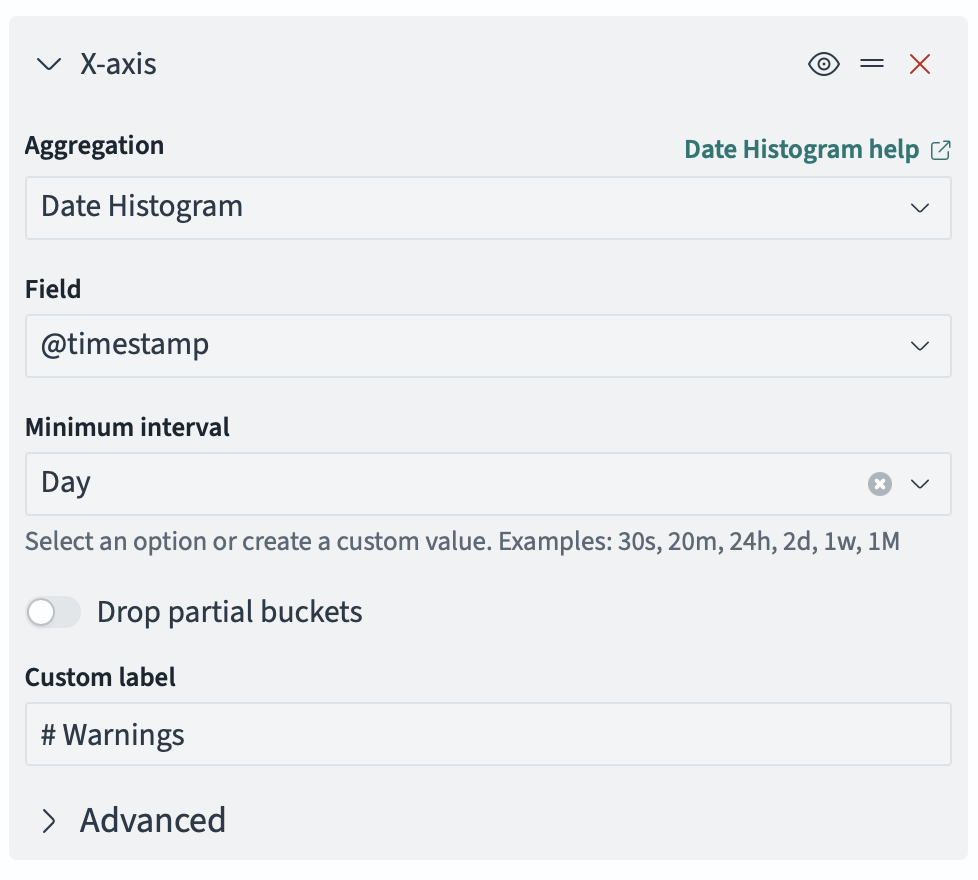
Then, add another bucket - a split series. Configure it just like the panel - a Filters aggregation, with log.level:"WARN".
Now you’ll have a chart tracking the number of warnings per day. And, again, you can do the same for ERROR-level logs.
Your dashboard might look a little something like this (but populated with a little bit of actual data):
5.4 - Log Interpretation
Log Format
Lucille uses SLF4J with Log4j2 as the logging backend. The log format depends on your Log4j2 configuration:
Plain text (typical console/file output):
2026-05-06 20:51:53.581 INFO [main] c.k.l.c.Runner - Pipeline Configuration is valid.
JSON (structured logging for log aggregation):
{
"@timestamp": "2026-05-06T20:51:53.581Z",
"log.level": "INFO",
"message": "Pipeline Configuration is valid.",
"process.thread.name": "main",
"log.logger": "com.kmwllc.lucille.core.Runner",
"run_id": "c1d9413a-..."
}
The JSON format includes the run_id and id (document ID) fields from the MDC, making it possible to filter logs by run or by document in log aggregation tools. In plain text mode, only the message field is typically visible.
Anatomy of a Log Line
Every log line contains:
- Timestamp — when the event occurred
- Level — INFO, WARN, ERROR, DEBUG
- Thread name — identifies which component generated the message
- Logger — the Java class that emitted the message
- Message — the human-readable content
- MDC fields (in JSON mode) —
run_idand optionallyid(document ID)
Identifying Components by Thread Name
The thread name tells you which component generated the message:
| Thread Name Pattern | Component |
|---|---|
main | Runner (validation, connector orchestration, Publisher waitForCompletion) |
Lucille-{runId}-Connector | ConnectorThread (executing the connector) |
Lucille-{runId}-Worker-1, Worker-2, etc. | Worker threads (pipeline processing) |
Lucille-{runId}-Indexer | Indexer thread |
Lucille-{runId}-WorkerWatcherExecutorService | WorkerPool watcher (periodic stats, stuck-worker detection) |
Lucille-Worker-1 (no runId) | Worker in distributed mode (standalone process, no local run) |
Lucille-Indexer (no runId) | Indexer in distributed mode (standalone process) |
Why the run ID is in the thread name
In a typical batch ingest in single-JVM mode, all threads are dedicated to the same run, so the run ID in the thread name might seem redundant. It exists for a specific scenario: concurrent runs in the same JVM via the REST API.
The lucille-api plugin provides a REST API (built on Dropwizard) that allows runs to be triggered via HTTP. The RunnerManager singleton manages these runs and launches each one asynchronously via CompletableFuture.runAsync(). Multiple runs can execute concurrently in the same JVM — each with its own Connector, WorkerPool, Indexer, and Publisher. Without the run ID in thread names, it would be impossible to tell which log messages belong to which run when two runs are in progress simultaneously.
The thread name is constructed by ThreadNameUtils.createName(name, runId):
- With a run ID:
Lucille-c1d9413a-8191-4f4a-92bb-0fc42b5499e3-Worker-1 - Without a run ID:
Lucille-Worker-1
Run ID handling in distributed mode
In distributed mode, Workers and Indexers are standalone processes that stay alive indefinitely, processing documents from multiple runs over their lifetime. They are NOT started by the Runner and do NOT have a localRunId. This creates a distinction between two kinds of run ID:
Thread-level run ID (in the thread name and MDC): When a Worker or Indexer starts as a standalone process, it has no run ID — the thread name is Lucille-Worker-1 (no UUID) and the MDC run_id is initially null (Worker) or “UNKNOWN” (Indexer).
Document-level run ID (stamped on each document): Each document carries a run_id field stamped by the Publisher when it was published. Documents from different runs may be interleaved on the same Kafka topic.
The Worker handles this by updating the MDC dynamically as it processes each document:
// In Worker.run():
MDC.put(RUNID_FIELD, localRunId); // null in distributed mode
while (running) {
doc = messenger.pollDocToProcess();
// If we don't have a localRunId, use the document's run_id for logging
if (localRunId == null && doc != null) {
MDC.put(RUNID_FIELD, doc.getRunId());
}
// ... process document ...
}
This means in distributed mode, the run_id in log messages changes with each document — it reflects which run produced that document, not a fixed property of the Worker process.
The Indexer uses a stack-based MDC (pushByKey/popByKey) because it processes batches that may contain documents from different runs:
// In Indexer, when sending events per document:
if (d.getRunId() != null) {
MDC.pushByKey(RUNID_FIELD, d.getRunId()); // temporarily set for this doc's log lines
}
messenger.sendEvent(d, "SUCCEEDED", Event.Type.FINISH);
if (d.getRunId() != null) {
MDC.popByKey(RUNID_FIELD); // restore previous value
}
Practical implication for log analysis: In distributed mode, you cannot rely on the thread name to identify which run a log message belongs to. Instead, filter by the run_id MDC field (available in JSON-formatted logs). In single-JVM mode, the thread name contains the run ID and is sufficient.
Identifying Components by Logger
The log.logger field identifies the class:
| Logger | Component |
|---|---|
com.kmwllc.lucille.core.Runner | Runner orchestration |
com.kmwllc.lucille.core.PublisherImpl | Publisher accounting |
com.kmwllc.lucille.core.WorkerPool | Worker pool management and periodic stats |
com.kmwllc.lucille.core.Indexer | Indexer batching and backend communication |
com.kmwllc.lucille.core.Stage | Per-stage metrics (logged at end of run) |
com.kmwllc.lucille.core.DocLogger | Per-document lifecycle events (if enabled) |
com.kmwllc.lucille.connector.* | Connector-specific messages |
com.kmwllc.lucille.stage.* | Stage-specific messages (warnings, errors) |
Reading a Run from Start to Finish
Phase 1: Validation
The first messages in any run confirm configuration validity:
Pipeline Configuration is valid.
Connector Configuration is valid.
Indexer Configuration is valid.
Other (Publisher, Runner, etc.) Configuration is valid.
Starting run with id c1d9413a-8191-4f4a-92bb-0fc42b5499e3
If validation fails, you’ll see error messages instead, and the run will not proceed. Look for messages from com.kmwllc.lucille.core.Runner at ERROR level.
Phase 2: Connector Execution
For each connector, you’ll see:
Running connector {name} feeding to pipeline {pipeline}
Starting {N} worker threads for pipeline {pipeline}
If a connector has no pipeline (e.g., it performs setup work only), you’ll see feeding to pipeline NOT CONFIGURED or null.
Phase 3: Periodic Progress (During Processing)
Three types of periodic messages appear every log.seconds (default 30 seconds):
Publisher (main thread):
{N} docs published. One minute rate: {X} docs/sec. Mean connector latency: {Y} ms/doc. Waiting on {Z} docs.
WorkerPool watcher:
{N} docs processed. One minute rate: {X} docs/sec. Mean pipeline latency: {Y} ms/doc.
Indexer:
{N} docs indexed. One minute rate: {X} docs/sec. Mean backend latency: {Y} ms/doc.
Phase 4: Connector Completion
When the connector finishes publishing:
Connector complete. Waiting on {N} docs.
This means the connector thread has finished, but documents are still being processed/indexed. The system is draining.
Phase 5: Publisher Completion
When all documents reach a terminal state:
Publisher complete. Mean publishing rate: {X} docs/sec. Mean connector latency: {Y} ms/doc.
{N} docs published. {C} children created. {S} success events. {F} failure events. {D} drop events.
All documents SUCCEEDED.
Or if there were failures:
{F} documents FAILED.
Phase 6: Per-Stage Metrics
After each connector completes, per-stage metrics are logged:
Stage {name} metrics. Docs processed: {N}. Mean latency: {X} ms/doc. Children: {C}. Errors: {E}.
Phase 7: Connector Timing
Connector {name} feeding to pipeline {pipeline} complete. Time: {X} secs.
Phase 8: Run Summary
At the very end:
RUN SUMMARY: ...
Run took {X} secs.
Answering Common Questions from the Logs
Is the config valid?
Look for the four validation messages at the start. If any say something other than “is valid,” the config has errors. The error messages will describe what’s wrong.
Did the connectors and pipelines start successfully?
Look for "Starting {N} worker threads for pipeline {name}". If this message appears, the WorkerPool started successfully (all Stage start() methods completed without error). If a stage fails to start, you’ll see an ERROR before this message and the run will abort.
How many connectors were run?
Count the "Running connector {name} feeding to pipeline {pipeline}" messages. If the run aborted early, later connectors won’t appear.
Which stages created the most latency?
Look at the per-stage metrics at the end of each connector’s execution:
Stage extract-entities metrics. Docs processed: 500000. Mean latency: 9.2441 ms/doc.
Stage normalize-scores metrics. Docs processed: 500000. Mean latency: 2.3383 ms/doc.
Stage clean-whitespace metrics. Docs processed: 500000. Mean latency: 0.0147 ms/doc.
Sort by mean latency to find bottlenecks. In this example, extract-entities at 9.24 ms/doc dominates the pipeline.
What errors occurred?
Search for log.level":"ERROR" or log.level":"WARN". Common patterns:
"Document FAILED"— common prefix for all document failures (pipeline processing, indexing, poison pills)"Document FAILED during pipeline processing: {id}"— a stage threw an exception for a specific document"Document FAILED during indexing: {id}"— the indexer failed to index a specific document"Document FAILED: retry count exceeded for {id}"— poison pill, document exceeded max retries"Error sending documents to index"— a batch failed at the indexer"Worker has not polled in {N} seconds"— a worker appears stuck"Connector failed to perform pre execution actions"— preExecute threw
Which documents failed?
The run summary reports how many documents failed but does not list their IDs. To identify specific failed documents, search the logs for failure messages. These are logged at ERROR level by the DocLogger and are visible in the default logging configuration without any changes.
Full document capture: For a machine-readable record of every failed document (including all field values at the time of failure), enable the Failed Document Logger. It writes one JSON object per line to ./log/failed-documents.jsonl, which can be parsed with jq or replayed through a FileConnector. See Logging Setup — Failed Document Logging for configuration details.
All document failures use a standardized "Document FAILED" prefix. To find every failed document in one pass:
grep "Document FAILED" lucille.log
To narrow down by failure type:
Pipeline failures (a stage threw StageException):
grep "Document FAILED during pipeline processing:" lucille.log
Each match includes the document ID and is followed by a stack trace showing which stage failed and why.
Indexer failures (the search backend rejected the document):
grep "Document FAILED during indexing:" lucille.log
Each match includes the document ID and the reason (e.g., mapping error, version conflict).
Poison pills (distributed mode only — document exceeded worker.maxRetries):
grep "Document FAILED: retry count exceeded" lucille.log
These documents were sent to the {pipeline}_fail Kafka topic. Consume that topic to retrieve the full document content for inspection or replay.
In structured/JSON logging, filter by the id MDC field and ERROR level:
jq 'select(.level == "ERROR" and .id != null)' lucille-json.log
In test mode (Java), use the RunResult API to get failed document IDs programmatically:
RunResult result = Runner.runInTestMode(config);
List<Event> events = result.getEvents("my-connector");
List<String> failedIds = events.stream()
.filter(e -> e.getType() == Event.Type.FAIL)
.map(Event::getDocumentId)
.collect(Collectors.toList());
Tip: To trace a specific document’s full journey through the pipeline (every stage entry and exit), lower the DocLogger to INFO level in your log4j2.xml. This is extremely verbose and should be routed to a separate file in production:
<Logger name="com.kmwllc.lucille.core.DocLogger" level="INFO" additivity="false">
<AppenderRef ref="doclogger-file" />
</Logger>
Where is latency introduced?
Three distinct latency measurements appear in the periodic logs:
Connector latency (Publisher message): Mean connector latency: 0.13 ms/doc
- Time between consecutive
publish()calls. Measures how fast the connector produces documents from the source system.
Pipeline latency (WorkerPool message): Mean pipeline latency: 11.06 ms/doc
- Time to process one document through all stages. This is the CPU-bound enrichment work.
Backend latency (Indexer message): Mean backend latency: {X} ms/doc
- Time per document for the search engine to accept a batch (total batch time / batch size).
What does “Waiting on {N} docs” mean?
This is the Publisher’s pending count — documents that have been published but haven’t yet reached a terminal state (indexed, failed, or dropped). If this number stays constant while the connector is still running, it means maxPendingDocs backpressure is active and the connector is blocked waiting for downstream components to catch up.
If the run is not complete yet, what are we waiting for?
Look at the most recent Publisher message:
"Waiting on {N} docs"— N documents are still in-flight (being processed or indexed)"Connector complete. Waiting on {N} docs"— the connector finished publishing, but N documents haven’t completed yet
If the “Waiting on” count is not decreasing over time, something is stuck. Check for:
- Worker stuck messages (
"Worker has not polled in...") - Indexer showing 0 docs indexed (backend might be unreachable)
- No new WorkerPool stats appearing (workers might have crashed)
Understanding “One Minute Rate”
The “one minute rate” is an exponentially weighted moving average (EWMA) computed by the Codahale Metrics library. It is NOT a simple count of events in the last 60 seconds.
How it works:
- The EWMA is updated every 5 seconds with the number of events since the last update
- It applies exponential decay with a 1-minute half-life
- Recent events are weighted more heavily than older events
Implications:
- At the start of a run, the one-minute rate ramps up gradually (it takes ~60 seconds to reach steady state)
- After a burst, the rate decays gradually rather than dropping instantly
- It’s a smoothed approximation of throughput, not an exact count
The rate represents the aggregate throughput across all threads for that component. If 4 worker threads are each processing 85 docs/sec, the one-minute rate shows ~340 docs/sec.
Understanding Latency Numbers in a Multithreaded System
Pipeline latency (Mean pipeline latency: 11.06 ms/doc) is the average time a single document spends being processed through all stages. This is measured per-document, per-thread. It does NOT include time spent waiting in the queue.
With 4 worker threads and 11 ms/doc pipeline latency, the theoretical throughput is:
4 threads × (1000 ms / 11 ms) = ~364 docs/sec
This matches the observed one-minute rate of ~345 docs/sec (the difference is queue polling overhead and other bookkeeping).
Connector latency (Mean connector latency: 0.13 ms/doc) is the average time between consecutive publish() calls on the connector thread. Low values mean the connector is producing documents faster than the pipeline can consume them (the connector is not the bottleneck).
Backend latency is the average time per document for the search engine to process a batch. If this is 0.00 ms/doc and 0 docs indexed, the indexer hasn’t flushed a batch yet (documents are still accumulating, or the pipeline is dropping all documents before they reach the indexer).
Why Different Stages Process Different Numbers of Documents
In the per-stage metrics, you might see:
Stage create-grouping-key metrics. Docs processed: 500000.
Stage apply-category-filter metrics. Docs processed: 1247.
Stage enrich-metadata metrics. Docs processed: 175000.
This happens because of conditional execution. Each stage can have a conditions block that determines whether it processes a given document. A stage with conditions that match only a subset of documents will show a lower count. In this example:
create-grouping-keyprocesses all 500,000 documents (no conditions, or conditions that always match)apply-category-filterprocesses only 1,247 documents (its conditions match only a small subset)enrich-metadataprocesses 175,000 documents (its conditions match about a third)
This is normal and expected. It does NOT indicate errors or skipped documents.
The RUN SUMMARY
At the end of a complete run, the Runner logs a structured summary including:
- Overall status (success/failure)
- Number of connectors executed
- Per-connector results (success/failure, duration, document counts)
- Total documents published, succeeded, failed, dropped
- Total run duration
If a connector failed, the summary indicates which one and why. Subsequent connectors are listed as skipped.
What Is WorkerWatcherExecutorService?
The WorkerWatcherExecutorService is a daemon thread started by the WorkerPool. It runs a scheduled task every 500ms that:
- Logs periodic pipeline statistics (every
log.seconds): docs processed, one-minute rate, mean latency - Detects stuck workers: checks each worker’s last poll timestamp; if any worker hasn’t polled within
worker.maxProcessingSecs, logs an error - Emits heartbeats (if
worker.enableHeartbeatis true): writes to the heartbeat logger for Kubernetes liveness probes
The thread name includes the run ID: Lucille-{runId}-WorkerWatcherExecutorService. It’s a daemon thread, so it doesn’t prevent JVM shutdown.
Single-JVM vs. Distributed Deployment Logs
Single-JVM (LOCAL mode)
All components log to the same output (console/file). You see interleaved messages from Runner, Publisher, Workers, Indexer, and the Watcher — all in one stream. The run_id is the same across all messages. Thread names distinguish components.
Distributed Deployment
Each process has its own log output:
Runner process — sees: validation messages, connector start/stop, Publisher messages (docs published, waiting on N, completion), per-stage metrics, run summary. Does NOT see worker or indexer processing messages.
Worker process(es) — each Worker JVM sees: its own WorkerPool stats (docs processed, pipeline latency), its own WorkerWatcherExecutorService messages, any stage-level warnings/errors for documents it processes. Each Worker JVM reports statistics only for the threads in that JVM. If you have 3 Worker JVMs each with 4 threads, each JVM’s logs show the throughput of its own 4 threads, not the aggregate.
Indexer process(es) — each Indexer JVM sees: its own indexing stats (docs indexed, backend latency), any batch errors. Each Indexer reports only its own throughput.
To get aggregate statistics in distributed mode, you need to sum across all Worker/Indexer logs, or use a log aggregation tool that can filter by run_id and aggregate metrics.
Common Log Patterns and What They Mean
“First doc published after {N} ms”
Time from when the connector started to when the first document was published. High values indicate slow connector initialization (e.g., establishing a database connection, listing files in S3).
“0 docs indexed. One minute rate: 0.00 docs/sec.”
The Indexer hasn’t flushed a batch yet. This is normal early in a run (documents are still accumulating in the batch) or when all documents are being dropped by the pipeline before reaching the Indexer.
“Connector complete. Waiting on {N} docs.”
The connector finished publishing all documents. The system is now draining — processing and indexing the remaining in-flight documents. The “Waiting on” count should decrease over time until it reaches 0.
“Publisher complete.”
All documents have reached a terminal state. The run is done (for this connector).
“All documents SUCCEEDED.” / “{N} documents FAILED.”
Final accounting. “SUCCEEDED” means all documents were either indexed or intentionally dropped. “FAILED” means some documents encountered errors.
“{N} drop events”
Documents that were intentionally dropped by the pipeline (via the drop flag). Dropped documents are counted as successful completions — they reached their intended terminal state.
WARN messages during Stage start()
Warnings emitted during stage initialization (e.g., dictionary conflicts, missing optional resources). These appear on the main thread because start() is called during WorkerPool startup. They appear once per worker thread (so 4 workers = 4 identical warnings).
“Document FAILED during pipeline processing: {id}”
A stage threw a StageException for this document. The document is failed and processing continues. Look for the stack trace immediately following this message.
Tips for Log Analysis
- Filter by thread name to isolate one component’s messages.
- Filter by
run_id(in JSON mode) to isolate one run in a system that runs multiple ingests. - Watch the “Waiting on” count — if it’s not decreasing, something is stuck.
- Compare connector rate vs. pipeline rate — if the connector is much faster, the pipeline is the bottleneck. If they’re similar, the connector might be the bottleneck.
- Look at per-stage metrics to find which stage dominates pipeline latency.
- Check for stages with error counts > 0 — these indicate documents that failed at specific stages.
- In distributed mode, remember that each JVM’s stats are local. Aggregate across JVMs for the full picture.
- The DocLogger (if enabled at INFO level) provides per-document tracing — every stage entry/exit for every document. This is extremely verbose but invaluable for debugging a specific document’s journey. Route it to a separate file in production.
5.5 - Performance Tuning
Before You Optimize: Choosing the Right Deployment Mode
Distributed mode provides a pathway to higher throughput by running multiple Worker and Indexer processes across machines. However, there is inherent overhead in serializing and deserializing documents across Kafka and process boundaries — every document is converted to JSON, written to Kafka, read from Kafka, and parsed back into a Document object at each hop.
Distributed mode is not necessary or justified for all projects. For a small ingestion task (thousands to low millions of documents with lightweight enrichment), local single-JVM mode is often sufficient and faster end-to-end than distributed mode because it avoids all serialization overhead. The in-memory queues in local mode have near-zero latency compared to Kafka round-trips.
Consider distributed mode when:
- Pipeline processing is CPU-bound and a single machine’s cores are saturated
- The ingest volume is large enough that the serialization overhead is amortized across many documents
- You need fault tolerance (crash recovery via Kafka redelivery)
- You need to scale Workers independently of the Connector or Indexer
Consider local mode when:
- The ingest completes in a reasonable time on a single machine
- The pipeline is I/O-bound (calling external APIs) rather than CPU-bound — adding threads in local mode is simpler than adding processes
- The operational complexity of Kafka is not justified for the workload
- You’re in development or testing
You can always start in local mode and move to distributed later without changing pipeline code — the transition is a command-line flag, not a rewrite.
Reducing Document Size
Documents flow through queues, are serialized to Kafka (in distributed mode), and are held in memory during processing. Smaller documents mean less memory consumption, less data transfer, and faster serialization. This is one of the highest-leverage optimizations available.
Remove Unnecessary Fields Early
If a field is not needed by downstream stages or the search backend, remove it as early as possible:
Best: Don’t populate it in the Connector. If the Connector reads from a database, only SELECT the columns you need. If it reads files, don’t load file_content unless a downstream stage requires it.
Second best: Remove it at the beginning of the pipeline. Use DeleteFields as one of the first stages:
stages: [
{
class: "com.kmwllc.lucille.stage.DeleteFields"
fields: ["raw_html", "debug_info", "internal_metadata"]
},
// ... remaining stages that don't need those fields
]
After extraction: Remove large intermediate fields. If a stage extracts text from file_content, delete file_content immediately after — it’s no longer needed and may be megabytes per document:
stages: [
{
class: "com.kmwllc.lucille.tika.stage.TextExtractor"
byteArrayField: "file_content"
dest: "body"
},
{
class: "com.kmwllc.lucille.stage.DeleteFields"
fields: ["file_content"]
},
// ... remaining stages operate on "body", not the raw bytes
]
Consider Whether Data Needs to Live on the Document
Not all data needs to be carried on the Document itself. Consider whether a reference (file path, URL, database key) is sufficient instead of the actual content:
- If a stage needs to read a file, the Connector can store the file path on the document and the stage can read the file directly — rather than the Connector loading the entire file into a
byte[]field. - If a stage needs to query an API, it can use an ID or URL stored on the document to make the call at processing time — rather than the Connector pre-fetching all API responses.
- If the search backend doesn’t need the raw content (only extracted/enriched fields), don’t carry the raw content through the entire pipeline.
This is especially important in distributed mode where every byte on the document is serialized to Kafka at each hop. A 10MB PDF binary on a document means 10MB written to the source topic, 10MB read by the Worker, 10MB written to the dest topic, and 10MB read by the Indexer — 40MB of I/O for content that might only be needed by one stage.
Using Conditional Execution to Avoid Unnecessary Work
Every Stage supports a conditions block that controls whether it executes for a given document. Use this to ensure expensive stages are not applied to documents that don’t need them:
stages: [
{
class: "com.kmwllc.lucille.tika.stage.TextExtractor"
byteArrayField: "file_content"
conditions: [
{ fields: ["file_content"], operator: "must" }
]
},
{
class: "com.kmwllc.lucille.stage.OpenAIEmbed"
source: "body"
conditions: [
{ fields: ["body"], operator: "must" }
{ fields: ["content_type"], values: ["article", "page"], operator: "must" }
]
conditionPolicy: "all"
}
]
In this example:
TextExtractoronly runs on documents that actually havefile_content— documents without it skip the stage entirely (zero cost).OpenAIEmbedonly runs on documents that have abodyfield AND acontent_typeof “article” or “page” — other documents skip the expensive embedding call.
This is free performance. Conditional execution is evaluated in the base Stage class before processDocument() is called. There is no overhead for documents that don’t match — they are simply not processed by that stage. For pipelines that handle heterogeneous documents (some with files, some without; some needing embeddings, some not), conditions can dramatically reduce the average pipeline latency.
Parallelizing Multiple Pipelines
If your ingest involves multiple pipelines (e.g., one for database records, one for files, one for an API source), consider whether they need to run sequentially or can run in parallel.
Sequential Pipelines (Single Config)
Use a single Lucille config with multiple connector/pipeline pairs when:
- One pipeline’s output is a dependency for another (e.g., parent documents must be indexed before child documents that reference them)
- You need a single run_id across all pipelines for unified accounting and log correlation
- You want a single run summary that reports success/failure across all connectors
connectors: [
{ name: "parents", class: "...", pipeline: "parent-pipeline" },
{ name: "children", class: "...", pipeline: "child-pipeline" }
]
pipelines: [
{ name: "parent-pipeline", stages: [...] },
{ name: "child-pipeline", stages: [...] }
]
In this configuration, parents completes fully (all documents indexed) before children starts. All documents share a single run_id.
Parallel Pipelines (Separate Configs)
If your pipelines don’t depend on each other, you can run them in parallel with separate Lucille configs launched via separate Runner invocations:
#!/bin/bash
# Run three independent pipelines in parallel
java -Dconfig.file=conf/database-ingest.conf -cp 'target/lib/*' com.kmwllc.lucille.core.Runner &
java -Dconfig.file=conf/file-ingest.conf -cp 'target/lib/*' com.kmwllc.lucille.core.Runner &
java -Dconfig.file=conf/api-ingest.conf -cp 'target/lib/*' com.kmwllc.lucille.core.Runner &
wait
echo "All ingests complete"
Each invocation gets its own run_id, its own Publisher, its own Workers, and its own run summary. They execute concurrently and independently.
Tradeoffs:
- Pro: Total wall-clock time is reduced (pipelines overlap instead of running sequentially)
- Pro: Each pipeline can be tuned independently (different thread counts, batch sizes)
- Pro: A failure in one pipeline doesn’t abort the others
- Con: Each run has a separate
run_id— you can’t correlate all documents from a single “ingest session” by run_id - Con: If pipelines write to the same index, you must ensure their document IDs don’t collide (use
docIdPrefix) - Con: Resource contention — multiple JVMs competing for CPU, memory, and search backend capacity
When to Choose Each Approach
| Scenario | Approach |
|---|---|
| Pipeline B depends on Pipeline A’s output | Sequential (single config) |
| Need unified run accounting across all pipelines | Sequential (single config) |
| Pipelines are independent, wall-clock time matters | Parallel (separate configs) |
| Different pipelines need different Worker thread counts | Parallel (separate configs) |
| Running on a machine with many cores and plenty of memory | Parallel (separate configs) |
| Running on a constrained machine | Sequential (single config) to avoid resource contention |
Understanding Where Time Is Spent
Lucille’s concurrent architecture means three things happen simultaneously: the Connector reads from the source, Workers process documents through the Pipeline, and the Indexer sends batches to the search backend. The overall throughput is limited by whichever component is slowest.
The periodic log messages tell you which component is the bottleneck:
INFO PublisherImpl: 80230 docs published. One minute rate: 483.11 docs/sec. Mean connector latency: 0.10 ms/doc. Waiting on 10019 docs.
INFO WorkerPool: 81269 docs processed. One minute rate: 390.46 docs/sec. Mean pipeline latency: 9.82 ms/doc.
INFO Indexer: 17016 docs indexed. One minute rate: 455.07 docs/sec. Mean backend latency: 6.90 ms/doc.
Interpreting the Numbers
Connector rate (Publisher message): How fast the Connector produces documents. A very low connector latency (< 1 ms/doc) means the Connector is not the bottleneck — it’s producing faster than downstream can consume.
Pipeline rate (WorkerPool message): How fast Workers process documents through all Stages. This is the aggregate rate across all Worker threads.
Indexer rate (Indexer message): How fast the search backend accepts batches.
“Waiting on N docs”: The number of documents currently in flight (published but not yet indexed or failed). If this number is consistently at maxPendingDocs or queueCapacity, the Connector is being throttled by backpressure — downstream is the bottleneck.
Identifying the Bottleneck
| Symptom | Bottleneck | Action |
|---|---|---|
| Pipeline rate « Connector rate, “Waiting on” at max | Pipeline (CPU-bound) | Add Worker threads or Worker processes |
| Indexer rate « Pipeline rate | Search backend (I/O-bound) | Tune batch size, add Indexer processes, or scale the backend |
| Connector rate « Pipeline rate, “Waiting on” is low | Connector (source I/O) | Optimize source queries, add parallelism in Connector |
| All rates similar and low | Likely a single slow Stage | Check per-stage metrics at end of run |
Per-Stage Bottleneck Analysis
At the end of each connector’s execution, Lucille logs per-stage metrics:
Stage text-extraction metrics. Docs processed: 500000. Mean latency: 45.2 ms/doc. Children: 0. Errors: 0.
Stage entity-recognition metrics. Docs processed: 500000. Mean latency: 12.8 ms/doc. Children: 0. Errors: 0.
Stage copy-fields metrics. Docs processed: 500000. Mean latency: 0.003 ms/doc. Children: 0. Errors: 0.
Sort by mean latency to find the dominant stage. In this example, text-extraction at 45.2 ms/doc accounts for ~78% of the total pipeline latency. Optimizing or parallelizing this stage would have the most impact.
What the Latency Numbers Mean in a Multithreaded System
Pipeline latency is measured per-document, per-thread. It does NOT include time spent waiting in the queue. With N Worker threads:
theoretical max throughput = N threads × (1000 ms / mean_pipeline_latency_ms)
Example: 4 threads × (1000 / 9.82) = ~407 docs/sec. If the observed rate is significantly lower than this theoretical max, something else is constraining throughput (queue contention, GC pauses, or the Indexer not consuming fast enough).
Why Different Stages Process Different Document Counts
If you see:
Stage extract-text metrics. Docs processed: 500000.
Stage apply-geo-filter metrics. Docs processed: 1247.
This is conditional execution — the second stage has conditions that match only a subset of documents. This is normal and expected, not an error.
Tuning Worker Threads
When to Add Threads
Add Worker threads when the pipeline is CPU-bound (pipeline rate is the bottleneck) and the machine has spare CPU cores.
worker {
threads: 8 # default is 1
}
Diminishing Returns
Each Worker thread creates its own Pipeline instance with its own Stage instances. If a Stage loads a large model (e.g., 500MB NLP model), each thread loads its own copy. With 8 threads, that’s 4GB of model memory.
Monitor CPU utilization and memory. If adding threads doesn’t increase throughput proportionally, you’ve hit either:
- Memory limits (GC pressure from too many model copies)
- I/O limits (all threads waiting on the same external service)
- Queue contention (unlikely with Lucille’s design, but possible at very high thread counts)
Per-Pipeline Thread Configuration
Threads can be configured per-pipeline rather than globally:
pipelines: [
{
name: "heavy-pipeline"
threads: 8
stages: [...]
},
{
name: "light-pipeline"
threads: 2
stages: [...]
}
]
Tuning Indexer Batching
Batch Size
Larger batches mean fewer API calls to the search backend, which generally improves throughput:
indexer {
batchSize: 500 # default is 100
}
However, larger batches also mean:
- More memory used to hold the batch
- Higher latency before documents appear in the index (they wait longer in the batch)
- Larger blast radius if a batch fails (all documents in the batch fail)
Batch Timeout
The timeout ensures documents are flushed even when volume is low:
indexer {
batchTimeout: 5000 # milliseconds; default is 100
}
A higher timeout allows more documents to accumulate (better throughput) but increases the time between a document being processed and appearing in the index.
Recommended Starting Points
| Scenario | batchSize | batchTimeout |
|---|---|---|
| High-volume batch ingest | 500–2000 | 5000–10000 ms |
| Low-volume incremental | 50–100 | 100–500 ms |
| Streaming (low latency) | 50–100 | 100 ms |
| Large documents (>1MB each) | 10–50 | 1000 ms |
Scaling in Distributed Mode
Adding Workers
In Kafka-distributed mode, adding Worker processes increases throughput proportionally (up to the number of source topic partitions):
# Start additional Worker processes
java -Dconfig.file=config.conf -cp 'target/lib/*' com.kmwllc.lucille.core.Worker my-pipeline
Each Worker joins the same Kafka consumer group. Kafka distributes partitions automatically.
Maximum parallelism = number of partitions on the source topic. If you have 8 partitions, at most 8 Workers can consume concurrently. To scale beyond this, increase the partition count on the source topic.
Adding Workers While Running
Workers can be added to a running ingest. The new Worker joins the consumer group, triggers a rebalance, and begins consuming from assigned partitions immediately. No restart required.
WorkerIndexer for Reduced Overhead
If the Indexer is not a separate bottleneck, use WorkerIndexer to avoid the Kafka round-trip between Worker and Indexer:
java -Dconfig.file=config.conf -cp 'target/lib/*' com.kmwllc.lucille.core.WorkerIndexer my-pipeline
Each WorkerIndexer process pairs one Worker with one Indexer, communicating via an in-memory queue. Scale by adding more WorkerIndexer processes.
Backpressure Tuning
Local Mode: Queue Capacity
publisher {
queueCapacity: 10000 # default
}
This bounds the in-memory processing and indexing queues. If the Connector publishes faster than Workers consume, publish() blocks when the queue is full. Increasing this allows more documents to buffer in memory (higher throughput burst capacity) at the cost of memory.
Distributed Mode: Max Pending Docs
publisher {
maxPendingDocs: 80000
}
This blocks the Connector when too many documents are in flight (published but not yet terminal). Without this, a fast Connector can publish millions of documents onto Kafka before Workers process them, consuming Kafka storage and potentially causing consumer lag issues.
Rule of thumb: Set maxPendingDocs to roughly 2–5× the number of documents your Workers can process per minute.
Memory Tuning
Heap Sizing
Always set -Xmx explicitly:
java -Xmx4g -Dconfig.file=config.conf -cp 'target/lib/*' com.kmwllc.lucille.core.Runner
Memory Budget
| Component | Memory Driver |
|---|---|
| Worker threads | Stage resources × number of threads (models, connections, caches) |
| Queue capacity | queueCapacity × average document size |
| Indexer batch | batchSize × average document size |
| Document overhead | Jackson ObjectNode per document in flight |
Symptoms of Insufficient Memory
- Frequent GC pauses (visible as throughput drops in periodic stats)
OutOfMemoryError(fatal — process crashes)- Throughput that decreases over time (GC pressure increasing as heap fills)
Reducing Memory Usage
- Reduce
worker.threads(fewer model copies) - Reduce
publisher.queueCapacity(fewer buffered documents) - Reduce
indexer.batchSize(smaller batches in memory) - Use singleton pattern for large shared resources (see Quick Reference: Threading Model)
- Delete large fields (e.g.,
file_content) after extraction stages are done with them
Optimizing Specific Stages
Stages That Call External Services
Stages that make HTTP calls, query databases, or call APIs are typically I/O-bound. Adding Worker threads helps because threads can overlap their I/O waits:
worker {
threads: 16 # high thread count for I/O-bound pipelines
}
Stages That Load Models
Stages that load ML models (JLama, OpenNLP) are memory-bound. Each thread loads its own model copy. Consider:
- Using the singleton pattern (
DictionaryManagerapproach) for thread-safe models - Reducing thread count to fit within memory
- Using a smaller/quantized model
Stages That Generate Children
Stages like ChunkText that generate many children per document can create throughput spikes. The lazy iterator model prevents memory issues, but the downstream stages must process all children before the next parent document is pulled. If children are expensive to process (e.g., embedding generation per chunk), the effective throughput per parent document is:
time_per_parent = pipeline_latency × (1 + number_of_children)
To improve this: reduce chunk count (larger chunks), or add more Worker threads to parallelize across parents.
Kafka Tuning for Distributed Mode
maxPollIntervalSecs
kafka {
maxPollIntervalSecs: 600 # 10 minutes
}
This is the maximum time between Kafka poll() calls before the consumer is evicted from the group. If a single document takes longer than this to process, the Worker is kicked from the group and the document is redelivered to another Worker.
Set this higher than your slowest expected document processing time. If you have stages that call slow external APIs or process very large documents, increase this value.
maxRequestSize
kafka {
maxRequestSize: 250000000 # 250MB
}
The maximum size of a single Kafka message. If your documents are large (e.g., containing extracted PDF text or binary content), this must be large enough to hold the largest document after JSON serialization.
Partition Count
More partitions = more potential parallelism. The source topic’s partition count is the upper bound on Worker parallelism.
Rule of thumb: Set partition count to at least 2× the maximum number of Workers you expect to run. This gives room to scale without repartitioning.
Warning: Lucille does not auto-create the source or dest topics. If Kafka auto-creates them (via broker auto.create.topics.enable), the default partition count is typically 1 — meaning only one Worker thread will receive work regardless of how many you configure. Pre-create topics with the desired partition count, or set the broker’s num.partitions appropriately. See the Kafka Integration internals page for details.
Monitoring Performance Over Time
Key Metrics to Watch
During a run, track these from the periodic log messages:
- One minute rate (docs/sec) — is it stable, increasing, or decreasing?
- “Waiting on” count — is it at the max (backpressure active) or low (Connector is the bottleneck)?
- Mean pipeline latency — is it stable or increasing over time? (Increasing suggests memory pressure or external service degradation)
- Mean backend latency — is the search engine keeping up?
Signs of a Healthy Run
- One minute rates are stable after the initial ramp-up period (~60 seconds)
- “Waiting on” count is between 0 and
maxPendingDocs(not pegged at either extreme) - Pipeline latency is stable
- No ERROR messages in logs
Signs of Trouble
- One minute rate decreasing over time → memory pressure or external service degradation
- “Waiting on” pegged at max → pipeline or indexer is the bottleneck
- “Waiting on” at 0 → connector is the bottleneck (or it’s finished)
- Pipeline latency increasing → GC pressure, external service slowing down, or resource exhaustion
- Indexer showing 0 docs indexed → backend unreachable or all documents being dropped before reaching indexer
Performance Checklist
- Consider whether local mode is sufficient before adopting distributed mode
- If running multiple pipelines, decide whether they should be sequential (single config) or parallel (separate configs)
- Identify the bottleneck (Connector, Pipeline, or Indexer) from periodic log messages
- Check per-stage metrics to find the slowest stage
- Use conditional execution (
conditionsblocks) to skip expensive stages for documents that don’t need them - Remove unnecessary fields early — ideally don’t populate them in the Connector; otherwise use
DeleteFieldsat the start of the pipeline - Consider whether large data (file content, binary blobs) needs to live on the document or whether a path/URL reference is sufficient
- Delete large intermediate fields (e.g.,
file_content) immediately after the stage that needs them - Set
worker.threadsappropriate for your pipeline’s CPU/memory profile - Set
indexer.batchSizeandbatchTimeoutfor your backend’s optimal batch size - Set
-Xmxheap size with headroom for GC - In distributed mode: ensure source topic partition count >= desired Worker count
- Set
kafka.maxPollIntervalSecshigher than your slowest document processing time - Set
publisher.maxPendingDocsorpublisher.queueCapacityto prevent memory exhaustion - Monitor for increasing latency over time (indicates resource pressure)
5.6 - Security Configuration
Lucille connects to external systems — search backends (Solr, OpenSearch, Elasticsearch, Pinecone) and Kafka — that may require TLS encryption and authentication. This page covers how to configure security for each.
General Principles
Never hard-code credentials in config files. Use HOCON’s environment variable substitution to inject secrets at runtime:
opensearch {
url: "https://localhost:9200"
url: ${?OPENSEARCH_URL} # override from env var
}
In Kubernetes, inject credentials via Secrets mounted as environment variables. In Docker, use --env or --env-file. The config file can live in version control with defaults; secrets come from the environment.
Use acceptInvalidCert: false in production. The acceptInvalidCert option exists for development against localhost with self-signed certificates. In production, always use valid certificates and leave this disabled.
OpenSearch / Elasticsearch Security
URL-Based Authentication
The simplest approach: embed credentials in the URL:
opensearch {
url: "https://admin:password@opensearch-host:9200"
url: ${?OPENSEARCH_URL}
index: "my-index"
}
Lucille’s OpenSearchUtils parses the userInfo from the URL and configures HTTP Basic authentication automatically. The username and password are extracted and applied to all requests.
TLS Configuration
OpenSearch connections use TLS when the URL scheme is https://. Lucille builds an SSL context and TLS strategy for the HTTP client automatically.
For valid certificates (production):
opensearch {
url: "https://opensearch-host:9200"
index: "my-index"
acceptInvalidCert: false # default — validates certificates normally
}
No additional configuration needed if the server’s certificate is signed by a CA in the JVM’s default trust store.
For self-signed certificates (development only):
opensearch {
url: "https://localhost:9200"
index: "my-index"
acceptInvalidCert: true # disables certificate validation and hostname verification
}
When acceptInvalidCert: true, Lucille:
- Trusts all certificates (including self-signed)
- Disables hostname verification (
NoopHostnameVerifier)
Warning: Never use acceptInvalidCert: true in production. It disables all TLS security guarantees.
Custom Trust Store
If your OpenSearch cluster uses certificates signed by an internal CA not in the JVM’s default trust store, provide a custom trust store via JVM system properties:
java \
-Djavax.net.ssl.trustStore=/path/to/truststore.jks \
-Djavax.net.ssl.trustStorePassword=changeit \
-Dconfig.file=config.conf \
-cp 'target/lib/*' com.kmwllc.lucille.core.Runner
Or configure via HOCON (Lucille sets these as system properties if not already set):
javax.net.ssl.trustStore: "/path/to/truststore.jks"
javax.net.ssl.trustStore: ${?TRUSTSTORE_PATH}
javax.net.ssl.trustStorePassword: "changeit"
javax.net.ssl.trustStorePassword: ${?TRUSTSTORE_PASSWORD}
Solr Security
HTTP Basic Authentication
solr {
url: "https://solr-host:8983/solr/my-collection"
userName: "solr-user"
userName: ${?SOLR_USER}
password: "solr-password"
password: ${?SOLR_PASSWORD}
}
TLS with Custom Keystore/Truststore
For Solr clusters with mutual TLS (mTLS) or custom CA certificates:
solr {
url: "https://solr-host:8983/solr/my-collection"
userName: ${?SOLR_USER}
password: ${?SOLR_PASSWORD}
acceptInvalidCert: false
}
# SSL system properties — Lucille sets these if not already set via -D flags
javax.net.ssl.keyStore: "/path/to/keystore.jks"
javax.net.ssl.keyStore: ${?KEYSTORE_PATH}
javax.net.ssl.keyStorePassword: "changeit"
javax.net.ssl.keyStorePassword: ${?KEYSTORE_PASSWORD}
javax.net.ssl.trustStore: "/path/to/truststore.jks"
javax.net.ssl.trustStore: ${?TRUSTSTORE_PATH}
javax.net.ssl.trustStorePassword: "changeit"
javax.net.ssl.trustStorePassword: ${?TRUSTSTORE_PASSWORD}
Lucille’s SSLUtils.setSSLSystemProperties(config) reads these from the config and sets them as JVM system properties (without overriding properties already set via -D flags). This means you can provide them either in the config file or on the command line.
SolrCloud with ZooKeeper
For SolrCloud deployments, the Solr client connects to ZooKeeper for cluster state. If ZooKeeper requires authentication, configure it separately (ZooKeeper auth is not managed by Lucille’s config — use ZooKeeper’s own client configuration mechanisms).
solr {
useCloudClient: true
zkHosts: ["zk1:2181", "zk2:2181", "zk3:2181"]
zkChroot: "/solr"
defaultCollection: "my-collection"
userName: ${?SOLR_USER}
password: ${?SOLR_PASSWORD}
}
Development: Accepting Invalid Certificates
solr {
url: "https://localhost:8983/solr/my-collection"
acceptInvalidCert: true # development only
}
Kafka Security
Security Protocol
Kafka supports four security protocols. Set the protocol in the kafka config block:
kafka {
bootstrapServers: "kafka-host:9093"
securityProtocol: "SSL" # or PLAINTEXT, SASL_PLAINTEXT, SASL_SSL
}
| Protocol | Encryption | Authentication |
|---|---|---|
PLAINTEXT | None | None |
SSL | TLS | TLS client certificates (optional) |
SASL_PLAINTEXT | None | SASL (username/password, Kerberos, etc.) |
SASL_SSL | TLS | SASL over TLS |
Using External Property Files
For complex Kafka security configurations (SASL mechanisms, Kerberos, custom SSL settings), use external property files:
kafka {
bootstrapServers: "kafka-host:9093"
securityProtocol: "SASL_SSL"
consumerPropertyFile: "/path/to/consumer.properties"
producerPropertyFile: "/path/to/producer.properties"
adminPropertyFile: "/path/to/admin.properties"
}
When a property file is specified, it completely replaces the programmatic Kafka client configuration (except for CLIENT_ID_CONFIG which is always set by Lucille). This gives you full control over every Kafka client property.
Example consumer.properties for SASL_SSL with SCRAM-SHA-256:
security.protocol=SASL_SSL
sasl.mechanism=SCRAM-SHA-256
sasl.jaas.config=org.apache.kafka.common.security.scram.ScramLoginModule required \
username="kafka-user" \
password="kafka-password";
ssl.truststore.location=/path/to/truststore.jks
ssl.truststore.password=changeit
ssl.endpoint.identification.algorithm=https
Example consumer.properties for SSL with client certificates (mTLS):
security.protocol=SSL
ssl.truststore.location=/path/to/truststore.jks
ssl.truststore.password=changeit
ssl.keystore.location=/path/to/keystore.jks
ssl.keystore.password=changeit
ssl.key.password=changeit
ssl.endpoint.identification.algorithm=https
Property File Loading
Lucille loads property files via FileContentFetcher, which supports:
- Local filesystem paths (
/path/to/file.properties) - S3 paths (
s3://bucket/path/to/file.properties) - Azure Blob paths
- GCS paths
This means you can store Kafka property files in cloud storage and reference them from the config — useful for centralized secret management.
Minimal SSL Configuration (Without Property Files)
For simple SSL setups where you only need to set the security protocol:
kafka {
bootstrapServers: "kafka-host:9093"
securityProtocol: "SSL"
consumerGroupId: "lucille_workers"
maxPollIntervalSecs: 600
maxRequestSize: 250000000
}
If the Kafka broker’s certificate is signed by a CA in the JVM’s default trust store, this is sufficient. For custom CAs, provide the trust store via JVM system properties:
java \
-Djavax.net.ssl.trustStore=/path/to/kafka-truststore.jks \
-Djavax.net.ssl.trustStorePassword=changeit \
-Dconfig.file=config.conf \
-cp 'target/lib/*' com.kmwllc.lucille.core.Runner
Pinecone Security
Pinecone uses API key authentication:
pinecone {
apiKey: ${PINECONE_API_KEY}
environment: "us-east-1-aws"
index: "my-index"
}
All Pinecone communication uses HTTPS by default. No additional TLS configuration is needed.
Weaviate Security
Weaviate supports API key and OIDC authentication:
weaviate {
scheme: "https"
host: "weaviate-host:8080"
apiKey: ${WEAVIATE_API_KEY}
className: "MyClass"
}
Credential Management Best Practices
Environment Variable Pattern
The standard pattern for all credentials in Lucille configs:
# Default for development (or omit entirely)
opensearch.url: "http://localhost:9200"
# Override from environment in production
opensearch.url: ${?OPENSEARCH_URL}
Kubernetes Secrets
Mount secrets as environment variables in your pod spec:
env:
- name: OPENSEARCH_URL
valueFrom:
secretKeyRef:
name: opensearch-credentials
key: url
- name: KEYSTORE_PASSWORD
valueFrom:
secretKeyRef:
name: tls-credentials
key: keystore-password
Docker
Pass credentials via --env or --env-file:
docker run \
--env OPENSEARCH_URL=https://admin:secret@opensearch:9200 \
--env PINECONE_API_KEY=pk-abc123 \
-it lucille-image
What NOT to Do
- ❌ Hard-code passwords in config files committed to version control
- ❌ Use
acceptInvalidCert: truein production - ❌ Store API keys in plain text in Docker images
- ❌ Use the same credentials for development and production
- ❌ Log credentials (Lucille does not log config values, but custom Connectors/Stages might)
Summary of Security Options by Backend
| Backend | Authentication | TLS | Config Location |
|---|---|---|---|
| OpenSearch | URL userinfo (Basic) | https:// scheme + acceptInvalidCert | opensearch {} block |
| Elasticsearch | URL userinfo (Basic) | https:// scheme + acceptInvalidCert | elastic {} block |
| Solr | userName + password | https:// + keystore/truststore | solr {} block |
| Kafka | securityProtocol + property files | SSL/SASL_SSL | kafka {} block |
| Pinecone | apiKey | Always HTTPS | pinecone {} block |
| Weaviate | apiKey | scheme: "https" | weaviate {} block |
| ZooKeeper | External config | External config | Not managed by Lucille |
5.7 - REST API
The lucille-api plugin adds an HTTP REST API built on Dropwizard that allows managing configs and triggering runs over HTTP rather than via the CLI. It includes a Swagger UI and optional basic authentication.
Current limitation: The REST API launches all runs in local mode (in-memory queues, Workers and Indexer as threads within the API server’s JVM). It cannot currently trigger a distributed Kafka-based ingest. If you need distributed mode, use the CLI Runner with -usekafka.
Maven dependency:
<dependency>
<groupId>com.kmwllc</groupId>
<artifactId>lucille-api</artifactId>
<version>${lucille.version}</version>
</dependency>
Starting the API Server
The API uses a Dropwizard YAML configuration file. An example config is provided at lucille-plugins/lucille-api/conf/api.yml.
java \
-cp 'lucille-plugins/lucille-api/target/lucille-api-{version}.jar:lucille-plugins/lucille-api/target/lib/*' \
com.kmwllc.lucille.APIApplication server lucille-plugins/lucille-api/conf/api.yml
The server listens on port 8080 by default. Swagger UI is available at http://localhost:8080/swagger.
Endpoints
All endpoints are under the /v1 prefix.
Config Management
| Method | Path | Description |
|---|---|---|
POST | /v1/config | Submit a config as a JSON object. Returns a configId UUID. Up to 10,000 configs can be stored. |
GET | /v1/config | List all stored configs. |
GET | /v1/config/{configId} | Retrieve a specific config by ID. |
DELETE | /v1/config/{configId} | Delete a specific config by ID. |
Note: Uploaded configs cannot resolve / use environment variables.
Run Management
| Method | Path | Description |
|---|---|---|
POST | /v1/run | Start a run. Request body: {"configId": "<uuid>"}. Returns RunDetails. |
GET | /v1/run | List all runs and their status. |
GET | /v1/run/{runId} | Get details for a specific run. Details for the last 10,000 runs are stored. |
Health and Observability
| Method | Path | Description |
|---|---|---|
GET | /v1/livez | Liveness check — returns 200 if the service is running. |
GET | /v1/readyz | Readiness check — returns 200 if the service is ready. |
GET | /v1/systemstats | CPU, RAM, JVM heap, and disk usage as JSON. |
GET | /v1/systemstats/metrics | Dropwizard Codahale metrics registry as JSON. |
Typical Workflow
POST /v1/configwith your HOCON config as JSON — receive aconfigId.POST /v1/runwith{"configId": "<uuid>"}— receive arunId.GET /v1/run/{runId}— poll for run status until complete.
Configuring the API
It is important to draw a distinction between configuration for the Lucille API and configuration for Lucille (a Lucille run).
Configuration for the Lucille API takes the form of a .yml file and controls an instance of the API. Within the API,
you’ll upload your Lucille Configs (as HOCON or JSON) to ultimately run them.
Preset Configs
You can update your Lucille API configuration to define a directory containing preset Configs you would like to be loaded upon initialization of the Lucille API.
presetConfig:
configDirectoryPath: /path/to/my/configs
The provided path must be a directory. Only .conf, .json, and .hocon files in this directory will be considered. Instead of a UUID,
configs loaded this way are keyed by their filename, including their file extension (e.g. config1.conf).
Preset configs can use environment variables / include other configs as normal. It may be good practice to place these “included”
configs in another directory so they are not loaded by the Lucille API as their own preset configs.
Concurrent Runs
You can prevent concurrent runs of the same Config with the preventConcurrentRuns option:
preventConcurrentRuns: true
Concurrent runs of the same Config are allowed by default. When this option is enabled, each configId may only be used for one run at a time. In other words, requests that would create concurrent runs with the same configId will fail.
5.8 - Support Matrix
Java
| Version | Status |
|---|---|
| Java 21 | Supported (minimum required) |
Lucille is compiled targeting Java 21. This version is tested in CI via GitHub Actions using Eclipse Temurin distributions.
Build Tool
Apache Maven 3.x is required to build Lucille from source.
Search Backends
The following backends are supported via the Indexer component.
| Backend | Tested Version | Notes |
|---|---|---|
| Apache Solr | 9.x | Client: solr-solrj 9.8.0 |
| OpenSearch | 2.x | Client: opensearch-java 2.11.1 |
| Elasticsearch | 8.x | Client: elasticsearch-java 8.18.4 |
| CSV | — | Writes indexed documents to a local CSV file; no server required |
| Nop | — | Discards output; used for testing and dry runs |
Kafka (Distributed Mode)
| Component | Version |
|---|---|
| kafka-clients | 4.0.0 |
| Kafka broker | 3.x, 4.x |
Kafka is only required when running in distributed mode (-usekafka). Local mode uses in-memory queues and has no Kafka dependency.
Operating Systems
| OS | Status |
|---|---|
| Linux | Supported; used in production deployments |
| macOS | Supported; tested in CI |
| Windows | Not officially tested |
License
Apache License, Version 2.0. See LICENSE in the repository.
5.9 - Troubleshooting
If something isn’t working, read logs first. Lucille logs are detailed and will usually identify where the problem is coming from. See Log Analysis for a guide to reading Lucille logs.
Debugging Failed Documents
The run summary reports how many documents failed, but not which ones or why. Here’s the workflow for investigating failures.
Step 1: Find the failed document IDs and reasons
Search the logs for failure messages. These are logged at ERROR level by the DocLogger. All document failures use a standardized "Document FAILED" prefix, so you can find every failure in one pass and then drill into specific types:
# All document failures (any cause)
grep "Document FAILED" lucille.log
# Pipeline failures (a stage threw StageException)
grep "Document FAILED during pipeline processing:" lucille.log
# Indexer failures (search backend rejected the document)
grep "Document FAILED during indexing:" lucille.log
# Poison pills (distributed mode — exceeded worker.maxRetries)
grep "Document FAILED: retry count exceeded" lucille.log
Each pipeline failure is followed by a stack trace identifying the stage and exception. Each indexer failure includes the backend’s rejection reason. See Which documents failed? for more detail.
Step 2: Understand the failure reason
Common causes:
| Failure type | Typical reasons |
|---|---|
Pipeline (StageException) | Required field missing, external service unavailable, malformed data the stage can’t parse |
| Indexer (backend rejection) | Field type mismatch with index mapping, document too large, version conflict |
| Poison pill (distributed mode) | Document causes a Worker crash repeatedly — often an out-of-memory condition or a bug in a stage |
If the reason is clear from the error message (e.g., “field X is missing”), fix the pipeline config or source data and re-run.
Step 3: Inspect the document’s contents
If you need to see what fields and values the document had at the point of failure:
Add a Print stage before the failing stage. Print logs document contents to a file or stdout. Use conditions to limit output to the specific document:
{
class: "com.kmwllc.lucille.stage.Print"
conditions: [{ fields: ["id"], values: ["the-failing-doc-id"] }]
}
Re-run with a CSV indexer. Swap your indexer to CSV and re-run. Documents that would have been rejected by the real backend are written to the CSV file where you can inspect their fields. This helps with indexer rejections but not pipeline failures (the document never reaches the indexer if a stage throws).
indexer { type: "CSV" }
csv { path: "./debug-output.csv", columns: ["id", "title", "problematic_field"] }
Re-run in test mode (Java). Use Runner.runInTestMode() with the same config and source data. After the run, inspect documents programmatically:
RunResult result = Runner.runInTestMode(config);
List<Document> docs = result.getDocsSentForIndexing("my-connector");
Document problem = docs.stream()
.filter(d -> d.getId().equals("the-failing-doc-id"))
.findFirst().orElse(null);
Consume the Kafka fail topic (distributed mode). Documents that exceeded worker.maxRetries are sent to the {pipeline}_fail topic with their full serialized content. Consume the topic to inspect the document.
Step 4: Fix and verify
Once you understand the cause:
- Missing or malformed field — add a stage earlier in the pipeline to clean or populate the field, or add conditions so the failing stage skips documents without the required data.
- Index mapping mismatch — update the index mapping to accept the field type, or add a stage to convert the field to the expected type.
- Stage bug — fix the stage code and add a test case for the problematic input.
Re-run with the fix and confirm the failure count drops to zero in the run summary.
Build & Java Environment Issues
Java Command Not Found / Wrong Version
Symptoms:
- java: command not found.
- Lucille fails with version errors.
Fix:
- Ensure Java 21+ is installed and on
PATH. - Ensure
JAVA_HOMEpoints to a JDK (not a JRE).
java -version
echo $JAVA_HOME
Example output:
java -version
java version "22.0.1" 2024-04-16
Java(TM) SE Runtime Environment (build 22.0.1+8-16)
Java HotSpot(TM) 64-Bit Server VM (build 22.0.1+8-16, mixed mode, sharing)
echo $JAVA_HOME
/Library/Java/JavaVirtualMachines/jdk-22.jdk/Contents/Home
If unset, refer to the installation guide.
Configuration Issues
Missing or Misspelled Keys
Symptoms:
- Configuration does not contain key “name”.
- Stage/Indexer throws for missing required property.
Fix:
- Compare with component
SPECdocs and ensure required fields exist and are correctly cased.
Invalid Types or List/Map Shapes
Symptoms:
- Expected NUMBER got STRING.
Fix:
- Match the
SPECtype exactly and convert scalars to lists/maps when required.
Kafka / Messaging
Cannot Connect to Kafka
Symptoms:
- Timed out waiting for connection from Kafka.
- Connection to Kafka could not be established.
Fix:
- Verify your
kafka.bootstrapServersin your config. - Check Kafka connectivity to ensure it is reachable.
Solr / Elasticsearch / OpenSearch Connectivity
Cannot Connect to Solr / Elasticsearch / OpenSearch
Symptoms:
- Failed to talk to the search cluster.
- Connection refused or host not found.
Fix:
- Ensure that the URL/port in your config is correct.
- Ensure that the service is reachable from the machine running Lucille.
Certificate / Authorization Problems
Symptoms:
- Handshake failure, certificate not trusted, or unauthorized.
Fix:
- Test connection with auth/TLS disabled for debugging.
- Verify that credentials are correct.
Schema / Mapping mismatches
Symptoms:
- Bulk index partially fails and some documents are rejected.
- Mapping or parsing exceptions.
Fix:
- Read the exact field and reason in the error details and fix that field in your pipeline or mapping.
Timeouts
Lucille has a default timeout specified in runner.connectorTimeout of 24 hours. You can override this timeout in the configuration file. This may be necessary in the case of very large or long-running jobs that may take more than 24 hours to complete.
6 - Contributor Guide
This section is for developers contributing code back to the Lucille project. It covers how the project is structured, how to set up your development environment, and the coding conventions used throughout the codebase.
If you are writing components for your own project rather than contributing to Lucille itself, see the Component Developer Guide instead.
6.1 - Project Structure and Build
Overview
Lucille is a multi-module Maven project. The module hierarchy is:
lucille (root aggregator)
├── lucille-parent # parent POM: dependency versions, plugin config, build profiles
├── lucille-bom # Bill of Materials: version-aligned dependency declarations
├── lucille-core # the framework itself: Runner, Worker, Indexer, Pipeline, Document, Stages, Connectors
├── lucille-plugins/ # optional modules with heavy or specialized dependencies
│ # (tika, pinecone, weaviate, jlama, parquet, ocr, video, entity-extraction, api)
└── lucille-examples/ # runnable example projects demonstrating common ingestion patterns (not published to Maven Central)
The Modules
lucille-parent
The parent POM that all other modules inherit from. It defines:
- Java version (21)
- Dependency versions for all third-party libraries (Jackson, Kafka, Solr, OpenSearch, Elasticsearch, AWS SDK, etc.) as properties
- Dependency management section that pins versions so child modules don’t need to specify versions
- Plugin configuration for compilation, testing, Javadoc generation, source JARs, and GPG signing
- Build profiles (e.g., the
deployprofile for publishing to Maven Central with GPG signing) - Distribution management pointing to Sonatype OSSRH for releases
When should you be concerned with lucille-parent? When you need to:
- Update a third-party dependency version (change the property in lucille-parent)
- Add a new dependency that multiple modules will use (add it to
dependencyManagement) - Change build plugin configuration (compiler settings, test runner, etc.)
- Prepare a release (the version number lives here)
Most day-to-day development (writing stages, connectors, tests) does not require touching lucille-parent.
lucille-bom
The Bill of Materials POM. It declares all Lucille modules (lucille-core, lucille-pinecone, lucille-tika, etc.) with their versions aligned to ${project.version}. External projects that depend on Lucille import the BOM in their dependencyManagement section, which lets them declare Lucille dependencies without specifying versions:
<dependencyManagement>
<dependencies>
<dependency>
<groupId>com.kmwllc</groupId>
<artifactId>lucille-bom</artifactId>
<version>0.9.0</version>
<type>pom</type>
<scope>import</scope>
</dependency>
</dependencies>
</dependencyManagement>
<dependencies>
<dependency>
<groupId>com.kmwllc</groupId>
<artifactId>lucille-core</artifactId>
<!-- version inherited from BOM -->
</dependency>
<dependency>
<groupId>com.kmwllc</groupId>
<artifactId>lucille-tika</artifactId>
<!-- version inherited from BOM -->
</dependency>
</dependencies>
The BOM ensures that all Lucille modules in a project are at the same version, preventing subtle incompatibilities.
lucille-core
The framework itself. Contains:
- The core architecture:
Runner,Worker,Indexer,Publisher,Pipeline,Document - The messenger abstractions:
LocalMessenger,TestMessenger,KafkaWorkerMessenger, etc. - Built-in Stages (field manipulation, regex, date parsing, text operations, database enrichment, HTTP enrichment, scripting, etc.)
- Built-in Connectors (FileConnector, DatabaseConnector, SolrConnector, etc.)
- Built-in Indexers (SolrIndexer, OpenSearchIndexer, ElasticsearchIndexer, CSVIndexer)
- The SPEC validation system
- Test infrastructure (
TestMessenger,RunType.TEST)
This is the only module required for a minimal Lucille deployment. If your pipeline doesn’t need Tika, Pinecone, OCR, etc., you only need lucille-core.
lucille-plugins
An aggregator POM containing optional modules. Each plugin:
- Has its own
pom.xmlwithlucille-coreas aprovideddependency - Brings in one or more heavy third-party libraries (Tika, Tesseract, JLama, Pinecone SDK, etc.)
- Produces its own JAR artifact
- Is published independently to Maven Central
The provided scope on lucille-core means the plugin compiles against core but does not bundle it — at runtime, core is expected to already be on the classpath. This prevents version conflicts when multiple plugins are used together.
When to create a new plugin module:
- The component depends on a large library (>10MB, or with many transitive dependencies)
- The dependency is licensed in a way that not all users would accept
- The component is specialized enough that most users won’t need it
- Including it in core would bloat the core JAR or cause transitive dependency conflicts
lucille-examples
Runnable example projects that demonstrate common ingestion patterns. Each example:
- Has its own
pom.xmlimporting thelucille-bom - Depends on
lucille-coreand whichever plugins it needs - Includes a
conf/directory with HOCON config files - Often includes a
scripts/directory with shell scripts for running - Uses
maven-dependency-pluginto copy runtime dependencies totarget/lib/
Examples are not published to Maven Central (<maven.deploy.skip>true</maven.deploy.skip>). They exist purely as reference implementations and starting points for new projects.
Version Management
The project version is specified in lucille-parent/pom.xml:
<version>0.9.0-SNAPSHOT</version>
All other modules inherit this version via their <parent> declaration. The version appears explicitly in each module’s parent reference (Maven requires this), but the single source of truth is lucille-parent.
SNAPSHOT vs. release: During development, the version ends with -SNAPSHOT. When a release is cut, the version is updated to remove -SNAPSHOT (e.g., 0.9.0), the release is built and published, and then the version is bumped to the next SNAPSHOT (e.g., 0.10.0-SNAPSHOT).
Updating the version: Because Maven requires the version to be explicit in each module’s <parent> block, updating the version requires changing it in every pom.xml in the project. This is typically done with the Maven versions plugin:
mvn versions:set -DnewVersion=0.9.0
How the Build Works
Building the entire project
From the root directory:
mvn clean install
This builds all modules in dependency order: lucille-parent → lucille-bom → lucille-core → lucille-plugins (each plugin) → lucille-examples (each example). Each module produces a JAR artifact installed to the local Maven repository.
Building a single module
mvn clean install -pl lucille-core
Or for a plugin:
mvn clean install -pl lucille-plugins/lucille-tika
What artifacts are produced
- lucille-core:
target/lucille.jar— a thin JAR containing only Lucille’s own classes (namedlucille.jarviafinalNamein the POM). Runtime dependencies are copied totarget/lib/. To run Lucille, both must be on the classpath:-cp 'target/lucille.jar:target/lib/*'(or simply-cp 'target/lib/*'since the lucille JAR is also copied there). - Each plugin: a shaded (fat) JAR that bundles the plugin’s own dependencies into a single artifact. This avoids classpath conflicts when multiple plugins are used together. Plugins that produce shaded JARs include: lucille-tika, lucille-pinecone, lucille-weaviate, lucille-jlama, lucille-parquet, lucille-ocr, lucille-video, and lucille-api.
- Each example: a thin JAR plus
target/lib/containing all runtime dependencies (viamaven-dependency-plugincopy-dependencies).
Thin JAR vs. Shaded JAR
| Module | JAR Type | Why |
|---|---|---|
lucille-core | Thin JAR + target/lib/ | Core is always on the classpath alongside its dependencies. No need to shade. |
| Plugins (tika, pinecone, etc.) | Shaded (fat) JAR | Plugins bundle their heavyweight dependencies to avoid version conflicts with core or other plugins. A single plugin JAR can be dropped onto the classpath without worrying about transitive dependency management. |
| Examples | Thin JAR + target/lib/ | Examples are runnable projects, not libraries. Dependencies are copied for easy classpath setup. |
When running Lucille from the command line, the classpath typically looks like:
java -Dconfig.file=config.conf \
-cp 'lucille-core/target/lucille.jar:lucille-core/target/lib/*:lucille-plugins/lucille-tika/target/lucille-tika-*.jar' \
com.kmwllc.lucille.core.Runner
Or more simply from an example directory where everything is in target/lib/:
java -Dconfig.file=conf/my-config.conf -cp 'target/lib/*' com.kmwllc.lucille.core.Runner
Running an example
After building, from an example’s directory:
java -Dconfig.file=conf/file-to-file-example.conf -cp 'target/lib/*' com.kmwllc.lucille.core.Runner
Using Custom Connectors and Stages with Lucille
Writing a custom component in your own project
If you write your own Connector or Stage in a separate Maven project, you need to:
- Depend on lucille-core (and any plugins you need):
<dependencyManagement>
<dependencies>
<dependency>
<groupId>com.kmwllc</groupId>
<artifactId>lucille-bom</artifactId>
<version>0.9.0</version>
<type>pom</type>
<scope>import</scope>
</dependency>
</dependencies>
</dependencyManagement>
<dependencies>
<dependency>
<groupId>com.kmwllc</groupId>
<artifactId>lucille-core</artifactId>
</dependency>
</dependencies>
Implement your Stage or Connector following the standard patterns (SPEC declaration, constructor calling
super(config), etc.)Build your project to produce a JAR.
Include your JAR on the classpath when running Lucille. The simplest approach is to copy your JAR into the
target/lib/directory alongside Lucille’s JARs.Reference your class in the config using its fully qualified class name:
stages: [
{
class: "com.mycompany.lucille.stages.MyCustomStage"
myParam: "value"
}
]
Lucille instantiates Stages, Connectors, and Indexers reflectively using the class property in the config. As long as the class is on the classpath and follows the expected constructor signature, it will work. There is no registration step, no plugin manifest, no service loader — just put the class on the classpath and reference it by name.
The classpath is the plugin mechanism
Lucille’s “plugin system” is simply the JVM classpath. To add a capability:
- Write a class that implements the appropriate interface or extends the appropriate base class.
- Put the compiled class (in a JAR) on the classpath.
- Reference it by fully qualified class name in the config.
This is why the built-in plugins are structured as separate JARs rather than using a framework-specific plugin API. A plugin JAR is just a JAR with classes that happen to extend Lucille’s base classes. Your custom code works exactly the same way.
Project Layout Conventions
Source code layout
Each module follows standard Maven conventions:
lucille-core/
├── src/
│ ├── main/
│ │ ├── java/com/kmwllc/lucille/
│ │ │ ├── core/ # Runner, Worker, Indexer, Publisher, Pipeline, Document, Stage
│ │ │ ├── connector/ # built-in Connectors
│ │ │ ├── indexer/ # IndexerFactory and related utilities
│ │ │ ├── message/ # Messenger interfaces and implementations
│ │ │ ├── stage/ # built-in Stages
│ │ │ └── util/ # utilities (ConfigUtils, LogUtils, etc.)
│ │ └── resources/
│ │ ├── reference.conf # default config values
│ │ └── validConfigProperties.conf # config validation rules
│ └── test/
│ ├── java/com/kmwllc/lucille/ # test classes
│ └── resources/ # test config files
└── pom.xml
Where to put new code
- A new general-purpose Stage →
lucille-core/src/main/java/com/kmwllc/lucille/stage/ - A new Connector →
lucille-core/src/main/java/com/kmwllc/lucille/connector/ - A Stage or Connector with heavy dependencies → new module under
lucille-plugins/ - A new example → new module under
lucille-examples/ - Test configs →
src/test/resources/in the relevant module
Test JARs
lucille-core produces a test JAR (lucille-core-0.9.0-SNAPSHOT-tests.jar) that is available to other modules for testing. The examples module depends on this test JAR, which provides test utilities and base classes for writing integration tests against the framework.
Publishing to Maven Central
Lucille is published to Maven Central via Sonatype OSSRH. The deploy profile in lucille-parent activates GPG signing and source/Javadoc JAR generation:
mvn clean deploy -Ddeploy
This publishes lucille-core, lucille-bom, and all plugin modules. Examples are excluded from publishing (maven.deploy.skip=true).
Summary
| Module | Purpose | Published? |
|---|---|---|
| lucille-parent | Version management, dependency versions, build config | Yes |
| lucille-bom | Version-aligned dependency declarations for consumers | Yes |
| lucille-core | The framework (all core components) | Yes |
| lucille-plugins/* | Optional modules with heavy dependencies | Yes (each) |
| lucille-examples/* | Runnable reference implementations | No |
The key things a developer needs to know:
- lucille-core is the only required dependency. Everything else is optional.
- Plugins use
providedscope for core. They compile against it but don’t bundle it. - The classpath is the plugin mechanism. Put your JAR on the classpath, reference the class by name in config.
- Version is in lucille-parent. All modules inherit it.
- Examples show the patterns. Start from an example when building a new ingest project.
- The BOM simplifies dependency management. Import it and you don’t need to specify Lucille module versions.
6.2 - Setup & Standards
Local Developer Setup
Prerequisite(s):
- IntelliJ application installed on machine
- Java project
Setting up Google Code Formatting Scheme
- Make sure that Intellij is open
- Go to the following link: styleguide/intellij-java-google-style.xml at gh-pages · google/styleguide
- Download the .xml file
- Open the file in an editor of your choice
- Navigate to the <option …> tag with name ‘Right Margin’ and edit the value to be 132 (it should default as 100)
- Save the file
- In Intellij IDEA, navigate to Settings | Preferences → Code Style → Editor → Java
- Click on the gear icon on the right panel and drill down to the option Import Scheme and then to Intellij IDEA Code Style XML
- In the file explorer that opens, navigate to where you stored the aforementioned .xml file we downloaded
- After selecting the file, you should see a pop-up allowing you to name the scheme; select a name and click ‘Okay’
- Click ‘Apply’ in the Settings panel
- Restart the IDE; You can use the ‘Reformat Code’ option to apply the plug-in on your code
Excluding Non-Java Files
Assuming that we don’t want to auto-format non-java files via a directory level ‘Reformat Code’ option, we need to exclude all other files from being reformatted
Navigate to Settings | Preferences in Intellij IDEA
Navigate to Editor → Code Style
Click on the tab on the right window labeled ‘Formatter’
In the ‘Do Not Format’ text box, paste the following and click ‘Apply'
*.{yml,xml,md,json,yaml,jsonl,sql}A restart of Intellij may be required to see changes
This method may prove to be too complicated, especially when new file types are added to the codebase, therefore, consider the following, simpler method instead:
- When clicking on ‘Reformat Code’ at the directory level, a window will pop up
- Under the filter sections in the window, select the ‘File Mask(s)’ option and set the value to ‘*.java’
- This will INCLUDE all .java files in your reformatting
Eclipse Users
Eclipse import conf .xml files
The linked post details some useful information for how Eclipse users can use the same .xml for their code formatting on Eclipse IDE.
6.3 - Coding Conventions
Lucille follows conventions broadly consistent with the Google Java Style Guide, with some deviations noted below. There is no enforced checkstyle or formatter plugin in the build — conventions are maintained through code review.
Formatting
Indentation: 2 spaces. All source files use 2-space indentation, consistent with Google style. No tabs.
Line length: No strict enforced limit, but lines are generally kept under 120 characters. Long lines (especially in constructors with many parameters or complex conditionals) are broken at natural points.
Braces: Opening braces on the same line as the statement (K&R style). Closing braces on their own line. Single-statement if blocks still use braces in most cases, though there are occasional instances of brace-less single-line if statements (a minor deviation from strict Google style).
if (doc == null) {
commitOffsetsAndRemoveCounter(null);
continue;
}
Blank lines: One blank line between methods. One blank line between logical sections within a method. No multiple consecutive blank lines (though occasional double blanks appear in older code).
Naming
Classes: PascalCase. Stage names describe what they do: CopyFields, DeleteFields, RenameFields, ChunkText, EmitNestedChildren. Connectors are named for their source: FileConnector, DatabaseConnector, SolrConnector. Indexers are named for their destination: SolrIndexer, OpenSearchIndexer, PineconeIndexer.
Methods: camelCase. Standard Java conventions. Getters use get prefix (getId(), getString()). Boolean getters use is or has prefix (isDropped(), hasChildren(), has()).
Constants: UPPER_SNAKE_CASE for static final fields that are true constants:
public static final String ID_FIELD = "id";
public static final String RUNID_FIELD = "run_id";
public static final int DEFAULT_BATCH_SIZE = 100;
Instance fields: camelCase with private final where possible. Fields are declared at the top of the class, after constants and the logger:
public class CopyFields extends Stage {
private static final Logger log = LoggerFactory.getLogger(MethodHandles.lookup().lookupClass());
public static final Spec SPEC = SpecBuilder.stage()...;
private final Map<String, Object> fieldMapping;
private final UpdateMode updateMode;
private final boolean isNested;
Local variables: camelCase. Short, descriptive names. Loop variables use standard conventions (i, doc, node, entry).
Packages: All under com.kmwllc.lucille. Sub-packages by function: core, stage, connector, indexer, message, util.
Class Structure
The standard ordering within a class is:
static finalconstants (UPPER_SNAKE_CASE)- Logger declaration
public static final Spec SPECdeclaration- Instance fields
- Constructor
start()method (for Stages)processDocument()orexecute()(the main logic)stop()orclose()(cleanup)- Private helper methods
This ordering is consistent across Stages, Connectors, and Indexers.
Logger Conventions
Two logger patterns are used:
Standard class logger — for operational messages:
private static final Logger log = LoggerFactory.getLogger(MethodHandles.lookup().lookupClass());
or equivalently:
private static final Logger log = LoggerFactory.getLogger(FileConnector.class);
Both patterns appear in the codebase. The MethodHandles.lookup().lookupClass() pattern avoids hardcoding the class name (useful when copy-pasting). The explicit class reference is more common in older code.
DocLogger — for per-document lifecycle events (used in core components, not in stages):
private static final Logger docLogger = LoggerFactory.getLogger("com.kmwllc.lucille.core.DocLogger");
Javadoc
All public Stages, Connectors, and Indexers have class-level Javadoc describing what the component does and listing its config parameters in a structured format:
/**
* Copies values from a source field to a destination field based on the field mapping.
*
* <p>
* Config Parameters -
* <ul>
* <li>fieldMapping (Map<String, Object>) : A mapping of source field names to destination field names.</li>
* <li>updateMode (String, Optional) : Determines how writing will be handled. Defaults to 'overwrite'.</li>
* <li>isNested (Boolean, Optional) : Sets whether to treat field names as nested json paths. Defaults to false.</li>
* </ul>
*/
This is a project convention: every Stage documents its config parameters in Javadoc using the Config Parameters - heading with a <ul> list. The format includes the parameter name, its type, whether it’s optional, and a description.
Interface methods have Javadoc. The Document, Publisher, Connector, and Messenger interfaces are thoroughly documented with @param, @return, and behavioral descriptions.
Private methods and implementation details generally do not have Javadoc, though complex private methods sometimes have inline comments explaining the approach.
Test Conventions
Test framework: JUnit 4. The project uses JUnit 4 (org.junit.Test, @Before, @After, etc.), not JUnit 5. This is a notable choice — most new Java projects use JUnit 5, but Lucille has remained on JUnit 4.
Test class naming: {ClassName}Test. Tests for CopyFields are in CopyFieldsTest. Tests for SolrIndexer are in SolrIndexerTest.
Test method naming: test{Behavior} in camelCase: testCopyFieldsReplace(), testDeleteFields(), testGetLegalProperties(). This follows the older JUnit 4 convention rather than the more descriptive should_behavior_when_condition style.
Test config files: Stored in src/test/resources/ in a subdirectory matching the test class name: src/test/resources/CopyFieldsTest/replace.conf. Loaded via StageFactory:
private StageFactory factory = StageFactory.of(CopyFields.class);
Stage stage = factory.get("CopyFieldsTest/config.conf");
Assertions: Use JUnit 4 static imports: assertEquals, assertFalse, assertNull, assertThrows. Assertion messages are used for complex assertions but often omitted for simple ones.
Mocking: Mockito is used for mocking external dependencies (HTTP clients, Kafka consumers, Solr clients). The core Lucille components are generally not mocked — test mode provides the full system running in-memory.
Deviations from Google Java Style
No enforced formatter. There is no checkstyle plugin or auto-formatter in the build. Formatting is maintained by convention and code review. This means minor inconsistencies exist (e.g., occasional extra blank lines, slightly varying import ordering).
Import ordering is not strictly enforced. Google style prescribes a specific import order (static imports first, then by package). Lucille generally groups imports logically but does not enforce a strict order. IDE auto-import ordering varies between contributors.
Wildcard imports appear occasionally. Google style discourages wildcard imports (import java.util.*). Lucille generally uses explicit imports but wildcards appear in some files (e.g., import java.util.* in Runner.java).
Line length is relaxed. Google style enforces 100 characters. Lucille allows longer lines, particularly for log messages, exception messages, and method signatures with many parameters.
JUnit 4 rather than JUnit 5. Not a style deviation per se, but notable for developers expecting modern JUnit conventions.
private static final logger named log rather than logger. Google style doesn’t prescribe logger naming, but many Java projects use logger. Lucille consistently uses log.
Field declarations sometimes lack explicit access modifiers in interfaces. Interface fields in Document are implicitly public static final without writing it out (e.g., String ID_FIELD = "id"). This is valid Java but some style guides prefer explicit modifiers.
Other Conventions
Config reading pattern: Required parameters use direct Typesafe Config getters. Optional parameters use ConfigUtils.getOrDefault:
this.sourceField = config.getString("sourceField"); // required
this.destField = ConfigUtils.getOrDefault(config, "destField", "output"); // optional with default
Exception handling in stages: Stages throw StageException for errors that should fail the current document. They do not catch and swallow exceptions silently. The Worker handles the exception and routes the document to a failure state.
Immutable fields where possible: Constructor-assigned fields are declared final. Mutable state is used only when necessary (e.g., counters, caches initialized in start()).
No Lombok. The project does not use Lombok or other annotation processors for boilerplate reduction. All getters, constructors, and builders are written explicitly.
Java 21 features: The project targets Java 21 and uses features like text blocks, var (sparingly), List.of(), Map.of(), and pattern matching in instanceof where appropriate.
8 - Concepts and Glossary
Core Components
Connector
A component that reads data from a source system and publishes Documents into the pipeline. Each Connector has a lifecycle: preExecute() → execute(publisher) → postExecute() → close(). Connectors are configured in the connectors list in the config file and executed sequentially by the Runner.
Worker A thread that polls Documents from the processing queue, runs them through a Pipeline of Stages, and places the results on the indexing queue. Multiple Worker threads can run concurrently, each with its own Pipeline instance. In distributed mode, Workers run as separate JVM processes.
Indexer A component that polls processed Documents from the indexing queue, accumulates them in batches, and sends them to the search backend via its bulk API. The Indexer handles batching, retry, field filtering, and event reporting.
Publisher The internal accounting component that tracks every Document from publication to terminal state. It determines when a run is complete by reconciling lifecycle events. The Publisher also provides backpressure (blocking the Connector when too many documents are in flight) and supports collapsing mode for CDC scenarios.
Pipeline An ordered sequence of Stages. When a Document enters a Pipeline, it flows through each Stage in order. The Pipeline uses lazy iterator chaining so that documents are processed one at a time with bounded memory usage.
Stage A single processing operation applied to a Document. Stages modify Documents in place and may optionally generate child Documents. Each Worker thread has its own instance of every Stage, so instance fields are thread-safe without synchronization.
Runner The top-level orchestrator that coordinates a complete Lucille run: validates configuration, starts Workers and Indexer, launches Connectors sequentially, waits for completion, and reports results.
Document
The basic unit of data flowing through Lucille. A Document is an ordered set of named fields (single-valued or multi-valued) backed by a Jackson ObjectNode. Every Document has an immutable id field.
Execution Concepts
Run
A single execution of one or more Connectors in sequence. Each Connector’s work must complete before the next begins. A run has a unique run_id (UUID) that is stamped on every Document published during that run.
Run ID A UUID that uniquely identifies a run. Stamped on every Document by the Publisher at publication time. Used for log correlation, event routing, and Kafka topic naming.
Batch Ingest An execution model where a finite set of data is retrieved from a source system, processed, and indexed. The run has a clear beginning and end. The Publisher provides exact completion detection.
Streaming Mode An execution model where an unbounded supply of documents arrives continuously. There is no run boundary, no completion accounting, and no Connector or Publisher. Workers consume directly from a Kafka topic populated by an external system.
Connector Timeout
The maximum time (default: 24 hours) the Runner will wait for a Connector’s work to complete before declaring the run failed. Configured via runner.connectorTimeout.
Document Concepts
Field
A named value on a Document. Fields can be single-valued (setField) or multi-valued (addToField). Supported types: String, Boolean, Integer, Double, Float, Long, Instant, byte[], JsonNode, Timestamp, Date.
Multi-Valued Field
A field containing a list of values rather than a single value. Created by calling addToField() on an existing field, or by using setOrAdd() multiple times.
UpdateMode
An enum controlling how a field write behaves: OVERWRITE (replace existing values), APPEND (add to existing values), or SKIP (write only if the field doesn’t already exist).
Reserved Fields
Internal control fields that cannot be written to by Stages: id, run_id, ___children, ___dropped, ___skipped. These are stripped by the Indexer before sending to the search backend.
Dropped Document
A Document marked with ___dropped = true. It is ignored by all downstream Stages and is NOT sent to the Indexer. The Worker sends a DROP event to the Publisher. Use this to filter out documents entirely.
Skipped Document
A Document marked with ___skipped = true. It is ignored by all downstream Stages but IS still sent to the Indexer. Used for deletion markers — the document bypasses enrichment but reaches the Indexer so it can issue a delete against the search backend.
Child Document (Attached)
A Document stored inside a parent via doc.addChild(childDoc). Attached children travel with the parent as nested data. They are not independently tracked by the Publisher and are not indexed as separate records.
Child Document (Emitted)
A Document returned from processDocument() as part of an Iterator. Emitted children become independent, first-class documents that flow through downstream Stages, are tracked by the Publisher (via CREATE events), and are indexed as their own records.
Document ID The immutable identifier assigned to a Document at creation time. Used as the Kafka message key (for ordering), the Publisher’s tracking key (for accounting), and the primary key in the search index (for upsert semantics). Must be deterministic and stable across re-runs.
ID Override (idOverrideField) A configuration option that tells the Indexer to use a different field’s value as the document’s ID in the search index, without changing the internal tracking ID.
Doc ID Prefix (docIdPrefix) A string prepended to all document IDs created by a Connector, used to namespace IDs and prevent collisions when multiple Connectors feed the same index.
Messaging Concepts
Messenger
An interface that abstracts inter-component communication. Each component type has its own Messenger interface (PublisherMessenger, WorkerMessenger, IndexerMessenger). Implementations include LocalMessenger (in-memory queues), TestMessenger (recording wrapper), and Kafka-based messengers.
Processing Queue (Source Queue)
The queue between the Connector/Publisher and the Workers. Documents waiting to be enriched sit here. In local mode: a LinkedBlockingQueue. In distributed mode: a Kafka topic named {pipeline}_source.
Indexing Queue (Destination Queue)
The queue between the Workers and the Indexer. Processed documents waiting to be sent to the search backend sit here. In local mode: a LinkedBlockingQueue. In distributed mode: a Kafka topic named {pipeline}_dest.
Event Queue
The queue carrying lifecycle events (CREATE, FINISH, FAIL, DROP) from Workers and Indexers back to the Publisher. In local mode: a LinkedBlockingQueue. In distributed mode: a Kafka topic named {pipeline}_event_{runId}.
Event
A lifecycle notification about a Document. Types: CREATE (child document generated), FINISH (successfully indexed), FAIL (processing or indexing error), DROP (explicitly dropped by a Stage).
Deployment Concepts
Local Mode All components run as threads in a single JVM. Communication uses in-memory queues. The default mode for development and small production jobs.
Test Mode
Same as Local mode, but the search backend is bypassed and all message traffic is recorded by a TestMessenger for assertion by test code.
Kafka-Local Mode All components run as threads in a single JVM, but communicate via Kafka topics. Useful for testing Kafka integration without deploying separate processes.
Kafka-Distributed Mode Workers and Indexers run as separate JVM processes. The Runner only launches Connectors and waits for completion via Kafka events. The production scale-out model.
WorkerIndexer A deployment pattern that pairs a Worker and an Indexer in a single JVM process. The Worker reads from Kafka but writes to an in-memory queue consumed by the co-located Indexer. Provides horizontal scaling without the operational complexity of separate Worker and Indexer fleets.
WorkerIndexerPool
Manages a pool of WorkerIndexer pairs within a single JVM. Configured via worker.threads.
WorkerPool Manages a pool of Worker threads within a single JVM. Includes a watcher thread for periodic stats logging and stuck-worker detection.
Reliability Concepts
Backpressure
A mechanism that prevents a fast Connector from overwhelming downstream components. In local mode: bounded queue capacity (publisher.queueCapacity). In distributed mode: publisher.maxPendingDocs blocks publish() when too many documents are in flight.
Poison Pill
A document that repeatedly causes a Worker process to crash (e.g., due to a bug in third-party code triggered by malformed input). Detected by a RetryCounter backed by ZooKeeper or Redis. After exceeding worker.maxRetries, the document is routed to the dead letter queue.
Dead Letter Queue (Fail Topic)
A Kafka topic ({pipeline}_fail) where poison-pill documents are sent after exceeding their retry limit. Documents here can be inspected, fixed, and replayed.
At-Least-Once Delivery Lucille’s delivery guarantee in distributed mode. A document may be processed more than once if a crash occurs between processing and offset commit, but it will never be silently lost.
Offset Commit The act of telling Kafka that a message has been successfully processed and should not be redelivered. In Lucille, offsets are committed synchronously after processing (Worker) or after indexing (WorkerIndexer hybrid mode).
Consumer Group Rebalance A Kafka mechanism that redistributes partitions among consumers when a consumer joins or leaves the group. In Lucille, this happens when a Worker or Indexer process starts or stops. Rebalances can cause brief reprocessing of in-flight documents.
Configuration Concepts
HOCON Human-Optimized Config Object Notation — the configuration format used by Lucille. A superset of JSON that supports comments, file includes, variable substitution, and relaxed syntax. Parsed by the Typesafe Config library.
SPEC A static declaration on every Stage, Connector, and Indexer that defines its legal configuration properties (required/optional, types). Validated before the run starts to catch config errors at startup.
ConfigUtils.getOrDefault
A utility method for reading optional config properties with a default value: ConfigUtils.getOrDefault(config, "key", defaultValue).
Environment Variable Substitution
HOCON’s ${?ENV_VAR} syntax for optionally overriding a config value from an environment variable. The ? makes it optional — if the env var is not set, the previous value stands.
Indexing Concepts
Batch
A group of documents accumulated by the Indexer before sending to the search backend in a single bulk API call. Flushes when indexer.batchSize is reached or indexer.batchTimeout milliseconds have elapsed.
MultiBatch
A variant of Batch that maintains separate batches per destination index. Used when indexer.indexOverrideField is configured and documents in the same run go to different indices.
Deletion Marker
A document field/value combination (indexer.deletionMarkerField + indexer.deletionMarkerFieldValue) that signals the Indexer to issue a delete operation instead of an index operation.
Delete-by-Query
A deletion mode where the Indexer deletes all documents in the index matching a field/value pair, rather than deleting a single document by ID. Configured via indexer.deleteByFieldField and indexer.deleteByFieldValue.
Field Filtering (Whitelist/Blacklist)
Configuration that controls which document fields are sent to the search backend. indexer.whitelist includes only listed fields; indexer.blacklist excludes listed fields. Reserved fields are always stripped.
Bypass Mode
When bypass = true (test mode), the Indexer skips all actual backend communication. Documents are still batched and events are still sent, but sendToIndex() is not called.
Metrics Concepts
Codahale Metrics (Dropwizard Metrics)
The metrics library used by Lucille. Provides Timers, Meters, Counters, and Histograms registered in a shared MetricRegistry.
One Minute Rate An exponentially weighted moving average (EWMA) of throughput with a 1-minute half-life. Not a simple count of events in the last 60 seconds. Reported by the WorkerPool watcher and Indexer.
Mean Pipeline Latency The average time (ms/doc) to process a single document through all pipeline stages. Measured per-document, per-thread. With N threads, theoretical throughput = N × (1000 / latency).
Mean Backend Latency The average time (ms/doc) for the search engine to accept a batch, normalized by batch size (total batch time / number of documents in batch).
WorkerWatcherExecutorService A daemon thread started by the WorkerPool that logs periodic pipeline statistics, detects stuck workers, and emits heartbeats for Kubernetes liveness probes.
Heartbeat
A periodic log message written to a dedicated logger (com.kmwllc.lucille.core.Heartbeat) that Kubernetes liveness probes can monitor. Enabled via worker.enableHeartbeat.
Testing Concepts
RunType.TEST A run mode that executes the full pipeline end-to-end with in-memory messaging and a bypassed indexer. All message traffic is captured for assertion.
TestMessenger
A wrapper around LocalMessenger that records every document published, every document sent for indexing, and every lifecycle event. Accessible after a test run for assertions.
StageFactory
A test utility that instantiates and starts a Stage from a config file, handling the boilerplate of reflective construction and start() invocation.
Validation Mode
Running Lucille with the -validate flag checks all configuration without executing any connectors. Reports all errors at once.
9 - FAQ
Setup & Requirements
What Java version do I need?
Java 21. Lucille is compiled targeting Java 21. See the Support Matrix for the full list of tested versions and distributions.
Do I need Kafka to run Lucille?
No. Local mode runs entirely in-memory inside a single JVM with no external dependencies beyond the JVM itself. Kafka is only required when running in distributed mode (-usekafka). You can develop and test your full pipeline without Kafka and add it later when you need to scale out.
What search backends are supported?
Apache Solr, OpenSearch, and Elasticsearch are the supported search backends. The Support Matrix lists the tested versions for each. Pinecone and Weaviate are supported as vector database targets via optional Maven dependencies — see Indexers for configuration. A CSV indexer is also available for local development and testing without a running search backend.
Custom connectors and indexers can be added without modifying the core project — implement the relevant interface, place the JAR on the classpath, and reference the fully-qualified class name in your config file.
What does the NopIndexer do?
It discards all output. Use it in tests and dry runs where you want to exercise the connector and pipeline stages without actually indexing anything. RunType.TEST uses a similar mechanism and additionally captures document history for assertion.
Running Lucille
How do I know when my run is complete?
In local mode, the Runner process exits when the run is complete. In distributed mode, the Runner exits once all documents have reached a terminal state (indexed, failed, or dropped). In both cases, Lucille prints a structured run summary at completion:
RUN SUMMARY: Success. 1/1 connectors complete. All published docs succeeded.
connector1: complete. 200000 docs succeeded. 0 docs failed. 0 docs dropped.
See Verifying Your Lucille Run for details on the log output during and after a run.
Can I run multiple connectors in one config?
Yes. The connectors block is a list. Each connector runs to completion in the order it is declared before the next one starts. A connector will not start until all documents from the previous connector have been fully indexed. This strict sequencing is intentional — it supports patterns like indexing parent documents before children that reference them.
Can I run multiple pipelines in one config?
Yes. Each connector specifies which pipeline it feeds via the pipeline parameter. Multiple connectors in the same config can reference different pipelines. All pipelines share the same indexer and search backend.
What does the -validate flag do?
It runs full configuration validation without executing any ingestion. All component SPECs are checked and all errors are reported at once. Useful in CI pipelines to catch config errors before deployment. The -render flag also resolves and prints the config so you can verify what values Lucille will actually use at runtime.
How do I debug a configuration problem?
Use -render to print the fully resolved config with all environment variable substitutions applied. Use -validate to validate all component parameters without running. See Configuration Management.
Can I pause and resume an ingest?
Not natively. Lucille runs are bounded: a connector runs to completion or fails. For incremental re-ingestion — processing only files or records that changed since the last run — the FileConnector supports an incremental mode. For database ingestion, the DatabaseConnector supports parameterized queries that can be scoped to a time window or a watermark.
Pipeline & Stages
What happens when a Stage throws an exception?
The document is marked as failed and a FAIL event is sent to the Publisher. The run continues — other documents in the pipeline are not affected. The run summary reports the failure count. To fail the entire run on a document error, set runner.failOnDocumentError: true.
How do I skip a Stage for some documents?
Use the conditions block on the Stage. Conditions can check field presence, field value, or combinations using conditionPolicy: "all" or conditionPolicy: "any". A Stage whose conditions are not met is skipped for that document without any error. See Stages for syntax and examples.
What is the difference between dropping and skipping a document?
Dropping (setting ___dropped = true) removes the document from the pipeline entirely. It will not be sent to the Indexer. A DROP event is sent to the Publisher. Use this to filter out documents you do not want to index.
Skipping (setting ___skipped = true) bypasses all downstream Stages but the document still reaches the Indexer. The Indexer interprets this as a deletion marker and issues a delete against the search backend for that document’s ID. Use this for CDC scenarios where your source emits delete events.
What is a child document?
A child document is an additional Document emitted by a Stage that flows through the remaining pipeline stages independently and is indexed as a separate record. A Stage emits children by returning them from processDocument() as an Iterator<Document>. The Publisher registers each child and tracks it through its own lifecycle.
The most common use case is chunking: a ChunkText Stage attaches text chunks to the parent document, and a subsequent EmitNestedChildren Stage converts those attached chunks to emitted children that flow through downstream stages and are indexed independently. See Child Documents.
Can I write a Stage in Python?
Two options are available depending on how much Python environment you need.
EmbeddedPython runs Python code via an embedded GraalPy interpreter with no external Python installation required. It accepts either an inline script string or a scriptPath to a file. This is the simpler option for self-contained scripts with no third-party dependencies.
ExternalPython manages a CPython virtualenv, installs dependencies from a requirements.txt, and calls your Python function per document via Py4J. Use this when your logic depends on PyPI packages (NumPy, spaCy, transformers, etc.).
Constraints that apply to both: only one Python stage configuration can be active per JVM at a time; the function cannot emit child documents; any field absent from the returned dict is removed from the document.
For custom Connectors, Java is required.
Documents
What field types does Lucille support?
String, Boolean, Integer, Double, Float, Long, java.time.Instant, byte[], com.fasterxml.jackson.databind.JsonNode, java.sql.Timestamp, and java.util.Date. See the Document reference for the full API.
Why does getString() return the first value on a multi-valued field instead of throwing?
By design. A Stage that only needs the primary value of a field does not need to handle the single vs. multi-valued distinction. Use getStringList() when you need all values. This pattern — getString returns the first, getStringList returns all — applies uniformly across all typed getters. See Document Model for the rationale.
How are reserved fields named?
Reserved internal fields use a triple-underscore prefix: ___dropped, ___skipped, ___children. The id and run_id fields are also reserved. Stages cannot write to these fields; validateFieldNames() enforces this on every write. Reserved fields are stripped by the Indexer before documents reach the search backend.
How do I control the document ID?
Set the id field when creating the document with Document.create("my-id"), or configure an idField on the Connector to designate which source field contains the ID. If no ID is provided, a UUID is generated. See Document IDs.
Distributed Mode & Kafka
What Kafka version is required?
Kafka 3.x or 4.x. Lucille uses kafka-clients 4.0.0. See the Support Matrix.
What order should I start components in distributed mode?
ZooKeeper (if using worker.maxRetries) → Kafka → Workers → Indexer → Runner. Workers should be consuming before the Runner starts publishing to avoid Kafka consumer group rebalancing delays while documents are already in flight. See Production Deployment.
What happens if a Worker crashes mid-run?
Kafka’s consumer group protocol detects the failure and reassigns the crashed Worker’s partitions to another Worker in the group. Documents that were in flight but not yet acknowledged are redelivered and reprocessed. No documents are silently dropped.
If there was only one Worker and it crashed, there are no remaining Workers to take over its partitions — processing stops until a new Worker is started. The Connector can continue publishing during this window: Kafka keeps accepting messages onto the processing queue regardless of how many Workers are consuming from it. When a Worker comes back up, it picks up from where the crashed Worker left off.
What is the event topic and why does its name include a run ID?
The event topic carries FINISH, FAIL, and DROP events from Workers and the Indexer back to the Publisher. Its name includes the run ID so that events from concurrent runs are always isolated — events from run A can never interfere with the Publisher for run B.
This isolation is what makes concurrent runs possible. Worker and Indexer processes are long-running — they stay up between runs and are not restarted by the Runner. Multiple Runner invocations can be active at the same time, all served by the same Worker and Indexer pool. Documents from different runs are interleaved on the Kafka source topic; each document carries its run_id, and Workers and Indexers use that run_id to route lifecycle events to the correct per-run event topic. Each Runner only consumes its own event topic, so completion accounting stays completely separate across concurrent runs. See Long-Running Workers and Indexers and Events.
Can a WorkerIndexer consume from multiple Kafka topics at once?
Yes, when running in streaming mode. WorkerIndexer interprets kafka.sourceTopic as a Java regex pattern, so setting it to a pattern like "orders_.*_source" causes the process to consume from all matching topics simultaneously. Kafka’s consumer group protocol handles partition assignment across all matched topics and rebalances automatically as new matching topics appear. Note that standalone Worker processes subscribe to a single exact topic name and do not support pattern matching. See Streaming Mode.
Can I use Lucille in streaming mode without a Runner?
Yes. Start one or more Worker (or WorkerIndexer) processes pointed at a Kafka source topic. An external producer places documents on that topic. Workers consume and process them continuously with no run boundary or completion accounting. Set kafka.events: false if you do not need event tracking. See Streaming Mode.
Plugins & Extensions
What plugins are available?
Optional extension modules are available as separate Maven dependencies: lucille-tika (text extraction from 1000+ file formats), lucille-ocr (Tesseract OCR), lucille-entity-extraction (OpenNLP NER), lucille-jlama (local LLM embeddings with no external API), lucille-parquet (Parquet file support), lucille-pinecone (Pinecone indexer), lucille-weaviate (Weaviate indexer), lucille-video (video frame extraction), and lucille-api (REST API for run triggering). Each is a separate Maven module that does not bloat the core JAR. Plugin stages are documented in All Stages; plugin connectors and indexers are documented in the Connectors and Indexers sections.
When should a component go in lucille-core vs. a plugin?
Add to lucille-core if the component is general-purpose and has no heavy transitive dependencies. Create a plugin module if the component depends on a large library, would introduce transitive dependency conflicts, or is specialized enough that most users do not need it. See Quick Reference.
How do I write a new Stage?
Implement the Stage interface: override start() for initialization, processDocument() for per-document logic, and stop() for cleanup. Declare a public static final Spec SPEC describing all configuration parameters. See Developing New Components.
Troubleshooting
My run is hanging — it started but never completes.
Check the periodic log messages. If “Waiting on N docs” is not decreasing, documents are stuck somewhere. Common causes:
- The Indexer can’t reach the search backend (check for connection errors in the Indexer thread’s logs).
- A Worker is stuck on a single document (check for “Worker has not polled in N seconds” warnings from the WorkerWatcherExecutorService).
- An event was lost (extremely rare — look for “RUN WILL HANG” in the logs).
- The connector timeout hasn’t been reached yet (default: 24 hours). Set
runner.connectorTimeoutto a shorter value if appropriate.
See Log Inspection and Analysis for how to diagnose from log output.
How do I trace a specific document through the system?
Enable the DocLogger at INFO level in your log4j2 configuration and route it to a file. Every significant transition a document makes is logged with the document ID in the MDC. You can then grep the log file for a specific document ID to see its complete history: publication, each stage entry/exit, indexer receipt, and final FINISH or FAIL event. See Logging.
Can I run multiple independent pipelines in parallel for faster wall-clock time?
Yes. Launch separate Runner processes with separate config files — each gets its own run_id and runs independently. Orchestrate with a simple shell script. The tradeoff: you can’t correlate all documents under a single run_id, and you need to ensure document IDs don’t collide if pipelines write to the same index (use docIdPrefix). See Parallelizing Multiple Pipelines.
My run completes but documents aren’t visible in the search backend.
For Solr, a commit is required to make documents visible. Issue a commit with openSearcher=true after indexing completes. For Elasticsearch and OpenSearch, documents are available after the refresh interval (default 1 second). Use the -validate flag to confirm configuration is correct before running.
How do I inspect what documents look like mid-pipeline, or replay a pipeline run without re-running enrichment?
The Print stage logs documents as JSON at any point in the pipeline and can write them to a JSONL file. Combined with a NopIndexer, this lets you capture fully-enriched documents to disk without indexing anything. You can then replay that file using FileConnector with the JSON handler and an empty pipeline, sending the already-processed documents directly to a live search backend. This is useful for iterating on indexer configuration or field mappings without repeating expensive enrichment steps (OCR, embeddings, database lookups). See the Print stage entry in All Stages for the full pattern.
A Stage is initializing a large model for every document instead of once per thread.
Put initialization in start(), not in processDocument(). start() is called once per Worker thread when the pipeline is initialized. Resources initialized there are reused for every document that thread processes. See Quick Reference.
Lucille is running out of memory.
Set -Xmx explicitly — Lucille will otherwise use all available JVM heap. In local mode, set publisher.queueCapacity to bound the number of in-flight documents. In distributed mode, set publisher.maxPendingDocs. See Memory Sizing.
How do I report a bug or request a feature?
Open an issue on GitHub.